rix
Community Developer
-
Joined
Everything posted by rix
-
Thanks for making me visible again, squid!
-
Thanks for keeping an eye out on our repos.
-
You might need to modify my script if it does not detect a specific disk, but it should mostly work right now. Let me know if you need further help.
-
I have recreated a more stable image for the official Google MusicManager. It should appear in Community apps any minute: https://github.com/rix1337/docker-templates/blob/master/rix1337/google-musicmanager.xml This one runs on --net=host to ensure the MAC adress does not cause issues. It also runs VNC on the host, with a port that can be set up by an environment variable. The host display :20 should not be in use, as this could break things. The MusicManager should always be visible on container launch.
-
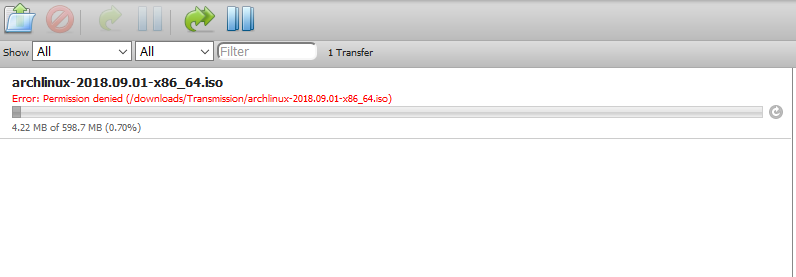
I figured it out.. Had to set umask to 0
-
I am getting permission denied errors on all my downloads The User/Group-IDs are still the default ones from your template and should work with unraid. /downloads/Transmission belongs to nobody:users and has 777 permissions. Any clue?
-
Thanks, that was all i needed!
-
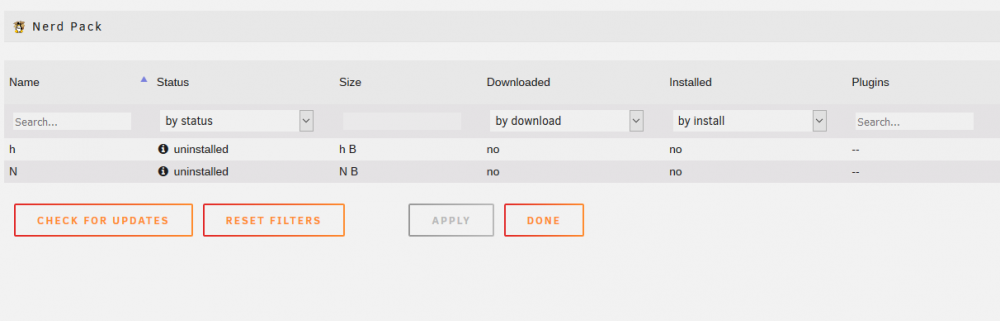
My nerdpack is empty on Unraid 6.6 RC1. Would love to install python2 for libvirtwol
-
Hi, glad you like it. I am using the image myself and have already talked to the dev about v2. There is one dealbreaker for me, currently: the removed webroot: I am reverse proxying multiple services, none of whom need a custom subdomain... synclounge would be the first one. The dev seemed okay about reimplementing the feature, but until then I will not update my image. Feel free to fork & try it yourself.. I will get around to v2 eventually.
-
Of course, when you set up the container it is mapped to /dev/sr0 Your second drive should reside at /dev/sr1 verify this by opening a terminal and entering ls /dev/ There should be multiple sr drives,.. these are your optical disk drives. Now, when installing Ripper from my template it is given a unique name ("Ripper"). You should be able to install this template a second time, only modifying the Name (e.g. "Ripper2"), and editing the mapping to /dev/sr1 where it sais /dev/sr0 (switch to advanced mode!). If you are unable to install this container a second time from the Community Applications, there is another way: On the docker tab you can also add new containers (button on the bottom of the page). Just select "my-Ripper" and modify as described above.
-
You can't listen on IPv6 apparently listen udp [::1] You need to supply a config without the IPv6 blocks, then it should work. And yes you need to bind the /config path. Have you had the old image installed? The latest template on community applications has the mapping set.
-
No Idea what went wrong for you, but here is the line probably responsible for it.. https://github.com/rix1337/docker-ripper/blob/0b6d985e7bea2de90be6cceeaadcf847a02a3efe/root/etc/my_init.d/ripper.sh#L20
-
Glad, you find my work useful. Sadly jotta-scanner does not work as I expected it to. Unlike a real client this tool only uploads a specific folder to jottacloud. It does not really sync files. If you remove anything from the online folder, it will be re-uploaded on the next run. I've oppened issues on both the original and the forked jottalib (see https://github.com/Fjodor42/jottalib-ng/issues/12), but no replies were made. Currently this tool only works for uploading files from a folder to Jottacloud - nothing I can change about that. If you want to test changes, fork my docker-jottacloud project on github and make changes to /root/etc/services.d/jottacloud/run then create an automated build on hub.docker.com and test your image. Its super easy. /sync merely refers to the path you link your container to and is required by jotta-scanner. Also /Jotta/Sync refers to the generic sync folder of jottacloud (not Archive/device specific). jotta-scanner /Jotta/Sync will not work.
-
as of immediately alpine is deprecated (see https://hub.docker.com/r/diginc/pi-hole/) Please switch your template to debian!
-
I don't mean to be pissy on an internet forum, but the switch to tar is a real dealbraker for me. I have around 130 GB of Plex Preview Thumbnails. Because of the sheer unbelievable amount of files Plex creates for metadata, it takes a silly amount of time to copy these files somewhere. Appdata Backup v1 took 5 minutes daily to update this incremental backup through rsync. Taring my appdata (which includes plex) now takes 45 minutes a day (also factor in the disk spinup/write process).. that is without compression/validation. Exkluding these files is no option either. Recreating those Preview Thumbnails will take a few weeks of full CPU load, my reason to back them up in the first place. Pleeeease, include an optional switch (I don't care how big the warning sign!) to use rsync with incremental backup again. This just does not work for me. I just re-read that mess of a comment. I know its insulting - and thanks for all the hard work. I'm just a desperate guy who can't write plugins himself (I know, I can still use the old plugin, but that is not being updated anymore)
-
Hi. Of course, input is highly appreciated. In its current state, the Pull Request does not work (wrong path info), but that can be fixed easily. I do not think it is required though. You should be able to edit the ripping script locally, to your liking (part of the concept!). So if you don't need FLAC or MP3 or anything else, just hack away at the script. Its merely an example, that should work. Is your script being overwritten on container updates? That would be an issue. Otherwise, just feel free to keep your changes local. From my understanding, those MKV profiles are really useful, but an advanced feature. I will look for documentation to back this up. As it stands now, I will not patch this into the image, just because it might not be required by others. E.g. baking in a preselected audio language or subtitle preference is not as universally distributable.
-
Stupid me didn't bother to read the posts above. I just assumed things were still ENV-based. The change makes sense, and should be much more robust for future users and provider switches. Also thanks for the heads up on the SABnzbd bug. Seems to be of low priority,.. which makes sense for a cosmetic one.
-
Hi binhex, I am using your delugevpn and sabnzbdvpn containers simultaneously (for different countries, the latter for privoxy to use OCH/Scrape the Web). On boot, it seems sabnzbd is always a bit too fast for the vpn to come up: [01/Aug/2017:11:34:12] ENGINE Error in HTTPServer.tick Traceback (most recent call last): File "/opt/sabnzbd/cherrypy/wsgiserver/__init__.py", line 2024, in start self.tick() File "/opt/sabnzbd/cherrypy/wsgiserver/__init__.py", line 2091, in tick s, ssl_env = self.ssl_adapter.wrap(s) File "/opt/sabnzbd/cherrypy/wsgiserver/ssl_builtin.py", line 67, in wrap server_side=True) File "/usr/lib/python2.7/ssl.py", line 363, in wrap_socket _context=self) File "/usr/lib/python2.7/ssl.py", line 611, in __init__ self.do_handshake() File "/usr/lib/python2.7/ssl.py", line 840, in do_handshake self._sslobj.do_handshake() error: [Errno 0] Error This error message shows up after every (re)start of the container. Otherwise the connection is fine. Secondly, the openvpn config is not recreated on my system. I tried to switch servers and had to manually edit the openvpn.conf to the new url/port/protocoll. Somehow the environment variables were unable to refresh the config file.
-
Great stuff. Confirmed working!
-
I must admit, I am the one who asked for this, referencing the last push of your container. I could not resist noVNC and the alpine base... Thanks for your work, both aptalca and Djoss! ___ After a bit of testing I have ran across the following issue: https://github.com/jlesage/docker-jdownloader-2/issues/1 JDownloader seems to require glibc to extract archives.
-
Thank you for the feedback. I have limited access to different bluray disk types. Are there additional strings you can provide? Just let me know if any more show up. I'll update the script soon!
-
Thank you very much for the upgrade to PHP7!
-
You could of course edit the script for 5 drives. But this would not achieve simultaneous ripping. I would rather advise you to set up this container 5 times with different names for your different drives. Dunno how this will perform, though.
-
As you'll see it ripped a CD (18 tracks) and encoded it in 12 minutes and it ripped a DVD (6.8 GB) in 17 minutes. Is there anything else I can help you with - anything from the big appdata/ripper/Ripper.log for example? I notice there are a lot of messages from MakeMKV regarding the DVD rip. They look like errors but I think it's MakeMKV trying different methods to access the data before settling down. So how useful do I really find it? Well, there's now a stack of CDs next to my server and whenever I walk past it I pop another one in. It just works. Again, many thanks for sharing. That sounds awesome. Thanks for the feedback. I have set up the container to only log "major" events (like Ripping/Ejecting). MakeMKV spews out very detailed info, that might be useful if something goes wrong. Thus, I decided to create the Ripper.log file with all the info. It's for debugging mostly. Ripping times look fine for me, especially with the MP3/FLAC going on simultaneously. 17 minutes for a DVD is also fine. The following: Concerns me a bit. I have updated the container to create the /root/.MakeMKV directory if it does not exist. Now the latest free key should be grabbed without issues. If you have the time, could you update; then check if a) the "No such file or directory" error has disappeared b) the file is created properly? do so using "docker exec -it Ripper bash" then "cd /root/.MakeMKV" then "vi settings.conf". The free key should be in that file Otherwise, it seems MakeMKV detects your media properly. I was worried, that my messy disk detection method would not work on other drives.
-
Thank you very much for the extensive feedback. It sounds to me, ripit is generally working for you. (An alternative would be abcde, that I would otherwise try to implement) A few observations: -Did you combine Flac/MP3 with the -c 0,2 tag, thus cutting the time required for ripping audio in half? That, I will implement! --W eliminates the special chars. A must implementation --w keeps the wav files. I will leave that out --e is unneccesary, because ripper.sh does eject the disk in the end, anyway ---playlist 0 disables the playlist Just updated: https://github.com/rix1337/docker-ripper/commit/b9b571101f354c194d0fbe0a7743fa9d28e85a93 updated again to include $suffix/$artist/$album One request on my side: Could you please check the startup log, if there are any errors concerning the MakeMKV beta key? I have only been able to test this on my system and would like to confirm it is working for others. Maybe even rip a DVD for me