





truetype
Members
-
Joined
-
Last visited
Everything posted by truetype
-
I confirm this is the way while waiting for a fix.
-
Nope, no checkbox over there. But I tried now again this time using Google Chrome as browser instead of Firefox, and now it worked... Now the array is starting and the new disk is added and disk-clear is in progress, which in itself is a little weird since I did pre-clear. But in my tries to get the array to start I also clicked erase manually, perhaps that untriggered it.
-
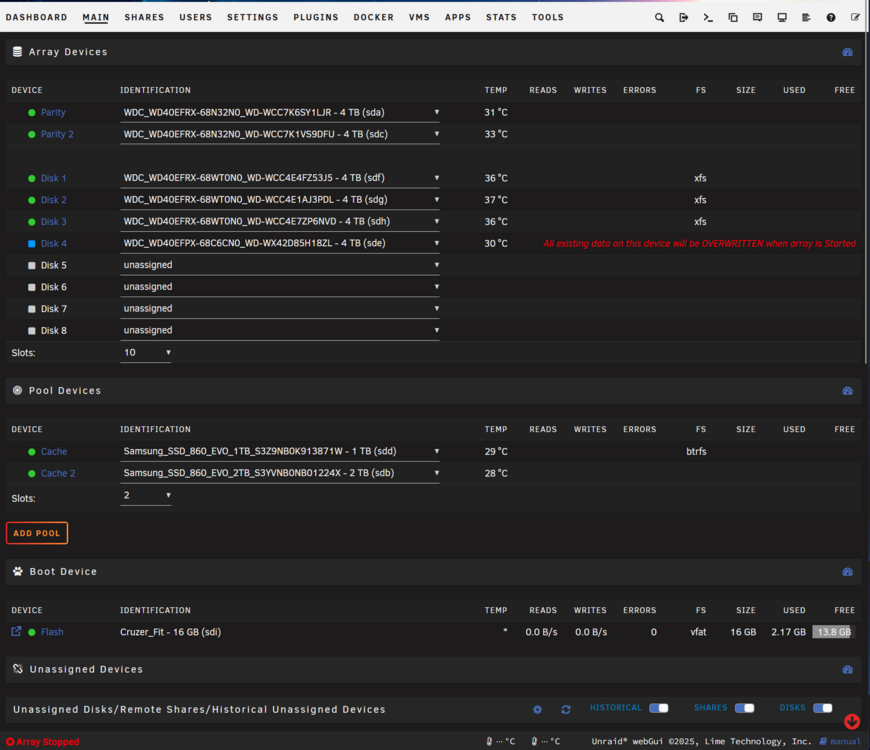
Hi, I am trying to add a new 4 TB drive to the array but nothing happens when pressing the start array button. Haven't noticed this before, I tried restart but same issue. Running 7.2.2
-

From the album: Community Created Banners
-
Just read the news about Plex starting to charge for remote streaming from my own server. Incredibly stupid move, what is the best alternative? Emby or Jellyfin?
-
I had issued as well, found the logs as you mentioned it was database error. Found an earlier backup from 2 weeks (before the errors in the logs started) and restored from that in the UI, worked like a flaw.
-
It would really be a great feature to have in Unraid to be able to divide a graphics card into multiple parts. So you can use, for example, a 4090 in a Windows VM as the main machine but also for Plex transcoding in Docker.
-
Yeah same problem for me with the flickering also. Holy smoke, that alot of errors, I have 22 errors (since 7 december) and counting right now, was 10 when I posted my first reply here. And same here the Log page in Admin menu is completely Blank, can't even find the Errors in the AppData for Nextcloud.
-
I have just updated to Version 28 and now I cannot upload files via Web anymore, the uploading bar is displayed as if the file is being uploaded but then when it's complete it does not appear in the directory. Uploading with Windows Client works fine. Also noticed I cannot use the drag & drop function (web) anymore either. Using latests Chrome, but also tried Firefox. It worked before the update. Anyone else having issues?
-
Did you find a solution for this?
-
Hey, same here. Did you solve it? I am also trying to find a solution to this.
-
I found out the cause of the problem. In the logs the Public IP that Steam fetched is not the correct public ip but instead is the VPN I am using and the SDR is using this IP when relaying through the Steam Network somehow. When I deactivated my VPN the V Rising server showed correct IP (my public IP) and it was possible to connect to it like magic. So now I am trying to figure out if there is a way to bypass only V Risings Ports from the VPN in opnSense...
-
I disabled bond, updated BIOS aswell and saw that SpeedStep was inactivated already, tried to activate it instead, made no difference. Wrote in V-Risings discord and they believe it might be some firewall issue, but I don't see how it would be.
-
Did you solve this? I have the same things in my log..
-
Yes I believe it's broadwell, will look into SpeedStep, never heard of it. Hmm ok, thanks for testing for me! Yes, latest Unraid 6.12.3. It's always been bond for me since I set it up for about 7 years ago. But I will look into that aswell, don't know why it's bond or why it might matter. I just read about SDR (https://partner.steamgames.com/doc/features/multiplayer/steamdatagramrelay) and I wonder if the issue might be because my unraid is behind a vpn.. Will try this aswell. EDIT: Did you login into your steam account in the docker or use anonymous? I have always used anonymous login.
-
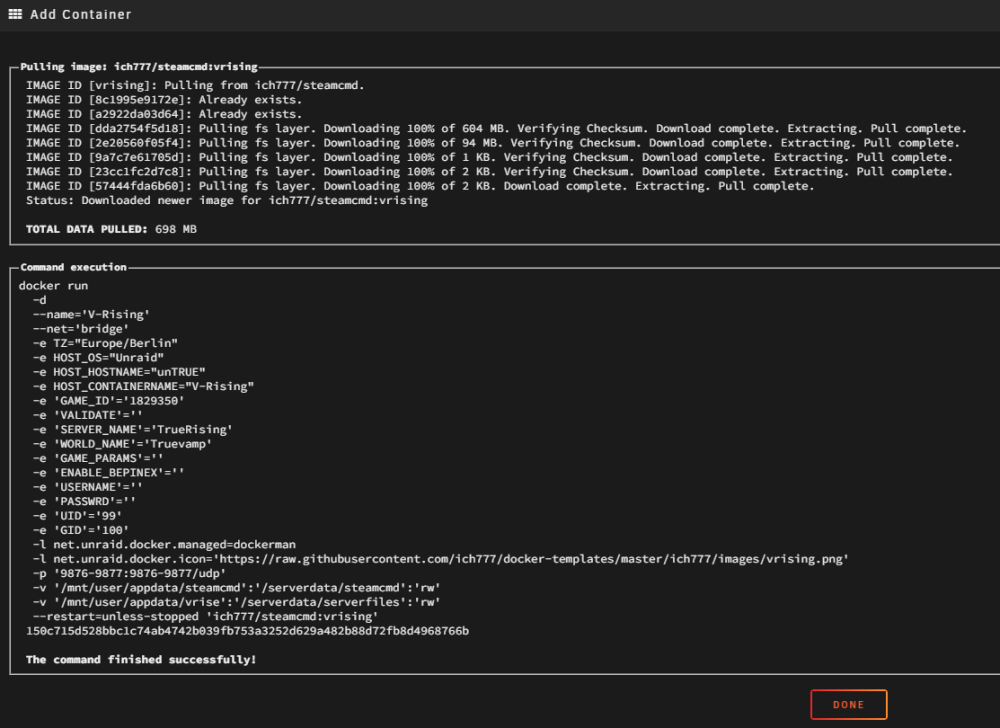
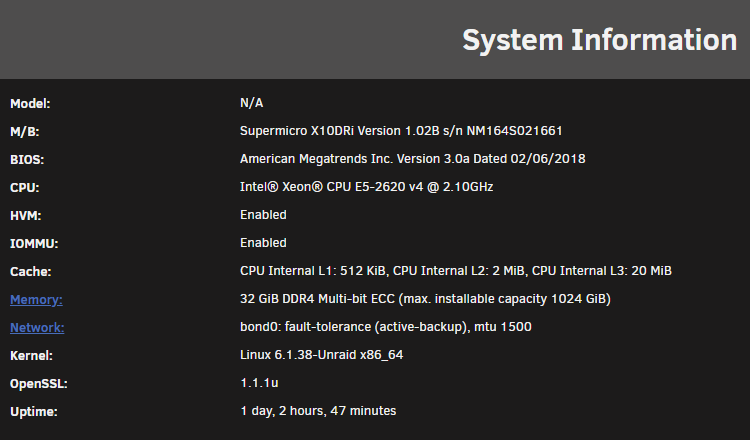
See attached screenshots for machine specs and a dump of install. Nope I did not pin any cores, should I do that you think? Thanks for trying, very strange this one...
-
I set a new name for serverdata/serverfiles and it downloaded the vrising game files yet again and I waited for it to boot up. My friend could join but only for like 1 min, he could create a character but then after 10 sec in game got disconnected and met with AuthenticationError, then everytime he tries to connect it's the same error. I post the serverlog in the attachment on this reply. Getting alot of strange SteamCMD errors such as "thread starvation" etc.. VRisingServer.log
-
Thanks for testing. But strangely I tried that yesterday aswell.. So how did you make the fresh install when you had a previous install? Did you delete the old V-rising Docker template on the USB aswell? But I will give it another go again in about 2-3 hours.
-
Thanks @ich777 I even tried renaming both SteamCMD folder and vrising folder so the Docker would redownload everything from scratch, but that did not solve it unfortunately. Running the V Rising Dedicated Server from Steam on my main Windows 11 PC works. So my spontaneus guess is that it has something todo with Linux SteamCMD, but I don't know. Please report back when you can, add me on Discord if you like to troubleshoot together. #truetype @ discord.
-
Anyone else having issues with V Rising since last major GLOOMROT update? I had a server with this docker running about a year ago and now wanted to give it a go again with the new update. I can join from LAN however my friends cannot join from WAN. Only getting "Authentication Error" and in log file from docker i see "src\steamnetworkingsockets\clientlib\steamnetworkingsockets_lowlevel.cpp (794) : Assertion Failed: GetBestRoute2 failed with result 50 for address 'XX.XX.XX.XX:0'" Ip redacted with XX. Have tried multiple different settings but nothing that solves it. Any ideas?
-
Hey, have been using SSH has stopped working. I can ping server on LAN and reach all other ports except 22. Any suggesstions? Im on version 6.11.5 ** EDIT ** A reboot was the solution.. ~TrueType
-
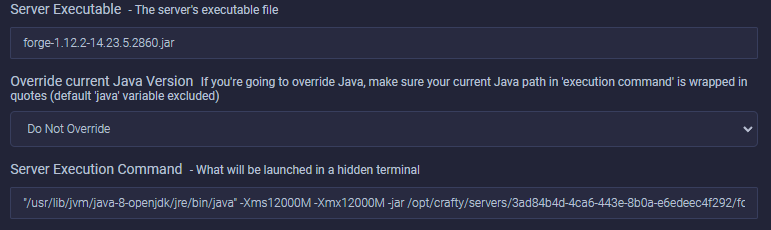
If someone else had struggles with this, as I, I just got it working with the setting "Do not override" and just enter in my case: ""/usr/lib/jvm/java-8-openjdk/jre/bin/java" -Xms12000M -Xmx12000M -jar /opt/crafty/servers/3ad84b4d-4ca6-443e-8b0a-e6edeec4f292/forge-1.12.2-14.23.5.2860.jar nogui" Into the server execution command. Then it worked.
-
Anyone got Java 1.18 working? I got it to show up in terminal atleast when i do "Java -version" it says: # java -version java version "18.0.1.1" 2022-04-22 Java(TM) SE Runtime Environment (build 18.0.1.1+2-6) Java HotSpot(TM) 64-Bit Server VM (build 18.0.1.1+2-6, mixed mode, sharing) But still don't get the server to do anything when I press start button. I can run the server on my PC with Java 1.18 but not 1.17. So the problem with this logic must be that java 1.18 is not getting applied in MineOS for me. But I don’t know if I change java the right way in MineOS docker, it says version 1.18 when I do java -version but nothing still happens when I press start button. Only thing I get in logs when I press start is: 2022-05-02 21:44:56,443 INFO reaped unknown pid 326 2022-05-02 21:44:56,443 INFO reaped unknown pid 325 2022-05-02 21:44:56,443 INFO reaped unknown pid 326
-
Now we need Java 1.18 in order to fix the Log4J vulnerability.. Trying to install java 1.18 gives this error: # apt install openjdk-18-jre-headless Reading package lists... Done Building dependency tree Reading state information... Done E: Unable to locate package openjdk-18-jre-headless
-
This is helpful! Back to manual/auto in unraid or in pfsense? Though I have problem that I cannot get reverse proxy with swag to work with name resolution to nextcloud. I have to use IP-adress instead of "nextcloud" in the proxy-conf file.. I think this is related somehow




