





egtrev
Members
-
Joined
-
Last visited
Everything posted by egtrev
-
I mounted the EFI and replaced the lilu, whatever green and applealc kexts the the other folder with the GitHub ones. Inject kexts was already at yes in my config.plist system parameters. I don't see anything under output section of the sound settings at all, after a shutdown and reboot. Everything else is running great.
-
I following this thread https://www.tonymacx86.com/threads/clover-hdmi-audio-for-nvidia-amd-cards-easy-way.145399/ My XML template looks likes this: <hostdev mode='subsystem' type='pci' managed='yes'> <driver name='vfio'/> <source> <address domain='0x0000' bus='0x02' slot='0x00' function='0x0'/> </source> <address type='pci' domain='0x0000' bus='0x03' slot='0x00' function='0x0' multifunction='on'/> </hostdev> <hostdev mode='subsystem' type='pci' managed='yes'> <driver name='vfio'/> <source> <address domain='0x0000' bus='0x02' slot='0x00' function='0x1'/> </source> <address type='pci' domain='0x0000' bus='0x03' slot='0x00' function='0x1'/> </hostdev> Only difference I can see is bus is 0x01 in the tip thread, but min eis 0x03. If I try to edit that it says "Attempted double use of PCI Address" ( I think the network interface is using 0x01. Should I change these around?
-
The video card passthrough seems to working now. Only thing I can't seem to figure out is the HDMI audio, no output device is found. Is it possible with nvidia cards to have the audio working in High Sierra? I tried a HDMI Audio Kext form Tonymac but no joy there either.
-
Thanks, i followed from that video but for whatever reason I can't get any video output at all from my video card once passed through. VM itself still worked fine through Splashtop.
-
I have High Sierra running fine from this Docker with Splash Top Desktop, no issues. Could anyone point me in the direction of the steps to passthrough a GPU/Audio (GTX 1070) and a USB mouse/Keyboard? I'm seeing mentions of Opencore/Clover not sure what is the prefferred/correct method.
-
That makes sense. Thank you.
-
I've been having an update issue with this Docker from both the old Unifi Docker and this new Unifi-Controller Docker. Docker reports there is an update and when I update it is successful but when I go to the Web UI it is still the same version as before. For this Docker I am currently on 5.10.20 (using the latest branch) - first question I guess... is 5.10.20 the latest version and Docker is incorrectly reporting an update or is there a later version and it's just not installing correctly?
-
Great, thank you. It finds everything now in their original locations :)
-
Thank you, what access mode should I use for the path?
-
I see it now. Is there a way to force the docker path to match my old docker? So I can keep file versioning etc?
-
I've finally went ahead and moved to Crashplan for Business and this Docker. I'm a bit stuck and unsure what to do next, I'm following the guide at Github for taking over an existing backup, I'm at this step: 6. Update the file selection by re-adding your files. Do not unselect missing items yet. All I see is a missing icon by all my files, how do I re-add them? I don't see that option. Old backup file path was mnt/user and new dockers file path seems to be root/storage/mnt/user Any help is appreciated
-
I don't mind starting fresh locally. What steps do I need to do to have the unassigned device show as a destination in the Pro docker? In my current Docker I think I had to add a path so it could be seen.
-
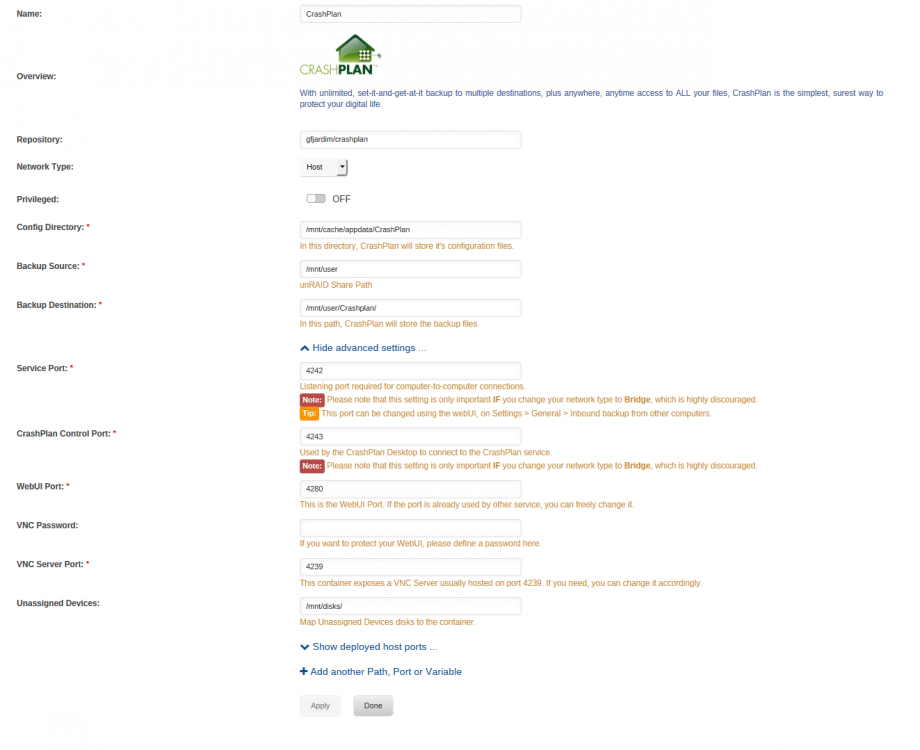
Hi, I'm migrating from Crashplan Home and want to make sure I do it correctly. I'm currently using gfjardim Crashplan Docker. I backup to Crashplan Cloud and I also backup to a local unassigned unRAID USB device. Does this docker support backing up to an unRAID unassigned device? If so do I need to setup the path so the docker will list it as a backup location? I've attached a sceenshot of my current docker settings.
-
I don't think so. I know the Small Business plan had a different Pro application, which was different to the standard home install. I'm sure that the docker container could be changed/updated to suit though.
-
Yes, no help there as usual. Managed to narrow the issue down to the audio track, I extracted the AC3 track from the TrueHD and added it as a separate additional track in the MKV and Plex managed to handle it after that. A bug somewhere in Plex players.
-
Hello, I'm starting to use PLEX and all is setup fine. I'm having an issue with some MKV files - "There was a problem playing this item" All files are made with MakeMKV and play with every other software I've tried. Problem occurs on all apps and web player, I have attached a partial part of the Plex log. The only errors shown in the logs are along the lines of the following: Jan 08, 2017 18:44:20.418 [0x7f3c42477700] ERROR - [Transcoder] [mp4 @ 0x45b2000] Application provided duration: -1 / timestamp: 2298847 is out of range for mov/mp4 format Any help or guidance is appreciated Plex.txt
-
Thanks for the guide/help danioj, all working perfect now! As for Host mode, not sure why it doesn't work, only other Docker/Plugin I have is MariaDB. It doesn't matter as it is now all working fine in Bridge mode
-
I think that might be my problem, I can't access the Web GUI at all in Host mode, so had to set to Bridge mode to access. What do I need to do/change to setup in Bridge mode? I'm want to use UDP 1194. Note: I setup a quick Debian Wheezy VM and installed OpenVPN AS, that works fine, but would prefer to use Docker for this service.
-
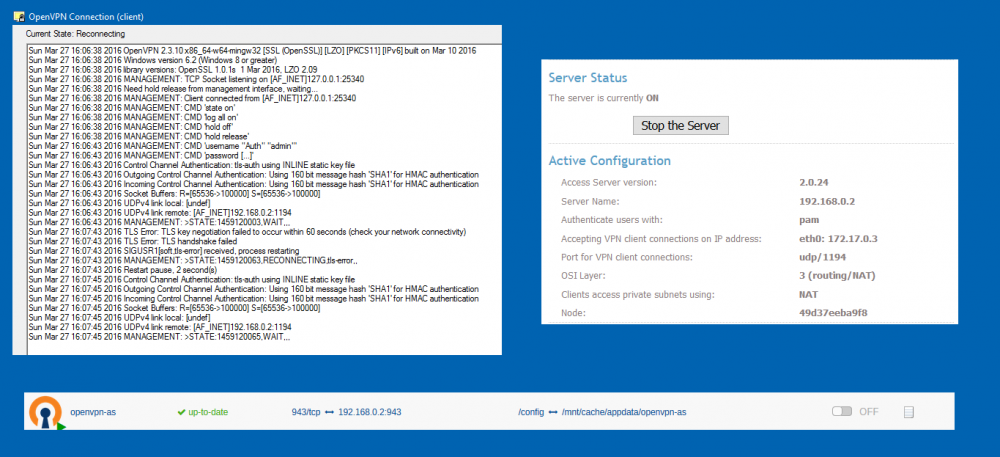
Thanks for the explanation. Should I be able to test OpenVPN internally from a machine on the network? (I have the AS Host Name set to UNRAID local IP) I can't seem to get OpenVPN GUI on Windows to connect to the Server: This Docker is set to Bridge with Privileged On, see attached screenshot for a few settings/error:
-
Thanks, managed to access the Web GUI in Bridge mode but couldn't in Host mode. When I access the WebGUI, under 'Server Network Settings' I see "eth0: 172.17.0.2" Should this match my internal IP range or external IP? as it does not match either. Also I have a bridge setup in UnRAID (br0) should I be using that instead of eth0?
-
I am unable to access the Web UI in Host or Bridge mode. I noticed on my list of Dockers, that this one has nothing underneath "Port Mappings (App to Host)" and all the other Dockers do. Could that be the problem?

