Jcloud
Members
-
Joined
Everything posted by Jcloud
-
root@HYDRA:/mnt/disk1/DockerApps# ifconfig bond0: flags=5443<UP,BROADCAST,RUNNING,PROMISC,MASTER,MULTICAST> mtu 1500 ether 10:c3:7b:6f:43:ae txqueuelen 0 (Ethernet) RX packets 376918292 bytes 545599728025 (508.1 GiB) RX errors 0 dropped 213548 overruns 0 frame 0 TX packets 35516033 bytes 6243595662 (5.8 GiB) TX errors 0 dropped 12 overruns 0 carrier 0 collisions 0 br0: flags=4163<UP,BROADCAST,RUNNING,MULTICAST> mtu 1500 inet 192.168.0.101 netmask 255.255.255.0 broadcast 192.168.0.255 ether 10:c3:7b:6f:43:ae txqueuelen 0 (Ethernet) RX packets 85104066 bytes 554801007870 (516.6 GiB) RX errors 0 dropped 13916 overruns 0 frame 0 TX packets 39609148 bytes 126332393253 (117.6 GiB) TX errors 0 dropped 0 overruns 0 carrier 0 collisions 0 docker0: flags=4163<UP,BROADCAST,RUNNING,MULTICAST> mtu 1500 inet 172.17.42.1 netmask 255.255.0.0 broadcast 0.0.0.0 ether 46:e0:a9:09:01:15 txqueuelen 0 (Ethernet) RX packets 52898 bytes 14164401 (13.5 MiB) RX errors 0 dropped 0 overruns 0 frame 0 TX packets 53867 bytes 30521239 (29.1 MiB) TX errors 0 dropped 0 overruns 0 carrier 0 collisions 0 eth0: flags=6211<UP,BROADCAST,RUNNING,SLAVE,MULTICAST> mtu 1500 ether 10:c3:7b:6f:43:ae txqueuelen 1000 (Ethernet) RX packets 376704744 bytes 545585615783 (508.1 GiB) RX errors 0 dropped 0 overruns 0 frame 0 TX packets 35516033 bytes 6243595662 (5.8 GiB) TX errors 0 dropped 0 overruns 0 carrier 0 collisions 0 eth1: flags=6211<UP,BROADCAST,RUNNING,SLAVE,MULTICAST> mtu 1500 ether 10:c3:7b:6f:43:ae txqueuelen 1000 (Ethernet) RX packets 213548 bytes 14112242 (13.4 MiB) RX errors 0 dropped 213548 overruns 0 frame 0 TX packets 0 bytes 0 (0.0 B) TX errors 0 dropped 0 overruns 0 carrier 0 collisions 0 device interrupt 18 memory 0xfbf00000-fbf20000 lo: flags=73<UP,LOOPBACK,RUNNING> mtu 65536 inet 127.0.0.1 netmask 255.0.0.0 loop txqueuelen 0 (Local Loopback) RX packets 137464 bytes 25960421 (24.7 MiB) RX errors 0 dropped 0 overruns 0 frame 0 TX packets 137464 bytes 25960421 (24.7 MiB) TX errors 0 dropped 0 overruns 0 carrier 0 collisions 0 veth17b05fb: flags=4163<UP,BROADCAST,RUNNING,MULTICAST> mtu 1500 ether 8e:b6:70:ea:a8:35 txqueuelen 0 (Ethernet) RX packets 2115 bytes 859529 (839.3 KiB) RX errors 0 dropped 0 overruns 0 frame 0 TX packets 1924 bytes 1218400 (1.1 MiB) TX errors 0 dropped 0 overruns 0 carrier 0 collisions 0 veth638c205: flags=4163<UP,BROADCAST,RUNNING,MULTICAST> mtu 1500 ether a6:2a:88:78:4c:66 txqueuelen 0 (Ethernet) RX packets 19556 bytes 2062340 (1.9 MiB) RX errors 0 dropped 0 overruns 0 frame 0 TX packets 21441 bytes 9256959 (8.8 MiB) TX errors 0 dropped 0 overruns 0 carrier 0 collisions 0 vetha052b41: flags=4163<UP,BROADCAST,RUNNING,MULTICAST> mtu 1500 ether 46:e0:a9:09:01:15 txqueuelen 0 (Ethernet) RX packets 699 bytes 548224 (535.3 KiB) RX errors 0 dropped 0 overruns 0 frame 0 TX packets 897 bytes 705751 (689.2 KiB) TX errors 0 dropped 0 overruns 0 carrier 0 collisions 0 virbr0: flags=4099<UP,BROADCAST,MULTICAST> mtu 1500 inet 192.168.122.1 netmask 255.255.255.0 broadcast 192.168.122.255 ether 52:54:00:fb:a4:f1 txqueuelen 0 (Ethernet) RX packets 0 bytes 0 (0.0 B) RX errors 0 dropped 0 overruns 0 frame 0 TX packets 0 bytes 0 (0.0 B) TX errors 0 dropped 0 overruns 0 carrier 0 collisions 0 vnet0: flags=4163<UP,BROADCAST,RUNNING,MULTICAST> mtu 1500 ether fe:54:00:7c:e6:b8 txqueuelen 500 (Ethernet) RX packets 12455171 bytes 31394587093 (29.2 GiB) RX errors 0 dropped 0 overruns 0 frame 0 TX packets 89716902 bytes 129283508307 (120.4 GiB) TX errors 0 dropped 5018 overruns 0 carrier 0 collisions 0 I'm a noob, but guessing from the ifconfig my docker needs to be pointed at br0 and not eth0 (default)? And if correct, I don't know how to go about doing that but I guess I can keep digging. I suspect it's down to the fact you've got bonding enabled on your Unraid machine as that's the only difference I see between my setup and yours. I went into webUI - edit page for docker; added a variable INTERFACE with a value of bond0 -- I can now access port 943. So I think my issue is resolved, but before I get too comfortable I just want to ask is this fix kosher? Also before this, I didn't realize I could do this. I.e. is there a technical reason it's mapped to eth0, or it's just default (you have to start somewhere)? Again, thank you for your assistance and time (not to mention patience to deal with this noob).
-
root@HYDRA:/mnt/disk1/DockerApps# ifconfig bond0: flags=5443<UP,BROADCAST,RUNNING,PROMISC,MASTER,MULTICAST> mtu 1500 ether 10:c3:7b:6f:43:ae txqueuelen 0 (Ethernet) RX packets 376918292 bytes 545599728025 (508.1 GiB) RX errors 0 dropped 213548 overruns 0 frame 0 TX packets 35516033 bytes 6243595662 (5.8 GiB) TX errors 0 dropped 12 overruns 0 carrier 0 collisions 0 br0: flags=4163<UP,BROADCAST,RUNNING,MULTICAST> mtu 1500 inet 192.168.0.101 netmask 255.255.255.0 broadcast 192.168.0.255 ether 10:c3:7b:6f:43:ae txqueuelen 0 (Ethernet) RX packets 85104066 bytes 554801007870 (516.6 GiB) RX errors 0 dropped 13916 overruns 0 frame 0 TX packets 39609148 bytes 126332393253 (117.6 GiB) TX errors 0 dropped 0 overruns 0 carrier 0 collisions 0 docker0: flags=4163<UP,BROADCAST,RUNNING,MULTICAST> mtu 1500 inet 172.17.42.1 netmask 255.255.0.0 broadcast 0.0.0.0 ether 46:e0:a9:09:01:15 txqueuelen 0 (Ethernet) RX packets 52898 bytes 14164401 (13.5 MiB) RX errors 0 dropped 0 overruns 0 frame 0 TX packets 53867 bytes 30521239 (29.1 MiB) TX errors 0 dropped 0 overruns 0 carrier 0 collisions 0 eth0: flags=6211<UP,BROADCAST,RUNNING,SLAVE,MULTICAST> mtu 1500 ether 10:c3:7b:6f:43:ae txqueuelen 1000 (Ethernet) RX packets 376704744 bytes 545585615783 (508.1 GiB) RX errors 0 dropped 0 overruns 0 frame 0 TX packets 35516033 bytes 6243595662 (5.8 GiB) TX errors 0 dropped 0 overruns 0 carrier 0 collisions 0 eth1: flags=6211<UP,BROADCAST,RUNNING,SLAVE,MULTICAST> mtu 1500 ether 10:c3:7b:6f:43:ae txqueuelen 1000 (Ethernet) RX packets 213548 bytes 14112242 (13.4 MiB) RX errors 0 dropped 213548 overruns 0 frame 0 TX packets 0 bytes 0 (0.0 B) TX errors 0 dropped 0 overruns 0 carrier 0 collisions 0 device interrupt 18 memory 0xfbf00000-fbf20000 lo: flags=73<UP,LOOPBACK,RUNNING> mtu 65536 inet 127.0.0.1 netmask 255.0.0.0 loop txqueuelen 0 (Local Loopback) RX packets 137464 bytes 25960421 (24.7 MiB) RX errors 0 dropped 0 overruns 0 frame 0 TX packets 137464 bytes 25960421 (24.7 MiB) TX errors 0 dropped 0 overruns 0 carrier 0 collisions 0 veth17b05fb: flags=4163<UP,BROADCAST,RUNNING,MULTICAST> mtu 1500 ether 8e:b6:70:ea:a8:35 txqueuelen 0 (Ethernet) RX packets 2115 bytes 859529 (839.3 KiB) RX errors 0 dropped 0 overruns 0 frame 0 TX packets 1924 bytes 1218400 (1.1 MiB) TX errors 0 dropped 0 overruns 0 carrier 0 collisions 0 veth638c205: flags=4163<UP,BROADCAST,RUNNING,MULTICAST> mtu 1500 ether a6:2a:88:78:4c:66 txqueuelen 0 (Ethernet) RX packets 19556 bytes 2062340 (1.9 MiB) RX errors 0 dropped 0 overruns 0 frame 0 TX packets 21441 bytes 9256959 (8.8 MiB) TX errors 0 dropped 0 overruns 0 carrier 0 collisions 0 vetha052b41: flags=4163<UP,BROADCAST,RUNNING,MULTICAST> mtu 1500 ether 46:e0:a9:09:01:15 txqueuelen 0 (Ethernet) RX packets 699 bytes 548224 (535.3 KiB) RX errors 0 dropped 0 overruns 0 frame 0 TX packets 897 bytes 705751 (689.2 KiB) TX errors 0 dropped 0 overruns 0 carrier 0 collisions 0 virbr0: flags=4099<UP,BROADCAST,MULTICAST> mtu 1500 inet 192.168.122.1 netmask 255.255.255.0 broadcast 192.168.122.255 ether 52:54:00:fb:a4:f1 txqueuelen 0 (Ethernet) RX packets 0 bytes 0 (0.0 B) RX errors 0 dropped 0 overruns 0 frame 0 TX packets 0 bytes 0 (0.0 B) TX errors 0 dropped 0 overruns 0 carrier 0 collisions 0 vnet0: flags=4163<UP,BROADCAST,RUNNING,MULTICAST> mtu 1500 ether fe:54:00:7c:e6:b8 txqueuelen 500 (Ethernet) RX packets 12455171 bytes 31394587093 (29.2 GiB) RX errors 0 dropped 0 overruns 0 frame 0 TX packets 89716902 bytes 129283508307 (120.4 GiB) TX errors 0 dropped 5018 overruns 0 carrier 0 collisions 0 I'm a noob, but guessing from the ifconfig my docker needs to be pointed at br0 and not eth0 (default)? And if correct, I don't know how to go about doing that but I guess I can keep digging.
-
I deleted my container in webUI; ssh and deleted the folder I was using on the user share. Made a new Docker Container, pointed /mnt/disk1/FOO per suggestion. Same issue as before, error connection refused. Tried https://192.168.0.101:943/ (correct IP) and https://localhost:943/ Also have the same error in openvpn.log. What else should I try? Thanks.
-
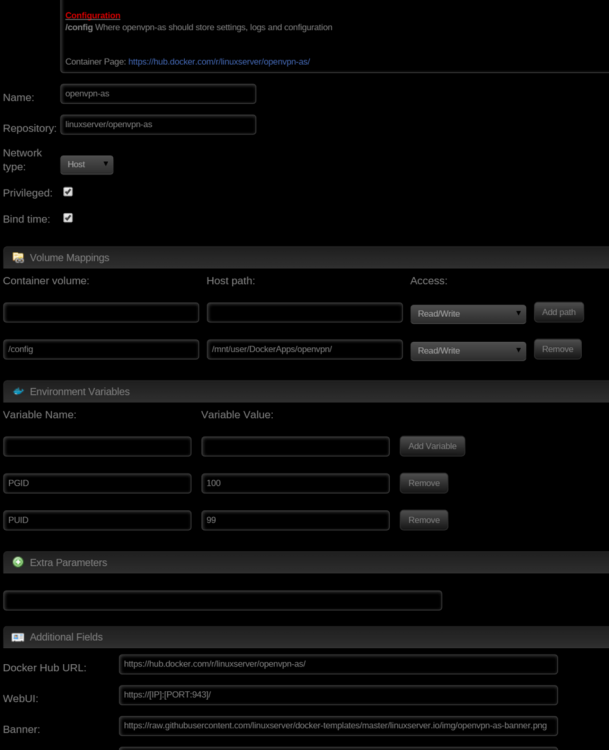
Just installed docker. Tried to launch webui received the error: connection refused. Docker setup is all defaults, as shown in screen shot. http://hydra/mnt/user/DockerApps/openvpn//log/openvpn.log reports: ... 2016-01-14 21:10:29-0800 [-] Server agent initialization failed (6/6 attempts) because the following network resources are unavailable: set(['eth0']) 2016-01-14 21:10:29-0800 [-] Server Agent is inactive due to the following errors: {'errors': {'admin_ui.https.ip_address': [('error', "LOCAL_ADDR eth0 : bad local address name or interface is not up; must be 'all', 'localhost', a local IP address, or an interface name: What do I need to change to fix this? Thank you for your help ###EDIT### Resolved. See reply #45 for fix.. /closed ticket/