





Bjonness406
Community Developer
-
Joined
-
Last visited
Everything posted by Bjonness406
-
I tried to switch to this dokcer image, why does it not accept spaces in "host path" or "Contrainer volume"? (/mnt/user/Tv Shows/ and /Tv_Shows)
-
As a rule, no, although once a month we update the base image which will cause it to show up, but for app updates then a container restart, unraid array restart or docker service restart is required. Thanks! Do you update the base image then it has been no updates with the docker itself?
-
I did not find a Linuxserver general thread, so I post here istead. Still relevant. I am not using any dockers from Linuxserver atm, but I am maybe switching to. I have heard that to update dockers, you have to restart it. If I go to the docker tab on my unRAID server, and click "check for updates", will the new update show up there?
-
There is already a docker from linuxserver, and it is just a simple docker. Why not just use that?
-
I am not interested myself, but maybe someone else are But why do you want to switch from deluge? What is the difference?
-
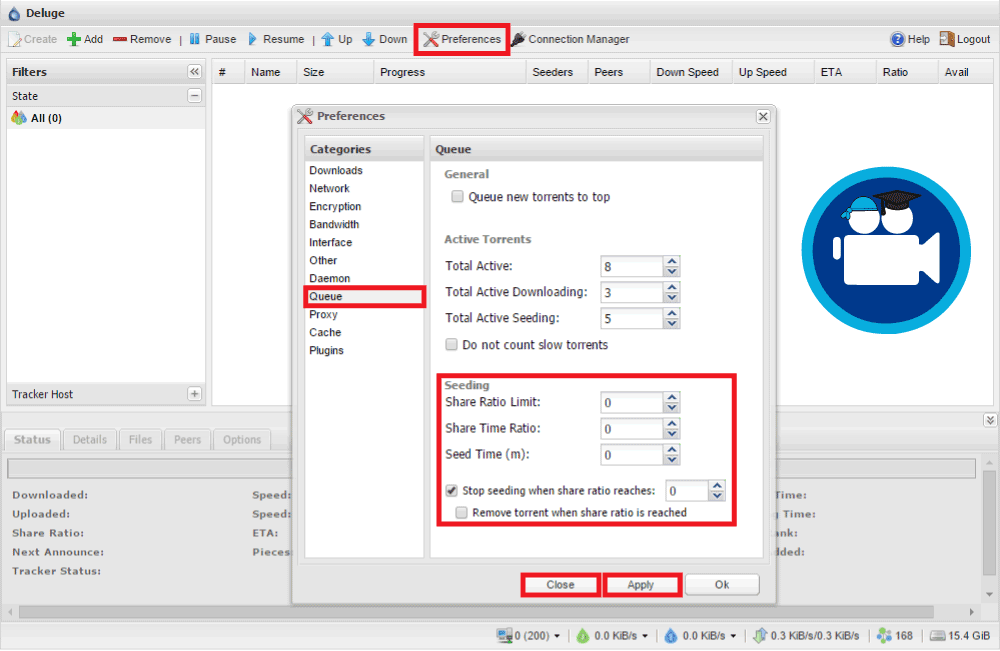
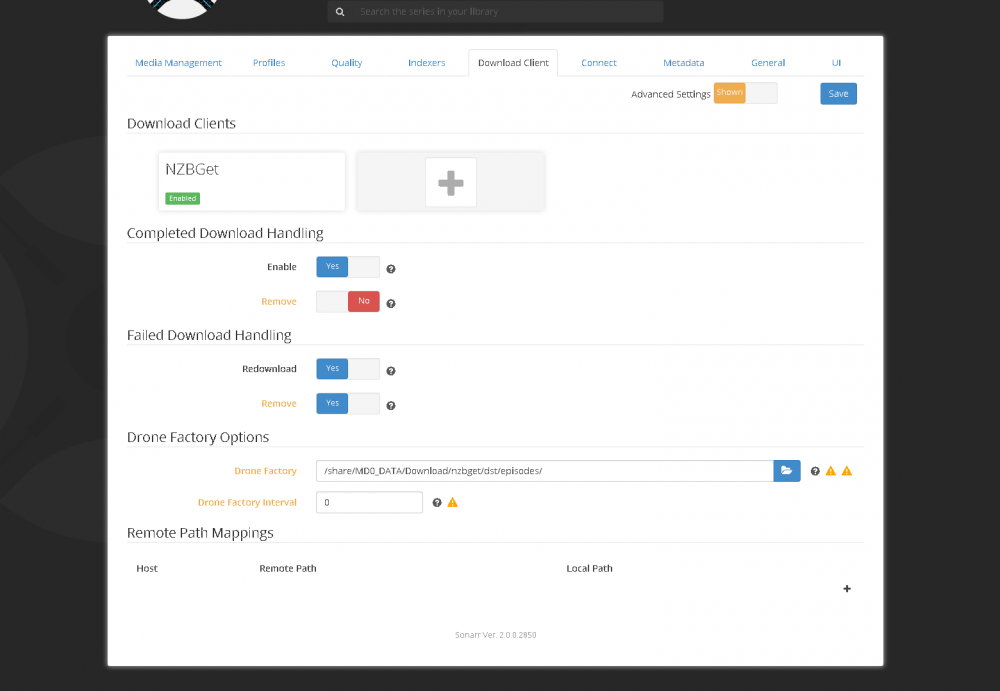
Set deluge to stop seeding torrent after a 3.0 ratio and go to Sonarr and click on advanced view, then you can set Sonarr to delete files after it is downloaded. Sonarr will delete it as soon deluge stopp seeding the torrent then. (not my pictures, I am on iPad so just found some random online)
-
No problem man Not my fault for once hehe Thanks for an awesome dokker
-
It goes instant for me, no waiting before Crashplan desktop appers. In the first post you say: Since I updated the docker, I don't have any variables to edit (in Environment Variables under advanced view). I added RDP_PASSWD in Variable Name, and "Test" in Variable Value, but I still can connect without password. What am I doing wrong. I dont have the WEB_PORT Variable either then, do I need that? Or only if I want to change port? Any other Variables I need?
-
If you haven't deployed it yet, you can use the new template from Community Applications. No mods are needed. Do I load CrashPlan or Crashplan-Desktop if I'm a new user of this? Just Crashplan now, crashplan-desktop was before. In the next release. Awsome Done. See the OP. Thanks man Awesome
-
In the next release. Awsome
-
Thanks for your good work gfjardim, keep it up Would it be possible to protect the VNC client with password?
-
How is the cpu usage compared with the old docker? My cpu got alot up then I started the desktop, and down then I closed it. Will the desktop on the updated docker only run when I try to access it, or always and use more cpu power that way?
-
So the CrashPlan docker has the desktop thing in the same docker now? So we only would need one docker for everything? Just update the old docker, change the some setting (from your post) and delete crashplan-desktop and we are good to go?
-
Ah, ok. Thanks
-
I can't get Deluge to stop seeding when it reaches a share ratio, could someone help me? I have set "Stop seeding when share ratio reaches" to 0 just to test, but it still seeds. I want to do this so sonarr can delete my torrents after a while.
-
Try setting both your file chmod mask and folder chmod mask within sonarr to be 0777 Would not guest be able to write to the folder/file then also? I don't want that to happend.
-
I had this problem too and found the answer somewhere on this forum. Go to Tools > New Permissions, and let it run through all your drives and when it completes you'll have write access again. Doesn't take very long on my 6TB. If you know which drive those particular files on you could just scan that drive to save time. Thank you, that worked Is there any way to permanent fix this?
-
Why can I not delete files after sonarr has renamed them and put them in the right folder? It takes a file from my download folder, and puts it in the folder called Tv-Shows, but if I try to delete something from the folder Tv-Shows, I get this error message. "You need to have permission from Unix\nobody to do changes in this folder" (or something like that, my windows is not on english ). I can delete and edit everything else in that folder, but not the things that sonarr has put there.
-
Can I add Onedrive docker as a request? Would be perfect to use onedrive to backup my data since I got 1TB with office 365.
-
My program that does it is crashing at the moment. Have to figure out why this weekend Whaaaaat? Hope you find it out
-
You should ask Squid to update his thread too http://lime-technology.com/forum/index.php?topic=37958.0
-
Have you set max connections to unlimited?
-
Variable name should be "PASSWORD" Variable Value should be "whateveryouwantforapassword" Ah, thank you! I thought minecraft was the username and I was going to change out the word "PASSWORD" for my own. Sorry
-
I did not understand I had to install CrashPlan also. Thanks man Problem solved! (well at least the first one… ) Haha! So ture I got this working now, but do the desktop docker need to run all time since I have used it to set up crashplan, or can I stop it and only run the Crashplan docker? The main Crashplan docker will run all by itself using the default settings. If you need to make any changes then just turn on the desktop part, connect to the main Crashplan docker, makes your changes and then shut down the desktop part. Thanks Good to know.
-
I did not understand I had to install CrashPlan also. Thanks man Problem solved! (well at least the first one… ) Haha! So ture I got this working now, but do the desktop docker need to run all time since I have used it to set up crashplan, or can I stop it and only run the Crashplan docker?

