FFV
Members
-
Joined
-
Last visited
-
I got anonymous access working by adding the variable GF_AUTH_ANONYMOUS_ENABLED set to true. Hope it helps
-
Hi, I've been looking for a self-hosted alternative to last.fm for a while now so I'm excited about this. Got the docker all set up - last.fm history imported and all looks good. What I'm struggling with is scrobbling from iTunes on OSX. I've been fiddling around but haven't found a way, yet, to get this to work. Would love to hear if someone has any ideas or has this working. Thanks!
-
Just wanted to put it out there - I was about to try the recommended fix but I rebooted my server this morning and without doing anything else Shinobi works again as expected.
-
Morning - I'm having the same issue; error: The following untracked working tree files would be overwritten by merge: package-lock.json Please move or remove them before you merge. Aborting Haven't found a way to resolve it.
-
I followed the video and installed High Sierra without any issues. Thanks for putting that together, really helpful! There is one thing that I've been struggling with and I'm wondering if someone else has had a similar experience; I can pass through USB devices without problems except for iPhones and iPads. If I pass them through they connect and disconnect instantly. They briefly show in the About This Mac/System Report and then disappear. I factory reset the devices and passing them through to another VM (OSX 10.12) works flawlessly so it's neither the device nor the cable. Trying the same with OSX 10.13.5 connects and then instant disconnect. I first thought it was an issue with passing USB devices to OSX 10.13.5 but keyboards and USB sticks all work fine. I've tried both 'hot swapping' the devices as well as embedding them in the VM's XML. If anyone has any suggestions they're more than welcome..
-
I'm having the same issue as Zin105, however only when I reboot my server. Once it is up I can install the plugin without problems and it runs correctly. On the next reboot however I get the same error message and the plugin is removed automatically. I can ping localhost and curl I returns the below; Any ideas? ***Edit 27/4*** Interesting/strange find: I rebooted my server this morning, the plugin uninstalled automatically (as I expected), but without reinstalling it Observium is seeing the device as online and collecting data from it...
-
Question about enabling the LastFM scrobbler; When I follow the instructions and put the file with my user name / password in my library folder I get the below. It seems to log in and get a session key but it is not working correctly. Any ideas? Forked Media Server Version 23.4 [2016-02-01 10:58:52] [ LOG] lastfm: Empty lastfm credentials file /music/setup.lastfm [2016-02-01 10:58:52] [ LOG] lastfm: Empty lastfm credentials file /music/._setup.lastfm [2016-02-01 10:58:52] [ LOG] lastfm: Invalid lastfm credentials file /music/._setup.lastfm: username name too long or missing password [2016-02-01 10:58:52] [ LOG] lastfm: Invalid lastfm credentials file /music/._setup.lastfm: username name too long or missing password [2016-02-01 10:58:52] [ LOG] lastfm: Empty lastfm credentials file /music/._setup.lastfm [2016-02-01 10:58:52] [ LOG] lastfm: Invalid lastfm credentials file /music/._setup.lastfm: username name too long or missing password [2016-02-01 10:58:52] [ LOG] lastfm: lastfm credentials file OK, logging in with username XXXXXXX [2016-02-01 10:58:54] [ LOG] lastfm: Got session key from LastFM: XXXXXXXXXXXXXXXXXXXXXXX [2016-02-01 10:58:55] [ LOG] lastfm: Invalid lastfm credentials file /music/._setup.lastfm: username name too long or missing password
-
Thanks Peter, I'll try that
-
My bad - attached. easyrsa3.pdf
-
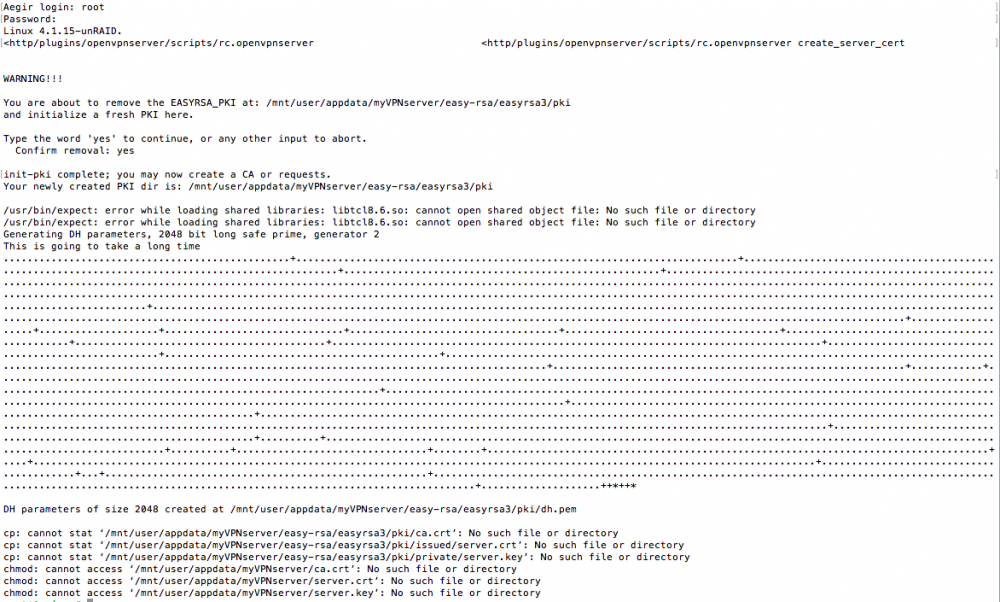
Something is wrong on your system, you have a missing libs! /usr/bin/expect: error while loading shared libraries: libtcl8.6.so: cannot open shared object file: No such file or directory /usr/bin/expect: error while loading shared libraries: libtcl8.6.so: cannot open shared object file: No such file or directory What more plugins do you have installed ? Please post syslog //Peter Syslog attached Plugins installed; Powerdown package 2.18 OpenVPN Server TUN mode Community Applications Dynamic webGui unRAID Server OS syslog.pdf
-
Attached here; http://lime-technology.com/forum/index.php?action=dlattach;topic=35435.0;attach=31021
-
Alright, here we go; -output of the command -config file -file in easy-rsa I'll Google to learn how to set the chmod 777 in the meantime (pretty new to this ) openvpnserver_cert.cfg easyrsafolder.pdf easyrsacmd.pdf
-
Done. Config file attached. (I edited out the duckdns address) Thanks for your help with this! openvpnserver.cfg
-
I tried again, using disk1 instead of user but getting the same results unfortunately. init-pki complete; you may now create a CA or requests. Your newly created PKI dir is: /mnt/disk1/appdata/myVPNserver/easy-rsa/easyrsa3/pki /usr/bin/expect: error while loading shared libraries: libtcl8.6.so: cannot open shared object file: No such file or directory /usr/bin/expect: error while loading shared libraries: libtcl8.6.so: cannot open shared object file: No such file or directory Checking in the Easyrsa folder there is indeed no folder called PKI.
-
Tried that just now. Not sure what the expected result should be... Screenshot attached.