





tmchow
Members
-
Joined
-
Last visited
Everything posted by tmchow
-
tried chmod 777 /mnt/user/appdata/redisinsight/ and that didn't work. What worked was adding these 3 variables/: PUID:99 PGID:100 UMASK:000
-
this worked! thanks
-
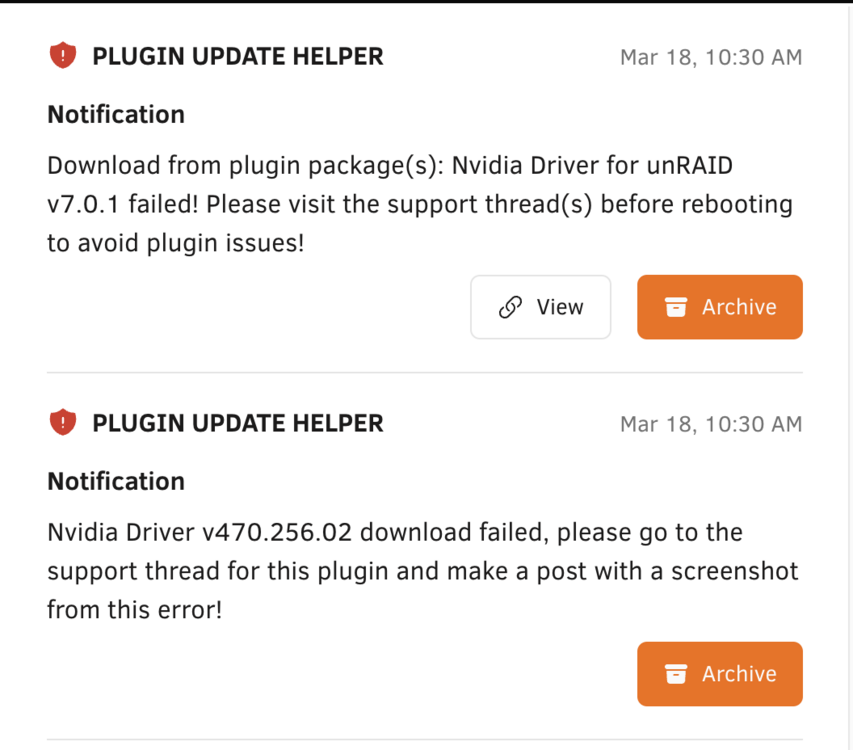
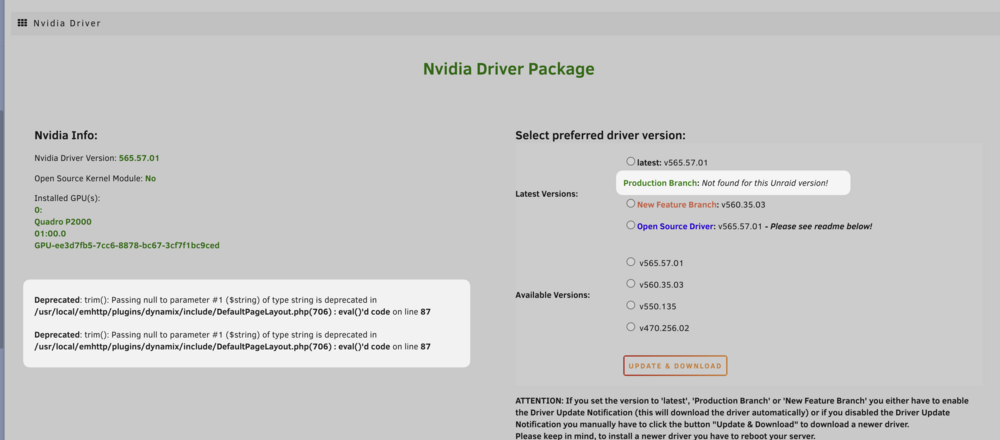
I have an Nvidia Quadro P2000 card I've been using for a few years with unraid 6.12.x. I'm trying to update to 7.0.1 and got this warning after the install (but before rebooting): On the Nvidia settings tool, i see this:
-
Sorry no i understand that. I'm asking whether i need to wait for parity check to be finished to do that. I believe the answer is yes, so parity is properly calculated but i'm not sure.
-
A few hours later I got message that disk is now disabled and the parity check is continuing. I’m attaching another set of diagnostics. tower-diagnostics-20250108-2302.zip
-
My unraid server is doing a parity check due to an unclean shutdown from power loss. One drive is reporting 6400 “raw read errors” and Reallocate sector count is 154. It’s still in middle of the parity check that’s not yet completed (47% complete) Should I let the parity check complete or just stop it and remove the drive and rebuild the array? tower-diagnostics-20250108-1914.zip
-
I was struggling to fix this with the directions. There's a step missing that wasn't clear to me. In case it helps: Create a local virtual disk using `dd if=/dev/zero of=diskX bs=1M count=310` (where "X" is the disk number) in some folder like `/tmp` Created filesystem with `mkfs -t xfs diskX` Create a folder at `/mnt/diskX` (again where "X" is the disk number) Mount the local virtual disk as the missing drive with `mount diskX /mnt/diskX`.
-
Fix Common Errors plugin has giving me this warning: I scanned a few of the files, and not an expert on this by any means. I read the help article tips and found this line in syslog: Apr 5 01:41:12 Tower emhttpd: read SMART /dev/sdj Apr 5 03:53:05 Tower kernel: mce: [Hardware Error]: Machine check events logged Apr 5 04:05:21 Tower emhttpd: spinning down /dev/sdl Apr 5 04:06:05 Tower emhttpd: spinning down /dev/sdb Apr 5 04:39:28 Tower emhttpd: read SMART /dev/sdb Apr 5 04:39:59 Tower emhttpd: read SMART /dev/sdl I could use some advice on whether this can be ignored or something more serious going on. Diagnostics attached. tower-diagnostics-20240709-0029.zip
-
@Findthelorax def an issue with the app data folder that was created.. there was a permission issue. I believe the issue is the UMASK should be `002` and not `022`
-
@Eurotimmy I've updated the xml file to add the chown directions to avoid the permissions error. It should be picked up by CA within a few hours on the next refresh cycle.
-
I've had tailscale running on my unraid server for awhile now, but have been using some script method I found way back. #!/bin/bash set -x # check latest version against what's installed VER=$(curl -sL https://api.github.com/repos/tailscale/tailscale/releases/latest | jq -r ".tag_name" | cut -c 2-) if [ "$VER" = "$(tailscale version | head -n1)" ]; then echo "$VER already installed, exiting..." exit 0 fi # download latest version, restart daemon echo "New version $VER available. Grabbing..." curl -fsSL -o /boot/config/tailscale/tailscale_static.tgz "https://pkgs.tailscale.com/stable/tailscale_${VER}_amd64.tgz" if [ $? -eq 0 ]; then pkill tailscaled sleep 1 /usr/sbin/tailscaled -cleanup bash /boot/config/tailscale/install.sh bash /boot/config/tailscale/start.sh fi I just noticed this plugin.. is this the recommended way to go vs rolling my own thing with this script? I cannot remember for the life of me why that script was recommended...perhaps before a plugin was created?
-
what’s not working with this template that you can’t update to the latest version?
-
Hmm. I don’t see this option at all in my configuration. https://imgur.com/a/OzZLKl6 I'm not sure how to update the firmware on my unit (I've also got a APC Smart-UPS X 1500). I recall trying to do this connecting the USB cable to a windows laptop but the software couldn't find it. According to the menus I’m currently on: firmware 09.8 ID:20 My date code is 2003 so it should be updated according to this page here: > According to that page my firmware update should work but when I previously tried this it didn't work. I got to 7% and it power cycles with no update successful:
-
Basic auth isn’t supported anymore so those aren’t needed. As for the error it looks like a permission issue. Make sure the directory and file are accessible by the n8n user
-
You’re not missing anything. Mistake on my part. I’ve patched the app.
-
Hi, sorry! I haven't paid much attention to this container I created support for until now as I don't use n8n much. However, I have done updates which should fix this for n8n 1.x launch: - Changed home directory to `/home/node/.n8n` from `/root/.n8n` - Renamed webhook tunnel variable to `WEBHOOK_TUNNEL` - Dropped basic auth config since it's deprecated in n8n 1.x
-
Thanks. I came to this conclusion after posting my original post. Appreciate you chiming in to reaffirm!
-
you can also accomplish this within Plex server settings specify the transcode directory to be /transcode/PlexRamScratch instead of it being /transcode
-
so no issue with a VM on the cache drive causing too many writes to the SSD? Not sure if it’s something to worry about or not
-
my cache drives are in a cache pool actually. So instead of putting the imagined on a single ssd connected with unassigned drives plug-in, sounds like I should put it on the cache pool?
-
Deleting the image shouldn't do anyting to your preferences (e.g. saved in /mnt/user/cache/appdata/n8n).
-
Hey! Sorry, I'm not using this regularly anymore hence me not looking at this. I dived back into this and saw the same "not available" message you had. However, I deleted the container and reinstalled it from scratch and it seems to work. Not sure what is different as the XML is exactly the same. Try reinstalling from scratch?

-
put it in your go file.
-
I’m using the unraid.net stuff
-
I’ve been running Home Assistant in a VM for years on my unraid server. However, the disk image has always been on my array. I didn’t think of this until recently, when I added a Win10 VM, and it was so slow to use. After some research the clear culprit was the image being on the array. I moved it to to an SSD that is connected in unassigned devices plugin. As soon as I did that win10 QAS very responsive. Home Assistanr overall works fine with the image on the array, but ive found it a bit slow for many things like updates. Given my win10 experience it got me thinking whether I should also move this image to the SSD not in the array. Being on the array gives me the security of data protection that comes with the array but wondering the downsides of moving it to the ssd outside the array?





