





lecrote
Members
-
Joined
-
Last visited
Everything posted by lecrote
-
Yes. I fix the issue by removing the gateway on the second nic. When both nic has gateway second nic was alway use
-
Is there a solution for that? I have the same Issue, on every reboot my default route go back to the NIC in the PCI card instead of the integrated. Thanks
-
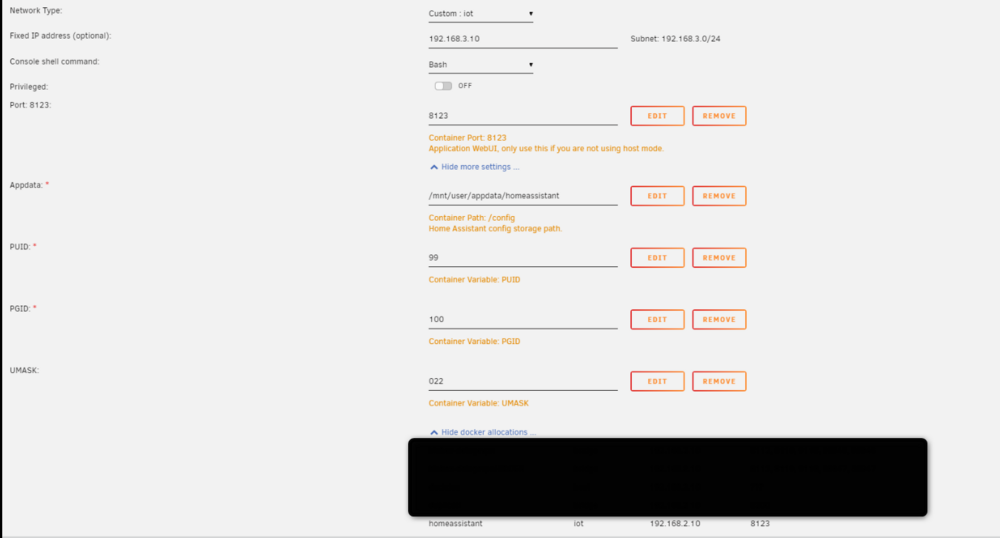
I try tu use a second nic for one docker and it is not working. I did an interface in the docker network When i try to assign an IP in the docker setting root@SERVER-DAN:~# docker network inspect iot [ { "Name": "iot", "Id": "e80da1d13b5298246a7315815bde046a7cbe7f6c1bbc2a2a16ab3dc7cec97928", "Created": "2025-01-06T21:47:11.687354161-05:00", "Scope": "local", "Driver": "bridge", "EnableIPv6": false, "IPAM": { "Driver": "default", "Options": {}, "Config": [ { "Subnet": "192.168.3.0/24", "Gateway": "192.168.3.1" } ] }, "Internal": false, "Attachable": false, "Ingress": false, "ConfigFrom": { "Network": "" }, "ConfigOnly": false, "Containers": {}, "Options": {}, "Labels": {} } ] server_dan-diagnostics-20250112-1004.zip
-
here is the VM logs: text error warn system array login -device '{"driver":"ide-hd","bus":"ide.2","drive":"libvirt-1-format","id":"sata0-0-2","bootindex":1,"write-cache":"on","serial":"vdisk1"}' \ -netdev tap,fd=36,id=hostnet0 \ -device '{"driver":"virtio-net","netdev":"hostnet0","id":"net0","mac":"52:54:00:85:d5:1e","bus":"pci.1","addr":"0x0"}' \ -chardev pty,id=charserial0 \ -device '{"driver":"isa-serial","chardev":"charserial0","id":"serial0","index":0}' \ -chardev socket,id=charchannel0,fd=34,server=on,wait=off \ -device '{"driver":"virtserialport","bus":"virtio-serial0.0","nr":1,"chardev":"charchannel0","id":"channel0","name":"org.qemu.guest_agent.0"}' \ -device '{"driver":"usb-tablet","id":"input0","bus":"usb.0","port":"1"}' \ -audiodev '{"id":"audio1","driver":"none"}' \ -vnc 0.0.0.0:0,websocket=5700,audiodev=audio1 \ -k en-us \ -device '{"driver":"qxl-vga","id":"video0","max_outputs":1,"ram_size":67108864,"vram_size":67108864,"vram64_size_mb":0,"vgamem_mb":16,"bus":"pcie.0","addr":"0x1e"}' \ -device '{"driver":"virtio-balloon-pci","id":"balloon0","bus":"pci.4","addr":"0x0"}' \ -sandbox on,obsolete=deny,elevateprivileges=deny,spawn=deny,resourcecontrol=deny \ -msg timestamp=on char device redirected to /dev/pts/0 (label charserial0) qxl_send_events: spice-server bug: guest stopped, ignoring 2025-01-03T17:45:26.853558Z qemu-system-x86_64: warning: no scancode found for keysym 224 2025-01-03T17:45:26.883916Z qemu-system-x86_64: warning: no scancode found for keysym 224 2025-01-03T17:47:19.855855Z qemu-system-x86_64: warning: no scancode found for keysym 224 2025-01-03T17:47:19.953959Z qemu-system-x86_64: warning: no scancode found for keysym 224 2025-01-03T17:49:47.101912Z qemu-system-x86_64: warning: no scancode found for keysym 224 2025-01-03T17:49:47.134178Z qemu-system-x86_64: warning: no scancode found for keysym 224 2025-01-03T17:51:46.651978Z qemu-system-x86_64: terminating on signal 15 from pid 7694 (/usr/sbin/libvirtd) 2025-01-03 17:51:46.834+0000: shutting down, reason=destroyed 2025-01-03 17:52:05.407+0000: starting up libvirt version: 8.7.0, qemu version: 7.2.0, kernel: 6.1.106-Unraid, hostname: SERVER-DAN LC_ALL=C \ PATH=/bin:/sbin:/usr/bin:/usr/sbin \ HOME=/var/lib/libvirt/qemu/domain-6-Linux \ XDG_DATA_HOME=/var/lib/libvirt/qemu/domain-6-Linux/.local/share \ XDG_CACHE_HOME=/var/lib/libvirt/qemu/domain-6-Linux/.cache \ XDG_CONFIG_HOME=/var/lib/libvirt/qemu/domain-6-Linux/.config \ /usr/local/sbin/qemu \ -name guest=Linux,debug-threads=on \ -S \ -object '{"qom-type":"secret","id":"masterKey0","format":"raw","file":"/var/lib/libvirt/qemu/domain-6-Linux/master-key.aes"}' \ -blockdev '{"driver":"file","filename":"/usr/share/qemu/ovmf-x64/OVMF_CODE-pure-efi.fd","node-name":"libvirt-pflash0-storage","auto-read-only":true,"discard":"unmap"}' \ -blockdev '{"node-name":"libvirt-pflash0-format","read-only":true,"driver":"raw","file":"libvirt-pflash0-storage"}' \ -blockdev '{"driver":"file","filename":"/etc/libvirt/qemu/nvram/b9394ad6-83bf-1088-8b44-017d9a0eed8c_VARS-pure-efi.fd","node-name":"libvirt-pflash1-storage","auto-read-only":true,"discard":"unmap"}' \ -blockdev '{"node-name":"libvirt-pflash1-format","read-only":false,"driver":"raw","file":"libvirt-pflash1-storage"}' \ -machine pc-q35-7.2,usb=off,dump-guest-core=off,mem-merge=off,memory-backend=pc.ram,pflash0=libvirt-pflash0-format,pflash1=libvirt-pflash1-format \ -accel kvm \ -cpu host,migratable=on,host-cache-info=on,l3-cache=off \ -m 2048 \ -object '{"qom-type":"memory-backend-ram","id":"pc.ram","size":2147483648}' \ -overcommit mem-lock=off \ -smp 1,sockets=1,dies=1,cores=1,threads=1 \ -uuid b9394ad6-83bf-1088-8b44-017d9a0eed8c \ -no-user-config \ -nodefaults \ -chardev socket,id=charmonitor,fd=35,server=on,wait=off \ -mon chardev=charmonitor,id=monitor,mode=control \ -rtc base=utc,driftfix=slew \ -global kvm-pit.lost_tick_policy=delay \ -no-hpet \ -no-shutdown \ -boot strict=on \ -device '{"driver":"pcie-root-port","port":11,"chassis":4,"id":"pci.4","bus":"pcie.0","addr":"0x1.0x3"}' \ -device '{"driver":"pcie-root-port","port":12,"chassis":5,"id":"pci.5","bus":"pcie.0","addr":"0x1.0x4"}' \ -device '{"driver":"pcie-root-port","port":8,"chassis":1,"id":"pci.1","bus":"pcie.0","multifunction":true,"addr":"0x1"}' \ -device '{"driver":"pcie-root-port","port":9,"chassis":2,"id":"pci.2","bus":"pcie.0","addr":"0x1.0x1"}' \ -device '{"driver":"pcie-root-port","port":10,"chassis":3,"id":"pci.3","bus":"pcie.0","addr":"0x1.0x2"}' \ -device '{"driver":"ich9-usb-ehci1","id":"usb","bus":"pcie.0","addr":"0x7.0x7"}' \ -device '{"driver":"ich9-usb-uhci1","masterbus":"usb.0","firstport":0,"bus":"pcie.0","multifunction":true,"addr":"0x7"}' \ -device '{"driver":"ich9-usb-uhci2","masterbus":"usb.0","firstport":2,"bus":"pcie.0","addr":"0x7.0x1"}' \ -device '{"driver":"ich9-usb-uhci3","masterbus":"usb.0","firstport":4,"bus":"pcie.0","addr":"0x7.0x2"}' \ -device '{"driver":"virtio-serial-pci","id":"virtio-serial0","bus":"pci.2","addr":"0x0"}' \ -blockdev '{"driver":"file","filename":"/mnt/user/domains/HASS.IO/vdisk1.img","node-name":"libvirt-1-storage","cache":{"direct":false,"no-flush":false},"auto-read-only":true,"discard":"unmap"}' \ -blockdev '{"node-name":"libvirt-1-format","read-only":false,"cache":{"direct":false,"no-flush":false},"driver":"raw","file":"libvirt-1-storage"}' \ -device '{"driver":"virtio-blk-pci","bus":"pci.3","addr":"0x0","drive":"libvirt-1-format","id":"virtio-disk2","bootindex":1,"write-cache":"on","serial":"vdisk1"}' \ -netdev tap,fd=36,id=hostnet0 \ -device '{"driver":"virtio-net","netdev":"hostnet0","id":"net0","mac":"52:54:00:85:d5:1e","bus":"pci.1","addr":"0x0"}' \ -chardev pty,id=charserial0 \ -device '{"driver":"isa-serial","chardev":"charserial0","id":"serial0","index":0}' \ -chardev socket,id=charchannel0,fd=34,server=on,wait=off \ -device '{"driver":"virtserialport","bus":"virtio-serial0.0","nr":1,"chardev":"charchannel0","id":"channel0","name":"org.qemu.guest_agent.0"}' \ -device '{"driver":"usb-tablet","id":"input0","bus":"usb.0","port":"1"}' \ -audiodev '{"id":"audio1","driver":"none"}' \ -vnc 0.0.0.0:0,websocket=5700,audiodev=audio1 \ -k en-us \ -device '{"driver":"qxl-vga","id":"video0","max_outputs":1,"ram_size":67108864,"vram_size":67108864,"vram64_size_mb":0,"vgamem_mb":16,"bus":"pcie.0","addr":"0x1e"}' \ -device '{"driver":"virtio-balloon-pci","id":"balloon0","bus":"pci.4","addr":"0x0"}' \ -sandbox on,obsolete=deny,elevateprivileges=deny,spawn=deny,resourcecontrol=deny \ -msg timestamp=on char device redirected to /dev/pts/0 (label charserial0) qxl_send_events: spice-server bug: guest stopped, ignoring 2025-01-03T17:52:36.632399Z qemu-system-x86_64: warning: no scancode found for keysym 224 2025-01-03T17:52:36.694291Z qemu-system-x86_64: warning: no scancode found for keysym 224 2025-01-03T17:53:51.033986Z qemu-system-x86_64: warning: no scancode found for keysym 224 2025-01-03T17:53:51.133303Z qemu-system-x86_64: warning: no scancode found for keysym 224
-
Sorry for the delay I was out for the holiday. I did create the VM manually and install everything manually. Any thought on how to retart it from the shell prompt? Thanks
-
I did recreate a Linux vm and point the virtual disk to the one in the /mnt/user/domains. But when I start the vm and console it it is stuck with a prompt Shell> What I need to do to start it? BTW it is and HASS.IO vm (homeassistant) Thanks
-
Hi, I did upgrade my CPU and Motherboard for a better one. I forgot to enable VMX in the bios prior to the restart. When I went to the VM tab my VM was stop. Tried to start it and it mention that virtualization is not enable. Before making the reboot to the bios I went to edit the VM to add more CPU when I click apply the VM disappear. How I can retrieve the VM? Thanks Dan
-
I finally found the memory stick that was crashing the memtest. I replace it with a another one 3 pass without error. I have restarted unraid. Let see Thanks
-
That was my fear I will test it Thanks
-
Hi, I have a ramdomly crash for quite a while now. This week I tried to do a memtest and I got no complete result. Either the server reboot by itself or the server crash during the test. One thing that I did remark is when my brother look at my plex library it seem to crash. I disable plex for now. I did upgrade everything last week. I attached the log files. Thanks server_dan-diagnostics-20241211-0711.zip
-
HI since I did upgrade to the new version, I do not known if the settings is still the Same. I was able to recover 95% + of my data with UFS explorer. Thanks
-
Appdata Backup/Restore v2.5 I can't because as of now the server is dismantle and I scan the drive with UFS explorer
-
In the Log I found that command Nov 20 12:00:16 SERVER-DAN CA Backup/Restore: Using command: /usr/bin/rsync -avXHq --delete --log-file="/var/lib/docker/unraid/ca.backup2.datastore/appdata_backup.log" /boot/ "/mnt/user/Public/" > /dev/null 2>&1 Is that
-
What caugh my attention is that just after I hit Backup I saw a lot of message in the terminal delete files xxxx. In the web notification I got this message. CA Backup: 20-11-2024 12:38 appData Backup Backup of appData complete - Errors occurred
-
Here's the log server_dan-diagnostics-20241120-1359.zip
-
Share folder are still there but they are empty no files Help will be really appreciate i'm on a panic right now Thanks
-
Hi I try to do a backup using that plugins and I lost all my data on my shares??? What happen????? My Share folders are still there but empty no files?! Please help Dan
-
Hi i'm on 6.5.3 I installed Appdata Backup/Restore v2.5 In prior to do an upgrade. I did a bakup and lost all the share and data How I can retrieve my data? Thanks
-
Hi, there is no disrespectful here, I'm not an expert in docker and these time I found myself like a stupid guys. I really respect and enjoy the work you have done and all others people that do things like you for us. to answer your question yes I read the instruction. In the instruction the only thing I found is that. "Unraid Many people have powerful enough NAS devices or home servers to also run docker. There is a Unraid Community App. To install make sure you have the community app plugin here. Then search for "Frigate" in the apps section within Unraid - you can see the online store here" Did I miss something? I did install it on a second unraid and I did not had that problem. not finished to understand all the setup but at least the docker is running. This is on my main Unraid that is giving me headache. Any help is always really appreciate Regards
-
I Tried this command: root@SERVER-DAN:~# docker pull ghcr.io/blakeblackshear/frigate:stable Error response from daemon: manifest for ghcr.io/blakeblackshear/frigate:stable not found I have internet access as I can ping ghcr.io root@SERVER-DAN:~# ping ghcr.io PING ghcr.io (140.82.114.34) 56(84) bytes of data. 64 bytes from lb-140-82-114-34-iad.github.com (140.82.114.34): icmp_seq=1 ttl=44 time=33.4 ms 64 bytes from lb-140-82-114-34-iad.github.com (140.82.114.34): icmp_seq=2 ttl=44 time=33.5 ms 64 bytes from lb-140-82-114-34-iad.github.com (140.82.114.34): icmp_seq=3 ttl=44 time=33.3 ms ^C --- ghcr.io ping statistics --- 3 packets transmitted, 3 received, 0% packet loss, time 2003ms rtt min/avg/max/mdev = 33.391/33.453/33.530/0.160 ms
-
I tried to install frigate as docker in unraid bu always get that error message: Pulling image: ghcr.io/blakeblackshear/frigate:stable TOTAL DATA PULLED: 0 B Command:root@localhost:# /usr/local/emhttp/plugins/dynamix.docker.manager/scripts/docker run -d --name='frigate' --net='bridge' --privileged=true -e TZ="America/New_York" -e HOST_OS="unRAID" -e 'FRIGATE_RTSP_PASSWORD'='XXXXXXX' -e 'PLUS_API_KEY'='' -e 'LIBVA_DRIVER_NAME'='iHD' -e 'NVIDIA_VISIBLE_DEVICES'='' -e 'NVIDIA_DRIVER_CAPABILITIES'='' -e 'YOLO_MODELS'='' -e 'USE_FP16'='' -e 'TRT_MODEL_PREP_DEVICE'='' -p '5000:5000/tcp' -p '8554:8554/tcp' -p '8555:8555/tcp' -p '8555:8555/udp' -p '1984:1984/tcp' -v '/mnt/user/appdata/frigate':'/config':'rw' -v '/mnt/user/Media/frigate':'/media/frigate':'rw' -v '/etc/localtime':'/etc/localtime':'rw' --device='/dev/bus/usb' --device='' --shm-size=256mb --mount type=tmpfs,target=/tmp/cache,tmpfs-size=1000000000 --restart unless-stopped 'ghcr.io/blakeblackshear/frigate:stable' invalid argument "" for --device=: bad format for path: See 'docker run --help'. The command failed.
-
Me and my brother have 2 unraid server with plex running as docker. The last 2 times we tried to access my plex library that I shared with him. Unraid crash. Here the docker logs I do not know where to start Thanks plex logs.txt

