






jedimstr
Members
-
Joined
-
Last visited
Everything posted by jedimstr
-
Those containers with "3rd party" labeling even though they're from App and not 3rd party, just old, also don't have an Edit option in the rightclick menu. So how do you do this without deleting the container and starting those from scratch?
-
I know this is an old topic, but found this on search... Just noticed this when upgrading to 7.0 and realized the 3rd Party listing is also added for those containers that were built based on old Apps entries that were removed and/or replaced. A good example is the Official Plex image. In Apps the official one is listed as "Plex-Media-Server". When I originally installed Plex years ago from the official repo, it was from Apps just listed as "Plex" and pointing to here for "more info:" https://hub.docker.com/r/plexinc/pms-docker/ . Now that I upgraded to 7.0 I can no longer update my customized folder and env settings in the GUI even in Advanced Mode because of the 3rd Party tagging, even though it was perfectly able to be edited in 6.12.14. I'd call that a pretty serious regression.
-
That was it!!! The custom www.conf settings were based on an older version of the www.conf that worked fine for 6 but not 7. The original reason for the custom www.conf was to raise the pm.max_children to 100 from the default of 50 but it may no longer be necessary. The actual breaking line within the www.conf itself was this in the 6.x version: listen = /var/run/php5-fpm.sock vs listen = /var/run/php-fpm.sock in the 7.x version. I'm keeping both the www.conf and sudoers cp lines commented out in the /boot/config/go since those old mods probably are no longer necessary for what I was trying to do originally. For reference, here's the diff of that www.conf file: https://www.diffnow.com/report/bjr2l Problem solved and running 7.0 on my media server now! Thanks!!!
-
After a bit of experimental cleanup of some plugins and removing a DVB Driver and Unraid Connect's beta plugin, tried upgrading to 7.0 again. Same issue, 500 internal server error. Manually downgraded back to 6.12.14 again and WebGUI is working fine again. Def something is conflicting with my setup on this one server and 7.0. My two other servers as mentioned above are perfectly fine with 7.0. Captured a second Diagnostics.zip after the second attempt to help narrow down what it could be. holocron-diagnostics-20250110-1514.zip
-
I ended up following the instructions here for manually downgrading back down to 6.12.14 and that works fine including switching back to HTTPS mode with my own certs. Will need more time to diagnose and try upgrading again to 7 at a later date, but for now I'll stick to the working WebGUI config, or I'll wait for a later revision to try again. If anyone catches any glaring potential sources of the issue in my Diagnostics Zip, let me know.
-
Nope, still getting 500 internal Server Error on http with use_ssl set to no. I use my own certs and domain and other services that use those certs are still working like Grafana. My two other servers have pretty much the same plugins installed and also use my wildcard cert & domains and they're working fine with 7.
-
Upgraded a few of my servers successfully including a security/backup server and a homelab testing server, so decided to pull the trigger on my main media server. That primary server is now getting Internal 500 Server Error in both the Web GUI and in local SafeMode GUI (just in case it was one of the plugins that prevented nginx from working as others have seen with this error in the past). But even in the local Safemode GUI instance I get an error, this time a 502 in the local browser. All my docker containers like Plex, Grafana, the **arrs, Tautulli, etc all are working fine and plugin based UIs like Unbalanced is working, so it just seems like the main webGUI is broken. Trying to access dashboard, plugins, docker views via their direct URLs all result in 500 errors. SSH works perfectly fine as well. Because of the multiple restarts in trying to diagnose the issue I see in my Slack notifcations that its performing a Parity Check so assuming the Array in general is fine. Trying to restart or manually stop and start with these commands doesn't fix anything, still 500 errors: /etc/rc.d/rc.php-fpm restart then tried these: /etc/rc.d/rc.php-fpm stop /etc/rc.d/rc.php-fpm start Attached is my Diagnostics zip file. I'm hoping there's some simple fix here that I missed modifying a config or playing with something on the /boot/config/plugins or in the go file to fix this. I'd hate to rebuild the flash from scratch on this server and trying to recover all my settings, plugins, and whatever customizing I did over the years. holocron-diagnostics-20250109-2352.zip
-
it could actually be any of your drives that could be dying not just the one you’re rebuilding. Parity operations use all your array drives and are limited by your slowest drive. So if any of your drives are dying or have other issues it’ll slow any parity operation like a rebuild.
-
Thanks! Worked well.
-
First of all, thanks for this! Having an issue with an imported mnemonic. Summary shows "Unknown" for Total Chia and Wallet shows: But the Settings/Keys tab shows the correct Fingerprint, Public Keys, and First Wallet Address that I have on one of my Windows PC's running the Windows Chia client with the same mnemonic/wallet. Any idea on how I can fix?
-
Am I the only one who thinks its a bad idea to put out a version update with "DO NOT INSTALL ON 6.8" in the default update path? Wouldn't it have been better to put out a separate plugin beta for manual install for 6.9 RC2 and keep the plugin that's compatible on the current stable versions on the regular plugin? What about those users who just click Update All and don't check the release notes?
-
Unfortunately I'm hitting the Exit code '56' from all the port-forward capable endpoints on the list. Tried ca-vancouver and ca-toronto first (I'm usually on ca-toronto anyway) but they've been on a constant retry loop for the last few hours. None of the others are working either.
-
Thanks!!!
-
I'm in the middle of a Parity Rebuild (upgrading one of my array disks from 10TB to 16TB Exos), and started getting hanging issues with my cache pool that lead to docker and the webGUI to timeout. When I do get through to Settings or Tools tab (other tabs hang, sometimes I get partial load on Main and shows Array is reading/writing), the parity rebuild is progressing (footer progress still going up in percentage) so I'm hesitant on doing a 'powerdown -r' or a physical reboot. There are long stretches when I can't access the WebGUI at all (max_children errors, I've already raised the level in www.conf for next reboot). So is there a way to check Parity Rebuild process from the commandline so I can do a powerdown -r when it finishes?
-
Probably more of a feature request, but is there a way to get Privoxy working with a Wireguard VPN provider instead of an OpenVPN provider? The goal would be for speed.
-
That particular drive ended up having multiple read errors and just dying even on a new pre-clear pre-read. Ended up RMA'ing it. After taking that drive out of the equation, I still get relatively slow parity syncs/rebuilds, but never as slow as with the RMA'd drive. Slowest now is in the dual digit MBs range (but it goes back up to the high 80's or 90's again).
-
Yup it looks like that fixed it. Thanks!!!
-
Removed and re-installed from CA. Here's the installation output: plugin: installing: https://raw.githubusercontent.com/gfjardim/unRAID-plugins/master/plugins/preclear.disk.plg plugin: downloading https://raw.githubusercontent.com/gfjardim/unRAID-plugins/master/plugins/preclear.disk.plg plugin: downloading: https://raw.githubusercontent.com/gfjardim/unRAID-plugins/master/plugins/preclear.disk.plg ... done plugin: downloading: https://raw.githubusercontent.com/gfjardim/unRAID-plugins/master/archive/preclear.disk-2020.01.13.txz ... done plugin: downloading: https://raw.githubusercontent.com/gfjardim/unRAID-plugins/master/archive/preclear.disk-2020.01.13.md5 ... done tmux version 3.0a is greater or equal than the installed version (3.0a), installing... +============================================================================== | Skipping package tmux-3.0a-x86_64-1 (already installed) +============================================================================== libevent version 2.1.11 is greater or equal than the installed version (2.1.11), installing... +============================================================================== | Skipping package libevent-2.1.11-x86_64-1 (already installed) +============================================================================== utempter version 1.1.6 is lower than the installed version (1.1.6.20191231), aborting... +============================================================================== | Installing new package /boot/config/plugins/preclear.disk/preclear.disk-2020.01.13.txz +============================================================================== Verifying package preclear.disk-2020.01.13.txz. Installing package preclear.disk-2020.01.13.txz: PACKAGE DESCRIPTION: Package preclear.disk-2020.01.13.txz installed. ----------------------------------------------------------- preclear.disk has been installed. Copyright 2015-2020, gfjardim Version: 2020.01.13 ----------------------------------------------------------- plugin: installed Updating Support Links preclear.disk --> http://lime-technology.com/forum/index.php?topic=39985.0
-
Both version 2020.01.12 and 2020.01.13 are showing the "unsupported" warning even though it was updated for 6.8.1 support.

-
To update, I was eventually able to complete the rebuild after a reboot. But then I have more disk replacements to do, so I'm in my second data drive replacement now on 6.8.0 and it slowed to a crawl again after a day. I rebooted the server again, which of course restarted the rebuild from scratch, but this time I saw slowdowns again down to the dual digit KBs range. This time I just left it running and eventually it bumped back up to around 45MBs, and a day later up to 96.3MBs... still crazy slow but better than the KB range. Hope the general slow parity/rebuild issue gets resolved.
-
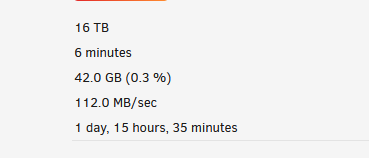
Thanks, I rebooted and I see Parity run at better speed now. Started from scratch and still slower than usual but at least its in the 3 digit MB range. There was also an Ubuntu VM I had running that often accesses a share that's isolated to one of the drives being rebuilt, so just in case that has anything to do with it, I shutdown that VM. I'm not the only one seeing this slow to a crawl issue though. Another user on Reddit posted this:
-
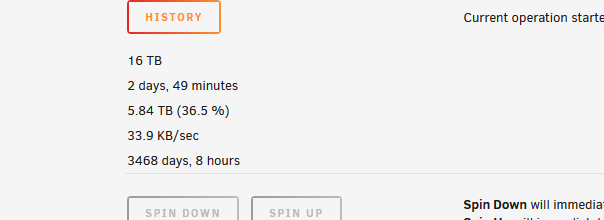
After upgrading to 6.8.0, I replaced my parity drives and some of my data drives with 16TB Exos from previous 12TB and 10TB Exos & IronWolfs. Initial replacement of one parity went fine with full rebuild completing in normal fashion (a little over 1 day). For the second parity, I saw that I could replace it and one of the data drives at the same time, so went ahead and did that with the pre-cleared 16TB drives. The parity-sync/data-rebuild started off pretty normal with expected speeds over 150+MBs most of the time until it hit around 36.5% where the rebuild dramatically dropped in speed to between 27/KBs to 44/KBs. It's been running at that speed for over 2 days now. At first I thought this was somehow related to the 6.8.0 known issues/errata notes that mentioned an issue with slow parity syncs on wide 20+ arrays (I have 23 data drives and 2 parity), but my speeds are much slower than those reported in the bug report for that issue by an order of magnitude. Here's what I'm seeing now and my diagnostics attached. holocron-diagnostics-20191215-0604.zip
-
Thanks I'll post in general support. My results definitely seem much slower by an order of magnitude than the slowdowns mentioned in the bug post.
-
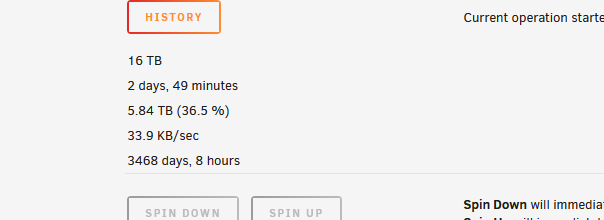
Is there an active bug posted around the slow Parity-Sync/Data-Rebuild for wide arrays mentioned being looked at in the errata? I can't find it in the bug forums. I'm definitely seeing this problem with my 23 data and 2 parity drive array. I've replaced both a data drive and one of the parity drives in the same rebuild session so that may be a contributing factor. I wanted to see if there's any data I can gather that would help in your investigation on the issue and see if there were any stop-gap solutions in the meantime but like I said, I can't find an active bug post for this. Here's my rebuild's current progress: holocron-diagnostics-20191215-0604.zip
-
Congrats on moving forward with this new container and giving everyone what they wanted whether they wanted to stay on older versions or leap ahead to current released versions. I've already moved on to other container providers, but happy to see you guys take critique and release a better product that should please everyone.



