





cheesemarathon
Members
-
Joined
-
Last visited
Everything posted by cheesemarathon
-
No offence taken! Just wanted to make sure you had all the info. One thing you can try is to set the free space for the share larger than the largest file you'll use. That way, the files go to the cache till it's full and then go to the array, in theory. Failing that this might be a question for some of the docker/unRAID experts on the forum 😂
-
I don’t personally use cache arrays so I’m not super savvy with the way they work. So from my understanding you want to move files from an SMB share on a different host to an unRAID share that is cache enabled? If I’m correct then you need to ensure you have the share mapped in cloudcommander and not the specific cache disk. It also believe that the cache settings for the share need to be correct. I super encourage you to watch this video by space invader one to fully understand all the options.
-
Don’t hold me to this as I have not tried it but I think you can creat a variable called MINIO_VOLUMES in the container settings and set it to. https://minio.example.net:9000/data/disk{1...4}/minio you will also need to change the data variable to just /mnt so it can access all the disks however be careful writing to specific disks as I’m not sure how unraid will respond to this. if I had a test unsaid setup I’d give it a try myself but I only have a production server and I don’t want to screw with it 😂 Good luck
-
I’m having this issue also. Any solution?
-
Your trying to mount one directory in the container to two different directories in the host. That's the issue.
-
I don't maintain the docker image. Only the template for UNRAID. I'd suggest asking by creating an issue at https://github.com/ms-jpq/kde-in-docker
-
In theory yes! However you might find that it doesn't last through container reboots. Give it a go installing it and shout if you have any issues. We will try to help.
-
Morning! I have just updated from RELEASE.2021-12-10T23-03-39Z to the latest which is RELEASE.2021-12-29T06:49:06Z I have had no issues with this at all. So I would try an update to the latest now and see how you get on. Failing that I would start asking questions over at the minio forums because as far as i can see in the docs, there are no changes that should prevent a successful upgrade. Thanks,
-
I'll look into this and see what I can find out. Hopefully there is just a migration command you can use.
-
Image was last updated 3 months ago. The last release on github was 8 months ago. Docker image appears to be maintained by the same guy who maintains the github repo. So if you wish for the docker to be updated, i would create an issue on github.
-
I’ll take a look as to why the updates have not come through.
-
Well done on finally sorting it. 9 times out of 10 it’s the stupid simple thing.
-
Sorry I'm not having the same issue and I'm not sure what could cause it. I have attached screenshot from NetData showing disk usage at nearly zero for my minio container. Are you 100% it's minio? Use the NetData container to narrow this down. Anything in the logs?
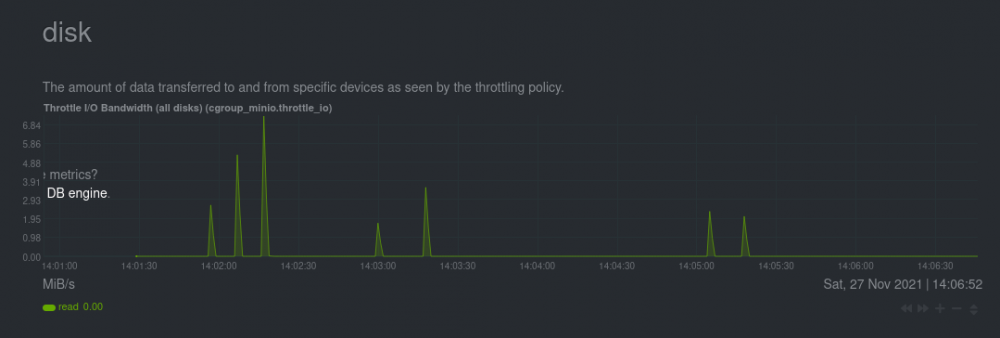
-
Thanks for sharing this @iDork56
-
This looks like a communication issue between Ghost and your DB. I’m running the latest version without issue which leads me to think it is not a problem with the unraid template. I only produce the unraid template to get Ghosts docker image to install. A such I would suggest requesting help from the ghost community forum. If you link me the issue I’ll try keep an eye on it and chime in with any relevant software. Apologies I can’t help more but it’s hard to help with software you do not write.
-
I don’t use it myself so I’m not sure what the issue is. I only create the template for the container to work on unraid not the docker image itself. On the taskcafe GitHub they suggest you use docker compose which unraid by default does not. It may be worth opening an issue on their GitHub to see if they can help. If you link the issue I’ll keep an eye on it and add any relevant info I can. https://github.com/JordanKnott/taskcafe
-
Easy fix. You're using the env variables that minio has depreciated. I updated the template but they don't seem to have pulled through to you. Remove your container and create it again from community apps. Just don't delete your minio appdata as well!!!! @pervel This should also fix your issue. I have just done the above as well and had no issues. Just make sure to fill in your same user and password as before.
-
I’ll have a poke in my system tonight as I haven’t updated mine yet. I did make a change to the template to fall inline with changes minio made to the env variables so maybe I cocked that up. Could you send a screenshot of your minio docker setup page in the unbraid ui? Thanks
-
Images have timed out, but here is one of my configs: server { listen 80; server_name app.domain.com; return 301 https://$server_name$request_uri; } server { listen 443 ssl; server_name app.domain.com; ssl_certificate /config/keys/letsencrypt/fullchain.pem; ssl_certificate_key /config/keys/letsencrypt/privkey.pem; ssl_prefer_server_ciphers on; add_header Strict-Transport-Security max-age=2592000; location /oauth2/ { proxy_pass http://192.168.1.41:4180; proxy_set_header Host $host; proxy_set_header X-Real-IP $remote_addr; proxy_set_header X-Scheme $scheme; proxy_set_header X-Auth-Request-Redirect $request_uri; } location = /oauth2/auth { proxy_pass http://192.168.1.41:4180; proxy_set_header Host $host; proxy_set_header X-Real-IP $remote_addr; proxy_set_header X-Scheme $scheme; # nginx auth_request includes headers but not body proxy_set_header Content-Length ""; proxy_pass_request_body off; } location / { auth_request /oauth2/auth; error_page 401 = /oauth2/sign_in; # pass information via X-User and X-Email headers to backend, # requires running with --set-xauthrequest flag auth_request_set $user $upstream_http_x_auth_request_user; auth_request_set $email $upstream_http_x_auth_request_email; proxy_set_header X-User $user; proxy_set_header X-Email $email; # if you enabled --cookie-refresh, this is needed for it to work with auth_request auth_request_set $auth_cookie $upstream_http_set_cookie; add_header Set-Cookie $auth_cookie; include /config/nginx/proxy.conf; add_header X-Frame-Options SAMEORIGIN; proxy_pass http://192.168.1.41:9080; } }
-
I have just updated the template for minio. It should fix all the issues of recent.
-
Looks like minio have made some changes to their container. I'll read the docs and update the template this evening!
-
What is producing this error?
-
Updated!
-
Thanks for the update! @hmoney007 try frankman's suggestion.
-
Like i said before I don't run Nginx proxy manager I run SWAG by linuxserver, but that uses nginx so my configs should work for you. I just wrote the one below and it loads fine on my server and domain. Just don't forget to change the XXX.XXX bit for your IP and change yourdomain for your domain. Also if your running cloudcmd on a different port to 8765 then you will have to change that also. This config assumes that you run cloudcmd as a sub domain rather than a sub directory e.g. cloudcmd.mydomain.com not mydomain.com/cloudcmd I hope that all makes sense 🙂 just shout if not. server { listen 80; server_name cloudcmd.mydomain.com; return 301 https://$server_name$request_uri; } server { listen 443 ssl; server_name cloudcmd.mydomain.com; ssl_certificate /config/keys/letsencrypt/fullchain.pem; ssl_certificate_key /config/keys/letsencrypt/privkey.pem; ssl_prefer_server_ciphers on; add_header Strict-Transport-Security max-age=2592000; location / { proxy_pass http://XXX.XXX.XXX.XXX:8765/; } }



