





cheesemarathon
Members
-
Joined
-
Last visited
Everything posted by cheesemarathon
-
Have you tried to see if this works already? The DNS forwarding should already work. If not, open an issue here as i'm not the author of the software, I just create the template with the help of @mlebjerg
-
Yes I'm well aware that oauthproxy is no longer being developed by the owners. There is an issue that I'm subscribed to that is discusing how the project will go forward, whether that is new owners for the project or moving official support to a new fork. I'm reluctant to move to a new fork until official agreement has been made as buzzfeed sso only supports Google as an auth provider at the moment.
-
Shame, his loss then....
-
URGENT!!! @MarkusMcNugen It looks like with your qbittorrent template you have forgotten to remove your VPN username and password from the template. Lines 71 and 76 currently contain values. I suggest you remove them!
-
Yeh, that's probably the best way! Not a problem, I'm here to help! Thanks for the coffee, unfortunately I'm an idiot and set it up with the wrong pay pal email. So they payment will bounce back in 30 days. Thanks anyway though!
-
Yes that will work. Yes it won't get updates if you ghost creates updates for it. But you can always add those in manually. The default theme in the container will get updates so you can download that from the admin page and merge updates manually. It's one or the other to be honest. I wouldn't want my theme changing without me changing it, but that's personal preference.
-
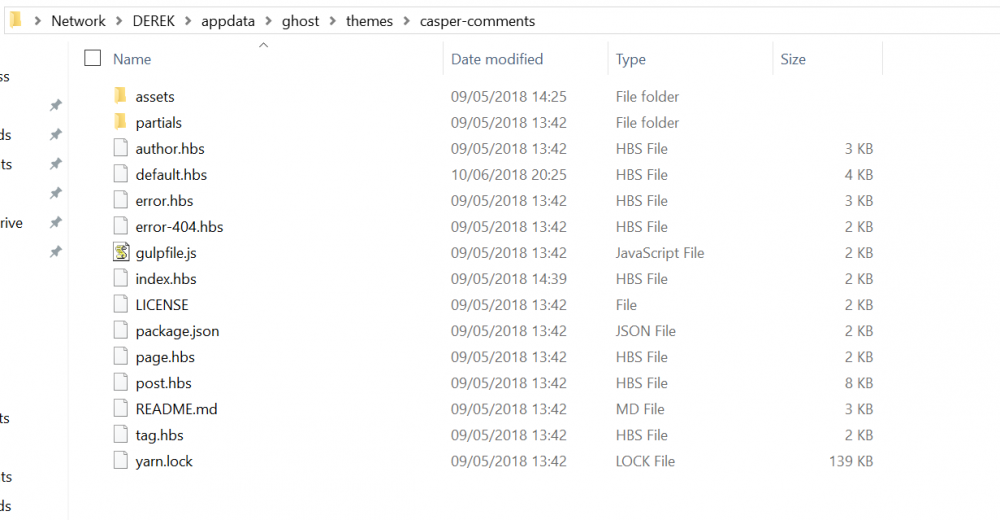
You can put your modified caspar folder in the themes folder. So /appdata/ghost/themes/caspar/ would contain the assests and partials folder and all the other hbs files.
-
@plantsandbinaryI created a modified theme and placed it in the theme folder. There is a guide to modifying themes here. Once modified place it in the theme folder. That folder will be persistent so long as you haven't modified the default mapped container directory. Let me know if your still unsure what to do.
-
Hmm I have this working, let me look at how I set it up and I'll get back to you!
-
I have opened an issue with the makers of the docker image regarding windows updates not caching. As for adding Nvidea, open an issue here suggesting it.
-
Fantastic! I have updated the template now so users should be able to easilly disable signups
-
For your first point see here I'll update the template tonight to add that option. Unfortunately there is no admin panel with the docker image I use.
-
I'll look into this!
-
According to the maintainer of the docker image used for bitwarden, it shouldn't need an ID/key for anything
-
Do you mean in your reverse proxy config? If so, I have always used my IP in my configs rather than host name, so I'm not sure. However that should be affected by your lets encrypt and network setup not the bitwarden container.
-
@Tweak3D@mostlydave It's well known issue See https://github.com/dani-garcia/bitwarden_rs#running-on-unencrypted-connection TL/DR: this is a problem when running over HTTP on chrome and its a problem upstream. Looks like it's just unsupported and wont fix. The issue is in the Vault to be specific. I'm running my bitwarden behind a reverse proxy that forces all traffic through HTTPS. This fixes the issue in Chrome Version 68.0.3440.106
-
Which app is this with?
-
@mlebjerg Are you having issues with uPlay? Has something broken with the SNIProxy? Does the image need rebuilding to include updates from the steamcache source?
-
If it's saying hit then it's caching data correctly. It will take a few download cycles to cache all the data.
-
Are cache files being created in the mounted cache directory? What platform is this, steam, uplay, origin?
-
Try changing your settings so that it points to your ssd to store the cache. Although that will limit the size of the cache quite a bit. That still seems unusually slow though. Try writing lots of small files to the array to test the write speeds.
-
Your not the only one having issues with uPlay at the moment. I'll look into it as soon as I can
-
If you want to use mariadb you should be able to just change the login credentials and host IP to that of your mariadb setup. Leave the database type as mysql. If you don't want to use an external database, remove all the database related variables and it will be setup with SQLite. I'm not sure what the migration process would be so you will need to play with that a bit. As for the mailgun setup, it is completely optional. You can simply not fill in the the variables for the mailgun setup and the container will work fine. I hope that helps. I'll change the documentation to reflect these changes when I can. I will also remove the database variables so that using an external database is not the default setup.
-
Sorry your having issues. The last time I checked it was working. @mlebjerg and I will check our systems and see if we are having issues or if it's a problem with your setup.
-
The list should be updated every time the container starts from that repo, so yes. @mlebjerg can you confirm this?


