





exico
Members
-
Joined
-
Last visited
Everything posted by exico
-
Here's the output: [#] ip link add wg0 type wireguard [#] wg setconf wg0 /dev/fd/63 [#] ip -4 address add 10.245.0.1 dev wg0 [#] ip link set mtu 1420 up dev wg0 [#] ip -4 route add 10.245.0.2/32 dev wg0 [#] ip -4 route add 192.168.10.0/24 dev wg0 RTNETLINK answers: File exists [#] ip link delete dev wg0 Guess that the error is File exists what does that mean?
-
Im having a strange problem and i cannot figure out whats wrong I edited a peer recently and from that point forward i cannot activate the tunnel. I did try to save it, remove it and re-import but whenever i add in "peer allowed IPs" the LAN network with x.x.x.x/24 the tunnel wont activate. Tunnel: Local tunnel network pool: 10.245.0.0/24 Local tunnel address: 10.245.0.1 Endpoint: [redacted, static ip]:51820 Local server uses NAT: No (i tried with Yes, nothing changes) First Peer: Peer name: something Peer type of access: Remote access to LAN Peer tunnel address: 10.245.0.2 Peer allowed IPs: 10.245.0.2 Whenever i put (192.168.10.0/24 is the lan) Peer allowed IPs: 10.245.0.2, 192.168.10.0/24 The tunnel wont stay On, if i press on the button it moves but if i F5 the page or go to another and come back is OFF. Syslog just says that the tunnel turned on and off There is a more useful log for wireguard? There is nothing in /var/log On this machine i have already a tunnel server to server that works flawlessy
-
Im an idiot 😆 Ping replied, got an handshake. I forgot that wireguard does not initiate the connection until there is a request. Gonna change the keys, thanks
-
Hello! I've been trying to setup a server to server access that from what i understand is like lan to lan but without the routing. I followed the steps in the first post but i cannot get an handshake. Heres what i configured (i will change keys later when i get this working) I have static IPs in both locations that i redacted for obvious reasons. I forwarded port 51830 in both pfsenses. For context, in both locations i have already a "remote access to LAN" setup with various clients and works fine (on a different port/tunnel obviously) I cannot get a handshake, do you have any idea of what im doing wrong?
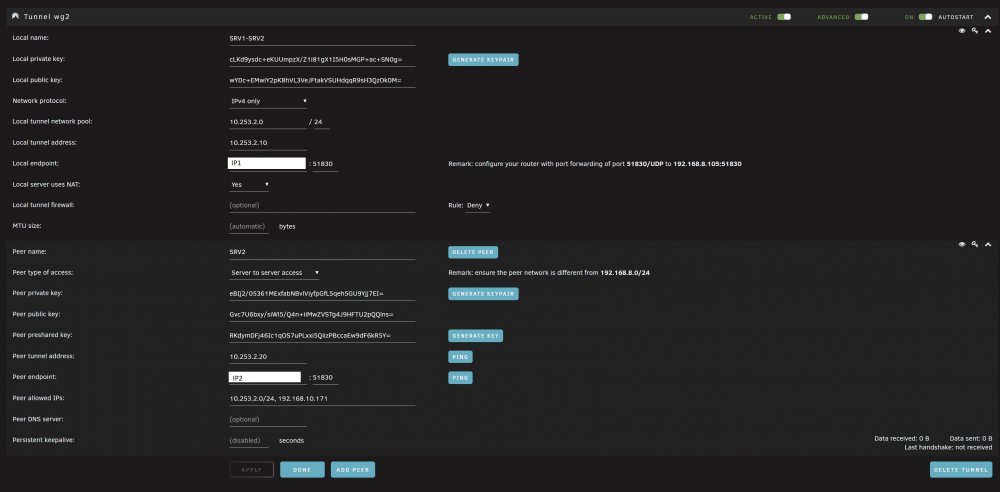
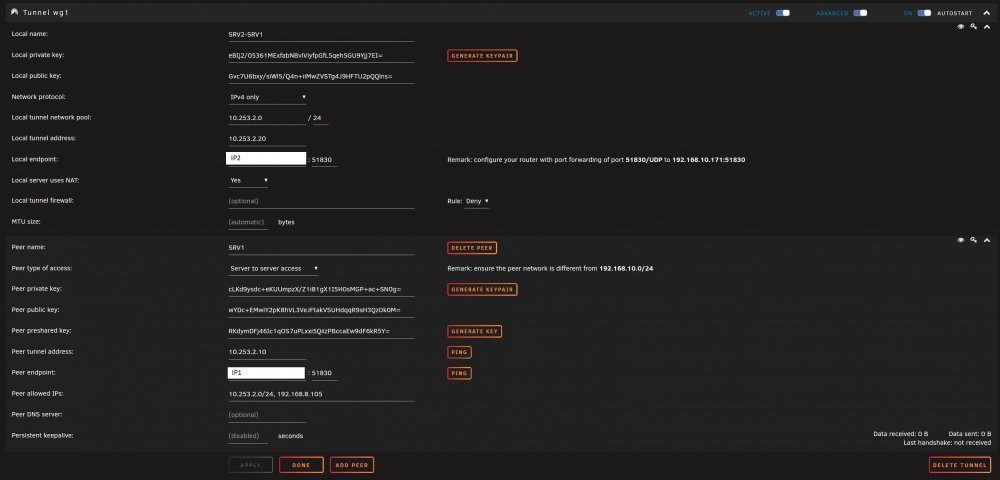
-
For those who had this problem: UniFi Controller startup failed We do not support upgrading from 6.2.23. Checkings the logs in /logs/server.log: [2021-05-13T12:09:08,198] <localhost-startStop-1> INFO db - DB version (6.2.23) different from Runtime Version(6.1.71), migrating... [2021-05-13T12:09:08,205] <localhost-startStop-1> ERROR db - We do not support upgrading from 6.2.23. I searched around in the data folder and i found that the "DB version" is just a text file. If you change the version in the text file it just skip the check and migration. You can find the file in /data/db/version Just edit it with notepad++ or whatever editor that is not Windows notepad and change it from 6.2.23 to 6.1.71 Save and start the docker. I dont know if this can cause problems in the long term but at least you can start back up the controller
-
You are right, it's the stupid vmware player vm that is broken. I tried with a vm in Unraid and it loads fine, i did not try with a physical machine yet because i use my desktop as work pc and my notebook has no ethernet. I wonder why vmware player doesnt work
-
I'm struggling to boot live media from the netboot docker and i have no idea what I'm doing wrong. - I set up the live endpoint correctly (i had to reroute port 8080 to 8069 cause it was already used in another container but it works. i can navigate it fine) - I downloaded the assets (in my case i tried popos 20.04 and ubuntu mate 20.10 and i can see them in 192.168.8.105:8069/.. etc ) - I set up a vmware vm that boot into pxe and i get this error (see attached image). I get the error whenever i boot popos or ubuntu mate live I tried Ultimate boot cd and works ( i had to download it manually and change the name cause there is a version mismatch in netboot config files) I tried ubuntu network install 20.10 and works, gparted works, clonezilla ubuntu stable works VM has plenty of ram (8G) and disk (64G) and is in bridge mode so it has its own ip and mac DHCP is provided by my pfsense and is configured correctly
.jpg.2d7e7e32042563c44ef0714bc14f8ab3.jpg)
-
It would be nice to add support for Apple updates in Steamcache docker. I managed to add it via "hacking" the existing configurations, if you plan to add it to the docker this is what i did to make it work: bootstrap.sh mod: Add after if [ -z "$WINDOWSCACHE_IP" ] && ! [ "$DISABLE_WINDOWS" = "true" ]; then WINDOWSCACHE_IP=$LANCACHE_IP fi This piece: if [ -z "$APPLECACHE_IP" ] && ! [ "$DISABLE_APPLE" = "true" ]; then APPLECACHE_IP=$LANCACHE_IP fi Add this after ## windows section ## apple if ! [ -z "$WINDOWSCACHE_IP" ]; then echo "Enabling cache for apple" cp /etc/bind/cache/apple/template.db.apple /etc/bind/cache/apple/db.apple sed -i -e "s%{{ applecache_ip }}%$APPLECACHE_IP%g" /etc/bind/cache/apple/db.apple sed -i -e "s%#ENABLE_APPLE#%%g" /etc/bind/cache.conf fi Add this in /etc/bind/cache.conf at the end of the file ## APPLE zone "swcdn.apple.com" in { type master; file "/etc/bind/cache/apple/db.apple"; }; Add a folder named "apple" in /etc/bind/cache Create 2 files in this folder: db.apple (the 10.0.0.10 ip would change automatically on docker boot, thats my ip for the cache docker) $TTL 600 @ IN SOA ns1 dns.steamcache.net. ( 2015040800 604800 600 600 600 ) @ IN NS ns1 ns1 IN A 10.0.0.10 @ IN A 10.0.0.10 template.db.apple $TTL 600 @ IN SOA ns1 dns.steamcache.net. ( 2015040800 604800 600 600 600 ) @ IN NS ns1 ns1 IN A {{ applecache_ip }} @ IN A {{ applecache_ip }} to enable the apple cache i just added "-e APPLECACHE_IP=youripnumber" in advanced view in docker edit/install in the extra parameters The complete modding requires mapping folders and copy files with correct permissions because of the docker resetting files when updating. If you are interested in testing it i can write it down but it would be faster if it is implemented in the docker directly instead. Thats my 2 cents. I just needed to add apple update caching on top of windows updates in a mixed evironment and i didnt want to create another docker just for that. I hope that this will be usefull and maybe be implemented.
-
No more warnings, thanks! Anyway there is any possibility to see what the client is doing? Some infos like in the desktop version.
-
Hello I have a little warning from Dropbox that im testing in a Unraid Machine. In the log says to update the client within 5 days to continue using dropbox on the machine. I guess it needs an update and i really need a Dropbox plugin / docker in this machine. Any info?



.jpg.2d7e7e32042563c44ef0714bc14f8ab3.jpg)