jademonkee
Members
-
Joined
-
Last visited
Everything posted by jademonkee
-
Updated from 7.0.1 with no issues.
-
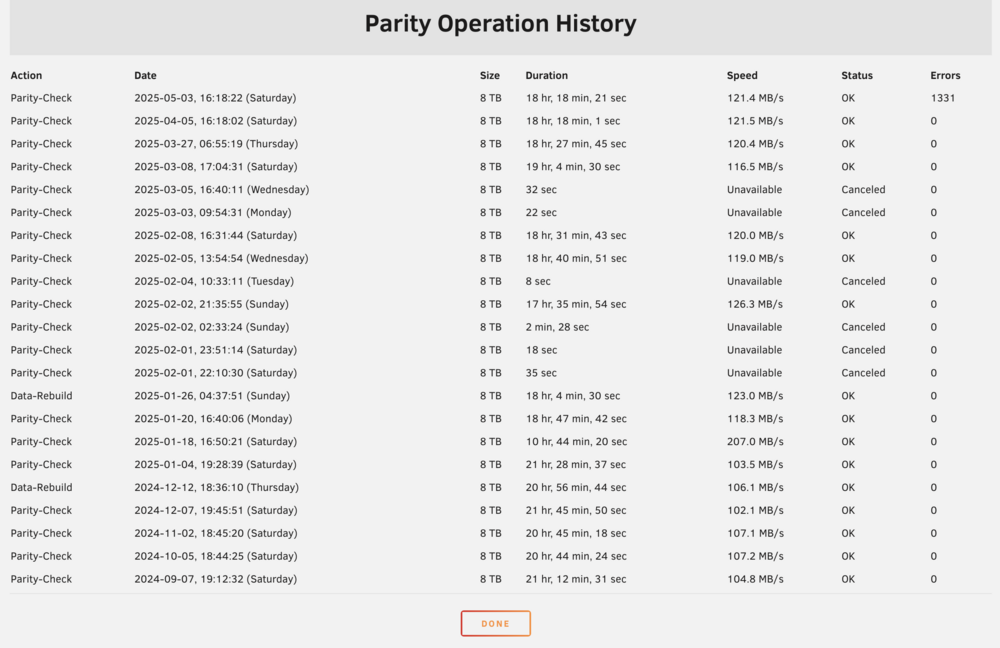
Correcting parity check completed with 1324 errors (so it keeps decreasing). I'm now running a non-correcting parity check to see if any more appear. I have collected a diagnostics for posterity. Thanks again to everyone for your help.
-
(likely) Final update: The parity check finished with 1329 errors this time (I'm assuming something was overwritten between the previous check and today's). I shutdown the server and checked the LBA card + cables. Nothing was obviously loose, but I can't say definitively. After booting, I mounted the disks in maintenance mode and ran filesystem checks on them. No errors found. I'm also running scrubs on my two ZFS pools, just to check. After the scrubs have completed, I will run a manual parity check with "write corrections" enabled. I have a feeling that the cause was probably the removal and reinstallation of the LBA card, as I can't think of what else could be responsible. Hopefully the errors were all in Parity and not the Array disks.
-
Update: I have created a list of all files on the array that were modified since the last succesful parity check using the command: find /mnt/disk1/ -newermt "4 April 2025" -not -newermt "7 May 2025" -type f >> modified_files.txt (I ran it for each disk in the array) So I now have a list of potentially problematic files that I will keep for future reference. Of the affected files, there are a few that I care about and have backups for. In addition to my backup disks, these are also stored on an SSD passed through to my VM. This SSD is the "working directory" for those files, which I then copy to the array. So I have a copy of each of these files that have never touched the array, and are therefore uncorrupted. As the SSD is passed through to my Windows VM, I used the Windows program FreeFileSync (which I also use to copy the files to the Unraid array) to run a CRC compare of the versions of the affected files stored on the SSD vs the array. There were no differences found (yay!). The Uncorrecting Parity check is still running, but I'll let it finish (it's still yet to find the final 4 errors - count is currently at 1329), then I'll re-seat the LBA card and cables, and run a correcting parity check. I'm comfortable with any of the remaining files having potential corruption. Though I might run filesystem integrity checks beforehand just to be sure. Thanks all for your input.
-
Thinking on a possible cause: I removed the HBA card when I was booting to bare metal Windows to test my optical drive (documented here), so I wonder if it's perhaps not seated correctly, either in the PCIe slot, or if a cable has come loose. I did that on April 22nd, so between the last "0 error" parity check and this most recent one, so it's the most likely occurance I can think of. But wouldn't that throw CRC errors when it goes to write/read to the disks? I'm running another (non-correcting) parity check, but when it completes I'll check that the HBA card + cables are properly seated. I might see if I can generate a list of all files written to the array between the last "0 error" parity check and today, and restore them from backup, just to be sure.
-
So is it best to just fix parity and hope for the best? I can't see any obvious reasons to see why it happened, which irks me.
-
Good to know, thanks. There haven't been any unclean shutdowns since my previous parity check. What should I do next? My SMART reports all look ok. I run nightly backups to an SSD pool, and weekly backups from that pool to an alternating pair of external drives. Is there any way I can see what data lies at the affected sector, and then check that data (if it's important) against the backups? All disks are XFS, and I don't run the data integrity plugin. Many thanks.
-
Hi there, I run monthly (non-correcting) parity checks. My monthly ran last week, and the push notification to my phone reported it as finding 0 errors. However, I logged into the GUI today to see the dashboard reporting that there were actually 1331 errors found. This is the first time that I've received any parity errors. So this post is two-fold: a) to highlight a discrepancy in the notofication for a completed parity check; and b) to ask what I should do next. Should I run a correcting parity check? Before I do, though, Is there any way to find out what sectors the parity errors were part of (to narrow down which disk/data may be at risk)? What are some of the possible causes for these errors? ie how can I figure out why they occured on my system? I have an old 2TB disk that I recently added to the array (disk 7), which had some 'uncorrectable' errors, but the count has remained stable at '27' since I installed it. The disk remains empty. I'm hoping they're from that, as it's an easy fix. Attached are my diagnostics, but also screenshots showing the different parity notifications. Thank you for you help. willow-diagnostics-20250506-1611.zip


-
See my posts above for what worked for me.
-
Alrighty! Today I installed the new drive (Toshiba SH-224FB) and ripping/listening to audio CDs works as expected (I haven't yet tested burning etc, but that all worked fine previously so I'm not expecting any problems). So it was just a quirky hardware combination. Hooray!
-
Just another quick update: I installed Windows 10 (bare metal) onto the server hardware this morning, and the optical drive exhibits the same problems. So it's something to do with my hardware (as the drive works fine in my other Windows 10 machine). Curiously, while playback in Foobar2000 has been fine throughout all these iterations, when I first tried playing a CD back in Foobar2000 on this Win 10 instance, it through up an error, skipped the first track, did the "crackly" playback for a moment. Then when I hit play a second time, the playback worked perfectly. So I thought I'd rip the CD using Foobar2000, but the rips came out with the same crackles. I eagerly await my new optical drive, as well as a response from Supermicro support. This is maddening.
-
Quick update: I today installed Windows 11 directly on the server hardware (ie bare metal, not as a VM), and the drive produced the same problems. For thoroughness, I tried it with different cables and on different ports. It made no difference. I am waiting for a new optical drive to arrive. I am also waiting for Supermicro to reply to my support request regarding compatibility of their SATA ports with optical drives. I do wonder if the problems will persist if I install Windows 10 on the server hardware (as the computer that the drive works on is Windows 10), but I don't think I can be bothered taking the time - unless the new drive doesn't work, of course...
-
Okaaaaaaay... so I booted into a USB version of Ubuntu, and the CD Drive creates the same problems when ripping (crackly audio) using Fre:ac, and it couldn't configure accuraterip. I also tried it in "full cd paranoia mode" and it resulted in the same problems with the rips. I am now emailing Supermicro to see if there are any known issues with optical drives on their SATA controllers. I have ordered a new optical drive (different brand - a Hitachi-LG GH24NSD5), and will report back once it's installed. I'll also try a bare metal Windows 11 install on the server just to see if it's any different. Stay tuned.
-
Thanks for your input. The drive works fine on my old machine (I tested it again a couple days ago). My next step is to plug it back in to my new server, but boot into a bare metal Ubuntu instance to see if the errors persist. The SATA controller is bound to VFIO. When it's not bound, I can see the optical drive attached to it in Unraid "System Devices". The SATA Controller and optical drive are in the same IOMMU (as is the relevant PCIe bridge). If I bind the controller, I cannot see the attached optical drive (it says it can't see attached devices because the controller is bound to VFIO). In the VM I have ticked the box to pass through the SATA controller (the optical drive isn't listed there). If I don't have the SATA controller bound to VFIO, the optical drive doesn't get listed anywhere in the GUI to be attached. Nothing else is attached to the SATA controller (though I previously had a HDD attached, which passed through to the same VM without issue). I have tried the optical drive on a different port and with different cables. I also "upgraded" to the recently released VirtIO drivers package and user agent. It's Easter Holidays right now, but I'll try booting into bare metal Ubuntu next week. If that works, I'll additionally try bare metal Windows 11. Then I'll know it's a config issue (or perhaps a hardware issue related to VM setup). If it doesn't work, I'll contact Supermicro for support re optical drives on the SATA ports, and probably also buy a different model optical drive to try out. Though I do wonder if it's some BIOS or security option not allowing direct access to the hardware? I couldn't see anything obvious in the BIOS to suggest it. Also, for clarity, I'm not accessing it via VNC or Remote Desktop, but with a passed through graphics card and connected KB + mouse. I read there are restrictions on accessing optical drives remotely, so thought I'd make clear that's not the case here. The below forum post is the closest I have found to anyone having a similar issue (my rips could be described as with "static"): https://forums.linuxmint.com/viewtopic.php?t=386879&sid=bb380c158e3cacc34a5e782035a3c8b0 His solution was a new drive, so I think that might end up being what's needed. However, I want to try a bare metal install on the same hardware before I spend the money on a new drive. Again, thanks for your help.
-
Ok, so I have moved the drive over to my old Windows 10 (physical) machine, and upgraded to the same version of DBPoweramp, and the CD plays back and rips fine. I was kind of hoping that it wouldn't, so that I could just go buy a new optical drive, but no... So, can anyone point me in the right direction for further troubleshooting? Could the drive not play well with Linux? Could my motherboard's SATA controller not play well with optical drives? Any ideas on what I could try? As always, your help is greatly appreciated.
-
Update: I created a Ubuntu VM, installed Fre:ac and face the same issues: I can't calibrate Accurip, when I rip CDs, they come out sounding distorted. I also enabled "Full paranoia mode" and I face the same issue. Next step: I will "unbind" the SATA controller from VFIO and try a CD Ripping Docker. Again, any help from people with experience on ripping CDs in VMs would be much appreciated. Update 2: I unbound the SATA ports from VFIO, and installed the Ripper Docker. I just tested, and the rips come with the same distortion. So I'm at a complete loss. I still have my old Windows 10 (physical) machine, so I'm going to install the drive in there (using the same cable) and test the ripping on that. Perhaps the drive has died in the move from one machine to the new one.
-
I'd love any feedback/help from anyone that has succesfully used a CD/DVD drive to rip audio CDs in a Windows VM, because I'm at a complete loss. I tried both methods outlined in this post, but they did not work (I un-bound the SATA controller from VFIO, then tried both of the suggested XML snippets for a CD/DVD drive - the CD/DVD drive appeared in Device manager/file explorer, but couldn't read CDs, and every time I hit the eject button, it would eject, then immediately close the tray). I also tried a different SATA port on the motherboard, as well as a different SATA cable. I checked that the power cable was firmly connected. When I have the time, I will set up a Linux VM to see if I have any success on that OS - though my everyday workflows (both personal and professional) are Windows-based, so I really do want to get it working there. I also don't particularly want an external drive, so would really like to get this working. Thanks to anyone/everyone for their help.
-
EAC has the same problems as DBPoweramp: In secure mode it immediately finds thousands of errors and has to re-read them. In Burst mode it created distorted audio. No CD I insert can be used to calibrate for Accurip. Strangely, compared to DBPoweramp, when I playback the CD in EAC, it plays fine. Only ripping it produces the clipping/distortion. Whereas playing the CD in DBPoweramp produces the distortion/clipping during playback, too. Play back Foobar2000 works fine. This is whacky. I'm going to jiggle come cables and see if that helps 🤷
-
Out of curiosity, @Goldmaster, how are you passing through your CD Drive to the VM? Are you passing through a SATA controller? Or the drive directly? Or is it a USB drive? Thanks.
-
Thanks. Typically, I renewed my DBPoweramp license for two years in order to get support from them (they weren't helpful at all). I should have just tried EAC to begin with (that's what I used 15 years ago before DBPoweramp). I'll try it this week and report back, thanks. I'll also see if I can get a refund from DBPoweramp...
-
Hi there,. I recently made the decision to run a Windows 11 VM on my Unraid server for use as my daily driver. I'm one of those old fuddy-duddies that still likes physical media, so I have a CD/DVD burner attached to my motherboard's on-board SATA controller. I have bound the SATA controller to VFIO in Unraid (along with an NVIDIA GPU and a PCIe slot containing an NVMe adapter + drive). The CD/DVD drive appears in Windows Device Manager as the correct model, and it can play back CDs in Foobar2000 fine. It can also burn CDs using CDBurnerXP fine. However, yesterday I ripped a CD using DBPoweramp CD Ripper, and the rip sounds distorted. I have posted about it in the DBPoweramp Forum, but they seem to think it's likely a VM issue, so here I am (please read that post for more info on the problem). Curiously, playing the CD in Foobar2k doesn't result in distortion - though playing it (not ripping) in DBPoweramp CD Ripper does result in distortion. So: is passing through the SATA Controller the best way to give the ripping software full access to the CD/DVD Drive? Is the default way in the UI (checking the box for the SATA Controller) the best way to pass through the controller for a CD/DVD Drive? Do I need to edit something in the XML to make the ripping software work better? OR am I better off leaving the SATA controller "unbound" and passing through the SATA CD/DVD drive in the VM UI/XML? Attached are my diagnostics as well as a copy of my Win11 VM XML file. Many thanks for your help. Win11_VM.xml willow-diagnostics-20250411-1240.zip
-
If you're running it behind Swag, there's a setting in your Swag config that defines max down/upload size. I have nothing to back this up, but personally I'd be hesitant to upload that much data via a browser. If it's a fairly new instance, I believe you can just put the data directly in the NextCloud directory on the server, then rescan the database. If your NextCloud instance already contains a lot of files, you may not want to do this, though, as it could take a while. I've never done that before, so you'll have to Google how or wait for someone else to chime in.
-
Just chiming in to say that I just upgraded to v31, that in order to clear the Row Format should be DYNAMIC erros, I had to run the script on this page, following these instructions: https://help.nextcloud.com/t/upgrade-to-nextcloud-hub-10-31-0-0-incorrect-row-format-found-in-your-database/218366/30 Hope that helps anyone else struggling with it. The other errors I could clear using the provided occ commands.
-
You might as well update it with the edits I made, as they are needed to get it working. The stability is a different issue, so can be worked on another time/by someone else.
-
FWIW, I couldn't get slskd to run reliably. When I was running it in volatile mode, I would login to find my upload and download queues empty (ie without history) which makes me think it was crashing and restarting frequently. Further, whenever it was running I would receive complaints from my Unifi Router that my internet connection was experiencing drop-outs. So I have now shut it down (likely permanently), and I will try out nicotine+ instead. If anyone else has had similar experiences and found a solution, please reply to this post and let me know. Thanks.