





sit_rp
Members
-
Joined
-
Last visited
Everything posted by sit_rp
-
bump. Nobody seen this before? Maybe this is not an Unraid version issue but a Docker container/VM machine issue? I do upgrade those on monthly basis...
-
Hello, After I upgraded from 6.11.5 to 6.12.3 (currently on 6.12.4), I began receiving log messages below. Oct 18 22:03:05 tower kernel: kvm: vcpu 3: requested 13593 ns lapic timer period limited to 200000 ns Oct 18 22:03:05 tower kernel: kvm: vcpu 1: requested 13593 ns lapic timer period limited to 200000 ns I get multiple messages like this everyday since the upgrade. Not sure if it is affecting anything (have not noticed any performance degradation). Has anybody seen this before?
-
Have anybody had issues with not being able to log in after changing password via WebGui? I am on the latest Docker release. Recently changed my password and can't log in anymore. I tried multiple browsers and incognito modes. I went ahead and used FILE__PASSWORD variable. And pointed it to /tmp/ folder. Can confirm that the file is there with the password when I cat from console. Also, when container starts I do see this in the logs: [env-init] PASSWORD set from FILE__PASSWORD But I can't login...Any ideas would be much appreciated. Bad timing since I am very low on space on my backup jobs...
-
I have the same issue. I have confirmed that VPN tunnel is UP (see below). I can ping the container, but nothing on port 8112. My VPN provider is Windscribe and I am using OpenVPN. I am able to connect when I turn off VPN. sh-5.1# ping google.com PING google.com (142.250.176.206) 56(84) bytes of data. 64 bytes from lga34s37-in-f14.1e100.net (142.250.176.206): icmp_seq=1 ttl=120 time=12.0 ms 64 bytes from lga34s37-in-f14.1e100.net (142.250.176.206): icmp_seq=2 ttl=120 time=11.1 ms 64 bytes from lga34s37-in-f14.1e100.net (142.250.176.206): icmp_seq=3 ttl=120 time=12.2 ms 64 bytes from lga34s37-in-f14.1e100.net (142.250.176.206): icmp_seq=4 ttl=120 time=11.5 ms 64 bytes from lga34s37-in-f14.1e100.net (142.250.176.206): icmp_seq=5 ttl=120 time=14.0 ms 64 bytes from lga34s37-in-f14.1e100.net (142.250.176.206): icmp_seq=6 ttl=120 time=15.3 ms ^C --- google.com ping statistics --- 7 packets transmitted, 6 received, 14.2857% packet loss, time 6009ms rtt min/avg/max/mdev = 11.114/12.681/15.269/1.481 ms sh-5.1# curl ifconfig.io 185.232.22.215 sh-5.1# ss -tulpen Failed to find cgroup2 mount Failed to find cgroup2 mount Failed to find cgroup2 mount Failed to find cgroup2 mount Failed to find cgroup2 mount Failed to find cgroup2 mount Failed to find cgroup2 mount Failed to find cgroup2 mount Failed to find cgroup2 mount Failed to find cgroup2 mount Netid State Recv-Q Send-Q Local Address:Port Peer Address:Port Process udp UNCONN 0 0 0.0.0.0:6771 0.0.0.0:* users:(("deluged",pid=585,fd=21)) uid:99 ino:1389810279 sk:5001 cgroup:unreachable:1 <-> udp UNCONN 0 0 127.0.0.11:59772 0.0.0.0:* ino:1389810785 sk:5002 cgroup:unreachable:1 <-> udp UNCONN 0 0 10.112.82.69%tun0:35759 0.0.0.0:* users:(("deluged",pid=585,fd=17)) uid:99 ino:1389810255 sk:5003 cgroup:unreachable:1 <-> udp UNCONN 0 0 10.112.82.69:35967 0.0.0.0:* users:(("deluged",pid=585,fd=18)) uid:99 ino:1389810276 sk:5004 cgroup:unreachable:1 <-> udp UNCONN 0 0 0.0.0.0:53641 0.0.0.0:* users:(("openvpn",pid=348,fd=3)) ino:1389804412 sk:5005 cgroup:unreachable:1 <-> tcp LISTEN 0 5 10.112.82.69%tun0:35759 0.0.0.0:* users:(("deluged",pid=585,fd=16)) uid:99 ino:1389810254 sk:5006 cgroup:unreachable:1 <-> tcp LISTEN 0 50 0.0.0.0:8112 0.0.0.0:* users:(("deluge-web",pid=617,fd=8)) uid:99 ino:1389768200 sk:5007 cgroup:unreachable:1 <-> tcp LISTEN 0 4096 127.0.0.11:36595 0.0.0.0:* ino:1389810786 sk:5008 cgroup:unreachable:1 <-> tcp LISTEN 0 50 0.0.0.0:58846 0.0.0.0:* users:(("deluged",pid=585,fd=13)) uid:99 ino:1389831372 sk:5009 cgroup:unreachable:1 <-> EDIT: I added supervisord.log. deludged.log supervisord.log
-
Hello, I upgraded to 6.9.1 today and Time Machine backups stopped working. SMB dumps core everytime Time Machine backup runs. This share is located on external USB drive mounted with Unassigned Devices plugin. Worked fine for the last several months, and literally stopped working right after this upgrade. Attached is diagnostics file, along with log entrties. Mar 28 13:38:49 Tower smbd[4208]: [2021/03/28 13:38:49.016583, 0] ../../source3/lib/popt_common.c:68(popt_s3_talloc_log_fn) Mar 28 13:38:49 Tower smbd[4208]: Bad talloc magic value - unknown value Mar 28 13:38:49 Tower smbd[4208]: [2021/03/28 13:38:49.016621, 0] ../../source3/lib/util.c:829(smb_panic_s3) Mar 28 13:38:49 Tower smbd[4208]: PANIC (pid 4208): Bad talloc magic value - unknown value Mar 28 13:38:49 Tower smbd[4208]: [2021/03/28 13:38:49.016681, 0] ../../lib/util/fault.c:222(log_stack_trace) Mar 28 13:38:49 Tower smbd[4208]: BACKTRACE: Mar 28 13:38:49 Tower smbd[4208]: #0 log_stack_trace + 0x39 [ip=0x1543c9cf8249] [sp=0x7ffc451e7670] Mar 28 13:38:49 Tower smbd[4208]: #1 smb_panic_s3 + 0x23 [ip=0x1543c9907d43] [sp=0x7ffc451e7fb0] Mar 28 13:38:49 Tower smbd[4208]: #2 smb_panic + 0x2f [ip=0x1543c9cf845f] [sp=0x7ffc451e7fd0] Mar 28 13:38:49 Tower smbd[4208]: #3 <unknown symbol> [ip=0x1543c9131497] [sp=0x7ffc451e80e0] Mar 28 13:38:49 Tower smbd[4208]: #4 get_share_mode_lock + 0x32d [ip=0x1543c99f373d] [sp=0x7ffc451e8110] Mar 28 13:38:49 Tower smbd[4208]: #5 smbd_contend_level2_oplocks_begin + 0xd1 [ip=0x1543c9aaea11] [sp=0x7ffc451e8170] Mar 28 13:38:49 Tower smbd[4208]: #6 brl_lock + 0x563 [ip=0x1543c99ebb33] [sp=0x7ffc451e8240] Mar 28 13:38:49 Tower smbd[4208]: #7 rpc_winreg_shutdown + 0xbe [ip=0x1543c99e804e] [sp=0x7ffc451e8310] Mar 28 13:38:49 Tower smbd[4208]: #8 release_posix_lock_posix_flavour + 0x1cd7 [ip=0x1543c99f1b07] [sp=0x7ffc451e83a0] Mar 28 13:38:49 Tower smbd[4208]: #9 db_open + 0xbae [ip=0x1543c992055e] [sp=0x7ffc451e83d0] Mar 28 13:38:49 Tower smbd[4208]: #10 db_open_rbt + 0x7dd [ip=0x1543c85a0a9d] [sp=0x7ffc451e8460] Mar 28 13:38:49 Tower smbd[4208]: #11 dbwrap_do_locked + 0x5d [ip=0x1543c859e31d] [sp=0x7ffc451e8510] Mar 28 13:38:49 Tower smbd[4208]: #12 db_open + 0x67e [ip=0x1543c992002e] [sp=0x7ffc451e8560] Mar 28 13:38:49 Tower smbd[4208]: #13 dbwrap_do_locked + 0x5d [ip=0x1543c859e31d] [sp=0x7ffc451e85e0] Mar 28 13:38:49 Tower smbd[4208]: #14 share_mode_do_locked + 0xe2 [ip=0x1543c99f3b42] [sp=0x7ffc451e8630] Mar 28 13:38:49 Tower smbd[4208]: #15 do_lock + 0x128 [ip=0x1543c99e8ce8] [sp=0x7ffc451e8680] Mar 28 13:38:49 Tower smbd[4208]: #16 afpinfo_unpack + 0x6e31 [ip=0x1543c48c7241] [sp=0x7ffc451e8770] Mar 28 13:38:49 Tower smbd[4208]: #17 smbd_smb2_request_process_create + 0xb15 [ip=0x1543c9a8c155] [sp=0x7ffc451e8880] Mar 28 13:38:49 Tower smbd[4208]: #18 smbd_smb2_request_dispatch + 0xd3e [ip=0x1543c9a8377e] [sp=0x7ffc451e89e0] Mar 28 13:38:49 Tower smbd[4208]: #19 smbd_smb2_request_dispatch_immediate + 0x730 [ip=0x1543c9a84490] [sp=0x7ffc451e8a70] Mar 28 13:38:49 Tower smbd[4208]: #20 tevent_common_invoke_fd_handler + 0x7d [ip=0x1543c914970d] [sp=0x7ffc451e8ae0] Mar 28 13:38:49 Tower smbd[4208]: #21 tevent_wakeup_recv + 0x1097 [ip=0x1543c914fa77] [sp=0x7ffc451e8b10] Mar 28 13:38:49 Tower smbd[4208]: #22 tevent_cleanup_pending_signal_handlers + 0xb7 [ip=0x1543c914dc07] [sp=0x7ffc451e8b70] Mar 28 13:38:49 Tower smbd[4208]: #23 _tevent_loop_once + 0x94 [ip=0x1543c9148df4] [sp=0x7ffc451e8b90] Mar 28 13:38:49 Tower smbd[4208]: #24 tevent_common_loop_wait + 0x1b [ip=0x1543c914909b] [sp=0x7ffc451e8bc0] Mar 28 13:38:49 Tower smbd[4208]: #25 tevent_cleanup_pending_signal_handlers + 0x57 [ip=0x1543c914dba7] [sp=0x7ffc451e8be0] Mar 28 13:38:49 Tower smbd[4208]: #26 smbd_process + 0x7a7 [ip=0x1543c9a738a7] [sp=0x7ffc451e8c00] Mar 28 13:38:49 Tower smbd[4208]: #27 samba_tevent_glib_glue_create + 0x2291 [ip=0x5616838485e1] [sp=0x7ffc451e8c90] Mar 28 13:38:49 Tower smbd[4208]: #28 tevent_common_invoke_fd_handler + 0x7d [ip=0x1543c914970d] [sp=0x7ffc451e8d60] Mar 28 13:38:49 Tower smbd[4208]: #29 tevent_wakeup_recv + 0x1097 [ip=0x1543c914fa77] [sp=0x7ffc451e8d90] Mar 28 13:38:49 Tower smbd[4208]: #30 tevent_cleanup_pending_signal_handlers + 0xb7 [ip=0x1543c914dc07] [sp=0x7ffc451e8df0] Mar 28 13:38:49 Tower smbd[4208]: #31 _tevent_loop_once + 0x94 [ip=0x1543c9148df4] [sp=0x7ffc451e8e10] Mar 28 13:38:49 Tower smbd[4208]: #32 tevent_common_loop_wait + 0x1b [ip=0x1543c914909b] [sp=0x7ffc451e8e40] Mar 28 13:38:49 Tower smbd[4208]: #33 tevent_cleanup_pending_signal_handlers + 0x57 [ip=0x1543c914dba7] [sp=0x7ffc451e8e60] Mar 28 13:38:49 Tower smbd[4208]: #34 main + 0x1b2f [ip=0x561683844c1f] [sp=0x7ffc451e8e80] Mar 28 13:38:49 Tower smbd[4208]: #35 __libc_start_main + 0xeb [ip=0x1543c8e0ee6b] [sp=0x7ffc451e9230] Mar 28 13:38:49 Tower smbd[4208]: #36 _start + 0x2a [ip=0x561683844ffa] [sp=0x7ffc451e92f0] Mar 28 13:38:49 Tower smbd[4208]: [2021/03/28 13:38:49.030974, 0] ../../source3/lib/dumpcore.c:315(dump_core) Mar 28 13:38:49 Tower smbd[4208]: dumping core in /var/log/samba/cores/smbd tower-diagnostics-20210328-1346.zip
-
Yeah, you are probably right. I went over the logs and didn't see anything out of normal (I looked at the Plex container logs and docker logs in diagnostics). The only thing I noticed was downgrade warning below. dpkg: warning: downgrading plexmediaserver from 1.20.4.3517-ab5e1197c to 1.19.5.3112-b23ab3896 At this point I am on the right version and when I restart the container it start in seconds, so it is possible it could have been something stupid like download. I do appreciate your attention on this.
-
It downloads container within seconds on my server. After I hit play it gets stuck. I don’t have this issue with any other container and if I use the latest version it starts up immediately. I didn’t notice the logs button but will take a look.
-
Very true...I will look up where docker logs are stored. So I left Plex container alone for about 1 hour while it was "hanged" (0% cpu utilization, only using about 5mb of RAM). Just came back to get my Plex back online with latest version and noticed that it finally booted up and I can get into it. It is reporting 1.19 version in the dashboard. Definitely need to look through logs here. 1 hour to boot up a container is not gonna roll with me.
-
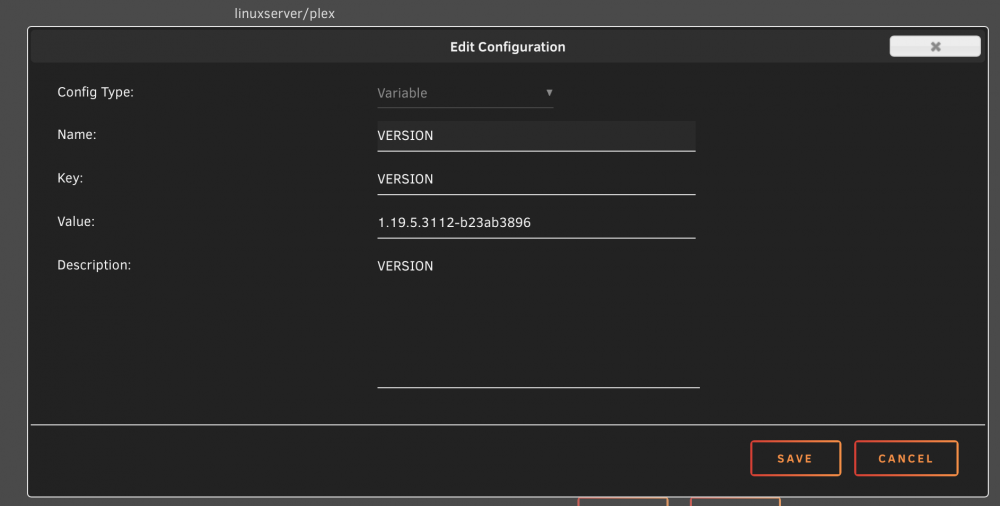
Sorry I didn't clarify that I pulled that from actually config file. Here is the screenshot of the settings which makes more sense. With this docker starts but hangs. I tried multiple versions including the latest one.
-
Folks, I hope you can point me in the right direction here. I am trying to downgrade from 1.20 to 1.19 to get my camera upload working again. Version field is there and I read official documentation. Container either pulls the latest image, or just hangs. This is the syntax I am using: VERSION=1.19.5.3112-b23ab3896 When I do above for any specific version, container starts but doesn’t work. Every other syntax combination just downloads the latest image.
-
Just got the same thing.
