cglatot
Members
-
Joined
-
Last visited
Everything posted by cglatot
-
Did you ever find the answer to this? I'm, having the same issue. Tried using the ini location override and get an error saying it can't find the location :/
-
Ahhhh, I found the post you were talking about, thanks! Hope you can get your problem solved!
-
When your unraid crashes, are the dockers you're running still accessible? I've been having similar problems since upgrading to 7.0 - the WebUI will stop responding, and trying to reboot via SSH won't work either (even though it gives me a message saying it will). My docker containers still work though, so I can still access things like my Homepage and Plex, etc. But I've had to hard reset it each time to be able to get the WebUI back again.
-
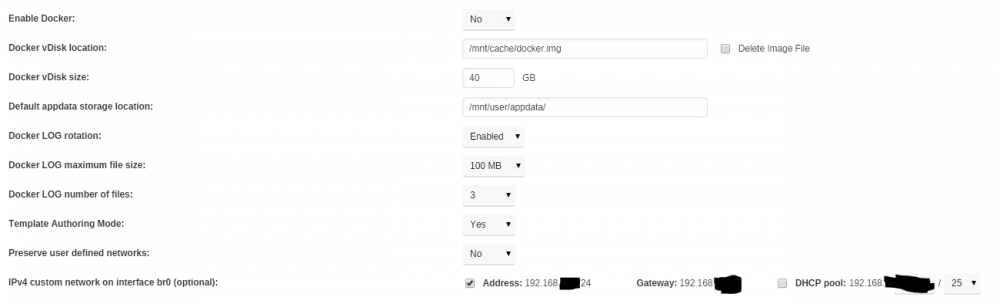
I've already got log rotation on. Here's my docker settings:
-
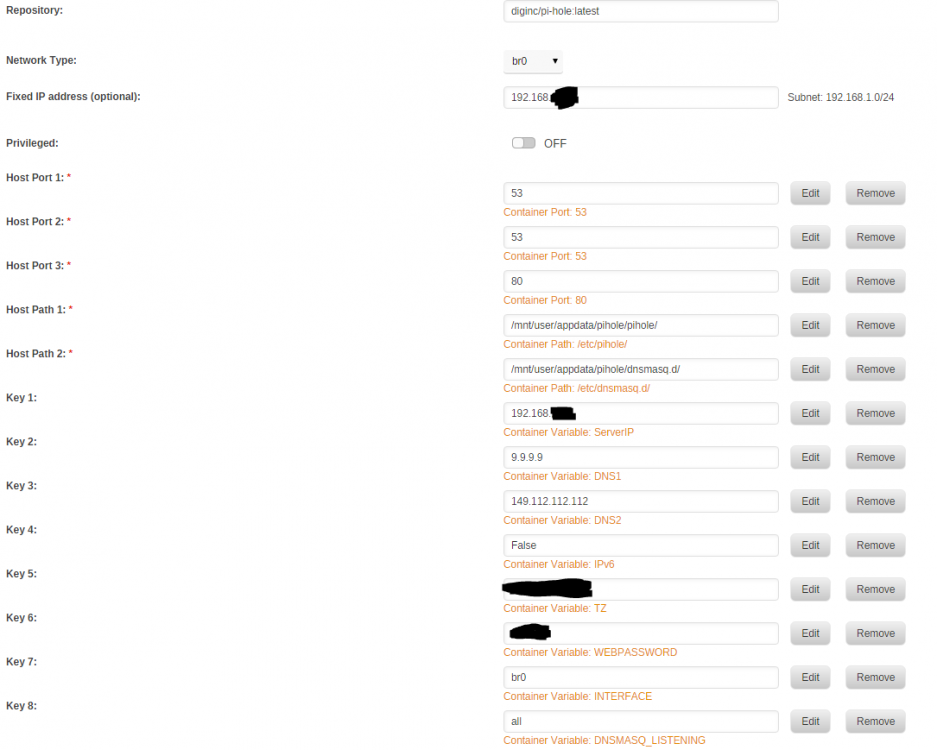
Has anyone has any issues with PiHole taking up an insane amount of space for the Docker disk image? With PiHole enabled, it quickly eats up my Docker disk image space. It's set to 40GB, and after removing PiHole just now the usage went from 76% down to 22%. I have no idea what is causing it - I set it up following SpaceInvaderOnes guide. It works great otherwise - just destroys the space and I need to remove it to clear it up again. Setup below, am I missing something?
-
IGNORE THIS!! I'm going to leave this here for prudence sake in case someone else has the same issue. It turns out the template DID have a "www" subdomain, which I removed (I removed the "subdomains" variable completely). For some reason this did not work. So I remade the subdomains variable, manually removed the container, and remade the container using the Unraid GUI. This time it worked. ------------------------------------------------------------------------------ I'm having some issues with getting a new cert generated by letsencrypt / certbot. Everything was working fine up until this morning. It is trying to get a cert for www.mydomain.ddns.net - but that does not exist since it is a DDNS service - there is only mydomain.ddns.net. How do I change it so that it does not try to validate www.mydomain.ddns.net? My unraid docker config does not have any subdomains listed for it. See the log below. ------------------------------------- _ _ _ | |___| (_) ___ | / __| | |/ _ \ | \__ \ | | (_) | |_|___/ |_|\___/ |_| Brought to you by linuxserver.io We gratefully accept donations at: https://www.linuxserver.io/donations/ ------------------------------------- GID/UID ------------------------------------- User uid: 99 User gid: 100 ------------------------------------- [cont-init.d] 10-adduser: exited 0. [cont-init.d] 20-config: executing... [cont-init.d] 20-config: exited 0. [cont-init.d] 30-keygen: executing... using keys found in /config/keys [cont-init.d] 30-keygen: exited 0. [cont-init.d] 50-config: executing... 2048 bit DH parameters present SUBDOMAINS entered, processing Sub-domains processed are: -d www.MYDOMAIN.ddns.net E-mail address entered: REDACTED Different sub/domains entered than what was used before. Revoking and deleting existing certificate, and an updated one will be created usage: certbot [SUBCOMMAND] [options] [-d DOMAIN] [-d DOMAIN] ... Certbot can obtain and install HTTPS/TLS/SSL certificates. By default, it will attempt to use a webserver both for obtaining and installing the cert. certbot: error: argument --cert-path: No such file or directory Generating new certificate Saving debug log to /var/log/letsencrypt/letsencrypt.log Obtaining a new certificate Performing the following challenges: tls-sni-01 challenge for MYDOIMAIN.ddns.net tls-sni-01 challenge for www.MYDOMAIN.ddns.net Waiting for verification... Cleaning up challenges Failed authorization procedure. www.MYDOMAIN.ddns.net (tls-sni-01): urn:acme:error:connection :: The server could not connect to the client to verify the domain :: DNS problem: NXDOMAIN looking up A for www.MYDOMAIN.ddns.net IMPORTANT NOTES: - The following errors were reported by the server: Domain: www.MYDOIMAIN.ddns.net Type: connection Detail: DNS problem: NXDOMAIN looking up A for www.MYDOMAIN.ddns.net To fix these errors, please make sure that your domain name was entered correctly and the DNS A record(s) for that domain contain(s) the right IP address. Additionally, please check that your computer has a publicly routable IP address and that no firewalls are preventing the server from communicating with the client. If you're using the webroot plugin, you should also verify that you are serving files from the webroot path you provided. - Your account credentials have been saved in your Certbot configuration directory at /etc/letsencrypt. You should make a secure backup of this folder now. This configuration directory will also contain certificates and private keys obtained by Certbot so making regular backups of this folder is ideal. /var/run/s6/etc/cont-init.d/50-config: line 127: cd: /config/keys/letsencrypt: No such file or directory [cont-init.d] 50-config: exited 1. [cont-finish.d] executing container finish scripts... [cont-finish.d] done. [s6-finish] syncing disks. [s6-finish] sending all processes the TERM signal. [s6-finish] sending all processes the KILL signal and exiting.
-
Thanks @Ezro - I'm using a different format since I use relative URLs instead of subdomains so I had to take a different method, but seeing yours helped! Hope you can get nextcloud working
-
@Ezro - did you ever get a solution to this? I'm having the same issue now
-
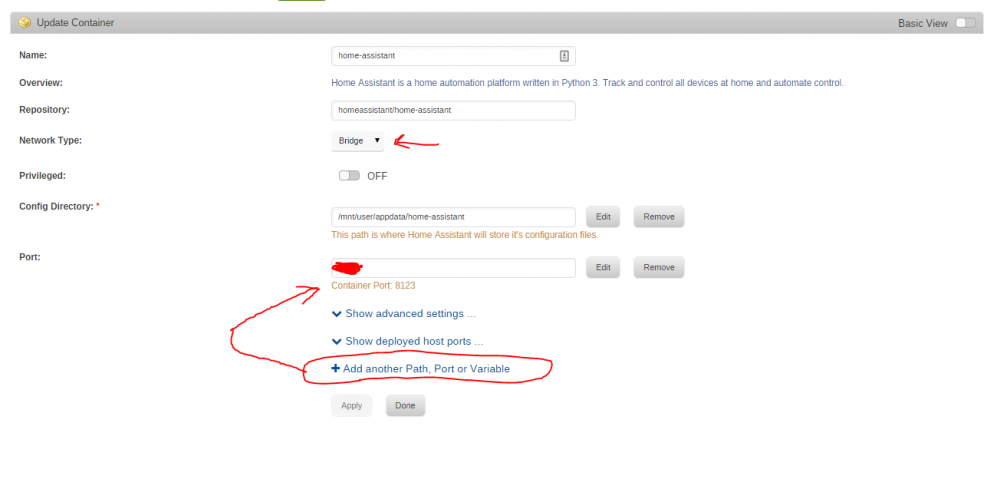
When you are about to install it (or after you have done so), you just need to make 2 changes to the config: 1. Change "Network Type" to "Bridge" 2. Add a port that points to 8123 in the container