






ich777
Community Developer
-
Joined
Everything posted by ich777
-
Please try this, it's a different game but the same applies here:
-
Just that one line. What @thymon said is the old way of enabling persistenced.
-
Please use this instead: nvidia-persistenced
-
Something like that should do it. Usually not, however I'll implement a check for /data (but without recursion because I don't want to destroy any permissions if there are any other) : https://github.com/ich777/docker-sabnzbd/blob/master/scripts/start.sh#L27-L29 The updated container will be available in a few minutes, however if something else changes the permissions/owner then this might be the culprit. However, it's best to do it on the host because the container by default uses 99:100
-
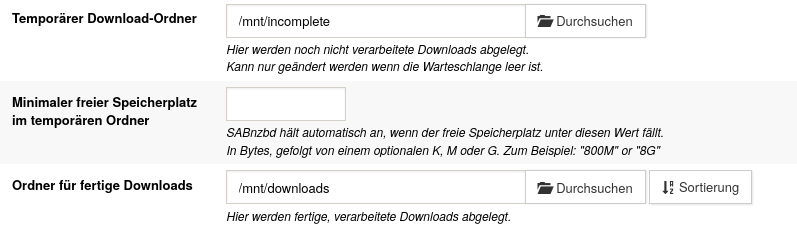
Yes please, you can usually use whatever path you want in the container, but I suspect the owner and group is wrong, however I can also add another check that sets the permissions for a folder named /data in the container if it exists, this would be not a huge deal. However in my containers it should look like this:
-
That's not the default path in my container, you should use /mnt/downloads or at least a folder in the /mnt folder inside the container. I have never tried other paths, I assume the /data folder is not owned by 99:100 at least that's what I suspect.
-
You don't need to save that usually it will work OOB, I really don't know why for some people the plugin breaks, I assume something messes with the plugin files after a long uptime.
-
There is nothing left to say and you see the issue. Is something eating up your GitHub API calls in your local network? To install the driver you need at least one API call. Do you have this monitoring solution in your network is named Pi something?
-
That won't help since this gets deleted every reboot, however these files are shipped with the LibreELEC package. Again, you don't need to do anything custom when you install the DVB Plugin and the correct package for your Tuner.
-
Sorry, the video can't be played over here. However it seems be related that the dedicated server can't connect to the Epic Online Services: LogRedpointEOS: Error: [LogEOS] ClientCredentials.ClientId must be an ANSI string between 1 and 64 in length LogRedpointEOS: Error: [LogEOS] Invalid input platform options. EOS_EResult: EOS_NotConfigured LogRedpointEOSCore: Error: Unable to initialize EOS platform. LogRedpointEOS: Error: Unable to initialize EOS platform. LogRedpointEOS: Warning: Unable to init online subsystem for Epic Online Services. Maybe a update from the dedicated server broke this. I'm not too sure, but this seems like a dedicated server issue and not a container issue. Please report that on the Longvinter Forums/Steam Community, I already see a few reports about that: https://steamcommunity.com/app/1635450/discussions/
-
From what I see everything is working fine: Oct 30 14:58:31 NAS kernel: usb 1-3: dvb_usb_v2: found a 'Astrometa DVB-T2' in warm state Oct 30 14:58:31 NAS kernel: usb 1-12.1: Found UVC 1.00 device KODAK Access Webcam (0c45:6366) Oct 30 14:58:31 NAS kernel: usbcore: registered new interface driver uvcvideo Oct 30 14:58:31 NAS kernel: usb 1-3: dvb_usb_v2: will pass the complete MPEG2 transport stream to the software demuxer Oct 30 14:58:31 NAS kernel: dvbdev: DVB: registering new adapter (Astrometa DVB-T2) Oct 30 14:58:31 NAS kernel: usb 1-3: media controller created Oct 30 14:58:31 NAS kernel: dvbdev: dvb_create_media_entity: media entity 'dvb-demux' registered. Oct 30 14:58:31 NAS kernel: i2c i2c-1: cxd2841er_attach(): attaching CXD2837ER DVB-C/T/T2 frontend Oct 30 14:58:31 NAS kernel: i2c i2c-1: cxd2841er_attach(): chip ID 0xb1 OK. Oct 30 14:58:31 NAS kernel: usb 1-3: DVB: registering adapter 0 frontend 0 (Realtek RTL2832 (DVB-T))... Oct 30 14:58:31 NAS kernel: dvbdev: dvb_create_media_entity: media entity 'Realtek RTL2832 (DVB-T)' registered. Oct 30 14:58:31 NAS kernel: usb 1-3: DVB: registering adapter 0 frontend 1 (Sony CXD2837ER DVB-T/T2/C demodulator)... Oct 30 14:58:31 NAS kernel: dvbdev: dvb_create_media_entity: media entity 'Sony CXD2837ER DVB-T/T2/C demodulator' registered. Oct 30 14:58:31 NAS kernel: r820t 2-003a: creating new instance Oct 30 14:58:31 NAS kernel: r820t 2-003a: Rafael Micro r820t successfully identified, chip type: R828D Oct 30 14:58:31 NAS kernel: r820t 2-003a: attaching existing instance Oct 30 14:58:31 NAS kernel: r820t 2-003a: Rafael Micro r820t successfully identified, chip type: R828D Oct 30 14:58:31 NAS kernel: rtl2832_sdr rtl2832_sdr.1.auto: Registered as swradio0 Oct 30 14:58:31 NAS kernel: rtl2832_sdr rtl2832_sdr.1.auto: Realtek RTL2832 SDR attached Oct 30 14:58:31 NAS kernel: rtl2832_sdr rtl2832_sdr.1.auto: SDR API is still slightly experimental and functionality changes may follow Oct 30 14:58:31 NAS kernel: rc_core: IR keymap rc-astrometa-t2hybrid not found Oct 30 14:58:31 NAS kernel: Registered IR keymap rc-empty Oct 30 14:58:31 NAS kernel: rc rc0: Astrometa DVB-T2 as /devices/pci0000:00/0000:00:14.0/usb1/1-3/rc/rc0 Oct 30 14:58:31 NAS kernel: input: Astrometa DVB-T2 as /devices/pci0000:00/0000:00:14.0/usb1/1-3/rc/rc0/input10 Oct 30 14:58:31 NAS kernel: usb 1-3: dvb_usb_v2: schedule remote query interval to 200 msecs Oct 30 14:58:31 NAS kernel: usb 1-3: dvb_usb_v2: 'Astrometa DVB-T2' successfully initialized and connected Oct 30 14:58:31 NAS kernel: usbcore: registered new interface driver dvb_usb_rtl28xxu But can you please explain what you do here: Oct 30 15:36:25 NAS emhttpd: cmd: /usr/local/emhttp/plugins/user.scripts/startScript.sh /tmp/user.scripts/tmpScripts/DVB_Driver_Compile/script Oct 30 15:36:25 NAS DVB-BUILD: Starting DVB driver build helper… and here: Oct 30 15:37:51 NAS emhttpd: cmd: /usr/local/emhttp/plugins/user.scripts/startScript.sh /tmp/user.scripts/tmpScripts/DVB_Driver_Compile/script Oct 30 15:37:51 NAS DVB-BUILD: Building DVB drivers for 6.12.54-Unraid via Docker container… and finally you DVB device uninitializes: Oct 30 17:29:26 NAS kernel: r820t 2-003a: destroying instance Oct 30 17:29:26 NAS kernel: dvb_usb_v2: 'Astrometa DVB-T2:1-3' successfully deinitialized and disconnected The above could also be related that you are using S3-Sleep and the device doesn't initialize properly again. Sorry, but please remove everything custom that you are doing here and then try again, if you have no luck please upload new diagnostics. I also have to say that you have so many custom things for power saving in your go file that I can't tell if this is causing this behavior.
-
You can do that or do the following: Uninstall the plugin Reinstall the plugin Execute this command from a Unraid terminal: wget -qO- https://raw.githubusercontent.com/ich777/unraid-plugin_update_helper/master/force_package_update | bash Reboot
-
Because you are now transcoding to 21Mbps, this is another transcode, you can't compare 4K Dolby Vision with 4K transcoding and different bitrates. Yes and no, this is a virtualized environment and I don't know what resources you've assigned to the VM and also GVT-g is not the same as the if you where using the iGPU directly. These are not equal comparisons, also you test Linux against Windows and these two systems work way differently, I don't even know what Plex is using on Windows and if they are using something else than a modified version from FFMPEG. However, what is your goal here with these tests? I really don't get the purpose here, sorry for asking but I don't see anything wrong. Just a word of warning, GVT-g is notorious to crash your whole Server at times when you exceed the VRAM <- on most motherboards you can't set it to something higher to 32 or 64MB and even that is not guaranteed to work properly because the GVT-g implementation is hit or miss at best from most Motherboard manufacturers. However you can accomplish that with GVT-g what you want to do here, at least if we are talking a CPU from 5th to 10th gen Core series. For Nvidia you won't be able to do that, at least not easily. Not really because it can also depend on the installed iGPU driver. Sadly I have to say that GVT-g isn't supported very well anymore. You have to edit the VM XML manually and remove the mediated devices.
-
Did you already saw the recommended post on top:
-
Please upload your Diagnostics, without them I can't say anything. You are lokking in the wrong spot, the DVB Driver was transfered to the Unraid GitHub Repository. Are you sure that your Plugin is up to date? Again, Diagnostics would answer most of the questions and as said I can't help without them.
-
That's really strange, your GitHub Rate limit looks normal and I also can see that you used two (please note that even this command counts as one request). Do you maybe have some Unifi hardware on your network or any AdBlocking? Please make sure that you don't block access to the GitHub API and or go through your network logs after starting the container. Do you also have the log output from the container after starting it? However I'll push another update shortly where I change back to the old method of getting the versions.
-
What does the log say? Please execute this command from a Unraid terminal and post the output: curl -s -I https://api.github.com/meta | grep x-ratelimit
-
Thank you for the report, I pushed another container update. BTW, can you please check if something eats up your GitHub API calls in your network? The container uses now the GitHub API to determine the latest version, I might revert that back to like it was before.
-
Nope, just trigger the upgrade and wait for the message in your Notifications (Bell Icon) says it's now okay to reboot.
-
That's not how you use persistence mode by today's standards, please use: nvidia-persistenced in your go file instead.
-
Dolby Vision is causing the high load and because you are transcoding from 4K to 4K unnecessary high bit rate, as explained above you usually transcode from 4K to 1080p. Most posts here, and in other threads, talk about transcoding from 4K to 1080p or at least 4K to 4K "main" profile with a reasonable bit rate.
-
5000 Series and up only supports the Open Source driver version.
-
To answer your question, what's wrong about that? I don't know to explain that properly, usually you transcode to a phone in something like 1080p since the quality loss should be acceptable even on a folding device. If someone speaks about transcoding, at least most of the times, they transcode from 4K "main" h265 profile to 1080p h264. In no offense but it's not very efficient, in terms of the bandwidth, to transcode 4K h265 to 4K h264 since the h264 was made for 1080p, sure it can transcode to 4K but it's not as efficient if you transcode to h265 but do keep in mind even if you transcode to h265 it won't be more powerfull since 4K is a lot to transcode to. However I find that more than acceptable what you are getting on the iGPU to transcode in such crazy high bitrates and even if you leave it like that, you should be able to transcode two or even three 4K Dolby Vison streams at a time since most media is 25fps. Again, if you transcode 4K to 4K it is a big hit on your GPU, I would recommend that you transcode to something lower or at least if you want to transcode to 4K in a reasonable bitrate for 4K. IIRC Netflix streams 4K in 16Mpbs but I'm not sure if they are now allowing 25Mpbs too. I hope I explained that somewhat understandable.
-
It looks like your GPU is transocding like it should, however I would recommend that you replace the GPU ASAP since the legacy driver, which this GPU requires, is not supported by Nvidia anymore, at least it seems like because it doesn't compile against newer Kernel which the next Unraid version will probably use. The reason why your CPU is working so hard is probably because it has to transcode the Audio stream (please see your screenshot) and Audio is transcoded in one go. Another reason could be that you have burnt in subtitles into the Video stream, this stresses the CPU alot.
-
Okay... a bit more information would be super helpful (which CPU are you using), how did you configure your core assignment in the container and on the host? However this is something you have to report on the Satisfactory forums since the container just downloads and runs the dedicated server, no limitations are in place by default.



