






ich777
Community Developer
-
Joined
Everything posted by ich777
-
Sorry but I have to deprecate the container, they added a human verification before the download starts and that's breaking the container.
-
Forgot about that one. I'll let you know.
-
Please update the container itself, updated.
-
Done, please update the container itself.
-
Please guys, you've all read the previous posts, where are your Diagnostics? It is pretty useless to say I have the same issue when you post no diagnostics at all. I even don't know on which Unraid version you are nor do I know what exact driver you all on. Do you all use --gpus all? Please remove that variable and add the variables like mentioned in the second post.
-
Do you have Diagnostics? Otherwise I'm not able to help. What are your container startup parameters so to speak what is your docker run command?
-
Sorry but that isn't an option for now because I use WINE without Proton and that would mean a complete overhaul from the container.
-
Only the steamapps folder, not the Saves folder. The steamapps folder is only for tracking the state from the game files not more, this is not the same as on Windows or Linux. There is already a force update but sometimes the steamapps folder looses track and the container won't pull an update at all. I assume you didn't read the previous posts, for all other users this has worked and nothing was deleted in terms of game stats/saves.
-
Why not use the ZFS Backup function then and not the implemented LXC Snapshot function? I won't recommend creating backups from databases when they are running and possible data is written to them. However I won't implement that, sorry.
-
You just have to put in your ID-Server address (not IP and without the port) and the Public Key that you get in the log. Then make sure to forward all the ports from the template with the appropriate protocol, that should be it. This should be safe since this is not a Web application, RustDesk does not run as root inside the container and you have the other benefit of just using your domain name, like: example.net
-
This is just normal because I assume you have other containers from Linuxserver.io installed and they share probably the base images with other containers that's why you see that. In the GitHub issue is also mentioned that something on the Nvidia Toolkit side changed, maybe that's the cause of the issue in your case. The maintainer from the image said that he is looking into that and rebuilding the base images today. I don't think that this is a driver issue anymore and more related to the Toolkit changes and the container.
-
Are you sure that the Container actually pulled the update? Please try: Stop the container Delete the steamapps folder inside the folder for abioticfactor in your appdata Start the container
-
And you deleted the directory in appdata for the container too? I now have another confirmation that it works, don't know what causes that on your end.
-
Maybe, I'm not the creator from the container but as you can see others already also had success with the new driver. I assume you are passing thourh D128 but your Nvidia GPU is D129 but as said before, for an Nvidia GPU you usually don't pass through a /dev/dri. Did you also read my other post where I mentioned how I got it running? You only need --runtime=nvidia and --gpus=all
-
Did you ever consider to remove the container including the appdata directory and starting over? Seems there is nothing wrong and it should work as intended, can you maybe try another Browser too since I have already confirmation that the newly built driver works.
-
-
Something seems wrong with this installation, however have you yet considered to completely remove the container including all the data for the container in your appdata directory and start over, however something seems still wrong since you have some odd lines in your log, but I also think that's from a previous start but I can't tell for sure. Please next time post your log in a box and not in plain text. :) I'm not 100% sure how I can help since the driver is now fixed.
-
Build is running, please give it a bit, in the meantime please uninstall the plugin. I'll update this post here when it's done. EDIT: @rpetrina14 the driver is now rebuilt, please install the plugin again and reboot afterwards.
-
I would recommend selecting another driver, click Download & Install, select the Open Source driver again and click Download & Install again. You can also try to click Download & Install again this should trigger a redownload because the checksum is not correct. Or you could also remove the driver plugin, reinstall it, change the driver to the Open Source one again. For each method mentioned above you have to reboot afterwards.
-
Did you redownload the driver?
-
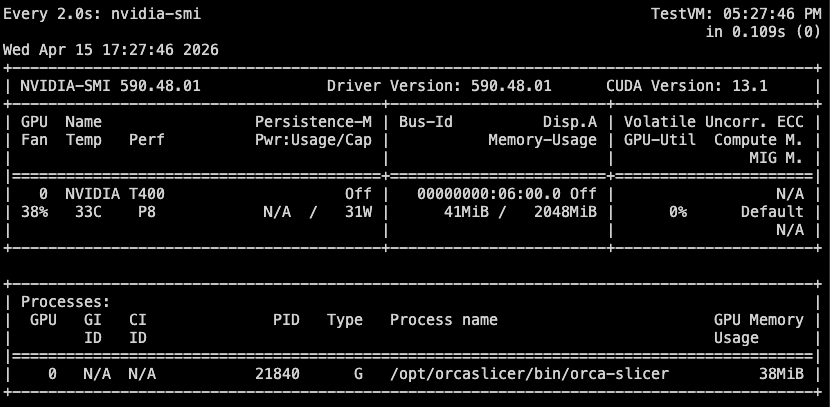
@AvoooCadoo & @rpetrina14 on what Unraid version are you and which driver version do you have installed, this is essential to know what drivers to recompile: I also give you the log but I really don't know if that is that important here since it's running just fine: Container output And just to give you the docker run command, you shouldn't need more: docker run -d --name='orcaslicer' --net='bridge' --pids-limit 2048 -e TZ="Europe/Berlin" -e HOST_OS="Unraid" -e HOST_HOSTNAME="TestVM" -e HOST_CONTAINERNAME="orcaslicer" -e 'PUID'='99' -e 'PGID'='100' -e 'UMASK'='022' -l net.unraid.docker.managed=dockerman -l net.unraid.docker.webui='https://[IP]:[PORT:3001]' -l net.unraid.docker.icon='' -p '3000:3000/tcp' -p '3001:3001/tcp' -v '/mnt/cache/appdata/orcaslicer':'/config':'rw' --runtime=nvidia --gpus=all 'lscr.io/linuxserver/orcaslicer' 4b9dd19a087c91fdf425c97ebefc76a2e55736c57ee8913ef25d77a997dc9724 However as said, I need your Unraid version and the driver version that you are currently on since I need to recompile the driver with the new runtime - if you are on Unraid 7.2.4 you can already try the Open Source driver version 590.48.01 which is already updated (please note that only Ampere and up will work with the Open Source driver), you might have to redownload the driver if you are already on that version. I also fogot to post proofe that it actually uses the card (just the output from nvidia-smi and I move the build plate rapidly to produce some load): CleanShot 2026-04-15 at 17.36.44.mp4
-
Okay, this is something I can fix. :)
-
No, I can't since the container is self maintaining and it should pull the updates automatically. What does your log say? Is maybe a static version set in the template?
-
I look into that, you have to wait a bit longer. I thought I can wait until Nvidia releases the new Container Toolkit 1.19.0 but it seems I have to look into it now and create a patched version for Unraid.
-
I think you miss understand the issue here, not missing they are not passed into the container. However I'm on it.





