






ich777
Community Developer
-
Joined
Everything posted by ich777
-
About what container are we talking? If we are talking about Prefill then Uplay isn't supported since only Steam, Epic and Battle net ware supported.
-
The Nvidia driver Plugin doesn't do anything to the /tmp directory other than saving the version numbers. Was Jellyfin on while testing? Are you sure it isn't Jellyfin because Inknow some people using the /tmp directory in the host for the transcoding cache and that can also cause that.
-
I take a look at that, give me a few days.
-
You can only create an issue here and request support for this device: https://github.com/Stonyx/QNAP-EC
-
Yes, maybe wait another day or two and see if it updates.
-
Maybe the dedicated server wasn't updated yet by the devs, I think I already heard that for that game a while back.
-
Please do the following: Stop the container Go into the folder for the game Delete the steamapps folder Start the container Open the logs from the container and see if it pulls the update
-
What did you do exactly? What do you mean manually updating by removing the old plugin? Your time would be better invested making a small post here because ChatGPT has proven to be almost always wrong about the Nvidia Driver for Unraid. Man... Driver version 590+ won't work with 10 series cards anymore, they will only work with RTX20 series. :D You can only use drivers including 580 series with your 10 series cards, they are now legacy and you should consider buying a new card somewhere in the near future. ChatGPT has proven to make false suggestions again and wasted your time, sorry for you about that but you would be better of making a short post here next time. :) Next time please include your Diagnostics.
-
Nope, don't know.
-
Sure why not. Because Unraid is based on Slackware and it is recommended to not install applications directly onto Unraid itself, rather you should use Docker/LXC/VMs. Not really, a little more overhead possibly but I even don't think that is the case here, of course you have to manage your containers manually then. I really don't know what you mean by that? I don't know but the application that you linked is also available as a Docker container and you can install Docker directly onto Unraid itself, so I really don't know what the benefit would be other than if you really want to test the container. However please ask in the Docker subforums how to create a container from that application you've linked since this is not topic of this thread. Yes, because in LXC you just choose the distribution and it will download that distribution and run it in a containerized fashion.
-
I would recommend that you post about that issue in the appropriate support thread. FWIK Plex isn't the best choice when it comes to HW transcoding on AMD hardware. However radeontop will show you when something is using your GPU.
-
If nothing is using the card nothing will show up and you will see 0% So in your case nothing is using the card.
-
If this happens usually something is wrong with the hardware or at least some incompatibility issue. Please try to load the default settings in the BIOS if possible, after that make sure that the boot order is correct, Resizable BAR Support and Above 4G Decoding is enabled. If you have these AER issues in your log you can actually disable them since at times the cause issues. Add this to your syslinxu.config (at the end of your append line) : pcie=noaer However I would not recommend enabling ASPM when you get AER errors afterwards since this indicates some kind of Firmware issue. Since you have Xid error 79 logged you can take a look here what this means, however it can be all: https://docs.nvidia.com/deploy/xid-errors/analyzing-xid-catalog.html However please also check if your Power Supply is still up to the task since they degrade over time and a few issues where solved by swapping the power supply for a new one.
-
No, just leave it as is. BTW you don't need to hide anything in a template (except for passwords and sensitive variables), there is no value in doing that.
-
I've sent you a DM, you should be able to answer it.
-
That's already possible by creating the Variable with the Key: STATIC_V and as the value you define the version that you want. Newer templates should already have this variable, this is the description from the variable in the template: If needed set a static version to prevent the container from updating (eg: '1.19.7' without quotes). Leave empty for automatic updates.
-
I usually don't accept DM's what is the issue or is something not working in terms of LXC?
-
For Intel that is not the case, the container must ship the libraries/runtimes and you are good to go. I would recommend that you report that in the support threads from the containers, maybe there is a workaround for this since you should be able to do use one or the other or even both GPUs depending about which container we are talking about. However as said this is something for the support threads from the container(s).
-
Sorry, but I'll deprecate this container since Terraria always gave me a lot of trouble.
-
I think you know what to do: Mar 7 21:14:08 HomeThrall kernel: NVRM: GPU 0000:82:00.0: GPU does not have the necessary power cables connected. Mar 7 21:14:08 HomeThrall kernel: NVRM: GPU 0000:82:00.0: RmInitAdapter failed! (0x24:0x1c:1590) Mar 7 21:14:08 HomeThrall kernel: NVRM: GPU 0000:82:00.0: rm_init_adapter failed, device minor number 0
-
No, why should it? No, the plugin is only meant for Intel GPU TOP However why would you need the runtime on the host? Usually Docker containers or whatever application comes with the necessary runtimes.
-
The plugin would probably need an update. if you have time, I accept PullRequests
-
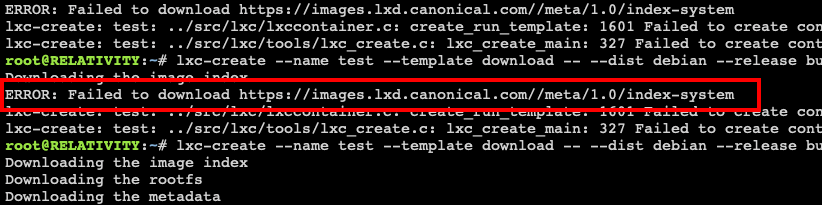
AFAIK Cononical doesn't follow the default folder structure form lxc images and IIRC you need to have LXD installed which is here not the case as you an see in your screenshot from above: I assume that you immediately tried it after you changed the URL back, correct? You have to wait for at least 15 minutes after the list got updated again or you can delete the folder /tmp/lxc, this should also solve the issue. I think that is not possible with LXC, you would need LXD for that which is not supported by this plugin.
-
First LED is LAN activity and will blink, or light up if activity is detected. Spin down won't disable LEDs on Unraid for disks.
-
It seems that the upload didn't went all the way through.


