






ich777
Community Developer
-
Joined
Everything posted by ich777
-
I might roll back to the Debian Bookworm version where everything was working, please give me a few days, I'm currently really busy.
-
No, only RTX20 (including GTX16) series and up support the open source driver. All cards below must use one of the other drivers.
-
Sorry, I don't see anything obvious from your syslog, everything seems to be working just fine. The plugin page issues nvidia-smi once to get the necessary data about your GPU(s) on the plugin page, do you maybe have other Dashboard pages from Unraid open, I assume you have GPUStatistics installed correct? If yes, please set a reasonable refresh rate from 2000 or even better 5000ms in the GPUStatistics plugin <- however this is just an assumption what could cause this.
-
Please use nvidia-persistenced as advised here (can't help where that came from but you always should use nvidia-persistenced) : Jan 17 08:15:15 PlexServer kernel: NVRM: Persistence mode is deprecated and will be removed in a future release. Please use nvidia-persistenced instead. You Nvidia GPU is using the nouveau driver therefore the Nvidia driver won't work properly: 01:00.0 VGA compatible controller [0300]: NVIDIA Corporation GA102 [GeForce RTX 3080] [10de:2206] (rev a1) Subsystem: Gigabyte Technology Co., Ltd Device [1458:404b] Kernel driver in use: nvidia Kernel modules: nouveau, nvidia_drm, nvidia To disable the nouveau driver please execute these commands from a Unraid terminal and reboot afterwards: mkdir -p /boot/config/modprobe.d echo "blacklist nouveau" > /boot/config/modprobe.d/nouveau.conf
-
I won't remove them since these are now the legacy drivers, but please do keep in mind that you possibly need a new card in the coming years, just saying, because one day Nvidia will drop support for these cards and then the driver won't compile against newer Kernels.
-
Please use the driver version 580 as @Kilrah already pointed out.
-
Please post your Diagnostics but most of the times this means that there is an issue with the hardware.
-
First of all: Jan 16 17:44:20 Tower kernel: NVRM: The NVIDIA GPU 0000:01:00.0 (PCI ID: 10de:1287) Jan 16 17:44:20 Tower kernel: NVRM: installed in this system is not supported by open Jan 16 17:44:20 Tower kernel: NVRM: nvidia.ko because it does not include the required GPU Jan 16 17:44:20 Tower kernel: NVRM: System Processor (GSP). Jan 16 17:44:20 Tower kernel: NVRM: Please see the 'Open Linux Kernel Modules' and 'GSP Jan 16 17:44:20 Tower kernel: NVRM: Firmware' sections in the driver README, available on Jan 16 17:44:20 Tower kernel: NVRM: the Linux graphics driver download page at Jan 16 17:44:20 Tower kernel: NVRM: www.nvidia.com. Your GT730 is not compatible with the OpenSource driver version. Secondly: 61:00.0 VGA compatible controller [0300]: NVIDIA Corporation GB206 [GeForce RTX 5060 Ti] [10de:2d04] (rev a1) Subsystem: Micro-Star International Co., Ltd. [MSI] Device [1462:5351] Kernel modules: nouveau, nvidia_drm, nvidia 61:00.1 Audio device [0403]: NVIDIA Corporation GB206 High Definition Audio Controller [10de:22eb] (rev a1) Subsystem: NVIDIA Corporation Device [10de:0000] This basically means that something is wrong with some BIOS setting. Please check if you are on the latest Firmware version from your BIOS, then make sure that Resizable BAR Support & Above 4G Decoding is Enabled in your BIOS. What you can also try is to swap the cards physically in your Server since this sometimes also helps, if that also doesn't help try for troubleshooting to lower the PCIe Generation for the slot where you 50 Series card is in to Generation 3.0
-
Only one time when a new Unraid version is release. These are the individual driver packages which are compiled for each individual release for Unraid (at least when the Kernel changes). Both of your Nvidia cards use the nouveau driver, which I'm not entirely sure why this is happening since the nouveau driver should be disabled by default on Unraid 01:00.0 VGA compatible controller [0300]: NVIDIA Corporation GK208B [GeForce GT 730] [10de:1287] (rev a1) Subsystem: Micro-Star International Co., Ltd. [MSI] Device [1462:8a9f] Kernel modules: nouveau, nvidia_drm, nvidia 01:00.1 Audio device [0403]: NVIDIA Corporation GK208 HDMI/DP Audio Controller [10de:0e0f] (rev a1) Subsystem: Micro-Star International Co., Ltd. [MSI] Device [1462:8a9f] 61:00.0 VGA compatible controller [0300]: NVIDIA Corporation GB206 [GeForce RTX 5060 Ti] [10de:2d04] (rev a1) Subsystem: Micro-Star International Co., Ltd. [MSI] Device [1462:5351] Kernel modules: nouveau, nvidia_drm, nvidia 61:00.1 Audio device [0403]: NVIDIA Corporation GB206 High Definition Audio Controller [10de:22eb] (rev a1) Subsystem: NVIDIA Corporation Device [10de:0000] However to disable the nouveau driver please execute theses commands from an Unraid Terminal and reboot afterwards: mkdir -p /boot/config/modprobe.d echo "blacklist nouveau" > /boot/config/modprobe.d/nouveau.conf
-
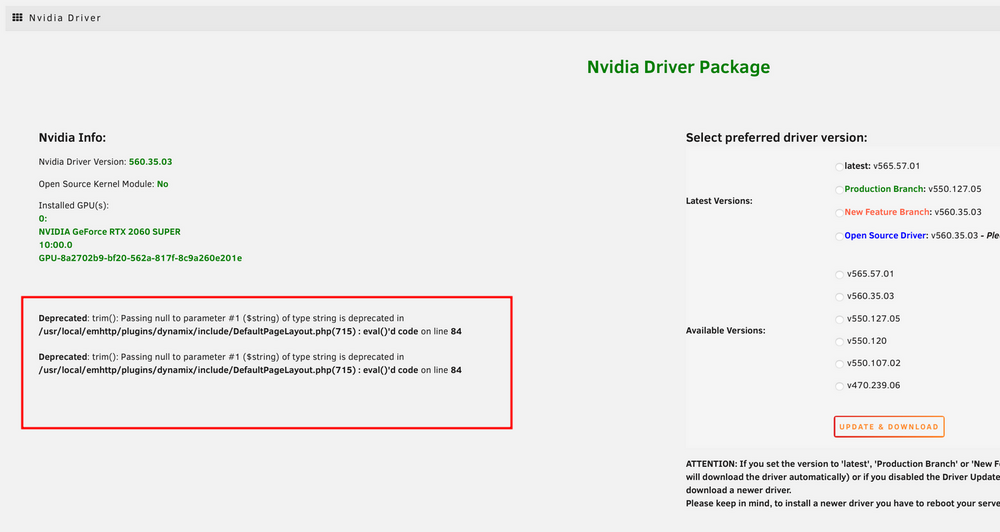
You also have to select a driver lower than 590: Jan 15 18:34:48 Tower kernel: NVRM: The NVIDIA NVIDIA GeForce GTX 1080 GPU installed in this system is Jan 15 18:34:48 Tower kernel: NVRM: supported through the NVIDIA 580.xx Legacy drivers. Please Jan 15 18:34:48 Tower kernel: NVRM: visit http://www.nvidia.com/object/unix.html for more Jan 15 18:34:48 Tower kernel: NVRM: information. The 590.44.01 NVIDIA driver will ignore Jan 15 18:34:48 Tower kernel: NVRM: this GPU. Continuing probe... Jan 15 18:34:48 Tower kernel: NVRM: No NVIDIA GPU found. Please don't download a driver that is that old, any 580 driver will do it, however for the error message I really can't tell why that's happening. Make sure that you have enough free space on your USB Boot device. Do you probably have these messages on your plugin settings page: If yes, do the following: Uninstall the plugin Reboot Install the plugin Visit the plugin page and select a 580 driver version Reboot
-
You have to change the driver version to something lower than version 590.x Jan 14 21:41:46 Olympus kernel: nvidia-nvlink: Nvlink Core is being initialized, major device number 239 Jan 14 21:41:46 Olympus kernel: NVRM: The NVIDIA Quadro P1000 GPU installed in this system is Jan 14 21:41:46 Olympus kernel: NVRM: supported through the NVIDIA 580.xx Legacy drivers. Please Jan 14 21:41:46 Olympus kernel: NVRM: visit http://www.nvidia.com/object/unix.html for more Jan 14 21:41:46 Olympus kernel: NVRM: information. The 590.48.01 NVIDIA driver will ignore Jan 14 21:41:46 Olympus kernel: NVRM: this GPU. Continuing probe... Jan 14 21:41:46 Olympus kernel: NVRM: No NVIDIA GPU found.
-
Nein, ich mache keine GameServer container mehr außer ich spiele sie selbst und ich hab ehrlich gesagt fast keine zeit mehr zum Spielen, vielleicht findet sich ja jemand anders der das macht. :)
-
I've edited the post when I made it:
-
Don't know if it's the same situation since the other user didn't post his Diagnostics. However I can see this in your syslog: Jan 12 07:00:52 Power kernel: NVRM: The NVIDIA GPU 0000:08:00.0 (PCI ID: 10de:2bb1) Jan 12 07:00:52 Power kernel: NVRM: installed in this system requires use of the NVIDIA open kernel modules. Jan 12 07:00:52 Power kernel: NVRM: GPU 0000:08:00.0: RmInitAdapter failed! (0x22:0x56:884) Jan 12 07:00:52 Power kernel: NVRM: GPU 0000:08:00.0: rm_init_adapter failed, device minor number 0 As you can see, please use the Open Source driver version for your Card. Please Disable C-States in the BIOS since you have a Ryzen CPU, if your Mainboard allows it change the PCIe Generation to 3.0, make sure that you have Resizable BAR Support and Above 4G Decoding enabled. Also make sure that you are on the latest BIOS version.
-
This post is also missing Diagnostics, I can't tell anything without them. However you have to use the Open Source driver version.
-
Sorry but this is strictly speaking a question for the General Support subforums, but to answer your question, go to the share settings, click on appdata and make sure that the Mover takes no action. If you have any further questions then please, as pointed out above, create a Post in the General Support subforums.
-
This is probably your issue, make sure if you select /mnt/cache/appdata/... that your appdata stays on the cache and the mover takes no action. You can change this path to /mnt/user/... but please be aware of that this is not the recommended way, I would strongly advise you so that appdata stays on the cache and is not moved to another pool.
-
No, it supports multiple GPU's but since you didn't send Diagnostics I can't tell why.
-
Nvidia 10th series seems not to be legacy, so to speak you can only use the latest driver from the 580.x driver series. Too less information, do you have Diagnostics? Do you have an error on the Nvidia Plugins settings page? Do you have Unifi hardware? If yes, please check in your logs if something isn't blocked by your Firewall. Also check if you have AdBlocking on your network that nothing is blocking the download, the plugin uses the GitHub API to get the newest releases. Do you have enough space on your USB Boot device (about 400MB for the Nvidia Driver).
-
Please don't install the OpenSource variant from the driver, you have to install the non Open Source version. From what I see you have this driver selected: -rw------- 1 root root 313219916 Oct 23 23:54 nvos-580.95.05-6.12.54-Unraid-1.txz -rw------- 1 root root 33 Oct 23 23:54 nvos-580.95.05-6.12.54-Unraid-1.txz.md5 Which basically indicates the open source variant.
-
Possibly, but it's up to you to compile such a driver, please see here: https://github.com/ich777/unraid_kernel you can also find the build scripts for the default Nvidia driver here: https://github.com/unraid/unraid-nvidia-driver/tree/master/source EDIT: After looking again through the Repository that you have linked, I'm not 100% sure if such an old driver will compile against a newer Kernel, but you can at least try.
-
Stop the container, delete the steamapps folder again, start the container again, wait for everything to finish and send over the full log by doing: docker logs CONTAINERNAME > /mnt/cache/appdata/ icarus_log.txt Change the path as needed.
-
What is exactly wrong, the log looks like it should be that the Lobby is empty.
-
Please always include your Diagnostics. I'm not sure since you didn't tell me what driver was initially selected.
-
So is it now working or not, I'm not sure if I understand completely since you mentioned that it is working? What brand is that tuner exactly or what is written on the DVB USB device? Some tuners need special treatment to work properly.



