






ich777
Community Developer
-
Joined
Everything posted by ich777
-
What happens when you issue nvidia-smi from a Unraid terminal? I just can assume that something is replacing nvidia-smi with an older version since nobody else is having this issue so far.
-
Are you sure that you have Resizable BAR Support, Above 4G Decoding enabled and are on the latest BIOS version? Dec 17 19:04:19 Fenrir kernel: NVRM: This PCI I/O region assigned to your NVIDIA device is invalid: Dec 17 19:04:19 Fenrir kernel: NVRM: BAR1 is 0M @ 0x0 (PCI:0000:01:00.0) Dec 17 19:04:19 Fenrir kernel: nvidia 0000:01:00.0: probe with driver nvidia failed with error -1 Dec 17 19:04:19 Fenrir kernel: NVRM: The NVIDIA probe routine failed for 1 device(s). Dec 17 19:04:19 Fenrir kernel: NVRM: loading NVIDIA UNIX Open Kernel Module for x86_64 580.95.05 Release Build (dvs-builder@U22-I3-B17-02-5) Tue Sep 23 09:55:41 UTC 2025
-
I'm really not sure what's going on since this shouldn't happen at all: Dec 16 00:03:10 Tower kernel: NVRM: API mismatch: the client 'nvidia-smi' (pid 12017) Dec 16 00:03:10 Tower kernel: NVRM: has the version 580.119.02, but this kernel module has Dec 16 00:03:10 Tower kernel: NVRM: the version 580.95.05. Please make sure that this Dec 16 00:03:10 Tower kernel: NVRM: kernel module and all NVIDIA driver components Dec 16 00:03:10 Tower kernel: NVRM: have the same version. Dec 16 00:03:10 Tower kernel: NVRM: API mismatch: the client 'nvidia-smi' (pid 12025) Dec 16 00:03:10 Tower kernel: NVRM: has the version 580.119.02, but this kernel module has Dec 16 00:03:10 Tower kernel: NVRM: the version 580.95.05. Please make sure that this Dec 16 00:03:10 Tower kernel: NVRM: kernel module and all NVIDIA driver components Dec 16 00:03:10 Tower kernel: NVRM: have the same version. Do you have any custom scripts in place which replacing nvidia-smi? Or do you maybe have an AI/LXC container which is possibly using another version from nvidia-smi. It's very strange since it seems you are the only one who has this issue so I assume this has something to do with your machine. Even the post two above yours says that the driver 580.119.02 works just fine.
-
But please don't forget that Unraid and possibly other services also need RAM on your system and it is most likely the case that the container crashes because it has no RAM available so to speak a OOM error since for others it seems to (now) just work fine without any issues.
-
Please read this post:
-
8GB of system RAM is definitely too less. On what system are you trying to run the container?
-
Do you have additional diagnostics from a 580 driver?
-
And what is the popup saying when you change the driver version? Any output? I can't see your screenshot. What about Nvidia Driver version: 580.119.02 or have you yet tried the version below that version? I'll trigger a recompilation from that driver.
-
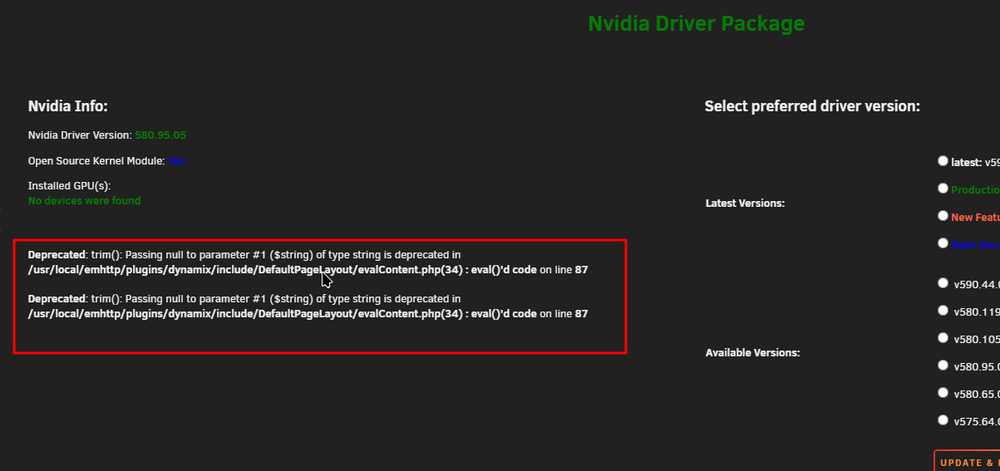
Have you seen this recommended post yet: https://forums.unraid.net/topic/98978-plugin-nvidia-driver/page/178/#findComment-1487747 Please also look at the post above, if you have the same two PHP errors like in the screenshot follow the steps from the linked post.
-
Please always post your Diagnostics when posting hardware related questions, please also see this post: Did you also reboot after selecting driver version 580? Again, Diagnostics would be very helpful.
-
Please also see this post:
-
Please read this post:
-
Seems to be just some analytics from your ARK server which couldn't be sent. Maybe their analytics server is down or some DNS issue. I wouldn't bother too much about that since less analytics are good, at least to me. :D
-
Can you try to stop the container, remove the krusader folder from your appdata directory and start the container again? Possible some configuration related issue with the update to Debian Trixie.
-
No worries at all, did my yearly maintenance on the application containers and PIA seems to use now a outdated verification method. However by deleting this block and adding the ignore filters everything should work, however I would always recommend to add these ignore filters because IPv6 can and possibly will leak.
-
You don't need to snipe anything, just stop the container and open the log file. Seems like an unrelated issue, however another user reported it is now working with the unstable branch. Did you try to start over by deleting the container and the directory for projectzomboid in your appdata folder?
-
Please see this post and the following two: https://forums.unraid.net/topic/83786-support-ich777-application-dockers/page/196/#findComment-1595719
-
For everyone having issues with the unstable branch on ProjectZomboid, can you please try: Stopping the container Deleting everything from the projectzomboid directory which is located in your appdata folder Start the container Basically a new instance should now, hopefully, also work.
-
I think it would be best to ask in his support threads not in mine, so he will definitely see it.
-
No, not by default, you have to enable it in the template. Switching branches always needs a validation, however a validation option is in the template for you to enable.
-
You'll also see that in the syslog, no dmesg needed, you have a Xid 119 error, please see here. I'm not sure, that could be also be a driver issue. Have you yet tried to reseat the card, please also check your Power Supply if it's up to the task, don't forget that power supplies also degrade over time. Maybe also try to set the PCIe Generation to something like Gen 4 or Gen 3 and see if that helps.
-
Sorry haven't been able to look into that and what's needed to support it, maybe a dependency is missing.
-
You can drag them just into the textbox within the forums. First of all, your plugin is broken, you can see that on these lines: Please remove the plugin, reboot, install the plugin again, select the open source driver, click Download & Update and reboot again. From what I see from your syslog: Dec 14 02:27:30 Tower kernel: NVRM: nvCheckOkFailedNoLog: Check failed: Out of memory [NV_ERR_NO_MEMORY] (0x00000051) returned from memdescAllocInternal(pMemDesc) @ memdesc.c:1359 Dec 14 02:27:30 Tower kernel: NVRM: _kgspBootGspRm: unexpected WPR2 already up, cannot proceed with booting GSP Dec 14 02:27:30 Tower kernel: NVRM: _kgspBootGspRm: (the GPU is likely in a bad state and may need to be reset) Dec 14 02:27:30 Tower kernel: NVRM: RmInitAdapter: Cannot initialize GSP firmware RM Dec 14 02:27:30 Tower kernel: NVRM: GPU 0000:01:00.0: RmInitAdapter failed! (0x62:0x40:2015) Dec 14 02:27:30 Tower kernel: NVRM: GPU 0000:01:00.0: rm_init_adapter failed, device minor number 0 Dec 14 02:27:32 Tower kernel: NVRM: nvCheckOkFailedNoLog: Check failed: Out of memory [NV_ERR_NO_MEMORY] (0x00000051) returned from memdescAllocInternal(pMemDesc) @ memdesc.c:1359 You are suffering from the same issues as others do, this is most of the times caused by hardware incompatbility or a wrong set setting in the BIOS. I would recommend that you do the following: Make sure your BIOS is up to date Load default BIOS settings Add nvidia-persistence at the end of your go file (/boot/config/go) Make sure to enable Above 4G Decoding in the BIOS Make sure to enable Resizabel BAR Support in the BIOS If you have the setting in your BIOS, enable BME DMA Mitigation (see this post)
-
Seems like PIA pushing some IPv6 routes which is not recommended, please add these two lines to you config: pull-filter ignore "ifconfig-ipv6" pull-filter ignore "route-ipv6"
-
What is the opposite from full CUDA acceleration?




