






ich777
Community Developer
-
Joined
Everything posted by ich777
-
@griffinpuc narrowed that down to a maybe faulty RAM, which can be the case. You have a different issue: Jan 7 22:21:51 Unraid kernel: NVRM: The NVIDIA Quadro P2000 GPU installed in this system is Jan 7 22:21:51 Unraid kernel: NVRM: supported through the NVIDIA 580.xx Legacy drivers. Please Jan 7 22:21:51 Unraid kernel: NVRM: visit http://www.nvidia.com/object/unix.html for more Jan 7 22:21:51 Unraid kernel: NVRM: information. The 590.48.01 NVIDIA driver will ignore Jan 7 22:21:51 Unraid kernel: NVRM: this GPU. Continuing probe... GTX10 series seems now to be legacy and you have to use driver version 580.x for your cards, 590.x versions will only work for GTX16/RTX20 series and up.
-
That's not easy achievable since you would have to find a driver which includes CUDA 12.8. I assume you have a container that not supports 13.1 correct? Is there maybe a updated container available which supports the new CUDA version?
-
So with these commands in your go file it is working? For some cards it is necessary to add additional commands to your go file or in a modprobe.d file.
-
Just because I'm always looking through the entire logs, please remove the driver that is not suitable for your Motherboard, it is really unusual that you have different types of Super I/O Chips on your Motherboard: /boot/config/plugins/it87-driver/packages/6.12.54/: total 36 -rw------- 1 root root 29264 Jan 5 08:38 it87-20260104-6.12.54-Unraid-1.txz -rw------- 1 root root 33 Jan 5 08:38 it87-20260104-6.12.54-Unraid-1.txz.md5 /boot/config/plugins/nct6687-driver/packages/6.12.54/: total 76 -rw------- 1 root root 70744 Oct 22 09:07 nct6687d-20250823-6.12.54-Unraid-1.txz -rw------- 1 root root 33 Oct 22 09:07 nct6687d-20250823-6.12.54-Unraid-1.txz.md5 Was this device working previously on Unraid or did it simply stop working?
-
I would recommend that you use an additional container something like a ProxyServer and then you simply can configure jDownloader2 to use the Proxy which is basically using the VPN. Because if you change the port this is just the port exposed on the host. You have to changethe RFB Port, which is basically the port which fails from what I see. To do that simply add a Variable to the template with the Key: RFB_PORT and the Value: 5999 (or something other than 5900 which is the standard and fails). Are you also sure that another container in your container network isn't also using the port 8080 if yes, you have to change the noVNC port too. You can do that by creating a Variable with the Key: NOVNC_PORT and the Value 8081 (or something else if something else is using port 8080 in the container network), but do keep in mind with that you change the port in the container to 8081 and is no longer 8080 anymore <- this is only important for the noVNC port and doesn't matter for the RFB_PORT.
-
I'm not a huge fan from uploading Diagnostics to anywhere else, please next time just drag the zip file here into the text box. Do you have any special start scripts or something like that installed, I see that your server installs driver version 580.82.09, about your USB Boot device, you have a lot of FSCK files on there, this isn't necessary a indication that the USB Boot device is failing but it seems rather strange to me since you shouldn't have that much on there, in the best case you won't have any such files on there. -rw------- 1 root root 16384 Dec 31 1979 FSCK0000.REC -rw------- 1 root root 16384 Dec 31 1979 FSCK0001.REC -rw------- 1 root root 16384 Dec 31 1979 FSCK0002.REC -rw------- 1 root root 16384 Dec 31 1979 FSCK0003.REC -rw------- 1 root root 16384 Dec 31 1979 FSCK0004.REC -rw------- 1 root root 16384 Dec 31 1979 FSCK0005.REC -rw------- 1 root root 16384 Dec 31 1979 FSCK0006.REC -rw------- 1 root root 16384 Dec 31 1979 FSCK0007.REC -rw------- 1 root root 16384 Dec 31 1979 FSCK0008.REC -rw------- 1 root root 16384 Dec 31 1979 FSCK0009.REC -rw------- 1 root root 16384 Dec 31 1979 FSCK0010.REC -rw------- 1 root root 16384 Dec 31 1979 FSCK0011.REC -rw------- 1 root root 16384 Dec 31 1979 FSCK0012.REC -rw------- 1 root root 16384 Dec 31 1979 FSCK0013.REC I can recommend Transcend USB 2.0 flash drives, don't know if you can get some where you live.
-
Do you have Diagnostics? Without them many information are missing for me to troubleshoot.
-
Please change the path in your template from /mnt/user/appdata/... to something like /mnt/cache/appdata/... some game servers have issues with the FUSE path and you should always use the real path to the files on the disk. I don't see that issue on my machine, I assume you have enough RAM? I don't think that this is an issue at all since you can see my log here: ---Ensuring UID: 99 matches user--- ---Ensuring GID: 100 matches user--- usermod: no changes ---Setting umask to 000--- ---Checking for optional scripts--- ---No optional script found, continuing--- ---Taking ownership of data...--- ---Starting...--- SteamCMD not found! steamcmd.sh linux32/steamcmd linux32/steamerrorreporter linux32/libstdc++.so.6 linux32/crashhandler.so ---Update SteamCMD--- Redirecting stderr to '/serverdata/Steam/logs/stderr.txt' ILocalize::AddFile() failed to load file "public/steambootstrapper_english.txt". [ 0%] Checking for available update... [----] Downloading update (0 of 36,113 KB)... [ 0%] Downloading update (0 of 36,113 KB)... ... [100%] Download Complete. [----] Applying update... [----] Extracting package... [----] Installing update... [----] Cleaning up... [----] Update complete, launching... Redirecting stderr to '/serverdata/Steam/logs/stderr.txt' Logging directory: '/serverdata/Steam/logs' [ 0%] Checking for available updates... [----] Verifying installation... [ 0%] Downloading update... [ 0%] Checking for available updates... [----] Download complete. [----] Installing update... [----] Cleaning up... [----] Update complete, launching Steamcmd... UpdateUI: skip show logo steamcmd.sh[29]: Restarting steamcmd by request... Redirecting stderr to '/serverdata/Steam/logs/stderr.txt' Logging directory: '/serverdata/Steam/logs' [ 0%] Checking for available updates... [----] Verifying installation... UpdateUI: skip show logo Steam Console Client (c) Valve Corporation - version 1766451518 -- type 'quit' to exit -- Loading Steam API...OK Connecting anonymously to Steam Public...OK Waiting for client config...OK Waiting for user info...OK Unloading Steam API...OK ---Update Server--- Redirecting stderr to '/serverdata/Steam/logs/stderr.txt' Logging directory: '/serverdata/Steam/logs' [ 0%] Checking for available updates... [----] Verifying installation... UpdateUI: skip show logo Steam Console Client (c) Valve Corporation - version 1766451518 -- type 'quit' to exit -- Loading Steam API...OK Connecting anonymously to Steam Public...OK Waiting for client config...OK Waiting for user info...OK Update state (0x3) reconfiguring, progress: 0.00 (0 / 0) ... Update state (0x61) downloading, progress: 100.00 (9471633997 / 9471633997) Update state (0x81) verifying update, progress: 7.45 (706056614 / 9471633997) Update state (0x81) verifying update, progress: 15.18 (1437836709 / 9471633997) Update state (0x101) committing, progress: 5.61 (531339809 / 9471633997) Update state (0x0) unknown, progress: 0.00 (0 / 0) Success! App '237410' fully installed. Unloading Steam API...OK ---Prepare Server--- ---Start Server--- /serverdata/serverfiles/srcds_run: 32: pushd: not found /serverdata/serverfiles/srcds_run: 35: popd: not found Server will auto-restart if there is a crash. LD_LIBRARY_PATH=/serverdata/serverfiles/bin:/serverdata/serverfiles:/serverdata/serverfiles/bin: # failed to dlopen /serverdata/serverfiles/bin/stdshader_dbg_srv.so error=/serverdata/serverfiles/bin/stdshader_dbg_srv.so: cannot open shared object file: No such file or directory # failed to dlopen /serverdata/serverfiles/bin/stdshader_dbg_srv.so error=/serverdata/serverfiles/bin/stdshader_dbg_srv.so: cannot open shared object file: No such file or directory # failed to dlopen stdshader_dbg_srv.so error=stdshader_dbg_srv.so: cannot open shared object file: No such file or directory # failed to dlopen /serverdata/serverfiles/bin/stdshader_dx9_srv.so error=/serverdata/serverfiles/bin/stdshader_dx9_srv.so: cannot open shared object file: No such file or directory # failed to dlopen /serverdata/serverfiles/bin/stdshader_dx9_srv.so error=/serverdata/serverfiles/bin/stdshader_dx9_srv.so: cannot open shared object file: No such file or directory # failed to dlopen stdshader_dx9_srv.so error=stdshader_dx9_srv.so: cannot open shared object file: No such file or directory # #Console initialized. #Loaded 2754 VPK file hashes from /serverdata/serverfiles/insurgency/insurgency_materials.vpk for pure server operation. #Loaded 2754 VPK file hashes from /serverdata/serverfiles/insurgency/insurgency_materials.vpk for pure server operation. #Loaded 20 VPK file hashes from /serverdata/serverfiles/insurgency/insurgency_misc.vpk for pure server operation. #Loaded 20 VPK file hashes from /serverdata/serverfiles/insurgency/insurgency_misc.vpk for pure server operation. #Loaded 294 VPK file hashes from /serverdata/serverfiles/insurgency/insurgency_models.vpk for pure server operation. #Loaded 294 VPK file hashes from /serverdata/serverfiles/insurgency/insurgency_models.vpk for pure server operation. #Loaded 2 VPK file hashes from /serverdata/serverfiles/insurgency/insurgency_particles.vpk for pure server operation. #Loaded 2 VPK file hashes from /serverdata/serverfiles/insurgency/insurgency_particles.vpk for pure server operation. #Loaded 1520 VPK file hashes from /serverdata/serverfiles/insurgency/insurgency_sound.vpk for pure server operation. #Loaded 1520 VPK file hashes from /serverdata/serverfiles/insurgency/insurgency_sound.vpk for pure server operation. # failed to dlopen /serverdata/serverfiles/insurgency/bin/game_shader_dx6_srv.so error=/serverdata/serverfiles/insurgency/bin/game_shader_dx6_srv.so: cannot open shared object file: No such file or directory # failed to dlopen /serverdata/serverfiles/bin/game_shader_dx6_srv.so error=/serverdata/serverfiles/bin/game_shader_dx6_srv.so: cannot open shared object file: No such file or directory # failed to dlopen game_shader_dx6_srv.so error=game_shader_dx6_srv.so: cannot open shared object file: No such file or directory # failed to dlopen /serverdata/serverfiles/insurgency/bin/game_shader_dx7_srv.so error=/serverdata/serverfiles/insurgency/bin/game_shader_dx7_srv.so: cannot open shared object file: No such file or directory # failed to dlopen /serverdata/serverfiles/bin/game_shader_dx7_srv.so error=/serverdata/serverfiles/bin/game_shader_dx7_srv.so: cannot open shared object file: No such file or directory # failed to dlopen game_shader_dx7_srv.so error=game_shader_dx7_srv.so: cannot open shared object file: No such file or directory # failed to dlopen /serverdata/serverfiles/insurgency/bin/game_shader_dx8_srv.so error=/serverdata/serverfiles/insurgency/bin/game_shader_dx8_srv.so: cannot open shared object file: No such file or directory # failed to dlopen /serverdata/serverfiles/bin/game_shader_dx8_srv.so error=/serverdata/serverfiles/bin/game_shader_dx8_srv.so: cannot open shared object file: No such file or directory # failed to dlopen game_shader_dx8_srv.so error=game_shader_dx8_srv.so: cannot open shared object file: No such file or directory # failed to dlopen /serverdata/serverfiles/insurgency/bin/game_shader_dx9_srv.so error=/serverdata/serverfiles/insurgency/bin/game_shader_dx9_srv.so: cannot open shared object file: No such file or directory sh: 1: ifconfig: not found [S_API FAIL] SteamAPI_Init() failed; SteamAPI_IsSteamRunning() failed. [S_API FAIL] SteamAPI_Init() failed; unable to locate a running instance of Steam, or a local steamclient.so. [S_API FAIL] SteamAPI_Init() failed; SteamAPI_IsSteamRunning() failed. [S_API FAIL] SteamAPI_Init() failed; unable to locate a running instance of Steam, or a local steamclient.so. # failed to dlopen /serverdata/serverfiles/bin/game_shader_dx9_srv.so error=/serverdata/serverfiles/bin/game_shader_dx9_srv.so: cannot open shared object file: No such file or directory # failed to dlopen game_shader_dx9_srv.so error=game_shader_dx9_srv.so: cannot open shared object file: No such file or directory #ConVarRef durationcache_debug doesn't point to an existing ConVar #Game.dll loaded for "Insurgency" #CGameEventManager::AddListener: event 'server_pre_shutdown' unknown. #CGameEventManager::AddListener: event 'game_newmap' unknown. #CGameEventManager::AddListener: event 'round_start' unknown. #CGameEventManager::AddListener: event 'round_end' unknown. mode MP, dedicated Yes, ports 27015 SV / 27005 CL Server is hibernating For FCVAR_REPLICATED, ConVar must be defined in client and game .dlls (sv_radial_spam_delay_leaderfrac) Parent cvar in server.dll not allowed (ins_bot_arousal_suppression_falloff) maxplayers set to 32 Unable to remove /serverdata/serverfiles/crash_sockets! Unable to remove /serverdata/serverfiles/crash_sockets! CCrashHandler - Spawning process... (/serverdata/serverfiles/crash_handler) CCrashHandler - Spawned process (pid:177) Unknown command "joy_name" Unknown command "joy_advanced" Unknown command "joy_accelmax" Unknown command "joy_accelscale" Unknown command "joy_advaxisx" Unknown command "joy_advaxisy" Unknown command "joy_advaxisz" Unknown command "joy_advaxisr" Unknown command "joy_advaxisu" Unknown command "joy_advaxisv" Unknown command "joy_autoaimdampen" Unknown command "joy_autoaimdampenrange" Unknown command "joy_autosprint" Unknown command "joy_axisbutton_threshold" Unknown command "joy_circle_correct" Unknown command "joy_diagonalpov" Unknown command "joy_display_input" Unknown command "joy_forwardsensitivity" Unknown command "joy_forwardthreshold" Unknown command "joy_inverty" Unknown command "joy_invertx" Unknown command "joy_lowend" Unknown command "joy_lowmap" Unknown command "joy_movement_stick" Unknown command "joy_pitchsensitivity" Unknown command "joy_pitchthreshold" Unknown command "joy_response_look" Unknown command "joy_response_move" Unknown command "joy_sidesensitivity" Unknown command "joy_sidethreshold" Unknown command "joy_yawsensitivity" Unknown command "joy_yawthreshold" Unknown command "joyadvancedupdate" Unknown command "joystick" Unknown command "+jlook" maxplayers set to 6 ---- Host_NewGame ---- sv_pure_default set to: 1 trusted_keys.txt not present; pure server using only base trusted key list Missing map material: nature/shorewave001a Host_NewGame on map market_coop ConVarRef room_type doesn't point to an existing ConVar Executing dedicated server config file Executing 'server.cfg' config file exec: couldn't exec server.cfg exec: couldn't exec servervoiceban.cfg exec: couldn't exec server.cfg Loading theater file 'default' on server PrecacheScriptSound 'Voice_Response_Ins_UnSupp.Lead_CheckFire' failed, no such sound script entry PrecacheScriptSound 'Voice_Response_Ins_Supp.Lead_CheckFire' failed, no such sound script entry PrecacheScriptSound 'Voice_Response_Sec_UnSupp.Lead_CheckFire' failed, no such sound script entry PrecacheScriptSound 'Voice_Response_Sec_Supp.Lead_CheckFire' failed, no such sound script entry PrecacheScriptSound 'Error' failed, no such sound script entry PrecacheScriptSound 'Player.Dismemberment_UpperLimb' failed, no such sound script entry PrecacheScriptSound 'Player.Dismemberment_LowerLimb' failed, no such sound script entry PrecacheScriptSound 'Player.Dismemberment_FootHand' failed, no such sound script entry PrecacheScriptSound 'bot.security_lead.blinded' failed, no such sound script entry PrecacheScriptSound 'bot.security_sub.blinded' failed, no such sound script entry PrecacheScriptSound 'bot.security_lead.heardsomething' failed, no such sound script entry PrecacheScriptSound 'bot.security_sub.heardsomething' failed, no such sound script entry PrecacheScriptSound 'bot.security_lead.aggressiveinvestigation' failed, no such sound script entry PrecacheScriptSound 'bot.security_sub.aggressiveinvestigation' failed, no such sound script entry [S_API FAIL] SteamAPI_Init() failed; SteamAPI_IsSteamRunning() failed. PrecacheScriptSound 'bot.security_lead.flashlightspotted' failed, no such sound script entry PrecacheScriptSound 'bot.security_sub.flashlightspotted' failed, no such sound script entry PrecacheScriptSound 'bot.security_lead.begininvestigate' failed, no such sound script entry PrecacheScriptSound 'bot.security_sub.begininvestigate' failed, no such sound script entry PrecacheScriptSound 'bot.security_lead.idle' failed, no such sound script entry PrecacheScriptSound 'bot.security_sub.idle' failed, no such sound script entry PrecacheScriptSound 'bot.security_lead.fireweapon' failed, no such sound script entry PrecacheScriptSound 'bot.security_sub.fireweapon' failed, no such sound script entry PrecacheScriptSound 'bot.security_lead.suppressenemy' failed, no such sound script entry PrecacheScriptSound 'bot.security_sub.suppressenemy' failed, no such sound script entry PrecacheScriptSound 'bot.security_lead.targetdown' failed, no such sound script entry PrecacheScriptSound 'bot.security_sub.targetdown' failed, no such sound script entry PrecacheScriptSound 'bot.security_lead.incominggrenade' failed, no such sound script entry PrecacheScriptSound 'bot.security_sub.incominggrenade' failed, no such sound script entry Attempted to create unknown entity type ins_team_parameters! Can't init ins_team_parameters Gamerules: entering state 'GR_STATE_PREGAME' Direct precache of WeaponCache.Explode Direct precache of WeaponCache.Explode Direct precache of WeaponCache.Explode Direct precache of WeaponCache.Explode Direct precache of WeaponCache.Explode Direct precache of WeaponCache.Explode CGameEventManager::AddListener: event 'teamplay_round_start' unknown. Initializing Steam libraries for secure Internet server Setting breakpad minidump AppID = 222880
-
Why not use GlutenVPN <-> ProxyServer <-> jDownloader2 (of course configuring jDownloader2 to use the proxy)
-
Are you sure that you USB boot device is not failing? Diagnostics would be super helpful when having hardware/driver related questions but it seems that no one is interested in posting them. :D Diagnostics especially Diagnostics when you get the Error: No driver found!, however from what I've read this sounds like a failing USB boot device. The message Error: No driver found! was implemented to detect such things and this basically means that the driver package is broken which shouldn't happen at all because there are a few things in place which should prevent these errors.
-
Yes, that was a safety implementation to make sure all containers get shutdown, I'm not sure if that would be easily implementable since the Replication plugin was designed to replicate the MASTER server so if it goes down the SLAVE server could spin up containers for a short period of time to bridge times of short downtime from the MASTER server. Yes, because the plugin stops the containers and therefore --restart will not work because basically they where stopped intentionally, at least from the plugins perspective. I don't think so, but the use case for the plugin is as I've described, to bridge short downtime from the MASTER server. However you could write a small script that starts the game server containers when the MASTER server is going online again, just look in your keepalived.conf file on the SLAVE server.
-
As always with hardware related issues, please post your Diagnostics. However when you see ERROR: No driver found! this basically means that you closed the installation window to early and did not wait for the download to finish.
-
Please update the container itself and it will now work.
-
Not the same, in your case the driver won't even download, the GTX970 is still supported by the 580 series driver versions. Do you have Diagnostics or something more? Just to clarify, you don't have these warnings on your plugin page? But as @ConnerVT already said, the GTX970 is not the best choice if you plan to use it for transcoding.
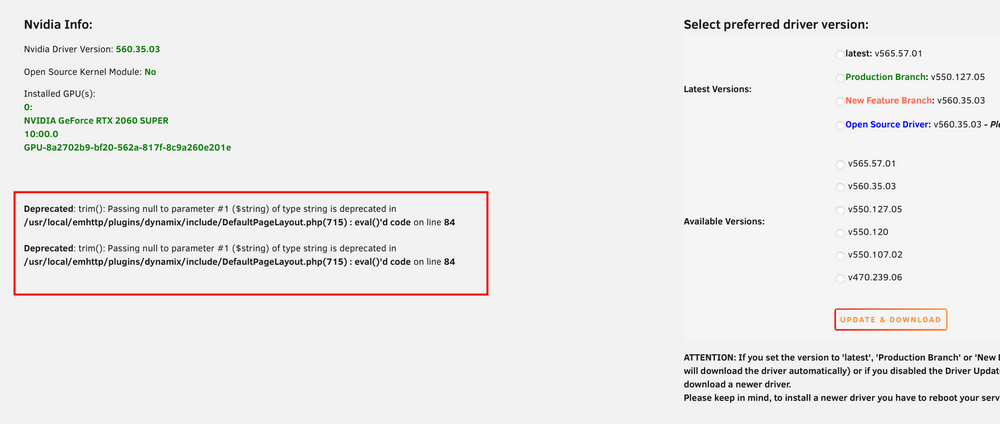
-
When the MASTER goes offline all containers are shutting down? Shouldn't it be the complete opposite? To only start stop containers which are replicated? That would be indeed be possible but not planed since this can cause some other issues and not the intended use case for this plugin.
-
How does the configuration look like, what does the syslog say, did it possibly say that the MASTER server isn't even online? Maybe this is a keepalived issue. I'm not too sure, the plugin is used by a few folks and it seems to work everywhere. Oh, this could be the issue, the plugin is specifically designed to be "replication" like.
-
The containers on the Backup server will only run when the Main server is online.
-
Yes and no. Since keepalived will detect when the MASTER goes offline a script will be triggered on the SLAVE which basically starts the containers (if configured) and the same is true for if when the MASTER comes back online the keepalived will also detect that and stop all containers on the SLAVE. The virtual IP would come in handy if you have services running on the bridge which you access usually through your server IP but you can do that then with the virtual IP and keepalived will switch between your MASTER and SLAVE server on that IP automatically depending which server is online. True, but that's not an issue here, I think you are overthinking it all a bit. :) If you configured the container that it has it's own IP then it will run on the SLAVE exactly like on the MASTER with the same IP that you've configured it there.
-
Yes and no, you would have to install or at least get a container with keepalived installed in it but since this can get very complicated with Docker I wouldn't recommend that, you would basically set up a vritual IP for each service and the real IP where you point the devices which should use PiHole for example to the virtual IP, with that keepalive and all devices would switch seamlessly between your Servers if one goes down. However as said this can get really hard or at least complicated with Docker since you need a container with keepalive built in and started and configured. I for example nowadays use a RockPi with keepalived (which runs also a KVM for my Server, my MQTT Server, Zigbee 2 MQTT and the failover instance for my PiHole) and on my Server I run PiHole in a LXC container with keepalived and they both have the virtual IP address 192.168.0.200 (from keepalived) which all my clients get from my DHCP Server and if my main Server goes down PiHole from the RockPi seamlessly kicks in and ensures that I have no issues with DNS at home. But with the replication plugin it should work just fine because the plugin just clones the containers from the main machine and if configured the containers will start when keepalive detects that your main server goes down, that means the containers which where cloned should start with their IPs from the main machine (if the Docker networks and networks in general are configured in a similiar way so that the containers can actually start).
-
@unraid.admin if you've selected Anonymize Diagnostics it should be fine. I see that you have a 1st gen Ryzen CPU, please make sure to disable P-States in the BIOS since this can cause the lockups that you are experiencing. I also in your syslog that a disk has issues, please create a post in the General Support section as pointed out above.
-
Just go to the Tools tab within Unraid, click on Diagnostics and Download them (maybe also anonymize them), after the download finished you can drag and drop the zip file here into the text box. Maybe also create a second post for that issue in the Generel Support section from the Unraid forums which you can find here. Even the 2GB variant should be fine, depending how many simultaneous transcodes you have but it technically can handle 8 simultaneous transcdoes, depending on the source and target media.
-
Please use the Open Source driver.
-
I don't think that you can easily use another OS so that you can make use of that card since the old legacy driver v470.x doesn't support newer Kernels anymore and wont even compile against newer Kernels and Nvidia basically deprecated these cards since the new legacy driver seems to be v580.x which basically supports Maxwell and Pascal architectures (no official confirmation however). The GTX670 is basically not the best choice nowadays for transcoding since it can only transcode h264 (AVC) and is not capable of transcoding h265 (HEVC). Even if you use another OS you will be stuck on an older Kernel and can't upgrade to something recent because of your Nvidia card. May I ask what system you have? Do you have Diagnostics for me so that I can go through them? A new or used card is not an option for you? Something like a Nvidia T400 would be more than enough for a few simultaneous transcodes these days and is supported by all driver versions since it's Turing based and you can get it for a pretty cheap price IIRC.
-
Hope you are feeling better now. Issue with that is that it is not designed for that, however I'm the wrong person to ask this question, I don't develop for Unraid actively anymore. I don't have those but you I can assume, from the different forum posts here, a lot of them running Unraid on a pretty low spec hardware to save energy and so on... Tha, don't say that too early with the DRAM shortage... xD Again, I'm the wrong person to ask. Sorry but I assume that Limetech staff reads through the posts here in the Feature Request forums, so no worries, it will be implemented eventually. :)
-
Did you read that recommended post on top:


