





AnnabellaRenee87
Members
-
Joined
-
Last visited
-
Hope things go well for you, I'll try out MOS to see what it's like. Been reading it for a bit, looks interesting.
-
I think I'm having an issue where some things aren't running yet and sometimes only one of the VFs will be there, having to run "/usr/local/sbin/vfio-pci >>/var/log/vfio-pci" again after having the scripts run it to get them all showing. The problem is after a reboot of the server, the system gives an error that here was an "vfio-pci-errors" error. (If I run "/usr/local/sbin/vfio-pci >>/var/log/vfio-pci again it fixes it") When I look at the logs for the script with the "sudo bash /boot/config/vfio-pci-bind.sh 15b3:1016 0000:02:01.2" in it, they're showing access denied. I'm on 7.2.2
-
Would a userscript running at boot; nvidia-smi --persistence-mode=ENABLED Be the same thing as; nvidia-persistenced ?
-
I turned it on, seems to have helped, will test for a bit, don't know if it will cause any performance issues or not. EDIT: it defaulted to Disabled, Changed it to Enabled.

-
I was hoping it would fix some of those memory errors, I just told the Fix Comon Problems plugin to igneore the errors, I've got 256 GB of RAM so I know I'm not running out of memeory. I've also got above 4G decoding and Resizable Bar enabled. I've also got this as an option, it's Disable right now. Not sure if that would help or not.
-
Don't suppose you could update the Open Source Driver to "590.44.01" (source: https://github.com/NVIDIA/open-gpu-kernel-modules/releases/tag/590.44.01) could ya? Also, been getting Out of Memory errors recently with the error referencing Nvidia.server-diagnostics-20251211-0351.zip
-
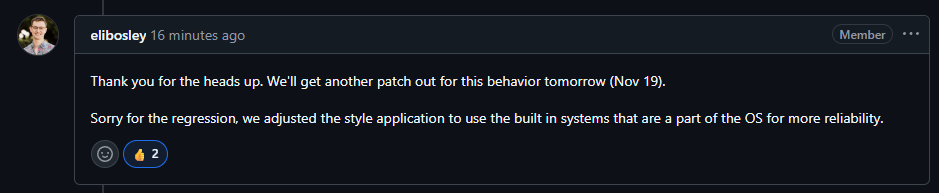
From the Connect GitHub;
-
I'm having the same issue too, I tried to reinstall it, rebooting between removal and reinstallation but I can't log back into it. server-diagnostics-20251118-1942.zip
-
Oh, I was asking to see if there's anything feature wise im missing out on being on the open-source drivers vs the closed ones. If there's no real differences from my perspective, then I should be fine.
-
Actually, does it matter if its closed or open source? I'm gonna be using it for transcoding, gaming and maybe AI with dockers. Yes steam link works with the dockered version of steam.
-
Please excuse me if I'm mistaken, but is this the Closed Source Driver and would this support the 5000 series? (just got the 5060Ti) https://www.nvidia.com/en-us/drivers/details/254665/
-
Just wondering, is the Dynamix Share Floor plugin still being supported? it's not really doing anytihng anymore.
-
After upgrading to Beta 2 (from prevous stable) I get the following on my Main tab. On the Dashbaord I'm seeing missing items like this.... Downgrading fixes it, I tried to look at the logs but seen this being spammed. I tried to pull Diagnostics but.... it never made them and then gave this in the logs. In Safe Mode I gete the drives loading up like this And the Dashboard is working like it should but..... I can't start the array because I have the plugin Dynamix SCSI Devices installed and the drives show up differently now. Suppose I could do a new config and make sure to put the drives back in the right places but.... wanna run it past you all first, I can supply a complete copy of my Flash again to Xenthis if needed on Discord since i can't get a Disgnostic dump, here's the Diagnostics from Safe Mode tho just in case there's somethning of use in there. Thanks! server-safemode-diagnostics-20250822-0007.zip EDIT: Going back to Stable for now.
-
At startup I'm having an issue where the system is stuck at "starting array" with it stuck on mounting the disk. If I downgrade things start to work again but upgrading sometimes works. I've attached my logs from when it was not working and the system had to force reboot and gather logs. syslog-previous server-diagnostics-20250803-2133.zip
-
I was testing with Plex on my phone while on 5G/LTE. I was also testing with Emby and JellyFin (Yes i have all 3 runing because I'm a nerd) Don't suppose you can keep the v565.77 drivers as legacy for the immedeate future? I ask because where Pascal is apparently going to be dropped at some point. I also need to find another single slot card (that I can afford) that can handle doing transcodes of a show from a totally legal place that may be in MP4 or AVI lol to H265.


