





jcouch93
Members
-
Joined
-
Last visited
Everything posted by jcouch93
-
Thanks @Squid! I didn't realize it would be that easy!
-
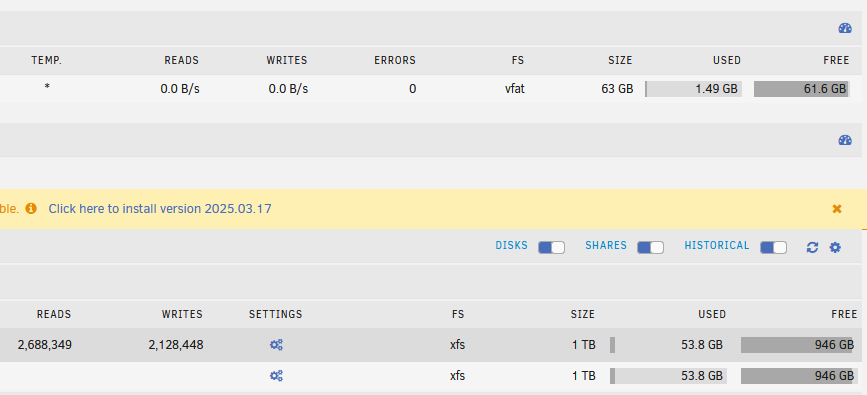
Quick question? In Main I have somehow got my Unassigned Devices showing Reads/Writes while all the other (Array, Pool, Boot) show the Speed. If I click the icon to change then they reverse, and the Array is Reads/Writes and UD is Speed. How do I get them sync'd back up? I checked in another browser and it's the same.
-
Installed Filebot and when creating a Binding receive a Java error. Log is below. Any ideas? [filebot-info] JNA Native: java.lang.Error: [filebot-info] There is an incompatible JNA native library installed on this system [filebot-info] Expected: 7.0.0 [filebot-info] Found: 6.1.3 [filebot-info] (at /usr/lib/libjnidispatch.so). [filebot-info] To resolve this issue you may do one of the following: [filebot-info] - remove or uninstall the offending library [filebot-info] - set the system property jna.nosys=true [filebot-info] - set jna.boot.library.path to include the path to the version of the [filebot-info] jnidispatch library included with the JNA jar file you are using [filebot-info] MediaInfo: java.lang.NoClassDefFoundError: Could not initialize class com.sun.jna.Native [filebot-info] Tools: fpcalc/1.5.1 7z/17.04 unrar/6.12 [filebot-info] Extended Attributes: OK [filebot-info] Unicode Filesystem: OK [filebot-info] Script Bundle: 2024-10-16 (r986) [filebot-info] Groovy: 4.0.21 [filebot-info] JRE: OpenJDK Runtime Environment 17.0.10 [filebot-info] JVM: OpenJDK 64-Bit Server VM [filebot-info] System Property: net.filebot.theme=System [filebot-info] CPU/MEM: 48 Core / 32 GB Max Memory / 110 MB Used Memory [filebot-info] OS: Linux (amd64) [filebot-info] HW: Linux b141eb580c23 6.1.74-Unraid #1 SMP PREEMPT_DYNAMIC Fri Feb 2 11:06:32 PST 2024 x86_64 GNU/Linux [filebot-info] CPU/MEM: : Intel(R) Xeon(R) CPU E5-2697 v2 @ 2.70GHz / MemTotal: 270 GB / MemFree: 22 GB / MemAvailable: 259 GB [filebot-info] STORAGE: btrfs [/] @ 31 GB | btrfs [/output] @ 31 GB | btrfs [/watch] @ 31 GB | xfs [/storage/disks/_cs-ssd-smsg-870evo-1tb] @ 920 GB | btrfs [/storage/disks/_cs-ssd-crcl-mx500-500gb] @ 313 GB | xfs [/storage/disk1] @ 516 GB | xfs [/storage/disk2] @ 552 GB | xfs [/storage/disk3] @ 561 GB | xfs [/storage/disk4] @ 645 GB | xfs [/storage/disk5] @ 1.0 TB | xfs [/storage/disk6] @ 1.0 TB | xfs [/storage/disk7] @ 1.1 TB | xfs [/storage/disk8] @ 1.0 TB | xfs [/storage/disk9] @ 1.1 TB | xfs [/storage/disk10] @ 1.0 TB | xfs [/storage/disk11] @ 1.1 TB | xfs [/storage/disk12] @ 2.3 TB | xfs [/storage/disk13] @ 4.0 TB | btrfs [/storage/cache] @ 771 GB | fuse.shfs [/storage/user0] @ 15 TB | fuse.shfs [/storage/user] @ 15 TB | btrfs [/config] @ 771 GB [filebot-info] UID/GID: uid=99(app) gid=100(app) groups=100(app) [filebot-info] DATA: /config [filebot-info] Package: DOCKER [filebot-info] License: UNREGISTERED [filebot-info] Done ヾ(@⌒ー⌒@)ノ [supervisor ] service 'filebot-info' exited (with status 0). [supervisor ] starting service 'app'... [supervisor ] starting service 'amc'... [xvnc ] Sat Oct 19 11:30:25 2024 [xvnc ] Connections: accepted: /tmp/vnc.sock [supervisor ] all services started. [xvnc ] SConnection: Client needs protocol version 3.8 [xvnc ] SConnection: Client requests security type None(1) [xvnc ] VNCSConnST: Server default pixel format depth 24 (32bpp) little-endian rgb888 [xvnc ] VNCSConnST: Client pixel format depth 24 (32bpp) little-endian bgr888 [xvnc ] ComparingUpdateTracker: 0 pixels in / 0 pixels out [xvnc ] ComparingUpdateTracker: (1:-nan ratio) [app ] Failed to retrieve parent window ID: java.lang.Error: [app ] There is an incompatible JNA native library installed on this system [app ] Expected: 7.0.0 [app ] Found: 6.1.3 [app ] (at /usr/lib/libjnidispatch.so). [app ] To resolve this issue you may do one of the following: [app ] - remove or uninstall the offending library [app ] - set the system property jna.nosys=true [app ] - set jna.boot.library.path to include the path to the version of the [app ] jnidispatch library included with the JNA jar file you are using [app ] Failed to retrieve parent window ID: java.lang.NoClassDefFoundError: Could not initialize class com.sun.jna.Native [app ] Fetch failed: Try again in 2 seconds (2 more) => java.io.IOException: java.lang.InterruptedException [app ] Fetch failed: Try again in 2 seconds (2 more) => java.io.IOException: java.lang.InterruptedException [app ] Fetch failed: Try again in 2 seconds (2 more) => java.io.IOException: java.lang.InterruptedException [app ] 1 line has been copied to the clipboard. [app ] java.lang.NoClassDefFoundError: Could not initialize class net.filebot.mediainfo.MediaInfoLibrary [app ] java.lang.NoClassDefFoundError: Could not initialize class net.filebot.mediainfo.MediaInfoLibrary [app ] java.lang.NoClassDefFoundError: Could not initialize class net.filebot.mediainfo.MediaInfoLibrary [app ] 1 line has been copied to the clipboard. [app ] 1 line has been copied to the clipboard. [xvnc ] Sat Oct 19 13:53:20 2024 [xvnc ] ComparingUpdateTracker: 10.6621 Gpixels in / 111.23 Mpixels out [xvnc ] ComparingUpdateTracker: (1:95.8562 ratio) [xvnc ] Sat Oct 19 13:58:27 2024 [xvnc ] ComparingUpdateTracker: 554.812 Mpixels in / 4.59869 Mpixels out [xvnc ] ComparingUpdateTracker: (1:120.646 ratio) [app ] Failed to retrieve parent window ID: java.lang.NoClassDefFoundError: Could not initialize class com.sun.jna.Native [app ] java.lang.NoClassDefFoundError: Could not initialize class net.filebot.mediainfo.MediaInfoLibrary
-
I believe you have to fill that in manually (at least I think I read that earlier in this thread).
-
This worked for me after searching for the answer all day. I do notice however that even when it bans the IP, the rule never shows up in the IPTABLES display. Not sure why but as long as it works!
-
I'm using the plugin on 6.12.8, and everything is working with no issues except for the file and folder naming. I saw an old post (Page 5 of this thread) about the file/folder structure changing but I made an initial manual backup and it was the original file/folder structure: Original (which is what my manual backup looks like) /backup_dir/vm_name/20200204_1555_vm_name.xml vs Updated /backup_dir/vm_name/20200204_1555/vm_name.xml). Is that structure change only applicable to automated backups? I also read that there should have been a selection made when opening the plugin but I never saw anything like that?
-
Ran a manual backup that was successful, I THINK that the issue was caused by the CA Update plugin that I had accidentally set to run at the same time as the backup. Fixed that and ran the manual backup and it was successful with some warnings. Still not sure why the original didn't output any logs but that may just stay a mystery.
-
Ran a backup automatically, I see folders in the backup location but the backup name ends in "failed", and the Restore option doesn't see the failed backup. There is no log (all it says in the GUI is "Log not existing or empty") so I'm at a loss of where to start t-shooting why it failed. Is there somewhere else I can see logs or do I just need to run a manual and watch the log output? Thanks!
-
I do the same thing, but I have SAB download into a folder that FileFlows monitors, FF does the conversion, and then FF moves the file(s) into the folder that Sonarr/Radarr is monitoring.
-
That worked perfectly! Thank you!
-
To get that to work, do I need all the stuff in the folder.view directories? I have your plugin, but on the Github page the folders have things in them (but my scripts and styles folders are empty). I tried just putting a docker-custom.css file in scripts but that didn't seem to do anything. Thank you for your help!
-
In Icon Only mode, is there way to have the icon show the status of the Docker (i.e. started, stopped)? Or is there a way to have Icon and Text to show multiple rows (I don't think so based on an earlier conversation in this topic)?
-
Running that one now. Seems to be running fine using my GPU as far as I can tell.
-
Been searching through the thread but I can't find an update on the support for nVidia HW transcoding? Is it still a no-go?
-
I'm seeing the same thing as well. Found this when searching around: https://forums.sabnzbd.org/viewtopic.php?t=23364 Started up normally after doing the following: 1. Connected to the docker (my container name was "sabnzbd") How to connect to a running Docker container? There is a docker exec command that can be used to connect to a container that is already running. Use docker ps to get the name of the existing container. Use the command docker exec -it <container name> /bin/bash to get a bash shell in the container. 2. cd /config/admin 3. mv server.cert server.cert.old (or delete it, but I was trying to play it safe) 4. mv server.key server.key.old (or delete it, but again playing it safe) I did an ls-al then and saw that the server.cert was immediately recreated but not the server.key I checked SAB and it was then running normally
-
That worked! Thanks saarg!
-
I tried it and it still says ANSI in the config. Here's from the Docker log on startup: 2017-03-14 13:12:10,523::INFO::[sabnzbdplus:1173] sabnzbdplus-1.2.1 (rev=d32cf57c7573ed43bcab40eb9b23a0853f1f7015) 2017-03-14 13:12:10,523::INFO::[sabnzbdplus:1174] Full executable path = /usr/bin/sabnzbdplus 2017-03-14 13:12:10,523::INFO::[sabnzbdplus:1186] Platform = posix 2017-03-14 13:12:10,524::INFO::[sabnzbdplus:1187] Python-version = 2.7.12 (default, Nov 19 2016, 06:48:10) [GCC 5.4.0 20160609] 2017-03-14 13:12:10,524::INFO::[sabnzbdplus:1188] Arguments = /usr/bin/sabnzbdplus --config-file /config --server 0.0.0.0:8080 2017-03-14 13:12:10,524::INFO::[sabnzbdplus:1190] Preferred encoding = ANSI_X3.4-1968 2017-03-14 13:12:10,524::INFO::[sabnzbdplus:1238] Read INI file /config/sabnzbd.ini My startup says all commands completed successfully and it showed that the variable were passed.
-
I have updated but no go. I think it all boils down to I need to get SAB to change it's encoding (as reported on the Config page) to Unicode\UTF and not ANSI and I don't know how to do that. Thanks!
-
I'm having the exact same issue with dir scanner crashing (as shown in your earlier posts). Thinking of trying NZBget again. Any luck on resolution so far? Unraid uses UTF8. Do the below when connected to unraid to check. echo $LANG I get root@COUCHSERV:~# echo $LANG en_US.UTF-8 but when I run it inside the docker container I get nothing: root@COUCHSERV:~# docker exec -it sabnzbd /bin/bash root@c6de913a870a:/# echo $LANG root@c6de913a870a:/# Python config page: Python Version: 2.7.12 (default, Nov 19 2016, 06:48:10) [GCC 5.4.0 20160609] [ANSI_X3.4-1968] Any other help\ideas would be welcome. Thanks!
-
I'm having the exact same issue with dir scanner crashing (as shown in your earlier posts). Thinking of trying NZBget again. Any luck on resolution so far?

