ridge
Members
-
Joined
-
Last visited
Everything posted by ridge
-
I apologize if this issue has been mentioned before, but with 46 pages in this thread on various game servers it's difficult to go through everything. The Ark docker appears to not be updating the servers correctly. Before trying to update to the latest (309.42) they were on 309.4, but after a restart they show as being on 307.6, which means none of my players can connect. Relevant docker log doesn't show much detail. Connecting anonymously to Steam Public...Loaded client id: 15143523430996911231 Listening for IPv4 broadcast on: 27036 Logged in OK Waiting for user info...OK Success! App '376030' already up to date. ---Prepare Server--- ---Server ready--- ---Start Server--- [S_API FAIL] SteamAPI_Init() failed; SteamAPI_IsSteamRunning() failed. Setting breakpad minidump AppID = 346110
-
My bad! Now downloading as nobody:users. Thank you! Any chance of a UMASK variable to allow files to be downloaded with write permissions across the board? Right now files download with 644 permissions. I download and then edit the metadata so the user and group ownership is only half the equation.
-
Assuming you have the container paths (specifically the SoulseekQT one) set as I have it, in Soulseek itself go to Options > General and set "Save client data every 60 minutes" to a more reasonable number, like 5. Leave the docker running for at least 5 mins so it saves, and then restart it. Everything you set up in options should now be remembered.
-
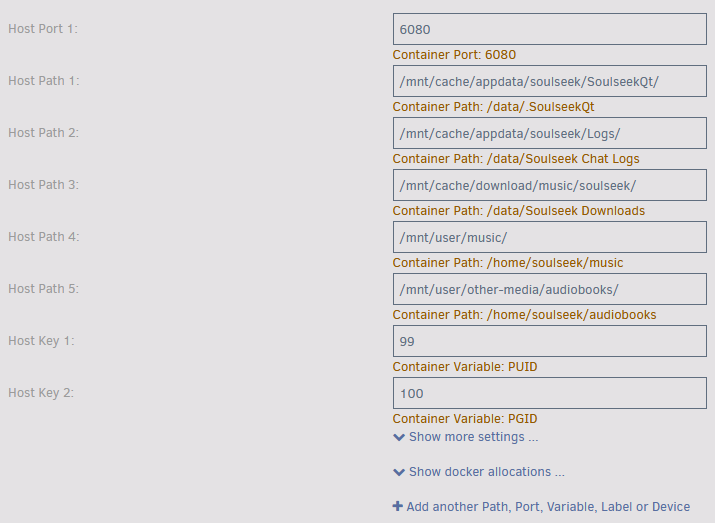
Here's the config I have which is working as far as paths, saving between restarts of the docker container, etc. What's not working is the PUID/PGID (copying and pasting from other containers I run, these values correspond to nobody:users). I still get everything saving to the configured download folder as root.
-
Confirmed. Config settings are no longer saving. (My bad, had a typo in my own settings when I was messing with the PUID/PGID stuff). However, it seems like the PUID and PGID variables don't work, even when adding properly.
-
Has anyone figured out how to get around the "can't use Cache Control on a virtual Mac" issue? The icon in Sharing is greyed out (in Mojave and Catalina at least), and this seems to be a known issue with virtualized Macs. Wondering if this is something that has an answer?
-
It is, and to close the loop for anyone else who might have a similar issue in the future: I had an invisible character in my path string. A unicode string for a zero-width non-breaking space:  ...that I somehow managed to get into the field through copy/pasting the path from this forum (which goes to show you should be very careful when copy/pasting from the web). You'd never know the unicode was there by looking at the path in the web panel - it was only by checking the XML files themselves that I was able to see the problem. Deleted the stray unicode, deleted the clusterfiles folder, restarted the dockers, and they recreated the clusterfiles folder with a valid path, and everything worked! If @bubo hadn't requested to see the XML files, I never would have spotted the problem. Thanks!
-
Sent them over, thank you!
-
The clusterwtf folder has been created, but there are no files in it NoTributeDownloads=False is in gameusersettings.ini
-
Paging @bubo or @Jo7410. Hoping you guys can help, if not @ich777... For the Ark dockers, I can't seem to get clusters working properly, or at least not cross-ark travel. Every time I use an obelisk to test survivor transfer it asks me to create a new character on the Ark I'm traveling to, and doesn't let me download my existing survivor. Here are my settings, maybe someone can verify I'm not doing anything wrong? Suggest something I may have missed? First of all, both servers are fully-accessible to the Internet. I have a path variable for Clusterfiles set to /serverdata/clusterfiles pointing to the same folder (/mnt/disks/SamsungSSD_1TB/ark-se/clusterfiles/) on both servers. The Clusterfiles folder sits outside of the two server folders (mnt/disks/SamsungSSD_1TB/ark-se/theisland/ and mnt/disks/SamsungSSD_1TB/ark-se/thecenter/ respectively) Game Parameters: Server 1: ?Port=7777?QueryPort=27015?RCONEnabled=True?RCONPort=27020?MaxPlayers=25?AltSaveDirectoryName=TheIsland Server 2: ?Port=7779?QueryPort=27025?RCONEnabled=True?RCONPort=27030?MaxPlayers=25?AltSaveDirectoryName=TheCenter Extra Game Parameters (both servers): -NoBattlEye -server -log -clusterid=clusterwtf -ClusterDirOverride=/serverdata/clusterfiles -NoTransferFromFiltering gameusersettings.ini relevant lines (both servers): PreventDownloadSurvivors=False PreventDownloadItems=False PreventDownloadDinos=False PreventUploadSurvivors=False PreventUploadItems=False PreventUploadDinos=False
-
@cen I'm sorry I didn't see your question. Try turning privileged off and running it. That's really the only difference I see between your config and mine.
-
It's in the answer on that link. But essentially, you need to go to Options > General in Soulseek itself and set "Save client data every __ minutes" to a value that makes sense to you. I have it set to 60 minutes. Then it'll save config every hour and all will be well.
-
@iiliedI posted about the deleting files/folders issue above, and @realiesreplied with this. For the time being, I took @cen's advice and have a cronjob running that chown -R's the relevant files/folders. I installed the User Scripts plugin, and have a script called chown_soulseek_complete which has this in it: #!/bin/bash find /mnt/user/musicsort/soulseek/complete/ -type d -exec chmod 777 {} \; find /mnt/user/musicsort/soulseek/complete/ -type f -exec chmod 666 {} \; I run that every 10 minutes by setting the schedule to Custom and entering */10 * * * * in the box that appears. It's a temporary solution until @realiesfixes the underlying problem. My port is running on 6080 so I can't help with that issue. And the save configurations problem is one I solved by following the instructions, so can't help you there either.
-
Thanks @realies. I've taken @cen's suggestion above and created a user script that runs in the meantime, but a more permanent fix would obviously be preferable.
-
@realiesHoping you can fix this: Using your container, files downloaded from Soulseek are owned by root:root and not nobody:users. Means I have to go through an extra couple of steps to clean up my "complete" folder when all I really want to do is delete using Explorer/Finder (which obviously isn't possible when the files are owned by root). Thanks!
-
Welp. Works now. Gonna just scream silently into the void for a while, mmkay?
-
@binhexOk, back from vacation. Still happening.
-
I’m on vacation right now and not really able to do much in the way of checking till I get home in 10 days time. I’ll follow up when I’m back and let you know, but I will say this was an ongoing problem for days on end following my switchover to AirVPN (and not just a one-time thing).
-
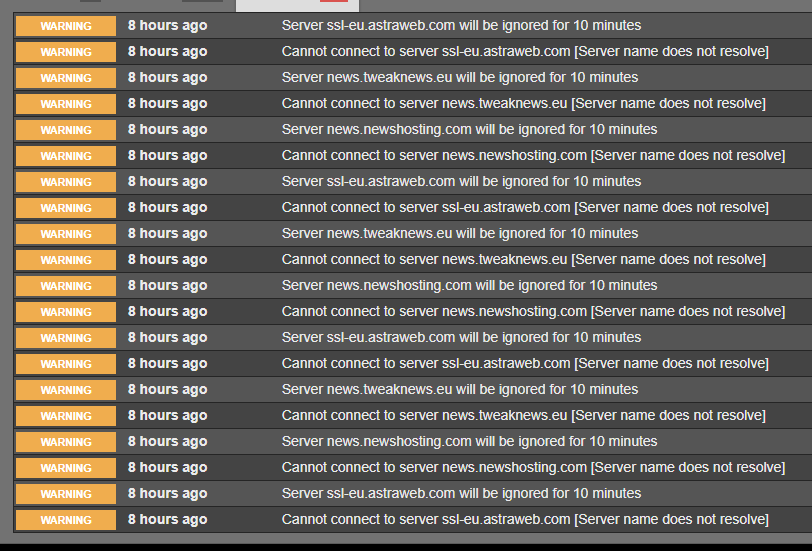
I just switched from PIA (where everything was working) to AirVPN (where it isn't), so being somewhat paranoid about cleaning up my installation, I deleted and went completely fresh. However, although the container starts, it appears as though DNS isn't resolving somehow. I've attached my supervisord.log file. Any thoughts? supervisord.log
-
Update: When the VPN option is set to yes, nothing is downloading at all now. I've had to set that option to no for the time being.
-
Looks like that worked. No errors from the last 24 hours or so. Thanks!
-
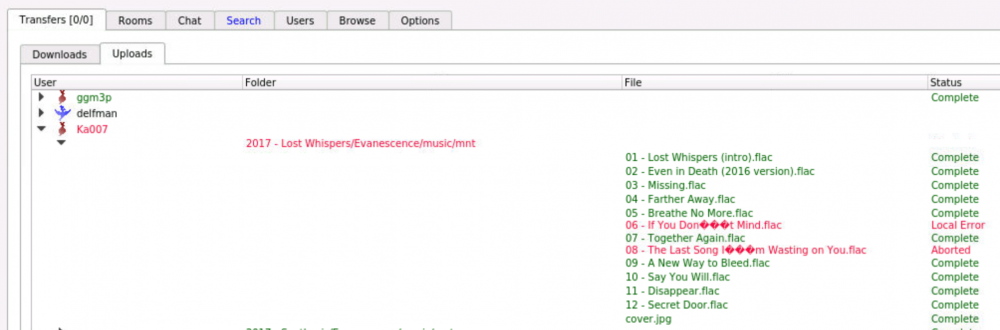
No, from me to them. So the screenshot I shared with the weird filenames is from the Uploads tab within Transfers. Here's another example
-
@realiesThey're like that in the upload window when someone tries to upload from me. I don't know what else to tell you.
-
Same problem here.
-
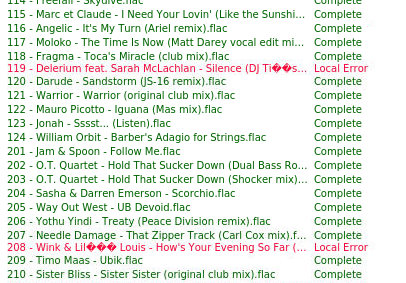
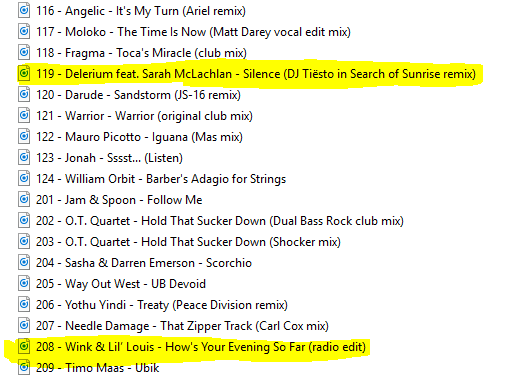
Hey @realies, wanted to ask if you'd seen any other instances of filenames not being parsed properly? Eg, filename-error.png, attached. The correct filenames are in filename-proper.png, highlighted. As you can see, the docker is having trouble with special characters like umlauts, and curly single quotes. My music is all tagged from Musicbrainz, and I know it's correct. I'd hate to have to go in and edit the filenames, and right now albums aren't sharing correctly. Any ideas?