





rh535
Members
-
Joined
Everything posted by rh535
-
Yes. This is my error 02:34:32 [Q] ERROR DENIED Redis is running in protected mode because protected mode is enabled and no password is set for the default user. In this mode connections are only accepted from the loopback interface. If you want to connect from external computers to Redis you may adopt one of the following solutions: 1) Just disable protected mode sending the command 'CONFIG SET protected-mode no' from the loopback interface by connecting to Redis from the same host the server is running, however MAKE SURE Redis is not publicly accessible from internet if you do so. Use CONFIG REWRITE to make this change permanent. 2) Alternatively you can just disable the protected mode by editing the Redis configuration file, and setting the protected mode option to 'no', and then restarting the server. 3) If you started the server manually just for testing, restart it with the '--protected-mode no' option. 4) Setup a an authentication password for the default user. NOTE: You only need to do one of the above things in order for the server to start accepting connections from the outside.
-
I don't think so. I rarely ever open up terminal. Pressing the close button (X button in Chrome) on my terminal browser window close the terminal - correct?
-
I recently started having issues with my server. It seems every time I reboot or Shutdown from the menu it says it was an unclean shutdown and starts a parity check. I have included my logs (including syslog log files). Recent Actions: I just ran memtest twice (10 hours) and it found zero errors. I thought my NVME (cache drive) was going bad so I replaced that and moved some drives around. Nothing else has really changed. Im now also having issues with a usb ZigBee controller usb device attached to my server (unsure if that matters or not - in use for Home Assistant on a VM). Any help would be greatly appreciated. syslog.zip tower-diagnostics-20211122-2127.zip
-
I realized I made a mistake with my Plex server and thankfully have a recent backup of the container with this plugin. Is there a way to just restore my one Plex docker and not my 20 other dockers? Thanks so much
-
I got this card from this seller and its been working great for over a month. No issues. I can't speak to it being/ or not being counterfeit - but everything worked out of the box.
-
Is the card still working well? Im thinking about picking up the same one from the same seller based on your recommendation.
-
I have the same issue. Does anyone have any thoughts on how to correct this error? I have reinstalled the docker numerous times and the same error message every time.
-
If it shows up then it's working. Just a bunch of annoying errors in the log. Cool. I'll just ignore the errors then. Thanks for the help and the plugin!!!
-
Does it continue to work? I get similar errors. Nut 2.74 would just drop the connect and not reconnect, leaving you unprotected. I compiled the plugin's current version off a different libusb branch and you get errors but it reconnects. Im pretty sure it works. It shows up in my dashboard saying online, runtime left etc....
-
I seem to be getting these errors frequently using this plugin. Any thoughts? Mar 10 10:41:30 Tower usbhid-ups[7138]: nut_libusb_get_string: Pipe error. Mar 10 10:51:36 Tower usbhid-ups[7138]: nut_libusb_get_report: Input/Output Error. Mar 10 11:00:08 Tower usbhid-ups[7138]: nut_libusb_get_report: Input/Output Error. OS: 6.6.7 UPS: CP1000AVRLCDa
-
Thank you both! I got a new flash drive and everything is back up and working.
-
I just ran a Dell Bios system scan of components and it came back with an error for my SSD drive (cache drive). Can i just unplug my cache drive and see if then boots up correctly? I don't want to make it worse, so i thought i would ask first.
-
What is the best way to accomplish this?
-
I have been running my unraid server since about Feb. 2017 with great success. Much of it thanks to you all. Unfortunately, i can't figure out how to fix this situation. I stopped my array and turned off my server to plug it into a new UPS/Surge protector. Ever since i plugged my server into the unit i have gotten this error after trying to boot into the server. end kernel panic - not syncing: VFS: unable to mount root fs on unknown-block(0,0) I removed my usb flash drive and checked the drive in Windows 10 and no errors were reported. I also ran a memtest for over 3 hours and no errors. Any thoughts on how to correct this?
-
I have it installed in the internal usb connector Sent from my iPad using Tapatalk
-
The Sony flash drive has UnRaid on it. That's not my external drive if that matters.
-
I removed the preclear plugin and that did not make a difference.
-
I had the latest update. I have attached my diagnostics. Thank you for the help! tower-diagnostics-20171104-1130.zip
-
Yes. It is Sent from my iPad using Tapatalk
-
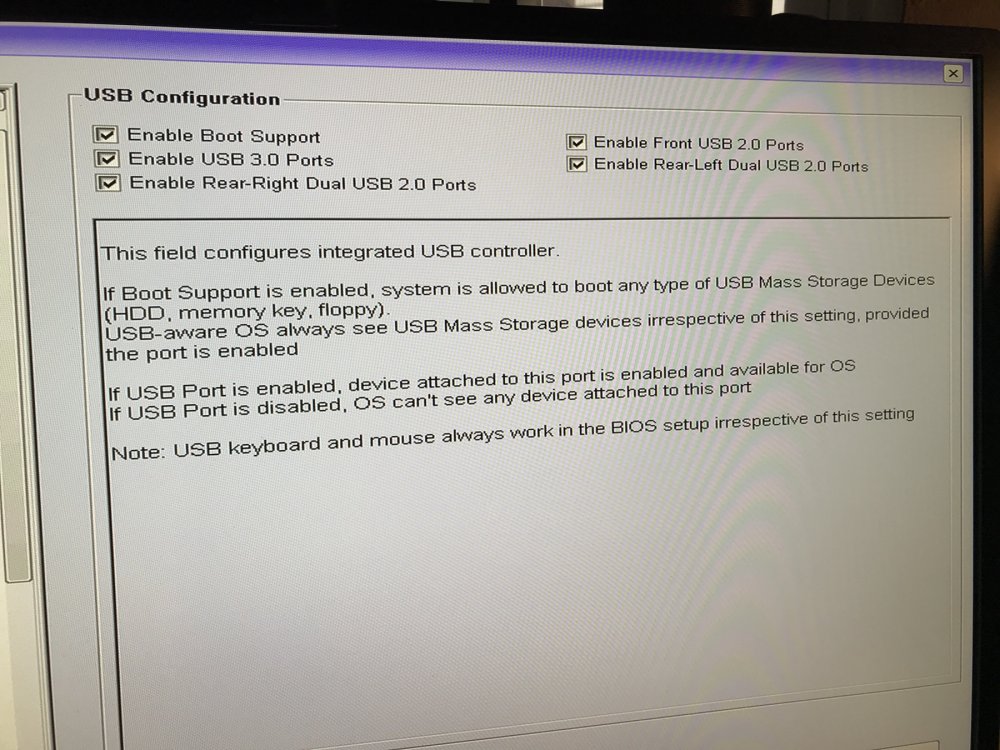
When I plug my external USB drive into a USB 3.0 port on my Dell PowerEdge T20 server it isn't recognized. When I plug the device into a USB 2.0 port it is recognized immediately. My external drive is USB 3.0. Any ideas on how to fix this?
