





dukiethecorgi
Members
-
Joined
-
Last visited
Everything posted by dukiethecorgi
-
same for me, still Oct 6 12:57:00 Tower vnstatd[23408]: Error: pidfile "/var/run/vnstat.pid" lock failed (Resource temporarily unavailable), exiting.
-
That's what I tried, removed old version and installed from scratch
-
Mine shows 2018.10.05
-
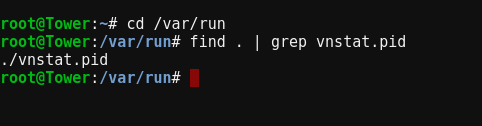
Still not working.... Installed latest version, after installation I see in the logs: Oct 5 21:42:57 Tower vnstatd[24665]: vnStat daemon 1.18 started. (pid:24665 uid:0 gid:0) Oct 5 21:42:57 Tower vnstatd[24665]: Monitoring: bond0 (2000 Mbit) eth0 (1000 Mbit) eth1 (1000 Mbit) The settings page says Stopped Try to start and the log says: Oct 5 21:46:44 Tower vnstatd[31073]: Error: pidfile "/var/run/vnstat.pid" lock failed (Resource temporarily unavailable), exiting. no PID of 31073 is running, but PID 24665 (vnstatd) is running /etc/rc.d/rc.vnstat status returns vnstat daemon is not running.
-
Here you go
-
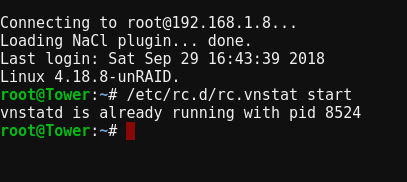
OK installed the update, still not working, but /etc/rc.d/rc.vnstat start says it is running
-
Thanks!
-
Not starting for me either 😞
-
That worked, thanks!
-
I can connect to the container with VNC, but not with the web interface. The interface opens, but in the left corner it says "Putty" with a red X for server disconnected (error 1006). Connecting using Chrome
-
Hey, got it working! The problem was the location of the GeoIP.dat file, it defaulted to /usr/share/GeoIP/GeoIP.dat so I created /config/geodata, changed the config, and manually downloaded the data
-
How would I configure this with the Plex server running on a different physical machine? What would I put for the path to /logs?
-
I'm trying to configure this to block access by country. I came across instructions on using GeoIP module on Ubuntu, but not being very conversant with linux I'm having trouble getting this to work. Running nginx -V shows " --with-http_geoip_module=dynamic" so it's compiled with the right module, but it doesnt seem to have geoip-database and libgeoip1 installed. Any way to get this working, or do these modules need to be part of the letsencrypt container?
-
Try different combinations of settings in your .ovpn config file. PIA allows udp on ports 53, 1194, 1197, 1198, 8080 and 9201. tcp on 80, 110,443, 501, and 502. I've found a huge difference in throughput between the different combinations. Also disable ipv6 if you can, that made a big difference. I was able to get VPN speed of about 90% of direct speed
-
Good to know, I couldn't get it to install but will try again via the GTK I found that it does make a difference, after tweaking a bit I was able to get downloads at 85% of my line speed
-
Would it be possible in a future release to have the ITConfig plugin installed?
-
http://forum.deluge-torrent.org/viewtopic.php?t=14635 It sort of worked for me - the torrents were all there, but I needed to do a force recheck for them to reattach properly
-
Take a look at the ombi log, and see if you have a lot of events that contain "ProviderID". If so, stop the container, go to Plex and under Server settings delete any Ombi tokens, start the container and the go to Ombi settings and request a new token
-
Thanks! I'll try it tonight
-
I'm not sure I understand. I use an up script on OpenVPN to query PIA for the port number, and then push that to Deluge. Using this docker, is it no longer necessary to do that?
-
Let me apologize in advance for the moronic questions, but I'm an absolute beginner when it comes to linux/dockers/etc .... I telnet into unRAID, and use 'docker exec -it letsencrypt /bin/bash' to get to the command line. When I try testing by 'sendmail [email protected] < /tmp/testmail.txt' I get the response 'can't connect to remote host (127.0.0.1): Connection refused' which I am guessing means that sendmail isn't configured. I look in /etc and I can't find anything - no mail or sendmail folder, no sendmail.conf, nothing at all. Using find to search the entire image, I still don't see anything. I'm completely lost, what am I doing wrong? Appreciative of any advice you could give.
-
Great container, replaces a VM I had running that had the same functions, but took a lot more resources. In the VM I had running, I used sSMTP to send fail2ban emails. Would it be possible to add this in a future release? Or is there already a way of sending email in the container?
-
I like Deluge myself, but it has issues handling a lot (>400) of torrents. The interface gets a bit sluggish, which I could live with, but the real problem is that communication with apps like Sonarr and Radarr becomes unreliable. Rtorrent has been rock solid for me
