






NewDisplayName
Members
-
Joined
-
Last visited
Everything posted by NewDisplayName
-
I know i could limit the dockers cpus, but i dont want to do that. Is there a way to set the handbrake process to a lower priority like in windows? (or the docker itself?)
-
Lets say i change fan2_input to fan1_input ... can your script control the pwm fan header, even it dont report any speed back?
-
Yeah, thats what i saw in pwmconfig and autofan. But it reports 0 speed back, i dont know why. Fans are running and stopping accordingly. Only /sys/devices/platform/nct6775.656/hwmon/hwmon1/fan2_input seems to work, which gets reported as array fan, but its the cpu fan...
-
I really dont know what to do. Its not detecting my fans on the "CHA FAN PWM". In the old board this was no problem? 1. Is there anything i can update to get it working, or does unraid this automatic? like load correct drivers. It only detect the CPU Fan as "ARRAY" fan..? 2. Can i force your script to control fans on the PWM header, even if it cant read the speed of the fans? 3. Is there a way to control the fans bases on a 3 pin fan?
-
im not doin anything manual. thats what was provided by automation.
-
no
-
As it came out i even added a feature request for it, anyway, i just wanted to ask if its added or not (i coulnd find it).
-
So im complete unsure what to do now or whats the problem. I also removed one Y cable at the beginning and made it so that the first Y bridge with "here are speed readings" is directly connected to a fan. Just btw. this setup worked for years without problem with another board... so that cant be the problem. I visited my server and checked the following: all fans are running. If i run pwmconfig, all fans stop and start accordingly to what i see on screen, it seems like: pmw fan 1 pmw 1 array pmw fan 2 pmw2 cpu But problem is, he cant see the speed the pmw 1 array fans are running... for a easy fix i could connect the array fans to the 3 pin headed PWR fan, does that help me in any way? (can they get roughly controlled without pwm?) Edit: i might found something, someone is suggesting on the internet that you need to load nct6775 but it seems like only nct6776 is loaded... how to do that? :D) edit: is it maybe caused by switching mainboard, do i need to remove or reconfig anything? I thought that would happen automatic (and since it was working, but for wrong fan, i didnt noticed till now)
-
That didnt helped. It still shows -12C, but i changed to SYSTIN, bc that -12 never changed, so i guess its just a ghost or something. Found the following devices: hwmon0 is coretemp hwmon1 is nct6776 Found the following PWM controls: hwmon1/pwm1 current value: 255 hwmon1/pwm2 current value: 255 Giving the fans some time to reach full speed... Found the following fan sensors: hwmon1/fan1_input current speed: 0 ... skipping! hwmon1/fan2_input current speed: 7258 RPM Fan 1 is the probably the CHA fan, can i control it, even if it doesnt show speed? Or can i install drivers or something? (fans are moving just btw) Testing pwm control hwmon1/pwm1 ... hwmon1/fan2_input ... speed was 7258 now 7297 no correlation No correlations were detected. There is either no fan connected to the output of hwmon1/pwm1, or the connected fan has no rpm-signal connected to one of the tested fan sensors. (Note: not all motherboards have the pwm outputs connected to the fan connectors, check out the hardware database on http://www.almico.com/forumindex.php) Did you see/hear a fan stopping during the above test (n)? y Testing pwm control hwmon1/pwm2 ... hwmon1/fan2_input ... speed was 7258 now 0 It appears that fan hwmon1/fan2_input is controlled by pwm hwmon1/pwm2
-
Okay, it might be the case. Auto fan control throttles the cpu fan based on the array temperature... Problem is, if i select PMW1, the "DETECT" does not work and thus the array fans dont get controlled, any idea?
-
I just have a small question. Can it be possible that my CPU PWM gets displayed while selecting a PMW controller in Fan Auto Control? I have a M/B: ASRock - B85M DASH/OL R2.0 i conected 2 fans to "CPU fan". And many fans to the "CHA FAN" pmw. Im asking because i dont see a CPU fan speed anywhere. Only array fan speed (which should be CHA FAN) root@Unraid-Server:~# sensors coretemp-isa-0000 Adapter: ISA adapter CPU Temp: +81.0°C (high = +80.0°C, crit = +100.0°C) Core 0: +81.0°C (high = +80.0°C, crit = +100.0°C) Core 1: +74.0°C (high = +80.0°C, crit = +100.0°C) nct6776-isa-0290 Adapter: ISA adapter Vcore: +0.87 V (min = +0.00 V, max = +1.74 V) in1: +0.17 V (min = +0.00 V, max = +0.00 V) ALARM AVCC: +3.33 V (min = +0.00 V, max = +0.00 V) ALARM +3.3V: +3.33 V (min = +0.00 V, max = +0.00 V) ALARM in4: +0.48 V (min = +0.00 V, max = +0.00 V) ALARM in5: +1.84 V (min = +0.00 V, max = +0.00 V) ALARM in6: +1.68 V (min = +0.00 V, max = +0.00 V) ALARM 3VSB: +3.41 V (min = +0.00 V, max = +0.00 V) ALARM Vbat: +3.30 V (min = +0.00 V, max = +0.00 V) ALARM Array Fan: 1103 RPM (min = 0 RPM) MB Temp: +32.0°C (high = +0.0°C, hyst = +0.0°C) ALARM sensor = thermistor CPUTIN: +32.5°C (high = +80.0°C, hyst = +75.0°C) sensor = thermistor AUXTIN: -12.5°C (high = +80.0°C, hyst = +75.0°C) sensor = thermistor PECI Agent 0: +82.0°C (high = +80.0°C, hyst = +75.0°C) (crit = +100.0°C) cpu0_vid: +0.000 V intrusion0: OK intrusion1: OK beep_enable: disabled
-
Did they finally add a way to display RSS feeds with this?
-
Is this still maintained? Im asking bc it seems like there is a new version, but docker didnt got updated?
-
Any chance to make him correctly process multiple .VOB files.. he converts all of them seperate..
-
I did a sleep 30m before deleting the upload file in the script to prevent too many checks. the upload script itself gets called every 5 min. # remove dummy file sleep 30m rm /mnt/user/appdata/other/rclone/rclone_upload ### upload script end
-
So music is uploaded, i find the playback ok, its a little slower then hdd (but if hdd needs to spin up, its like the same). I dont notice it so hard, because most music is unhearable at end and start anyway.. and if its some sec more silent... not a big deal for me.
-
I dont know if its a problem, in the end it just takes time and CPU. So this also happens to u?
-
Last problem i see is this: 2018/12/23 19:05:20 DEBUG : Silicon Valley/Staffel 3: Removing directory 2018/12/23 19:05:20 DEBUG : Silicon Valley/Staffel 3: Failed to Rmdir: remove /mnt/user/Archiv/Serien/Silicon Valley/Staffel 3: directory not empty 2018/12/23 19:05:20 DEBUG : Silicon Valley/Staffel 2: Removing directory 2018/12/23 19:05:20 DEBUG : Silicon Valley/Staffel 2: Failed to Rmdir: remove /mnt/user/Archiv/Serien/Silicon Valley/Staffel 2: directory not empty 2018/12/23 19:05:20 DEBUG : Silicon Valley/Staffel 1: Removing directory 2018/12/23 19:05:20 DEBUG : Silicon Valley/Staffel 1: Failed to Rmdir: remove /mnt/user/Archiv/Serien/Silicon Valley/Staffel 1: directory not empty 2018/12/23 19:05:20 DEBUG : Silicon Valley: Removing directory 2018/12/23 19:05:20 DEBUG : Silicon Valley: Failed to Rmdir: remove /mnt/user/Archiv/Serien/Silicon Valley: directory not empty it tries to remove every directory and fails... why? Why does it try to remove non empty directorys? I understand that he removes empty directories after uploading, but why at every run? (he is also making a lot of directories at each run?!)
-
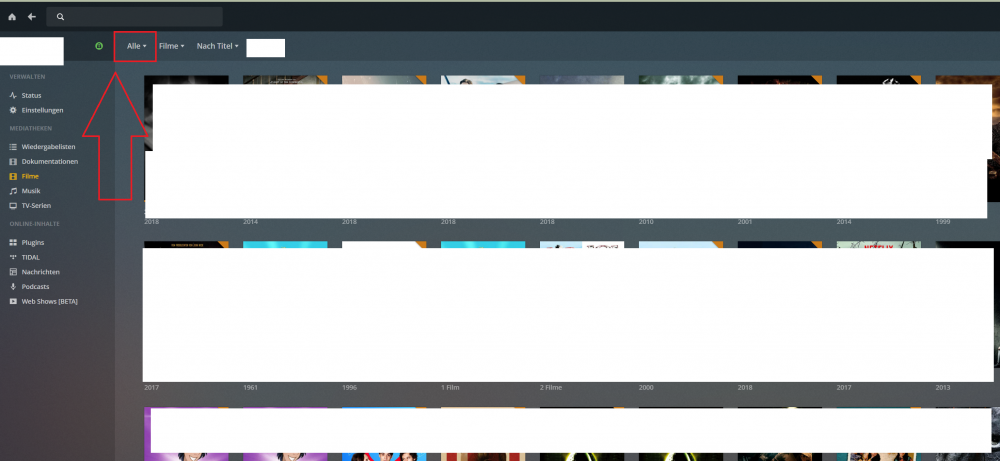
If all your paths are correct... and if u can see it in krusader, then plex also must see it. Did you click on something here, you need to select all.
-
Then is something wrong, do you see your folders files via terminal?
-
yea. And i didnt connect plex with radarr and sonarr.
-
For me, it does that. e.g. if a new movie is added, it automaticly sees and add this...^^
-
Whats a good setting for that? 60min? Do i add it inside the container as a variable?
-
Normal it makes 1 file out of the input.. but this time, the first iso: GLib-GIO-Message: 11:05:17.603: Using the 'memory' GSettings backend. Your settings will not be saved or shared with other applications. [autovideoconverter] Starting conversion of '/watch/Feuchtgebiete.2013.GERMAN.COMPLETE.BLURAY-RetailBD/ret-feuchtg-bd.iso' (5f6ae633c378e1323f99af6a71282d9d) using preset 'HQ 1080p30 Surround'... [autovideoconverter] 8 title(s) to process. [autovideoconverter] Processing title 7 (1/8)... it does again multiple files, how to stop that? (or will it combine at the end?)
-
y. duplicati is shit. i used it a long time it stopped working at some unknown time and i never got it back running, error after error. And i was just backing up usb drive/dockers/plugins to a ftp server, nothing special.

