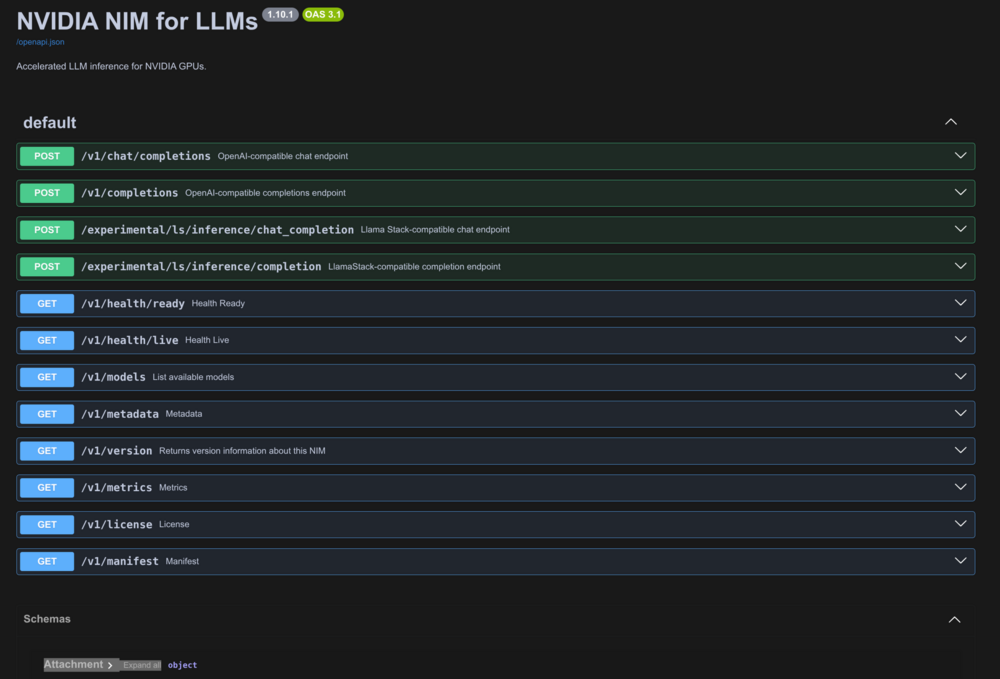
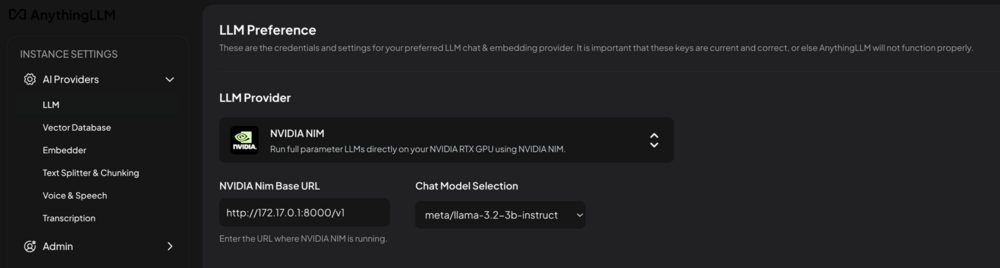
This is the support thread for the NVIDIA NIM Single Unraid template. Made this for my personal use so I could use NVIDIA-NIM with Unraid and my AnythingLLM container. GitHub Repo Template Readme This guide explains how to run NVIDIA NIM containers on Unraid using a consumer NVIDIA GPU. NIM provides optimized inference servers with an OpenAI-compatible API, making it easy to connect tools like AnythingLLM or Open WebUI. Tested environment: RTX 3060 12 GB Unraid 6.12+ NIM 1.10.1 PrerequisitesYou will need the following: Unraid 6.12 or later NVIDIA GPU (Turing architecture or newer) Examples: RTX 20xx, RTX 30xx, RTX 40xx NVIDIA drivers installed in Unraid Community Applications → NerdTools or GPU Statistics plugin Free NVIDIA NGC account https://build.nvidia.com NGC API key generated from your NGC dashboard Model SelectionNIM uses pre-optimized engine profiles, which are primarily designed for data center GPUs. Consumer GPUs require smaller models and reduced context windows. Example modelsModel VRAM Required Fits 12 GB GPU meta/llama-3.2-3b-instruct ~6 GB ✅ Recommended microsoft/phi-3-mini-4k-instruct ~8 GB ✅ Yes nvidia/Llama-3.1-Nemotron-Nano-4B-v1.1 ~10 GB ✅ Yes mistralai/mistral-7b-instruct-v0.3 ~14 GB fp16 ❌ OOM meta/llama-3.1-8b-instruct ~22 GB bf16 ❌ OOM meta/llama-3.1-70b-instruct ~80 GB ❌ Multi-GPU If you want to run 7B+ models on a 12GB GPU, consider Ollama, which supports quantized weights. NGC Registry Login⚠️ This must be done before Unraid can pull NIM images. NIM images are hosted on NVIDIA's private registry (nvcr.io), not Docker Hub. Run this one time in the Unraid terminal: docker login nvcr.ioLogin credentials: Username: $oauthtoken
Password: YOUR_NGC_API_KEY⚠️ Important: docker login → allows pulling the container image NGC_API_KEY → allows downloading model weights at runtime Both are required. Cache Directory PermissionsBefore starting the container, create the cache directory with the correct permissions. NIM runs inside the container as UID/GID 1000. If the cache directory is owned by root, the container will fail to start. Run: chown -R 1000:1000 /mnt/user/appdata/nvidia-nim/cache
chmod 775 /mnt/user/appdata/nvidia-nim/cacheEnvironment VariablesVariable Value Notes NGC_API_KEY your_ngc_api_key Required. Used to download model weights NIM_MODEL_NAME meta/llama-3.2-3b-instruct Must match the image tag NIM_MAX_MODEL_LEN 16384 Required for consumer GPUs NIM_CACHE_PATH /opt/nim/.cache Cache directory CUDA_VISIBLE_DEVICES 0 Use 0 for single GPU PYTORCH_CUDA_ALLOC_CONF expandable_segments:True Reduces memory fragmentation First RunOn the first startup, NIM downloads the model weights to the cache directory. Example size: ~6 GB for llama-3.2-3b This can take several minutes depending on your internet connection. You can verify the container is running with: curl http://localhost:8000/v1/modelsConnecting ClientsNIM exposes an OpenAI-compatible API, so most AI clients work out of the box. Connection settingsSetting Value Docs http://[unraid-ip]:8000/docs Base URL http://[unraid-ip]:8000/v1 API Key Any non-empty string (e.g. nim) Model meta/llama-3.2-3b-instruct Compatible clientsAnythingLLM Open WebUI LangChain LlamaIndex Cursor (custom OpenAI base URL) Any application with configurable OpenAI endpoints Switching ModelsCurrently the template uses model-specific container images. To switch models: Stop the container Change the Repository field Example: nvcr.io/nim/microsoft/phi-3-mini-4k-instruct:latestUpdate the model variable: NIM_MODEL_NAME=microsoft/phi-3-mini-4k-instructStart the container To run multiple models, create additional containers on different ports: 8000
8001
8002They can share the same cache directory — weights will not be duplicated. TroubleshootingCache Permission ErrorIf the container fails with: PermissionError: [Errno 13] Permission denied: '/opt/nim/.cache/local_cache'Run: chown -R 1000:1000 /mnt/user/appdata/nvidia-nim/cache
chmod 775 /mnt/user/appdata/nvidia-nim/cacheKV Cache Size ErrorExample error: ValueError: The model's max seq len (131072) is larger than the maximum number of tokens that can be stored in KV cacheFix: NIM_MAX_MODEL_LEN=16384If needed, try: 8192Consumer GPUs cannot handle the full context window used by data center profiles. Common ErrorsError Cause Fix 401 Unauthorized Not logged into nvcr.io Run docker login nvcr.io ValueError: invalid literal 'all' CUDA_VISIBLE_DEVICES=all Change to 0 PermissionError on .cache Wrong permissions Fix cache directory permissions max seq len > KV cache Context window too large Set NIM_MAX_MODEL_LEN=16384 CUDA out of memory Model too large Use a smaller model No compatible profiles GPU too old Requires RTX 20xx or newer nvfp4 unsupported warning Consumer GPU limitation Safe to ignore XML TemplateThis repository includes an Unraid Community Applications-compatible template: nvidia-nim-single.xmlTo install manually: /boot/config/plugins/dockerMan/templates-user/After copying the file there, it will appear in the Unraid Docker template list. Uploading Attachment...Uploading Attachment...