Ezro
Members
-
Joined
-
Last visited
Everything posted by Ezro
-
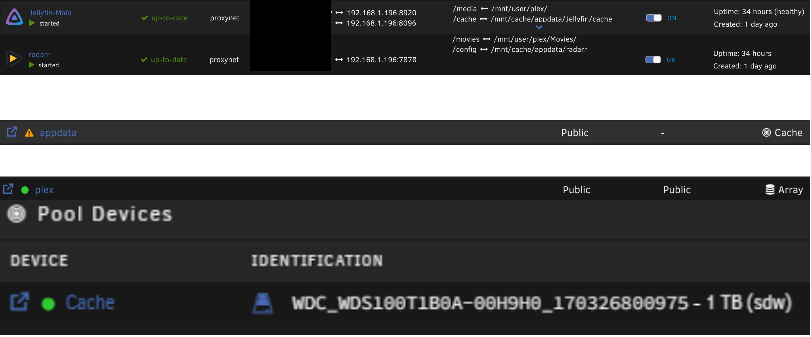
Hi all, It takes 15+ seconds to load Movies in Jellyfin and 3h to 'Refresh Movies' in Radarr. I've been trying to identify the bottleneck for weeks now and still can't pinpoint why I'm experiencing this slowness. Can someone please help vet my unraid configuration?
-
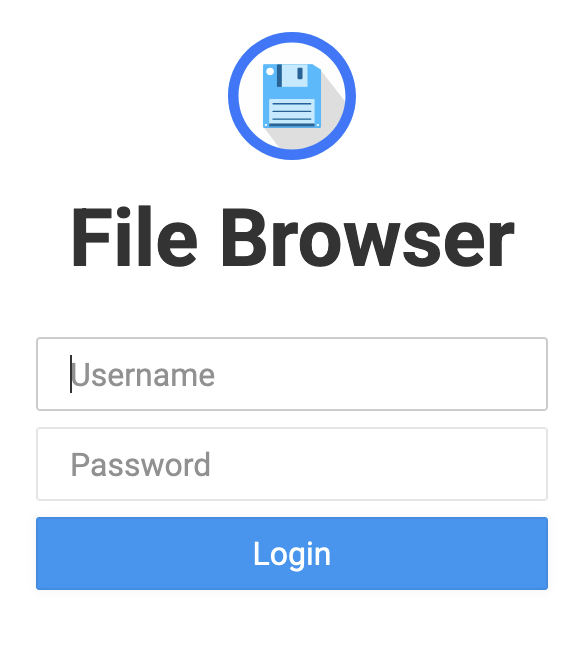
I meant to disable the FileBrowser login screen
-
@alturismo Do you know if it's possible to allow public access to the FileBrowser? Right now I have most of my app access managed via nginx and it'd be nice to have this do the same
-
Ty for the info! I completely misunderstood this. I'll look into webdav for accessing / syncing my unRAID share via a public (reverse proxied) URL
-
I was able to set this up and have it working behind my reverse proxy (e.g., https://filebrowser.mydomain.com). If I use the browser and go to the URL, I'm able to log in and upload / download files. If I wanted to use the FileBrowserGO iOS app though is there a way to add it as a remote location that way Photos can be uploaded / synced from my phone without having to use Safari (or a browser)? Or similarly, if I wanted to directly map this on my Macbook, is there a way to do that without having to use a browser?
-
Hey everyone, I'm running into a bit of a pickle and I'm hoping someone can help with my configuration. My current setup consists of: Gandi domain + Cloudflare proxy providing SSL cert => the old version of this docker container to provide the reverse proxy Duckdns subdomain => the old version of this docker container (letsencrypt) to provide the reverse proxy and SSL cert I've recently removed Cloudflare and am now running into an issue where my domain is using the cert of my duckdns subdomain. I don't mind upgrading the container but would anyone be able to provide insight into how I would need to configure the parameters to accomplish this? (Or am I better off leaving the existing deprecated container and trying to somehow generate a new cert for my Gandi domain?)
-
@JorgeBI ordered a replacement extender backplane (https://www.ebay.com/itm/274829421125) which is the same model as the one I replaced. After swapping it out, I've been testing it and seeing the same issue(s). Sometimes I'll restart it and no SCSI devices appear in the Tools->System Devices->SCSI Devices. Sometimes a few drives appear. Sometimes almost all (but one) drive appears. I haven't yet had the new backplane show all drives in the SCSI Devices pane. Do you know how I can determine if maybe I'm not powering all of the drives well? Or maybe it's the cables I'm using? I'm not sure how to diagnose what's going wrong but I'm going to switch back to the original backplane to try to get all SCSI devices recognized.
-
A bit of a newbie question, but is there an easy way to detect how many / which drives are being detected? (Preferably by serial number)
-
@JorgeB I still have this issue pretty much every time I restart the server and it usually takes a bunch of reboots in order for everything to start working again. Last year I ordered an LSI SAS 9210-8i and swapped it out, but that didn't resolve the issue. I currently have a Supermicro 846E1-R900B server and am not sure how to diagnose if it's something with the SAS backplane or if I happened to receive another dud HBA card. Do you have any advice / steps on how I can diagnose this and hopefully fix it?
-
For anyone interested: I changed the Radarr config path to /mnt/cache/appdata/radarr and that sped things up dramatically (down to under 20s). I was advised to also move my Docker to the cache (Settings -> Docker -> Docker vDisk location and Default appdata storage location), but did not notice any additional improvements from that; it could be that the unRAID container updates and restart are faster now, but I don't really notice.
-
Hey everyone. I've been noticing performance issues for a while now after updating to the new UI (v3?). It currently takes over 3 minutes to load the Movies section each time I refresh the UI. I was thinking it may be because the container wasn't using my SSD cache for the config; initially my appdata User Share was 'Perfer' for Cache, and now I've made it Only. I've ran the data mover and have restarted the container but am still seeing the same slowness. Currently my container is set to use: /config <-> /mnt/user/appdata/radarr Could it be that that is still somehow using the spin disk instead of the cache? (Should I update it to /mnt/cache/appdata/radarr? I've seen threads mention that this is a bad practice and /mnt/user should be used)
-
Hi everyone, I currently have a working LetsEncrypt (port forwarded 443 -> 444) + DuckDNS for all of my docker containers hosted on my unRAID. I added a new machine to my network that is running Windows 10 and hosting a Jellyfin instance. If I want to use a different domain (not DuckDNS) for Jellyfin, how should I set things up that way I can keep my existing DuckDNS + my new domain all as HTTPS? Edit: I was able to get it working by pointing my CloudFlare DNS to my public ip, and creating the appropriate proxy-conf with the server_name set to my non-DuckDNS domain. If I understand correctly, this means that my SSL isn't actually being created / handled by the LetsEncrypt docker and is being managed at CloudFlare. Does anyone see any issues with taking this approach?
-
I'm able to connect to GitLab and it appears to be running correctly, but an error keeps spamming my logs: ==> /var/log/gitlab/prometheus/current <== 2019-12-04_06:09:35.37530 level=info ts=2019-12-04T06:09:35.375Z caller=main.go:293 msg="no time or size retention was set so using the default time retention" duration=15d 2019-12-04_06:09:35.37547 level=info ts=2019-12-04T06:09:35.375Z caller=main.go:329 msg="Starting Prometheus" version="(version=2.12.0, branch=master, revision=)" 2019-12-04_06:09:35.37555 level=info ts=2019-12-04T06:09:35.375Z caller=main.go:330 build_context="(go=go1.12.13, user=GitLab-Omnibus, date=)" 2019-12-04_06:09:35.37563 level=info ts=2019-12-04T06:09:35.375Z caller=main.go:331 host_details="(Linux 4.18.20-unRAID #1 SMP Fri Nov 23 11:38:16 PST 2018 x86_64 2cc6f067be8c (none))" 2019-12-04_06:09:35.37570 level=info ts=2019-12-04T06:09:35.375Z caller=main.go:332 fd_limits="(soft=40960, hard=40960)" 2019-12-04_06:09:35.37575 level=info ts=2019-12-04T06:09:35.375Z caller=main.go:333 vm_limits="(soft=unlimited, hard=unlimited)" 2019-12-04_06:09:35.37916 panic: runtime error: slice bounds out of range Has anyone come across this before?
-
I decided to give this a go and was able to successfully mount to my NFS share for Plex. In doing some testing, though, I'm noticing that both SMB and NFS have pretty bad (relative) scan times when it comes to my Plex libraries (around 2-10 Mbps in my Windows network throughput graph). On my Windows machine (PMS), I've tried changing the mount to use nolock and have also tried TCP / UDP / TCP + UDP for the NFS client. On my unRAID server, I've tried Auto / Yes for the the Tunable (enable Direct IO) setting. The machines are connected via ethernet on the same network. My shares are running using 5400 RPM 6 GB/s spin disks, and my Plex library is structured like this: /mnt/user/plex/movies/{movie_name} (movie_year}/{movie_name}.{ext} Using Crystal Disk Mark, I'm able to get decent synthetic scores (30MB/s NFS vs 63MB/s SMB sequential read), so I'm not entirely sure what's causing the slow scanning. (I also was expecting NFS to generally outperform SMB, but it was only better in random read / write, while SMB was better in sequential) Does anyone have any advice on how I can beef up my connection so that I'm able to push more than a few Mbps?
-
It doesn't look like it. I tried switching the port that the HBA card is plugged into and that also didn't work. I'm not sure if the power outage possibly fried the card itself or if it's my motherboard's ports. It'd be weird if an unused port was fried out, though, so I'm more inclined to believe that it's the HBA card. Do you know if there's possibly a bios property that could have been switched if the bios reset?
-
Hi everyone, Last week my server shut down unexpectedly and I've been working on fixing it; after bringing it back up I'm seeing all of the disks as missing except for the boot device. I have a feeling it may be something with the SAS HBA, but it's been a while since I've done any work on this server. If anyone has any ideas / tips to try to get the OS to recognize the drives again it'd be greatly appreciated. Attached is the diagnostics. Regards, Ezro tower-diagnostics-20190806-1738.zip
-
I think I understand. I updated my router to forward to 81: But now I'm running into an error with finding my 'default' file: Docker Log [cont-init.d] 50-config: exited 0. [cont-init.d] done. [services.d] starting services [services.d] done. nginx: [emerg] open() "/config/nginx/common" failed (2: No such file or directory) in /config/nginx/site-confs/default:8 Edit: Disregard. I copied my common file over and now everything's working! Thanks saarg / CHBMB!

-
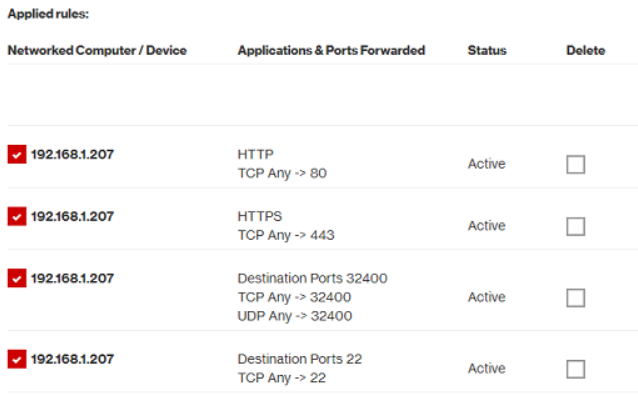
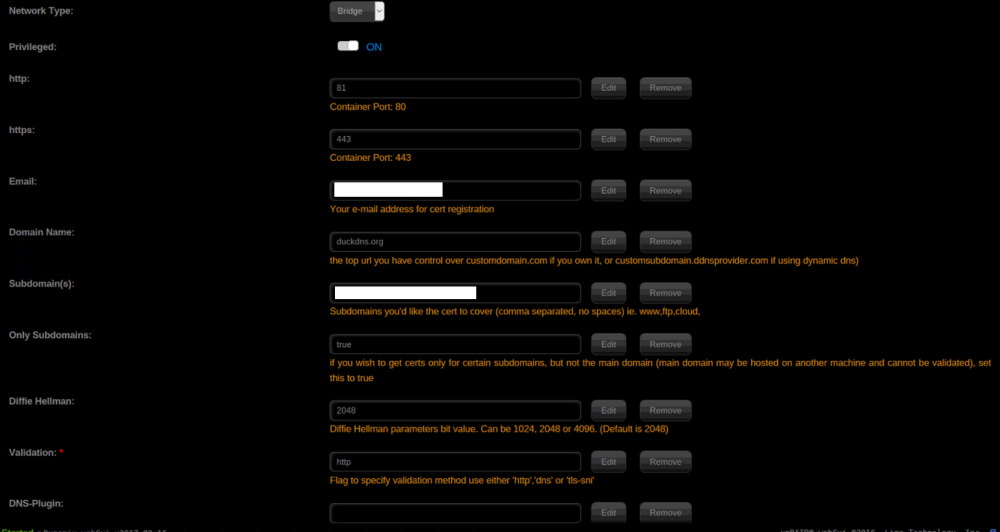
That makes sense. Here's my setup: Docker Settings Docker Command root@localhost:# /usr/local/emhttp/plugins/dynamix.docker.manager/scripts/docker run -d --name="letsencrypt" --net="bridge" --privileged="true" -e TZ="America/Los_Angeles" -e HOST_OS="unRAID" -e "EMAIL"="..." -e "URL"="duckdns.org" -e "SUBDOMAINS"="..." -e "ONLY_SUBDOMAINS"="true" -e "DHLEVEL"="2048" -e "VALIDATION"="http" -e "DNSPLUGIN"="" -e "PUID"="99" -e "PGID"="100" -p 81:80/tcp -p 443:443/tcp -v "/mnt/user/appdata/letsencrypt":"/config":rw linuxserver/letsencrypt Docker Log ------------------------------------- GID/UID ------------------------------------- User uid: 99 User gid: 100 ------------------------------------- [cont-init.d] 10-adduser: exited 0. [cont-init.d] 20-config: executing... [cont-init.d] 20-config: exited 0. [cont-init.d] 30-keygen: executing... using keys found in /config/keys [cont-init.d] 30-keygen: exited 0. [cont-init.d] 50-config: executing... Backwards compatibility check. . . 2048 bit DH parameters present SUBDOMAINS entered, processing Only subdomains, no URL in cert Sub-domains processed are: -d domain.duckdns.org -d subdomain.domain.duckdns.org E-mail address entered: ... Generating new certificate Saving debug log to /var/log/letsencrypt/letsencrypt.log Plugins selected: Authenticator standalone, Installer None Obtaining a new certificate Performing the following challenges: http-01 challenge for domain.duckdns.org http-01 challenge for subdomain.domain.duckdns.org Waiting for verification... Cleaning up challenges IMPORTANT NOTES: Failed authorization procedure. subdomain.domain.duckdns.org (http-01): urn:acme:error:unauthorized :: The client lacks sufficient authorization :: Invalid response from http://subdomain.domain.duckdns.org/.well-known/acme-challenge/KuPVPz-1dTvVdvyW6XP2zYitXLgejpWJoblhVxuYUiU [100.2.67.27]: 401, domain.duckdns.org (http-01): urn:acme:error:unauthorized :: The client lacks sufficient authorization :: Invalid response from http://domain.duckdns.org/.well-known/acme-challenge/iknfqFylSG_2b4MGv1uEkubeRgaHO6OzVJPmOqDM2u8 [100.2.67.27]: 401 - The following errors were reported by the server: Domain: subdomain.domain.duckdns.org Type: unauthorized Detail: Invalid response from http://subdomain.domain.duckdns.org/.well-known/acme-challenge/KuPVPz-1dTvVdvyW6XP2zYitXLgejpWJoblhVxuYUiU [100.2.67.27]: 401 Domain: domain.duckdns.org Type: unauthorized Detail: Invalid response from http://domain.duckdns.org/.well-known/acme-challenge/iknfqFylSG_2b4MGv1uEkubeRgaHO6OzVJPmOqDM2u8 [100.2.67.27]: 401 To fix these errors, please make sure that your domain name was entered correctly and the DNS A/AAAA record(s) for that domain contain(s) the right IP address. ERROR: Cert does not exist! Please see the validation error above. The issue may be due to incorrect dns or port forwarding settings. Please fix your settings and recreate the container Port Forwarding
-
I'm running into the same issue as deadnote. My LetsEncrypt was working fine prior to updating, but the container update seems to have broken it. My port forwarding is set to port 80, and I have 80->81 in the container. Does anyone know what else I can try?
-
How can I log into this container after I install it? I tried admin / admin but that didn't work and I don't see default credentials listed anywhere. Edit: I found the file. For anyone who's also struggling, the password can be found in the initialAdminPassword file located in /config/secrets folder.
-
@cglatot I did. I've been messing with my configs a ton in order to try to get everything working together. After getting gitea to work (which is awesome), I no longer am able to use my nextcloud container. Here's a stale version of my configs which had everything but nextcloud working: https://pastebin.com/VzS0zrth Hope that helps!
-
@fanningert Here's my /config/nginx/proxy.config: client_max_body_size 10m; client_body_buffer_size 128k; #Timeout if the real server is dead proxy_next_upstream error timeout invalid_header http_500 http_502 http_503; # Advanced Proxy Config send_timeout 5m; proxy_read_timeout 240; proxy_send_timeout 240; proxy_connect_timeout 240; # Basic Proxy Config proxy_set_header Host $host:$server_port; proxy_set_header X-Real-IP $remote_addr; proxy_set_header X-Forwarded-For $proxy_add_x_forwarded_for; proxy_set_header X-Forwarded-Proto https; proxy_redirect http:// $scheme://; proxy_http_version 1.1; proxy_set_header Connection ""; proxy_cache_bypass $cookie_session; proxy_no_cache $cookie_session; proxy_buffers 32 4k;
-
@fanningert I tried changing the reverse proxy settings but am now getting a 400 error: 400 Bad Request: too many Host headers Would configuration be easier if I used caddy? I'm not too familiar with any of this configuration (especially with multiple docker containers). Ideally, I'd like to not have to SSH into my server in order to get the routing working properly.
-
I'm still getting 404. Here's what my configs currently look like: /appdata/gitea/gitea/conf/app.ini [server] APP_DATA_PATH = /data/gitea SSH_DOMAIN = mydomain.duckdns.org DOMAIN = mydomain.duckdns.org HTTP_PORT = 3000 ROOT_URL = https://mydomain.duckdns.org/gitea DISABLE_SSH = false SSH_PORT = 22 LFS_START_SERVER = false OFFLINE_MODE = false PROTOCOL = http /appdata/letsencrypt/nginx/site-confs location /gitea { include /config/nginx/proxy.conf; proxy_pass http://192.168.1.207:3000; }
-
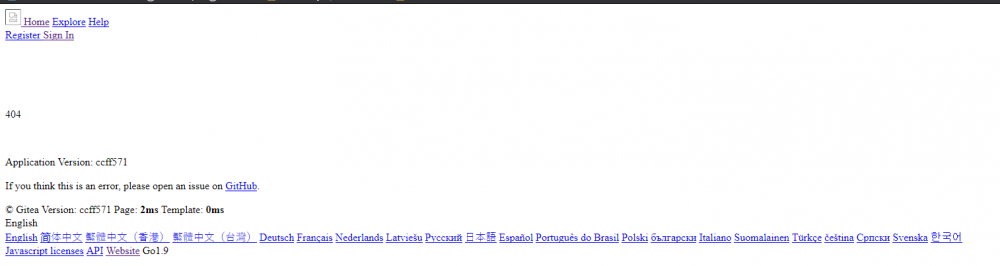
I feel like I'm getting close. I'm able to get a 404, but with some Gitea information listed on the page (version, page load time, template, languages, etc.)