





SelfSD
Members
-
Joined
-
Last visited
Everything posted by SelfSD
-
I can't remember experiencing this either but then again, I never rebooted my server unless there was an update available. I don't know much about dockers either to help diagnose Loady's issue if it's a problem with the container.
-
Then it may be time to ask Lime Tech about persistent permissions if the group and owner keeps resetting.
-
Note to self: Check the lime tech forums more often... I was running the docker by Hexparrot, the creator of MineOS. It always told me it couldn't find a new update with an error but never gave me any problems.
-
Your signature says you're running 6.1.9. Have you considered updating to the latest 6.5.2? It's possible there is something that has been fixed in a later version as I have not seen permissions being reset during reboots before.
-
No problem. Hopefully we can find a solution to the issue.
-
Could you share a screenshot of the MineOS docker config page? Click on "Show more settings ..." as well and I'll take a look to see if I can notice something else that may be an issue.
-
Enter the number zero in both group and owner and it will be owned by root.
-
Ignore the rw/slave stuff. Upon further reading it looks like it's only for the Unnasigned devices plugin. Reading the "Real docker FAQ" it's recommended to not put it via the user mount point apparently. All my dockers use the user mount point and never has had any issues... I am honestly blank if changing permissions doesn't do anything on that path. I know there are some other MineOS docker containers out there. It may be worth trying one of them and see if it changes anything.
-
You mention you can see the servers in "/mnt/cache/appdata/minecraftos/servers". Is that the folder you changed the permission on? If so it may not have worked. The folder you need to edit permissions to would be "/mnt/user/appdata/minecraftos/". If I remember correctly, dockers need to be set to "rw/slave" if you are using a disk share, (eg /mnt/disk1/ or /mnt/cache) which you preferably should not unless you purposely are splitting the appdata folder between the cache drive and array.
-
Updating the BIOS and upgrading unRaid didn't help. It's back flooding the logs.
-
That doesn't look right... It should be /mnt/user/appdata/minecraftos.
-
Hi and apologies for not replying before. I've been out sick for a long while. I'm afraid I have no other suggestions if changing the folder owner and permissions didn't work.
-
I wasn't aware the diagnostics reported BIOS information as well. That's definitely handy to know!
-
The motherboard is running the latest BIOS unless I installed the wrong board when I built the server. I'll take a look in a moment. Update: Yup. I picked the wrong board... I have 3 of these motherboards and only two of them were updated and had been used. I wasn't aware there was a new release out! My server never notified me about an update. I'll get right on that too. Thank you.
-
I have not been able to solve it. I have to manually delete the syslog and reconnect the UPS 1-3 times a week. Using a USB2 port did not help in my case. :(
-
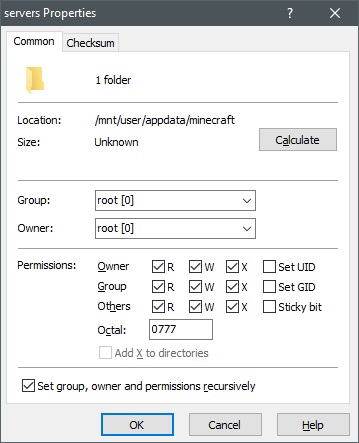
I think I miss worded permission with owner. My bad. Try setting the owner and group to root 0 and the permissions to 0777. I'm not too familiar with Filezilla but if you have the options to set permissions to subfolders recursively , check that so all the files inside the folder gets these permissions too.
-
Most likely a permission problem like myself and FrozenGamer had. See my post above:
-
Hey guys! After updating to 6.4.1 from 6.3.5 my UPS has started to flood the logs with an error saying: Mar 1 09:36:33 UnRaid kernel: usb 10-1: input irq status -75 received This is repeated about 15 times a second until I unplug it and reconnect my UPS. Then it stops doing so for a day or two before it continues to throw this error. My UPS is still detected by Unraid when this error occurs. I got a PowerWalker VI 2200 SH which is actually not supported by apcupsd and I've been using the NUT plugin for it, but after I got a warranty replacement for it. The new UPS doesn't work in NUT but is detected by apcupsd which is really weird. This worked without issues with apcupsd in 6.3.5 and didn't throw any erros until I updated Unraid. For some reason the diagnostics doesn't want to capture the up to date logs, so there's a manually cut snippet from just now when I disconnected the UPS and reconnected it: Mar 1 09:59:18 UnRaid kernel: usb 10-1: input irq status -75 received Mar 1 09:59:18 UnRaid kernel: usb 10-1: input irq status -75 received Mar 1 09:59:18 UnRaid kernel: usb 10-1: input irq status -75 received Mar 1 09:59:18 UnRaid kernel: usb 10-1: input irq status -75 received Mar 1 09:59:18 UnRaid kernel: usb 10-1: input irq status -75 received Mar 1 09:59:18 UnRaid kernel: usb 10-1: input irq status -75 received Mar 1 09:59:18 UnRaid kernel: usb 10-1: input irq status -75 received Mar 1 09:59:18 UnRaid kernel: usb 10-1: input irq status -75 received Mar 1 09:59:18 UnRaid kernel: usb 10-1: input irq status -75 received Mar 1 09:59:18 UnRaid kernel: usb 10-1: input irq status -75 received Mar 1 09:59:18 UnRaid kernel: usb 10-1: input irq status -75 received Mar 1 09:59:18 UnRaid kernel: usb 10-1: input irq status -75 received Mar 1 09:59:19 UnRaid kernel: usb 10-1: input irq status -75 received Mar 1 09:59:19 UnRaid kernel: usb 10-1: input irq status -75 received Mar 1 09:59:19 UnRaid kernel: usb 10-1: input irq status -75 received Mar 1 09:59:19 UnRaid kernel: usb 10-1: input irq status -75 received Mar 1 09:59:19 UnRaid kernel: usb 10-1: input irq status -75 received Mar 1 09:59:19 UnRaid kernel: usb 10-1: input irq status -75 received Mar 1 09:59:19 UnRaid kernel: usb 10-1: USB disconnect, device number 3 Mar 1 09:59:27 UnRaid kernel: usb 10-2: new low-speed USB device number 4 using xhci_hcd Mar 1 09:59:27 UnRaid kernel: hid-generic 0003:06DA:FFFF.0003: hiddev96,hidraw0: USB HID v1.00 Device [PPC Offline UPS] on usb-0000:05:00.0-2/input0 Mar 1 09:59:29 UnRaid apcupsd[12353]: Communications with UPS restored. Mar 1 09:59:30 UnRaid sSMTP[12612]: Creating SSL connection to host Mar 1 09:59:30 UnRaid sSMTP[12612]: SSL connection using **** Mar 1 09:59:33 UnRaid sSMTP[12612]: Sent mail for *** (***) uid=0 username=root outbytes=709 unraid-diagnostics-20180301-1000.zip
-
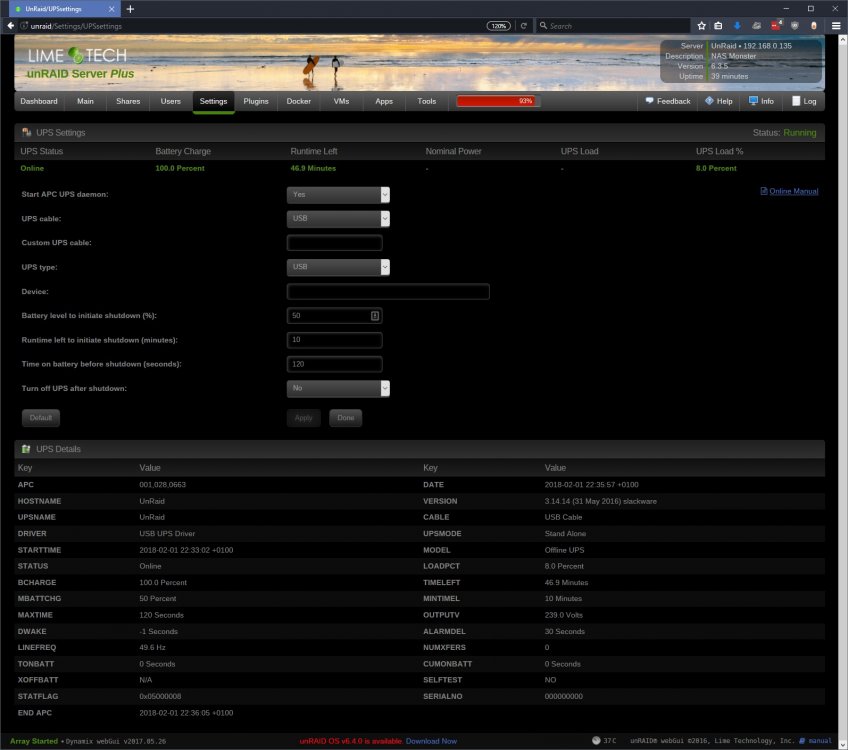
Ok what the hell... Just for the hell of it I tried to start the APC UPS Daemon that comes with Unraid and it detects my UPS Now I'm even more confused. These PowerWalkers has never worked with apcupsd...
-
I just got a replacement UPS as my previous one just died when the power went out. With this new one I can't get NUT to start. Both the new and the old are a PowerWalker BlueWalker VI 2200 SH. Unraid detects it when I plug it in: Feb 1 22:09:18 UnRaid kernel: hid-generic 0003:06DA:FFFF.0001: hiddev0,hidraw0: USB HID v1.00 Device [PPC Offline UPS] on usb-0000:05:00.0-1/input0 The driver is set to Blazer_usb and the port to auto. This worked fine with the old one. If I try to start it from SSH this is what happens: root@UnRaid:/# /etc/rc.d/rc.nut start Writing nut config Updating permissions... Network UPS Tools - UPS driver controller 2.7.4.1 Network UPS Tools - Megatec/Q1 protocol USB driver 0.12 (2.7.4.1) No supported devices found. Please check your device availability with 'lsusb' and make sure you have an up-to-date version of NUT. If this does not help, try running the driver with at least 'subdriver', 'vendorid' and 'productid' options specified. Please refer to the man page for details about these options (man 8 blazer_usb). Driver failed to start (exit status=1) But if I try to stop it (even when it's not running) this happens: root@UnRaid:/# /etc/rc.d/rc.nut stop Writing nut config Updating permissions... Stopping the UPS services... Network UPS Tools - UPS driver controller 2.7.4.1 Can't open /var/run/nut/blazer_usb-auto.pid: No such file or directory I've tried to switch around the drivers and every time it can't find the .pid file under /var/run/nut/. I've tried to reinstall the plugin without any luck as well.
-
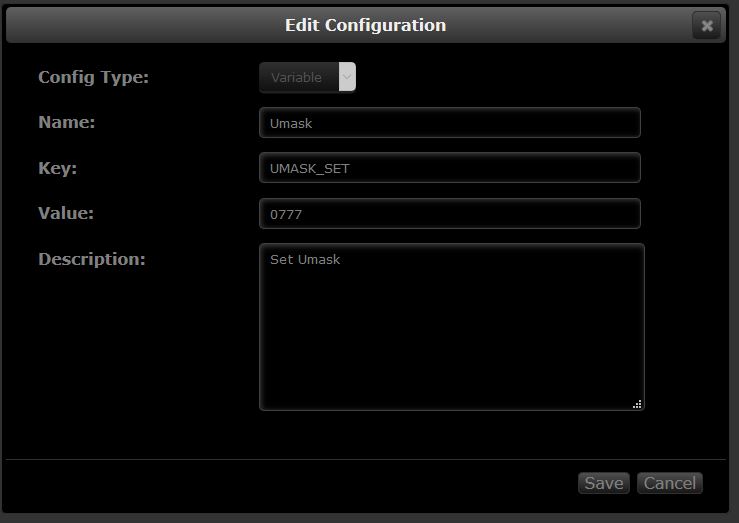
@poopsie @sup3rb0wlz Add a new variable with the key UMASK_SET and the value 0777: Edit: Not actually knowing a thing about how umask works, 000 may be the correct setting after reading a few more forum posts.
-
If you browse to /mnt/user/appdata/minecraft/servers, do you see the server folder and contents there? If you do it's a permission problem. I had to change the permissions on all the folders and files inside the minecraft folder to 0 for MineOS to be able to read from them.
-
Thank you so much for this! I'm a bit on the edge though as when doing a test backup as my whole server froze again when V2 tried to delete the old V1 backup folders BUT it's actually deleting them. At least it deleted the first folder so far. I'll update this post if/when the other folder gets removed. Hooray! It did it!
-
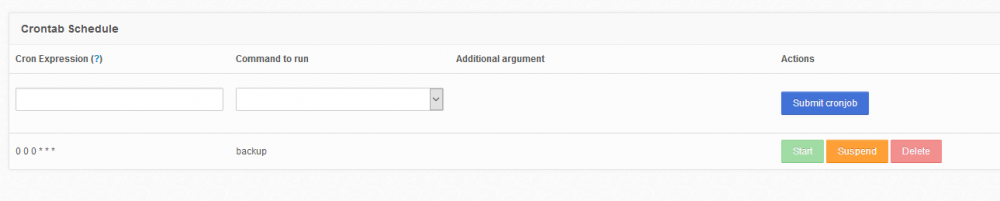
No, nothing is done automatically by default. If you want to create a restore point every night, you can add a new schedule. The cron expression should be "0 0 0 * * *" and the command should be "Create a new restore point" which ends up being "backup" in the list for some reason. That will create a restore point at 00:00:00 (hours, minutes, seconds) every day of every month, every year. Once you hit submit, you need to start it, otherwise the job will not be run at the desired time. You can see my example below:
-
The log_dir was set to /opt/plexpy/logs. Setting it to /config/logs worked! Thank you very much! Edit: Both the backup_dir and _cache_dir was also set to /opt/plexpy and not /config. I have no idea why this change happened but everything seems to be working fine now!


