





Aractor
Members
-
Joined
-
Last visited
-
Can someone please help me understand the "binhex-shared" folder added to many of the binhex templates, and how to use it? I've tried looking for any documentation on this feature of the binhex templates but haven't really been able to find anything explaining it.
-
Figured it out - Changed the Recyclarr container to use "network: bridge" and now everything is happy.
-
I'm sure I'm missing something obvious, but I'm trying to get Recyclarr to talk to binhex-sonarr, which is running behind binhex-privoxyvpn. I got the ports removed from binhex-sonarr, and added to binhex-privoxyvpn, and everything is working great for accessing Sonarr locally through the browser. But when I'm trying to setup Recyclarr to sync TRaSH profiles into Sonarr, I get an HTTP error saying it cannot reach Sonarr. =========================================== Processing Sonarr Server: [web-1080p-v4] =========================================== [ERR] Unable to obtain service version information [ERR] HTTP error: Call failed. Host is unreachable : GET http://REDACTED:8989/api/v3/system/status [ERR] Reason: Problem connecting to the service. Is your `base_url` correct? I've triple checked my API key (even tried generating a new one) and the base URL in my recyclarr.yml but I'm guessing there is something I need to do to let Recyclarr talk to Sonarr through the VPN.
-
I was finally able to fix this myself by running the command and confirming the container wasn't getting access to the main storage. docker exec --user app backblaze_personal_backup ls -la /config/wine/dosdevices/ So, I ran this command to manually mount the storage drive. docker exec --user app backblaze_personal_backup ln -s /backup_volume/ /config/wine/dosdevices/d: Found the solution in the container's git documentation https://github.com/JonathanTreffler/backblaze-personal-wine-container#volumes
-
I have the same issue myself. I've tried using both the normal deployment with `tessypowder/backblaze-personal-wine` and `tessypowder/backblaze-personal-wine:ubuntu22` but neither is seeing a Z drive. I tried fully deleting the app data foldering & docker image, to reinstall with a completely clean slate, but no change. Right now the backblaze docker is effectively useless. 😓
-
I can say that yes I've read it, but if I've caused these issues for myself then I clearly didn't fully understand it. 😕 I'll review the article you linked.
-
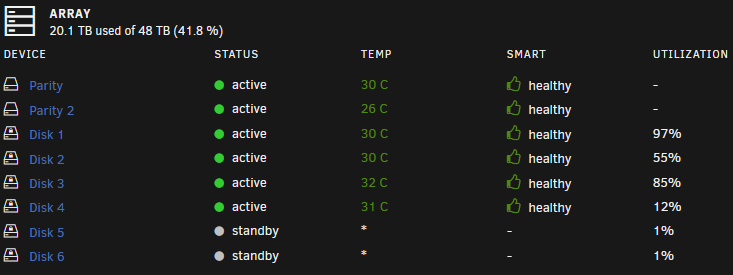
Looks like this kind of figured itself out? I was getting system alerts for my disk 3 filling up, and it got up to 100% utilization. But looking at it now, it's down to 85% utilization. My disk 1 however continues to remain high at 97% utilized, while my disk5 and disk6 haven't been used at all.
-
My array is 8 disks (8x8TB), 6 data disks + 2 parity disks, and 2x4TB m.2 cache drives. Everything seems to be working great, except that I'm noticing two of my disks are getting filled up significantly more than the others. All of my shares are assigned to use all the disks, so as far as I known nothing is explicitly being assigned to any one disk. What can I do to fix this so all my disks are getting filled more equally? Or alternatively, can I do anything to move data around & rebalance the disks? whnas-diagnostics-20231206-1308.zip
-
Rebooted the server and the error has gone away 🤷♂️Hopefully it's nothing to worry about long term.
-
Bump...Would greatly appreciate any insight on if this is something I need to be concerned about or not. Thank you!
-
Woke up to this error from the Fix Common Problems plugin, not sure what's causing it. whnas-diagnostics-20231022-1536.zip
-
Ok, thank you, I think I'm following. So basically, the containers can share SteamCMD files but each container needs it's own Steam port set. The Steam port needs to be unique for each server, and cannot be shared. Is that right?
-
What is the best practice for running multiple game server dockers for different games? The games run on different ports, but the Steam port (27015) overlaps between containers. Ideally I'd like to reuse the same install of SteamCMD for both containers if possible.
-
Thanks @ich777! I knew I was doing something basic wrong, and I definitely had validate installed flagged true. I cleared that, set my own config file, and now everything is working great.
-
I feel like I must be missing something really basic here, but I'm trying to get the 7DaysToDie server running. It starts, everything is great, but if I edit serverconfig.xml and the restart the docker container then the file gets overwritten back to the generic default. Am I not supposed to be editing the serverconfig.xml directly? Do I need to mark it read-only after making changes? I just know I'm missing something obvious.

