





Aractor
Members
-
Joined
-
Last visited
Everything posted by Aractor
-
Can someone please help me understand the "binhex-shared" folder added to many of the binhex templates, and how to use it? I've tried looking for any documentation on this feature of the binhex templates but haven't really been able to find anything explaining it.
-
Figured it out - Changed the Recyclarr container to use "network: bridge" and now everything is happy.
-
I'm sure I'm missing something obvious, but I'm trying to get Recyclarr to talk to binhex-sonarr, which is running behind binhex-privoxyvpn. I got the ports removed from binhex-sonarr, and added to binhex-privoxyvpn, and everything is working great for accessing Sonarr locally through the browser. But when I'm trying to setup Recyclarr to sync TRaSH profiles into Sonarr, I get an HTTP error saying it cannot reach Sonarr. =========================================== Processing Sonarr Server: [web-1080p-v4] =========================================== [ERR] Unable to obtain service version information [ERR] HTTP error: Call failed. Host is unreachable : GET http://REDACTED:8989/api/v3/system/status [ERR] Reason: Problem connecting to the service. Is your `base_url` correct? I've triple checked my API key (even tried generating a new one) and the base URL in my recyclarr.yml but I'm guessing there is something I need to do to let Recyclarr talk to Sonarr through the VPN.
-
I was finally able to fix this myself by running the command and confirming the container wasn't getting access to the main storage. docker exec --user app backblaze_personal_backup ls -la /config/wine/dosdevices/ So, I ran this command to manually mount the storage drive. docker exec --user app backblaze_personal_backup ln -s /backup_volume/ /config/wine/dosdevices/d: Found the solution in the container's git documentation https://github.com/JonathanTreffler/backblaze-personal-wine-container#volumes
-
I have the same issue myself. I've tried using both the normal deployment with `tessypowder/backblaze-personal-wine` and `tessypowder/backblaze-personal-wine:ubuntu22` but neither is seeing a Z drive. I tried fully deleting the app data foldering & docker image, to reinstall with a completely clean slate, but no change. Right now the backblaze docker is effectively useless. 😓
-
I can say that yes I've read it, but if I've caused these issues for myself then I clearly didn't fully understand it. 😕 I'll review the article you linked.
-
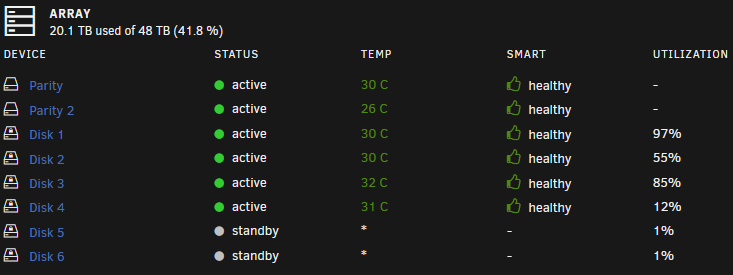
Looks like this kind of figured itself out? I was getting system alerts for my disk 3 filling up, and it got up to 100% utilization. But looking at it now, it's down to 85% utilization. My disk 1 however continues to remain high at 97% utilized, while my disk5 and disk6 haven't been used at all.
-
My array is 8 disks (8x8TB), 6 data disks + 2 parity disks, and 2x4TB m.2 cache drives. Everything seems to be working great, except that I'm noticing two of my disks are getting filled up significantly more than the others. All of my shares are assigned to use all the disks, so as far as I known nothing is explicitly being assigned to any one disk. What can I do to fix this so all my disks are getting filled more equally? Or alternatively, can I do anything to move data around & rebalance the disks? whnas-diagnostics-20231206-1308.zip
-
Rebooted the server and the error has gone away 🤷♂️Hopefully it's nothing to worry about long term.
-
Bump...Would greatly appreciate any insight on if this is something I need to be concerned about or not. Thank you!
-
Woke up to this error from the Fix Common Problems plugin, not sure what's causing it. whnas-diagnostics-20231022-1536.zip
-
Ok, thank you, I think I'm following. So basically, the containers can share SteamCMD files but each container needs it's own Steam port set. The Steam port needs to be unique for each server, and cannot be shared. Is that right?
-
What is the best practice for running multiple game server dockers for different games? The games run on different ports, but the Steam port (27015) overlaps between containers. Ideally I'd like to reuse the same install of SteamCMD for both containers if possible.
-
Thanks @ich777! I knew I was doing something basic wrong, and I definitely had validate installed flagged true. I cleared that, set my own config file, and now everything is working great.
-
I feel like I must be missing something really basic here, but I'm trying to get the 7DaysToDie server running. It starts, everything is great, but if I edit serverconfig.xml and the restart the docker container then the file gets overwritten back to the generic default. Am I not supposed to be editing the serverconfig.xml directly? Do I need to mark it read-only after making changes? I just know I'm missing something obvious.
-
nzbGet only supports downloading 1 nzb at a time, but the UrlConnections does control how many parts of that nzb it downloads at the same time.
-
Attaching my diagnostics files. After some Googling it appears this 2.5GB NIC might have a known issue with Linux seeing both ports having the same MAC address. I manually set one of them to a randomly generated MAC address to temporarily bypass that possible issue, but there's no real change. Nothing I've been able to do changes the Interface Rules drop-down menu to include the MAC addresses for the Intel NICs. whnas-diagnostics-20230621-1309.zip
-
Sorry, I should have mentioned I've tried that several times. At best, one time I was able to boot to only eth0-2 but for some reason one of the disabled onboard NICs still gets picked up by Unraid at eth0. Interface Rules also never offers the NIC MAC addresses to set as eth0 or eth1 either.
-
I just picked up and installed a dual port Intel 2.5GB NIC into my Unraid box. https://www.amazon.com/gp/product/B0BY83FW5H I assumed in Settings -> Network Settings I'd be able to edit the Interface Rules to make the two new NIC ports eth0 and eth1, but so far I'm not having any luck. I've disabled both onboard NICs in my BIOS, but then when I boot into Unraid one of the onboard NICs is still seen by Unraid and works. 😕 Also, my Interface Rules only offer eth0 and eth2 to change MAC address values, even though Network Settings shows eth0-3. The Interface Rules drop-down menu also only has the choice of the MAC address for eth0 or eth2. Lastly, my eth1 and eth3 are showing the same MAC address. All I want is for my two 2.5GBs NICs to be in use, and disable/ignore my two 1GBs NICs. But I'm so completely lost here. Any help would be appreciated.
-
Read a bit further back in the thread and found the solution mentioned, worked like a charm.
-
Not quite sure what I could be doing wrong here...I just installed the ClamAV app, but when running it I get: 2022-08-01T03:21:54+00:00 ClamAV process starting Updating ClamAV scan DB Hint: The database directory must be writable for UID 100 or GID 101 An error occurred (freshclam returned with exit code '2') The Docker is pointed to /mnt/user/appdata/clamav/ for the ClamAV Signatures, and successfully created the folder during deployment. After deployment the /appdata/clamav folder is owned by nobody with permissions drwxr-xr-x I've also confirmed PGID and PUID are the same as all my other Docker containers which are working fine. What can I do to fix this so ClamAV can run?


