





Maticks
Members
-
Joined
-
Last visited
Everything posted by Maticks
-
I can ping from unraid to the docker. i managed to fix it through just changed to Host.
-
I tried this but didnt work still. Still can't ping the Unraid server.
-
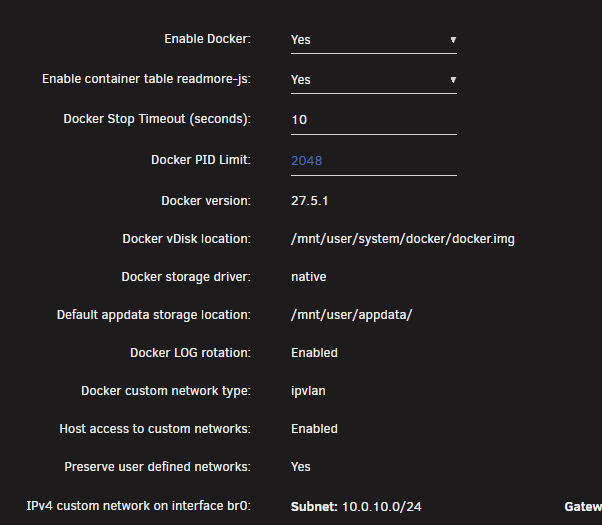
I am hoping its just a setting somewhere i have missed. I have Home Assistant running on a VM as BR0 i have given it an ip on my lan of 10.0.10.248. my unraid server is 10.0.10.252 when i try ping 10.0.10.252 i can't reach it on the VM. I am trying to run the Unraid plugin on HA. I can access the HA server fine on the LAN though.
-
Not sure if anyone has seen this but since moving to an AM5 7700X Unraid just randomly stops responding. It feels more like the network driver stops working though, because when i boot back up after forcing a reboot i get a UPS Communcations error about it being unreachable. So that tells me the Kernel likely didnt crash the network card stopped working likely. Since I can't get diags downloaded with no network connection ive attached them anyone know what this might be? It's random sometimes its hours sometimes its days. tower-diagnostics-20240729-0017.zip.crdownload
-
Anyone ever seen these, i moved from an Intel Ethernet Card to another with an Intel Ethernet Card. I tried upgrading but that didn't make any difference. These messages weren't there before switching out the motherboard. Attaching Diagnotics, anyone have any suggestions on how to fix it. Jul 21 05:37:43 Tower kernel: veth7574e5c: renamed from eth0 Jul 21 05:37:43 Tower kernel: eth0: renamed from veth246d9d3 Jul 21 05:38:00 Tower kernel: veth246d9d3: renamed from eth0 Jul 21 05:38:01 Tower kernel: eth0: renamed from veth7257c17 Jul 21 05:38:17 Tower kernel: veth7257c17: renamed from eth0 Jul 21 05:38:18 Tower kernel: eth0: renamed from veth74ebec2 Jul 21 05:38:35 Tower kernel: veth74ebec2: renamed from eth0 Jul 21 05:38:35 Tower kernel: eth0: renamed from vethb478acf Jul 21 05:38:52 Tower kernel: vethb478acf: renamed from eth0 Jul 21 05:38:53 Tower kernel: eth0: renamed from veth6960e55 Jul 21 05:39:10 Tower kernel: veth6960e55: renamed from eth0 Jul 21 05:39:10 Tower kernel: eth0: renamed from veth8ff1cbc Jul 21 05:39:28 Tower kernel: veth8ff1cbc: renamed from eth0 Jul 21 05:39:28 Tower kernel: eth0: renamed from vethbe2c01a Jul 21 05:39:45 Tower kernel: vethbe2c01a: renamed from eth0 Jul 21 05:39:45 Tower kernel: eth0: renamed from vethe11298f Jul 21 05:40:03 Tower kernel: vethe11298f: renamed from eth0 Jul 21 05:40:03 Tower kernel: eth0: renamed from veth470aa43 Jul 21 05:40:19 Tower kernel: veth470aa43: renamed from eth0 Jul 21 05:40:19 Tower kernel: eth0: renamed from vethd2261d5 Jul 21 05:40:36 Tower kernel: vethd2261d5: renamed from eth0 Jul 21 05:40:36 Tower kernel: eth0: renamed from veth23b3f6b Jul 21 05:40:52 Tower kernel: veth23b3f6b: renamed from eth0 Jul 21 05:40:53 Tower kernel: eth0: renamed from veth96c40fb Jul 21 05:41:10 Tower kernel: veth96c40fb: renamed from eth0 Jul 21 05:41:10 Tower kernel: eth0: renamed from veth91b9029 Jul 21 05:41:27 Tower kernel: veth91b9029: renamed from eth0 Jul 21 05:41:27 Tower kernel: eth0: renamed from veth3c239da Jul 21 05:41:44 Tower kernel: veth3c239da: renamed from eth0 Jul 21 05:41:44 Tower kernel: eth0: renamed from veth62b354d Jul 21 05:42:01 Tower kernel: veth62b354d: renamed from eth0 Jul 21 05:42:02 Tower kernel: eth0: renamed from vetha5e03e2 Jul 21 05:42:18 Tower kernel: vetha5e03e2: renamed from eth0 Jul 21 05:42:19 Tower kernel: eth0: renamed from veth009bc2e Jul 21 05:42:36 Tower kernel: veth009bc2e: renamed from eth0 Jul 21 05:42:36 Tower kernel: eth0: renamed from veth705ed30 Jul 21 05:42:53 Tower kernel: veth705ed30: renamed from eth0 Jul 21 05:42:53 Tower kernel: eth0: renamed from veth15e9705 Jul 21 05:43:01 Tower kernel: veth15e9705: renamed from eth0 Jul 21 05:43:13 Tower kernel: eth0: renamed from veth791e18a Jul 21 05:43:30 Tower kernel: veth791e18a: renamed from eth0 Jul 21 05:43:31 Tower kernel: eth0: renamed from veth53e22e4 Jul 21 05:43:47 Tower kernel: veth53e22e4: renamed from eth0 Jul 21 05:43:48 Tower kernel: eth0: renamed from vethcbcc80c tower-diagnostics-20240720-1946.zip
-
6.12.8 is crashing for me the same way with BTRFS. I will try change out the motherboard, processor and memory see if that fixes it. its weird my main cache drive is fine just my second cache pool is having this issue. but a repair has no errors.
-
May 5 15:50:51 Tower kernel: BTRFS error (device sde1): parent transid verify failed on logical 13897975595008 mirror 2 wanted 1008412 found 1008417 May 5 15:50:51 Tower kernel: BTRFS error (device sde1): parent transid verify failed on logical 13897975595008 mirror 1 wanted 1008412 found 1008417 May 5 15:50:51 Tower kernel: BTRFS: error (device sde1: state A) in __btrfs_free_extent:3076: errno=-5 IO failure May 5 15:50:51 Tower kernel: BTRFS info (device sde1: state EA): forced readonly May 5 15:50:51 Tower kernel: BTRFS error (device sde1: state EA): failed to run delayed ref for logical 13897975300096 num_bytes 16384 type 176 action 2 ref_mod 1: -5 May 5 15:50:51 Tower kernel: BTRFS: error (device sde1: state EA) in btrfs_run_delayed_refs:2150: errno=-5 IO failure May 5 15:50:51 Tower kernel: BTRFS warning (device sde1: state EA): Skipping commit of aborted transaction. May 5 15:50:51 Tower kernel: BTRFS: error (device sde1: state EA) in cleanup_transaction:1992: errno=-5 IO failure happened a lot quicker this time
-
lots of people downgraded to 6.11.5 who ran into this but i can't seem to do that anymore? is there a command to force that version to downgrade ?
-
memtest has also passed
-
ive tried different sticks and in different slots works fine for 12 hours then starts error again. it's weird behaviour.
-
since upgrading to 6.12.10 ive had BRFS errors not on my main cache setup but my second cache pool. A reboot always fixes it, rolling back to 6.12.8 seems to stop the BRFS issues, but is there a fix here i can apply? tower-diagnostics-20240503-1654.zip.crdownload
-
What is the best way to replace my aging cache disks? I have them in a BTRFS Raid 1 Do i run a Balance then power down the server rip out one of the disks and replace it?
-
Yeah i do notice that, so what you guys are saying apart from a fancy newer LSI card and fresh cables. It won't really make any difference in speed with this many drives and 4T disks still in my system?
-
8TB around 20-24 hours. a faster LSI card i am assuming will cut that down with faster disk accesses.
-
Hi Unraid pplz, I have a LSI 9201-16i at the moment total of 15 disks second cache pool included or 2 Parity and 11 Data Drives on just the array. WD Red and Ironwolf 4T and 8T disks. I am looking to move onto a 9305-16i and recable all the SATA disks with the different adaptor type. Anyone have an idea of what speed increase ill see on the array or anyone have a 9305-16i and advise what speeds they see on their disks. Considering moving to 10T or 12T disks but the rebuilt times at the moment are rather long any increase is just going to make that process even longer.
-
In the plex docker under extra parameters add in this to the end you already have nvidia in there. --runtime=nvidia --no-healthcheck
-
changed docker from macvlan to ipvlan, rebooted the server, looks like that fixed it for me. lets see if it crashes in the next 24 hours.
-
I added that to Extra Parameters: it still is outputting that statement into log.json
-
Docker was running and VM was running, and it just crashed the webui while i was working. noticed my dockers were unreachable. I suspect it is this Plex ongoing issue with this log file filling tmpfs. Can't seem to find a way to stop it happening. It is about 1M per hour i suspect it hits 100% and crashes everything. tmpfs 32M 6.4M 26M 20% /run Is there a way to disable verbose logging in docker to log.json ? Only other thing i can think of is try using the old Nvidia driver see if that stops this v530.41.03
-
Been having some issues with hard lockups i get a few days then the server lets go. Today it happened again my Plex server docker logs was fulling up /run before i've tried purging the logs but they are filling really fast. I can't seem to get rid of this message repeating endlessly in log.json. I have tried deleting it daily but that didn't help. This afternoon the unraid server web ui would only load the banner and nothing else. Docker was offline with all the dockers down when it hard locked up. Diags are attached not sure if there is anything in them since i had to reboot the system to export them. VM's were still running though and reachable. I had to power off the server. Server is up for only 3 hours already at 5MB log file. Filesystem Size Used Avail Use% Mounted on tmpfs 32M 5.0M 28M 16% /run log.json file. Nvidia drivers are the latest and the server version is as well. {"level":"info","msg":"Using low-level runtime /usr/bin/runc","time":"2023-07-06T19:26:37+10:00"} {"level":"info","msg":"Running with config:\n{\n \"AcceptEnvvarUnprivileged\": true,\n \"NVIDIAContainerCLIConfig\": {\n \"Root\": \"\"\n },\n \"NVIDIACTKConfig\": {\n \"Path\": \"nvidia-ctk\"\n },\n \"NVIDIAContainerRuntimeConfig\": {\n \"DebugFilePath\": \"/dev/null\",\n \"LogLevel\": \"info\",\n \"Runtimes\": [\n \"docker-runc\",\n \"runc\"\n ],\n \"Mode\": \"auto\",\n \"Modes\": {\n \"CSV\": {\n \"MountSpecPath\": \"/etc/nvidia-container-runtime/host-files-for-container.d\"\n },\n \"CDI\": {\n \"SpecDirs\": null,\n \"DefaultKind\": \"nvidia.com/gpu\",\n \"AnnotationPrefixes\": [\n \"cdi.k8s.io/\"\n ]\n }\n }\n },\n \"NVIDIAContainerRuntimeHookConfig\": {\n \"Path\": \"/usr/bin/nvidia-container-runtime-hook\",\n \"SkipModeDetection\": false\n }\n}","time":"2023-07-06T19:26:42+10:00"} {"level":"info","msg":"Using low-level runtime /usr/bin/runc","time":"2023-07-06T19:26:42+10:00"} {"level":"info","msg":"Running with config:\n{\n \"AcceptEnvvarUnprivileged\": true,\n \"NVIDIAContainerCLIConfig\": {\n \"Root\": \"\"\n },\n \"NVIDIACTKConfig\": {\n \"Path\": \"nvidia-ctk\"\n },\n \"NVIDIAContainerRuntimeConfig\": {\n \"DebugFilePath\": \"/dev/null\",\n \"LogLevel\": \"info\",\n \"Runtimes\": [\n \"docker-runc\",\n \"runc\"\n ],\n \"Mode\": \"auto\",\n \"Modes\": {\n \"CSV\": {\n \"MountSpecPath\": \"/etc/nvidia-container-runtime/host-files-for-container.d\"\n },\n \"CDI\": {\n \"SpecDirs\": null,\n \"DefaultKind\": \"nvidia.com/gpu\",\n \"AnnotationPrefixes\": [\n \"cdi.k8s.io/\"\n ]\n }\n }\n },\n \"NVIDIAContainerRuntimeHookConfig\": {\n \"Path\": \"/usr/bin/nvidia-container-runtime-hook\",\n \"SkipModeDetection\": false\n }\n}","time":"2023-07-06T19:26:47+10:00"} {"level":"info","msg":"Using low-level runtime /usr/bin/runc","time":"2023-07-06T19:26:47+10:00"} {"level":"info","msg":"Running with config:\n{\n \"AcceptEnvvarUnprivileged\": true,\n \"NVIDIAContainerCLIConfig\": {\n \"Root\": \"\"\n },\n \"NVIDIACTKConfig\": {\n \"Path\": \"nvidia-ctk\"\n },\n \"NVIDIAContainerRuntimeConfig\": {\n \"DebugFilePath\": \"/dev/null\",\n \"LogLevel\": \"info\",\n \"Runtimes\": [\n \"docker-runc\",\n \"runc\"\n ],\n \"Mode\": \"auto\",\n \"Modes\": {\n \"CSV\": {\n \"MountSpecPath\": \"/etc/nvidia-container-runtime/host-files-for-container.d\"\n },\n \"CDI\": {\n \"SpecDirs\": null,\n \"DefaultKind\": \"nvidia.com/gpu\",\n \"AnnotationPrefixes\": [\n \"cdi.k8s.io/\"\n ]\n }\n }\n },\n \"NVIDIAContainerRuntimeHookConfig\": {\n \"Path\": \"/usr/bin/nvidia-container-runtime-hook\",\n \"SkipModeDetection\": false\n }\n}","time":"2023-07-06T19:26:52+10:00"} {"level":"info","msg":"Using low-level runtime /usr/bin/runc","time":"2023-07-06T19:26:52+10:00"} tower-diagnostics-20230706-1927.zip
-
I have tried 6.11.5 and 6.12.2 both having the same issue Nvidia Drivers are filling the Plex Server Docker log.json file till it crashes the system in 28+ Hours. Tried setting parameters in Plex Docker didn't get rid of the below message, but i have put together a workaround below for the time being till i guess an update comes out? If someone knows how to fix this properly then even better {"level":"info","msg":"Running with config:\n{\n \"AcceptEnvvarUnprivileged\": true,\n \"NVIDIAContainerCLIConfig\": {\n \"Root\": \"\"\n },\n \"NVIDIACTKConfig\": {\n \"Path\": \"nvidia-ctk\"\n },\n \"NVIDIAContainerRuntimeConfig\": {\n \"DebugFilePath\": \"/dev/null\",\n \"LogLevel\": \"info\",\n \"Runtimes\": [\n \"docker-runc\",\n \"runc\"\n ],\n \"Mode\": \"auto\",\n \"Modes\": {\n \"CSV\": {\n \"MountSpecPath\": \"/etc/nvidia-container-runtime/host-files-for-container.d\"\n },\n \"CDI\": {\n \"SpecDirs\": null,\n \"DefaultKind\": \"nvidia.com/gpu\",\n \"AnnotationPrefixes\": [\n \"cdi.k8s.io/\"\n ]\n }\n }\n },\n \"NVIDIAContainerRuntimeHookConfig\": {\n \"SkipModeDetection\": false\n }\n}","time":"2023-07-01T08:49:53+10:00"} {"level":"info","msg":"Using low-level runtime /usr/bin/runc","time":"2023-07-01T08:49:53+10:00"} {"level":"info","msg":"Running with config:\n{\n \"AcceptEnvvarUnprivileged\": true,\n \"NVIDIAContainerCLIConfig\": {\n \"Root\": \"\"\n },\n \"NVIDIACTKConfig\": {\n \"Path\": \"nvidia-ctk\"\n },\n \"NVIDIAContainerRuntimeConfig\": {\n \"DebugFilePath\": \"/dev/null\",\n \"LogLevel\": \"info\",\n \"Runtimes\": [\n \"docker-runc\",\n \"runc\"\n ],\n \"Mode\": \"auto\",\n \"Modes\": {\n \"CSV\": {\n \"MountSpecPath\": \"/etc/nvidia-container-runtime/host-files-for-container.d\"\n },\n \"CDI\": {\n \"SpecDirs\": null,\n \"DefaultKind\": \"nvidia.com/gpu\",\n \"AnnotationPrefixes\": [\n \"cdi.k8s.io/\"\n ]\n }\n }\n },\n \"NVIDIAContainerRuntimeHookConfig\": {\n \"SkipModeDetection\": false\n }\n}","time":"2023-07-01T08:49:59+10:00"} {"level":"info","msg":"Using low-level runtime /usr/bin/runc","time":"2023-07-01T08:49:59+10:00"} {"level":"info","msg":"Running with config:\n{\n \"AcceptEnvvarUnprivileged\": true,\n \"NVIDIAContainerCLIConfig\": {\n \"Root\": \"\"\n },\n \"NVIDIACTKConfig\": {\n \"Path\": \"nvidia-ctk\"\n },\n \"NVIDIAContainerRuntimeConfig\": {\n \"DebugFilePath\": \"/dev/null\",\n \"LogLevel\": \"info\",\n \"Runtimes\": [\n \"docker-runc\",\n \"runc\"\n ],\n \"Mode\": \"auto\",\n \"Modes\": {\n \"CSV\": {\n \"MountSpecPath\": \"/etc/nvidia-container-runtime/host-files-for-container.d\"\n },\n \"CDI\": {\n \"SpecDirs\": null,\n \"DefaultKind\": \"nvidia.com/gpu\",\n \"AnnotationPrefixes\": [\n \"cdi.k8s.io/\"\n ]\n }\n }\n },\n \"NVIDIAContainerRuntimeHookConfig\": {\n \"SkipModeDetection\": false\n }\n}","time":"2023-07-01T08:50:04+10:00"} {"level":"info","msg":"Using low-level runtime /usr/bin/runc","time":"2023-07-01T08:50:04+10:00"} User Script running daily is keeping it under control for me. #!/bin/bash set -e # Enable error checking echo "" echo "<font color='red'><b>Before:</b></font>" echo "=====================================================================================================================================================================================" du -ah /run/docker/containerd/ | grep -v "/$" | sort -rh | head -60 | grep log.json echo "=====================================================================================================================================================================================" echo "Cleaning Logs:" logs=$(find /run/docker/containerd/ -name 'log.json') for log in $logs; do if [[ -f "$log" ]]; then # Check if the file exists echo "Cleaning $log" cat /dev/null > "$log" echo "Cleanup complete for $log" else echo "File not found: $log" fi done sleep 6 echo "...<font color='blue'>cleaning complete!</font>" echo "" echo "<font color='green'><b>After:</b></font>" echo "=====================================================================================================================================================================================" du -ah /run/docker/containerd/ | grep -v "/$" | sort -rh | head -60 | grep log.json echo "" The script running. Script location: /tmp/user.scripts/tmpScripts/Clean Docker Logs/script Note that closing this window will abort the execution of this script Before: ===================================================================================================================================================================================== 6.9M /run/docker/containerd/daemon/io.containerd.runtime.v2.task/moby/84a71d0217765ed3e4358ec4a4dfdeee3fa7a34e41a00186ebab7b84d94cc3bf/log.json 8.0K /run/docker/containerd/daemon/io.containerd.runtime.v2.task/moby/1158fb61ff223a7465fd7eca2d128f7cebb25a922f9e048dab8120e9788c4341/log.json 4.0K /run/docker/containerd/daemon/io.containerd.runtime.v2.task/moby/68ee5760f343a65f11b43434acf4ca724b9fb0115a4448ee1f213612b802a396/log.json ===================================================================================================================================================================================== Cleaning Logs: Cleaning /run/docker/containerd/daemon/io.containerd.runtime.v2.task/moby/84a71d0217765ed3e4358ec4a4dfdeee3fa7a34e41a00186ebab7b84d94cc3bf/log.json Cleanup complete for /run/docker/containerd/daemon/io.containerd.runtime.v2.task/moby/84a71d0217765ed3e4358ec4a4dfdeee3fa7a34e41a00186ebab7b84d94cc3bf/log.json Cleaning /run/docker/containerd/daemon/io.containerd.runtime.v2.task/moby/f439d9288ed4eeeff81e3fefea2e53c319db8e88587f477cbb7f00084ce53f78/log.json Cleanup complete for /run/docker/containerd/daemon/io.containerd.runtime.v2.task/moby/f439d9288ed4eeeff81e3fefea2e53c319db8e88587f477cbb7f00084ce53f78/log.json Cleaning /run/docker/containerd/daemon/io.containerd.runtime.v2.task/moby/e0723af74f141f744aa6002a2573efefe31a825727140675571000173b866174/log.json Cleanup complete for /run/docker/containerd/daemon/io.containerd.runtime.v2.task/moby/e0723af74f141f744aa6002a2573efefe31a825727140675571000173b866174/log.json Cleaning /run/docker/containerd/daemon/io.containerd.runtime.v2.task/moby/68ee5760f343a65f11b43434acf4ca724b9fb0115a4448ee1f213612b802a396/log.json Cleanup complete for /run/docker/containerd/daemon/io.containerd.runtime.v2.task/moby/68ee5760f343a65f11b43434acf4ca724b9fb0115a4448ee1f213612b802a396/log.json Cleaning /run/docker/containerd/daemon/io.containerd.runtime.v2.task/moby/4fda88ee8beeb6ace74584bbf196b5ac3e18c6b491a1fd06c2f23eecf1fc8f39/log.json Cleanup complete for /run/docker/containerd/daemon/io.containerd.runtime.v2.task/moby/4fda88ee8beeb6ace74584bbf196b5ac3e18c6b491a1fd06c2f23eecf1fc8f39/log.json Cleaning /run/docker/containerd/daemon/io.containerd.runtime.v2.task/moby/23093eff7956319820e36e53b29f1d053859320636e12be6f763ab5ace1ce50b/log.json Cleanup complete for /run/docker/containerd/daemon/io.containerd.runtime.v2.task/moby/23093eff7956319820e36e53b29f1d053859320636e12be6f763ab5ace1ce50b/log.json Cleaning /run/docker/containerd/daemon/io.containerd.runtime.v2.task/moby/1158fb61ff223a7465fd7eca2d128f7cebb25a922f9e048dab8120e9788c4341/log.json Cleanup complete for /run/docker/containerd/daemon/io.containerd.runtime.v2.task/moby/1158fb61ff223a7465fd7eca2d128f7cebb25a922f9e048dab8120e9788c4341/log.json Cleaning /run/docker/containerd/daemon/io.containerd.runtime.v2.task/moby/9235ee51028a3baa5407882cc7eee50f0f2dad73bca02dc0b053dc490d50549d/log.json Cleanup complete for /run/docker/containerd/daemon/io.containerd.runtime.v2.task/moby/9235ee51028a3baa5407882cc7eee50f0f2dad73bca02dc0b053dc490d50549d/log.json ...cleaning complete! After: ===================================================================================================================================================================================== 4.0K /run/docker/containerd/daemon/io.containerd.runtime.v2.task/moby/84a71d0217765ed3e4358ec4a4dfdeee3fa7a34e41a00186ebab7b84d94cc3bf/log.json
-
you might be running into the same issue a few have had. Nvidia GPU Drivers and Plex seem to be created a done of noise in the log files filling the FS for /run which crashes docker and the whole system. do a df -h on console and checkout /run usage for tmpfs. likely in /run/docker/ you have a log.json file that is growing. can't seem to find a fix myself other than clearing the log file in a script daily.
-
If you go into the Docker tab and down the bottom left you click "Add Container" in the template section in the drop down any docker container you've installed the config will be there with the path mapping. you can always select the program you had installed in docker there and click Apply at the bottom to pull it down and install it again.
-
Full error seems to be in the plex docker filling the logs even after updating unraid and the nvidia driver. {"level":"info","msg":"Running with config:\n{\n \"AcceptEnvvarUnprivileged\": true,\n \"NVIDIAContainerCLIConfig\": {\n \"Root\": \"\"\n },\n \"NVIDIACTKConfig\": {\n \"Path\": \"nvidia-ctk\"\n },\n \"NVIDIAContainerRuntimeConfig\": {\n \"DebugFilePath\": \"/dev/null\",\n \"LogLevel\": \"info\",\n \"Runtimes\": [\n \"docker-runc\",\n \"runc\"\n ],\n \"Mode\": \"auto\",\n \"Modes\": {\n \"CSV\": {\n \"MountSpecPath\": \"/etc/nvidia-container-runtime/host-files-for-container.d\"\n },\n \"CDI\": {\n \"SpecDirs\": null,\n \"DefaultKind\": \"nvidia.com/gpu\",\n \"AnnotationPrefixes\": [\n \"cdi.k8s.io/\"\n ]\n }\n }\n },\n \"NVIDIAContainerRuntimeHookConfig\": {\n \"Path\": \"/usr/bin/nvidia-container-runtime-hook\",\n \"SkipModeDetection\": false\n }\n}","time":"2023-07-01T23:22:13+10:00"} {"level":"info","msg":"Using low-level runtime /usr/bin/runc","time":"2023-07-01T23:22:13+10:00"} {"level":"info","msg":"Using OCI specification file path: /var/run/docker/containerd/daemon/io.containerd.runtime.v2.task/moby/da7bb470257853b13128471ed642f52c08147d7d2125cb39dff7ccc8243663af/config.json","time":"2023-07-01T23:22:13+10:00"} {"level":"info","msg":"Auto-detected mode as 'legacy'","time":"2023-07-01T23:22:13+10:00"} {"level":"warning","msg":"Ignoring 32-bit libraries for libcuda.so: [/usr/lib/libcuda.so.535.54.03]","time":"2023-07-01T23:22:13+10:00"} {"level":"info","msg":"Using prestart hook path: /usr/bin/nvidia-container-runtime-hook","time":"2023-07-01T23:22:13+10:00"} {"level":"info","msg":"Selecting /dev/dri/card0 as /dev/dri/card0","time":"2023-07-01T23:22:13+10:00"} {"level":"info","msg":"Selecting /dev/dri/card1 as /dev/dri/card1","time":"2023-07-01T23:22:13+10:00"} {"level":"info","msg":"Selecting /dev/dri/renderD128 as /dev/dri/renderD128","time":"2023-07-01T23:22:13+10:00"} {"level":"info","msg":"Selecting /dev/dri/renderD129 as /dev/dri/renderD129","time":"2023-07-01T23:22:13+10:00"} {"level":"info","msg":"Selecting /usr/lib64/libnvidia-egl-gbm.so.1.1.0 as /usr/lib64/libnvidia-egl-gbm.so.1.1.0","time":"2023-07-01T23:22:13+10:00"} {"level":"warning","msg":"Could not locate glvnd/egl_vendor.d/10_nvidia.json: pattern glvnd/egl_vendor.d/10_nvidia.json not found","time":"2023-07-01T23:22:13+10:00"} {"level":"info","msg":"Selecting /etc/vulkan/icd.d/nvidia_icd.json as /etc/vulkan/icd.d/nvidia_icd.json","time":"2023-07-01T23:22:13+10:00"} {"level":"info","msg":"Selecting /etc/vulkan/implicit_layer.d/nvidia_layers.json as /etc/vulkan/implicit_layer.d/nvidia_layers.json","time":"2023-07-01T23:22:13+10:00"} {"level":"warning","msg":"Could not locate egl/egl_external_platform.d/15_nvidia_gbm.json: pattern egl/egl_external_platform.d/15_nvidia_gbm.json not found","time":"2023-07-01T23:22:13+10:00"} {"level":"warning","msg":"Could not locate egl/egl_external_platform.d/10_nvidia_wayland.json: pattern egl/egl_external_platform.d/10_nvidia_wayland.json not found","time":"2023-07-01T23:22:13+10:00"} {"level":"warning","msg":"Could not locate nvidia/xorg/nvidia_drv.so: pattern nvidia/xorg/nvidia_drv.so not found","time":"2023-07-01T23:22:13+10:00"} {"level":"warning","msg":"Could not locate nvidia/xorg/libglxserver_nvidia.so.535.54.03: pattern nvidia/xorg/libglxserver_nvidia.so.535.54.03 not found","time":"2023-07-01T23:22:13+10:00"} {"level":"warning","msg":"Could not locate X11/xorg.conf.d/10-nvidia.conf: pattern X11/xorg.conf.d/10-nvidia.conf not found","time":"2023-07-01T23:22:13+10:00"} {"level":"warning","msg":"Could not locate nvidia/xorg/nvidia_drv.so: pattern nvidia/xorg/nvidia_drv.so not found","time":"2023-07-01T23:22:13+10:00"} {"level":"warning","msg":"Could not locate nvidia/xorg/libglxserver_nvidia.so.535.54.03: pattern nvidia/xorg/libglxserver_nvidia.so.535.54.03 not found","time":"2023-07-01T23:22:13+10:00"} {"level":"info","msg":"Mounts:","time":"2023-07-01T23:22:13+10:00"} {"level":"info","msg":"Mounting /usr/lib64/libnvidia-egl-gbm.so.1.1.0 at /usr/lib64/libnvidia-egl-gbm.so.1.1.0","time":"2023-07-01T23:22:13+10:00"} {"level":"info","msg":"Mounting /etc/vulkan/icd.d/nvidia_icd.json at /etc/vulkan/icd.d/nvidia_icd.json","time":"2023-07-01T23:22:13+10:00"} {"level":"info","msg":"Mounting /etc/vulkan/implicit_layer.d/nvidia_layers.json at /etc/vulkan/implicit_layer.d/nvidia_layers.json","time":"2023-07-01T23:22:13+10:00"} {"level":"info","msg":"Devices:","time":"2023-07-01T23:22:13+10:00"} {"level":"info","msg":"Injecting /dev/dri/renderD129","time":"2023-07-01T23:22:13+10:00"} {"level":"info","msg":"Injecting /dev/dri/card1","time":"2023-07-01T23:22:13+10:00"} {"level":"info","msg":"Hooks:","time":"2023-07-01T23:22:13+10:00"} {"level":"info","msg":"Injecting /usr/bin/nvidia-ctk [nvidia-ctk hook create-symlinks --link ../card1::/dev/dri/by-path/pci-0000:01:00.0-card --link ../renderD129::/dev/dri/by-path/pci-0000:01:00.0-render]","time":"2023-07-01T23:22:13+10:00"} {"level":"info","msg":"Applied required modification to OCI specification","time":"2023-07-01T23:22:13+10:00"} {"level":"info","msg":"Forwarding command to runtime","time":"2023-07-01T23:22:13+10:00"} {"level":"info","msg":"Running with config:\n{\n \"AcceptEnvvarUnprivileged\": true,\n \"NVIDIAContainerCLIConfig\": {\n \"Root\": \"\"\n },\n \"NVIDIACTKConfig\": {\n \"Path\": \"nvidia-ctk\"\n },\n \"NVIDIAContainerRuntimeConfig\": {\n \"DebugFilePath\": \"/dev/null\",\n \"LogLevel\": \"info\",\n \"Runtimes\": [\n \"docker-runc\",\n \"runc\"\n ],\n \"Mode\": \"auto\",\n \"Modes\": {\n \"CSV\": {\n \"MountSpecPath\": \"/etc/nvidia-container-runtime/host-files-for-container.d\"\n },\n \"CDI\": {\n \"SpecDirs\": null,\n \"DefaultKind\": \"nvidia.com/gpu\",\n \"AnnotationPrefixes\": [\n \"cdi.k8s.io/\"\n ]\n }\n }\n },\n \"NVIDIAContainerRuntimeHookConfig\": {\n \"Path\": \"/usr/bin/nvidia-container-runtime-hook\",\n \"SkipModeDetection\": false\n }\n}","time":"2023-07-01T23:22:14+10:00"} {"level":"info","msg":"Using low-level runtime /usr/bin/runc","time":"2023-07-01T23:22:14+10:00"}
-
still happening even after upgrade.

