






Rich
Members
-
Joined
-
Last visited
-
After 10 hours of troubleshooting post upgrading my server, this was the solution i needed. Thank you so much for posting, you've allowed me a good nights sleep after a crappy day.
-
Did anyone get to the bottom of this? I’m shopping around for a CPU upgrade and had my eye on a 13700.
-
Understood. So DNS isn't passed through to br1, br1 simply uses the same DNS address that br0 has been set to. Assuming i've understood things correctly, i just need to add a firewall rule to allow my br1 network access to the DNS IP on br1. Thanks for your help.
-
That's what i had gathered from reading different posts; DNS is effectively passed-through / inherited from system level and not configured locally (eth1). But why isn't is working in this case?
-
If i run, docker network ls and then, docker network inspect xxxxxx on the bridge, none of the eth1 dockers appear in the list. Assuming this is why the dockers aren't getting DNS?
-
Ok, so i can now ping the gateway and 1.1.1.1 from the docker console connected to the NIC. What isn't working is pinging an address, e.g. google.com, which points towards a DNS problem. Is that likely, as i'd read that eth1 should use the DNS settings from eth0?
-
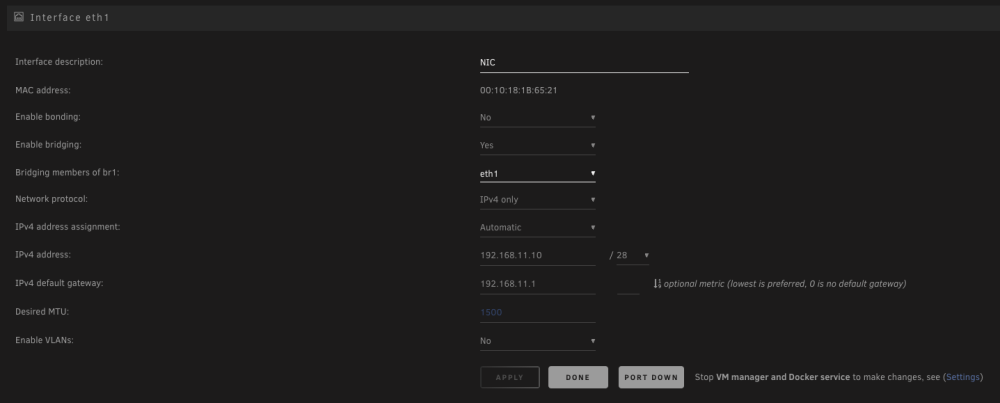
For clarity, what i am trying to do it add a NIC to the server, set it up as eth1 and then set 5ish dockers to use br1 so they can use the NIC to access a separate network and get internet access via the that network / eth1/br1. Is that actually possible? The settings i have currently are as pictured. From the Docker console, for a docker on eth0/br0 i can ping it's gateway and 1.1.1.1. For a docker on eth1/br1, with the pictured settings, i cannot ping it's gateway but can ping 1.1.1.1. Really appreciate any help provided.

-
Tried again with and without a gateway for eth1 and still no luck. What am I missing?
-
Thanks for the reply. I'm confused at why other posts say the gateway should be empty? Also i have a UDM Pro setup with multiple subnets, the two in question are visible in the screenshots above. I started with the gateway populated and still no internet access for the dockers. I have triple tested that a laptop on the new subnet can access the internet, which it can, so it doesn't appear to be an issue with UDM Pro network settings.
-
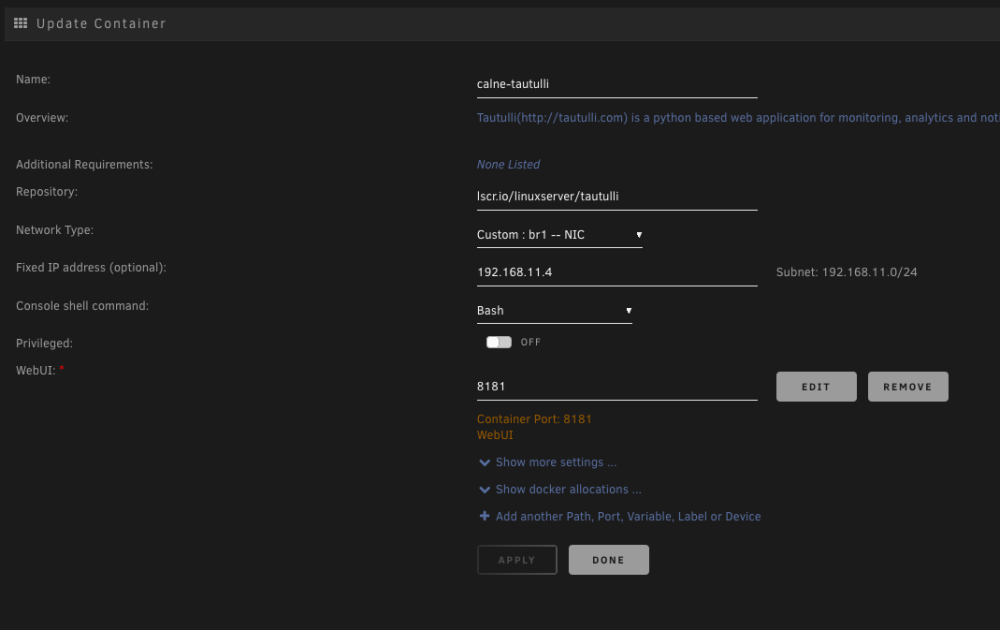
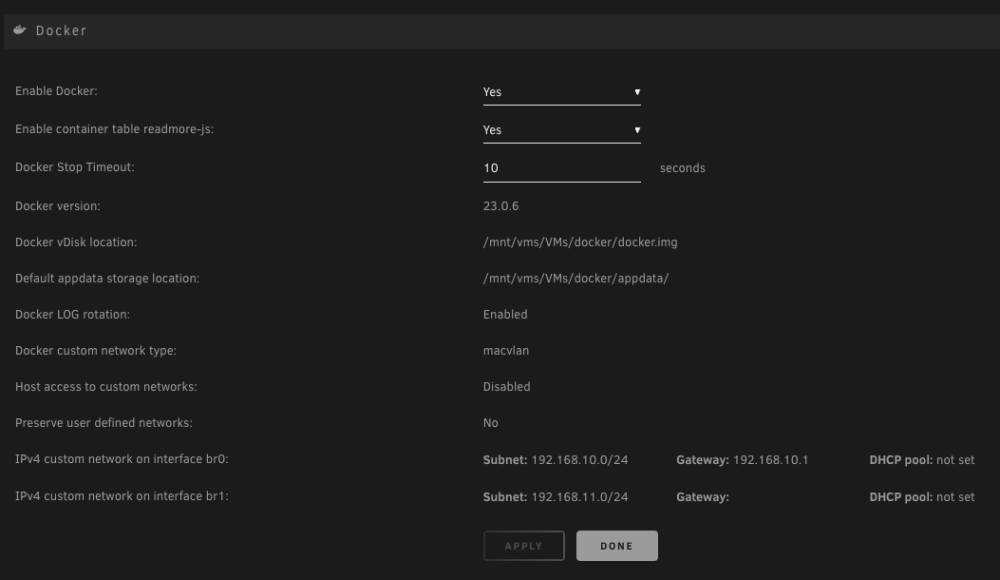
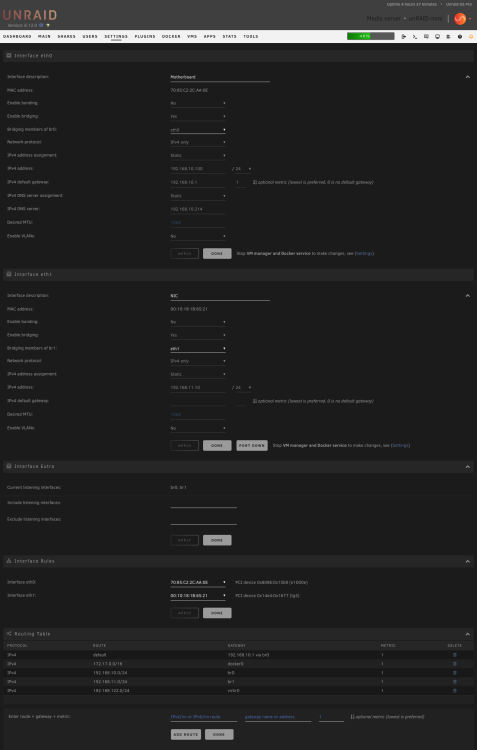
I've just added a (working) NIC to my server to function at eth1, however after setting up and installing dockers on br1 i realised nothing on the network has internet access. I can ping from outside the network inward and from inside the network to other local IPs, however i am not able to get access out of the network. After a quick google i found results saying i needed to keep the gateway for eth1 blank in network settings, which i thin did, however no luck with outward access. Settings are as below. Would really appreciate some pointers here as i've been at this for hours with no luck. Thanks.
-
Hi there, is it possible to add netcat to the nerdtools plugin, please?
-
Is anyone able to help me out here, please?
-
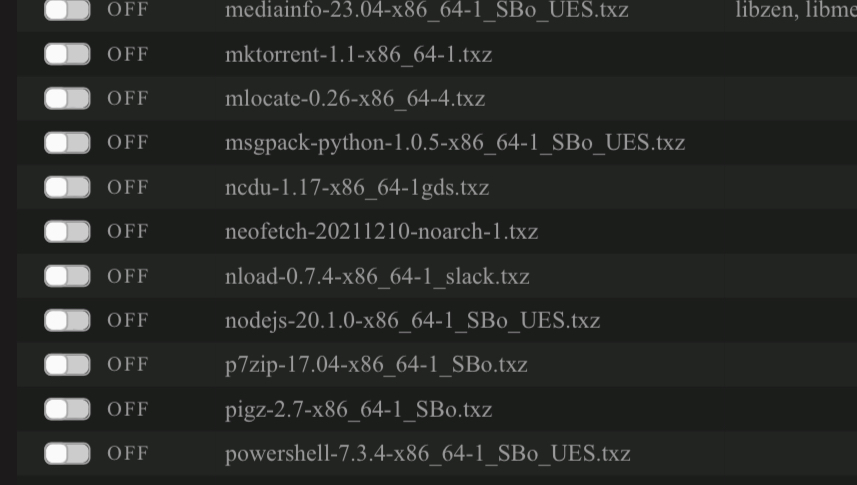
It doesn’t appear in nerdtools, that’s why I’m installing it via the extra folder, on boot.
-
Would really appreciate some help with this one, please.
-
Would appreciate some help with this one: I have a bash script that runs, via User Scripts, each time the array is started to turn on a TP-Link smart plug. To get the script working i had to install the netcat pkg, which is now done automatically by placing the txz in flash/extra/. All worked well, however at some point over the last few weeks, the script stopped running and when i manually test i now get this error, nc: error while loading shared libraries: libmd.so.0: cannot open shared object file: No such file or directory I have seen a previous post HERE where a similar issue was fixed, but my understanding of Linux isn't good enough to be able to adapt the fix, if possible? Can anyone give me some pointers? Thank you.


