





TODDLT
Members
-
Joined
-
Last visited
Everything posted by TODDLT
-
OK so sometimes I need to slow down and read closer. The 4 bay version of the enclosure I was using is eSATA, but when I changed to the 2 bay version, I didn't notice the eSATA dropped off. So that is headed back to Amazon. I can't seem to find a 2 bay with eSATA, except an older model that was expensive and had mediocre reviews at best so I'm now on to a 4 bay model. SINCE I'm having to re-order I thought I'd ask if anyone had used one of the two I'm looking at before. Any comments or known compatibility issues? I want to be able to plug it in, run pre-clears on the drives, then turn on the hardware raid on the enclosure and format it NTFS to mount outside the array. https://www.amazon.com/gp/product/B003YFHEAC/ref=ewc_pr_img_2?smid=A2WSTUX2A6RQ1A&th=1 https://www.amazon.com/gp/product/B0CXPD9J6X/ref=ewc_pr_img_1?smid=A2E3FBDGWMEIZ7&th=1 Then poking around, I came across this. https://www.amazon.com/gp/product/B09WQC44B3/ref=ox_sc_saved_title_3?smid=A2IQNZSH0ZS9OH&th=1 for probably 275-300 could build another unRAID server with that .. as compared with a little less than half the cost for just a RAID enclosure.. (plus drive cost). Makes me ponder it anyway. It's all more than i was wanting to spend.
-
The 2 bay external enclosure includes hardware RAID. Normal (independent disks), JBOD, RAID 0, and RAID 1. It's also an ESATA connection. So as long as it's mounted outside the array, unRAID should see it fine, correct?. I can write to it as a single drive span.
-
Thanks ^^ Does anyone know how much space is lost from the bare capacity for formatting overhead? Any thoughts on formatting as one logical drive instead of individual drives? Is there a way to "high water" write to drives outside the array? I dont think this is possible. I'm using Rclone to maintain the backup each night, just writing changes.
-
I am upgrading my external drive case, which is a backup of a large portion of my data and mobile. So it should be a format that is recognized on an Windows machine should the need ever arise. It's going to be a multi bay case as too much for one drive. So really two questions: - Wouldn't using NTFS make the most sense for compatibility with Windows? If not which? How much space is lost due to formatting overhead with NRFS? - I'm juggling between having independent drives which is a PITA for a progressive backup, and setting the case up from something like JBOD where if one disk dies both are essentially wiped out. Is there a way to format multiple drives as a single partition without complete sudden death or the inability to expand? If money were not an object I'd use 4 drives and set the case for RAID, but money is part of the deal. 2 drives will cover my storage space needs for now.
-
Does anyone worry about the age of a flash? It occurs to me I'm still on my original, of 12 years. Not any parts to break but still. A USB 3 might load and update faster. Yes/no? Any good suggestions for a robust, USB 3 flash? Plenty out there, but I know they need to have a digital ID number to work with Plex.
-
Not sure how I missed this one, but.... Thanks!
-
I've downloaded both of these, have the server running, but can't figure out how to conifgure the server for remote access.. or provide the server address/name for Subsonic. Any hints?
-
Plex doesnt show up on carplay. I'd be fine if it was music only.
-
I've been out of town for a couple days, but will check both of these out. Thanks.
-
I know there are a number of ways to stream music from an unRaid server. I primarily use Plex for this. However, I am looking for an application that can run on unRaid, and works with a client that is Apple Car Play ready. IE i would like to access my home music collection via Apple CarPlay. Plex is not CarPlay friendly likely because no one would support a driver being able to watch movies Any advise or direction to investigate is apprecaited.
-
Hoping for a little help with this. This is about the closet thing to "portable" I have found. https://smile.amazon.com/gp/product/B09WQC44B3/ref=ox_sc_act_title_7?smid=A2IQNZSH0ZS9OH&psc=1
-
I'm considering building a 2nd rig as a backup unit only. - minimal demand, only storage - capacity for 3 to 4 drives - want it small enough to pick up and walk out the door. I've been considering an external RAID enclosure that holds 3-4 drives, but expanding it would mean starting over. So that thought pushed me to just making a small unRaid backup rig. My concern with building an unraid rig is making it "portable" as a backup unit My current rig is 43 TB with 28 used. I was thinking of using 2 - 18 TB drives, pretty cheap right now and that would cover me for a while. Options are just use a RAID 0 Esata enclosure... OR... an unraid rig... thoughts?
-
This is SO true, a harsh reality sometimes, but can be a real struggle to balance. Everything on my server that is truly irreplaceable and would be problematic if I lost... is backed up, in more than one place I might add, one of which is detached. However, that makes up such a small piece of the big picture. I have ~ 500 GB of truly can't lose it kind of stuff, and another 500GB of stuff that is compact enough it's not worth the risk. The rest of it comprises another 27 TB and grows regularly. Its mostly Plex media and most of that I have the original media for, but it would take me months to re-rip it all. The DVR component is growing and would be gone for good. It wouldn't change my life but I'd still probably cry if I lost it, or at least throw a thing or two through the TV . This thread has me thinking I need to just bite the bullet on a couple drives to back it up. I could probably find a couple drives that would hold it in my desktop for $600 and as I say that it seems ridiculous that I haven't. A multidrive NAS box would be nice though and I guess I need to look at that option too. I guess I know what I'm doing after dinner
-
Thanks, I actually just found "docker safe new permissions" and ran it. Appears to have worked. I will post a message specific to Plex and see if anyone knows how to modify settings on how it sets up permissions for DVR recordings. I am clear that it is only folders created by the DVR that have this permission issue. I believe it has to do with the below setting in Plex. This allows you to delete a file from inside the plex GUI, but from the note underneath I am guessing that it is adjusting access permissions when the save to location is created by Plex (and this only happens with the DVR). Thanks for the time.

-
OK, but the problem is that only "nobody" has access to modify those files/folders. I don't have a userID of nobody to access with Where it shows that only "nobody" has read/write access, I can't create or delete anything. Where it shows that "Everyone has read/write access, I can delete, create folders etc.. How do I change the permissions
-
My primary use of unRaid, is for Plex, and one of my Plex uses is as a DVR. So whenever Plex records something new it creates a new folder to put it in. Somewhere along the line Plex started limiting everyone but the "owner" to read access when it creates a folder. I believe this MAY have coincided with the time I turned on the ability to delete files within plex, but not totally sure about that. The trouble is, the "owner" for plex is a user called "nobody" which doesnt actually exist except from Plex, so I can't actually manually move or deleted files/folders that were created by the Plex DVR. I have included snips of those folder permission as they appear to me for information. There is no user called "nobody" in my unraid user settings. So two fundamental questions. 1. How do you globally reset user permissions on a given drive or folder or share within unraid. All my DVR goes to one specific drive so if I could push down an update of user permissions it would solve the current issue. 2. Is there a way inside Plex (on unraid) to change the assigned username? (I will probably ask this one in a more plex specific form as well). If it used my username for example than this would not be a problem. Thanks for any help. These are permissions for a recently created folder by Plex. When I try to modify the permissions from my windows machine it denies access. These are properties for a folder that has been on the server for a long time. I have no idea how "nobody" was created as a user, but control is not limited.


-
I have Plex installed on my unRaid server and will be without internet for some unknown period of time.. until they re-string the cable line where a tree recently removed it. I was trying to change the server settings to allow local connections without authentication so at least we can watch Plex content in the house. Since the server cant see the internet, I'm not having to do this manually if i can. I did read at https://www.howtogeek.com/303282/how-to-use-plex-media-server-without-internet-access/ There is a configuration/preferences file that contains "allowedNetworks" and adding the range "192.168.68.1/255.255.255.0" will let any local address work. Then I see for Linux installed plex the preferences / settings are in "Preferences.xml" I found that file on unRaid, but nothing within it for "allowednetworks" So.... does anyone know how to manually change Plex on UnRaid to allow local connections without authentication?
-
This did solve my issue above. Thanks!
-
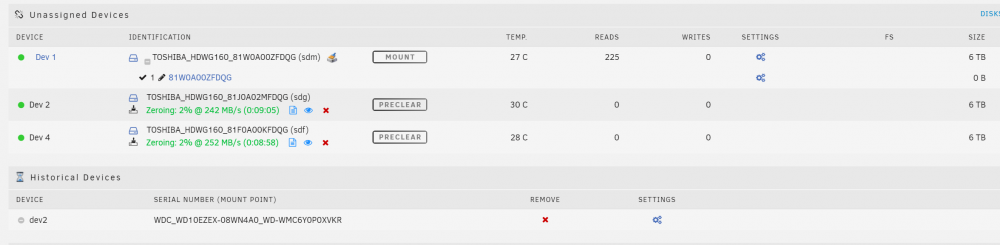
I tried to rename to dev3 (as it shows on the dashboard page, and is otherwise unused). It automatically revereted to dev2, IE it wouldn't save a new name. output sent.
-
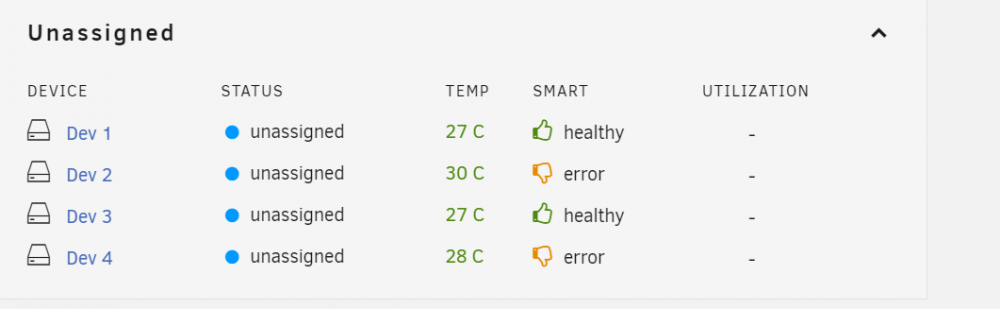
EDIT: On the below list Dev 1 is the warm spare (always there) Dev 2 & 4 are the drives I just pre-cleared Dev 3 is the backup drive. It is noted as the "missing dev 2" drive. Previously it was Dev 2. ["dev1"] name="dev1" id="TOSHIBA_HDWG160_81W0A00ZFDQG" device="sdm" sectors="11721045168" sector_size="512" rotational="1" spundown="1" temp="*" numReads="405" numWrites="0" ["dev2"] name="dev2" id="TOSHIBA_HDWG160_81J0A02MFDQG" device="sdg" sectors="11721045168" sector_size="512" rotational="1" spundown="1" temp="*" numReads="0" numWrites="0" ["dev3"] name="dev3" id="WDC_WD10EZEX-08WN4A0_WD-WMC6Y0P0XVKR" device="sdb" sectors="1953525168" sector_size="512" rotational="1" spundown="1" temp="*" numReads="488144" numWrites="3324" ["dev4"] name="dev4" id="TOSHIBA_HDWG160_81F0A00KFDQG" device="sdf" sectors="11721045168" sector_size="512" rotational="1" spundown="1" temp="*" numReads="0" numWrites="0"
-
I already upgraded to the latest UD. No change. Diagnostics attached. Thanks for the help! EDIT - both drives connected to eSata completed zeroing without additional UDMA errors, so I'm assuming it was the bad power cable that fed both of them. todd-svr-diagnostics-20220127-1006.zip
-
Does anyone know why I would have an unassigned drive show up on the "Dashboard" but not appear in the Unassigned Devices window on the "Main" page. See two photos below: A little background. I routinely have two devices connected "unassigned" at all times. One is mounted as a shared drive outside the array and used as a backup drive. The other is a warm spare. Periodically I have added one or two drives on Esata ports to preclear through unassigned devices and have never had issues. This time my backup drive no longer shows up in the "unassigned" connected drives. Instead its under "historical devices" yet the shared drive is visible and works. A few restarts trying to troubleshoot and it appeared back on Unassigned as connected. I think I did refresh the unassigned drives button in this operation and that is what I attributed it coming back too. Note: I did also disconnect and reconnect the Esata drives, rebooting during this process. Concurrently I have another issue I'm trying to troubleshoot, where I am getting UDMA errors during the "write zeros" operation of preclear for the two added drives. I don't believe this has anything to do with the problem here, and believe I've tracked it to the power cable. I've just started the two drives concurrently "writing zeros" under preclear and will know in a few hours. Link for more info here: https://forums.unraid.net/topic/119010-errors-during-pre-clear-2-drives-simultaneously/?tab=comments#comment-1089117 It seems every time I reboot the my unassigned devices change which is Device 1,2,3,4. I haven't figured out what is driving that but it doesn't appear driven by what port they are connected too because it floats. Is this possibly driven by the backup drive previously being "Dev2" and now a different drive has taken the "Dev2" assignment? Should I just red-x the Historical Drive? I don't want to lose settings for that device.
-
So I'm certain the UDMA issue is only happening during the "writing zeros" operation. I think its connected with the power cable not the data cables. Power cable replaced I am now just writing zeros with preclear to both drives at once so we'll see what happens.
-
So The rest of the 1st cycle was un-eventful. The 2nd cycle was fine until it started zeroing and then the UDMA errors came back. Both drives errored simultaneously and then the same drive single drive as yesterday has had a few other errors. Does the fact that the UDMA issues are happening during zero'ing but not pre/post read tell us something? It seems zeroing would possibly use more power? Nothing on the power side looks loose or not fully engaged. I can't imagine how data would affect both at exactly the same time. The external IDE power connection for those two drives is the only thing on that socket from the PSU. Most if not all the other drives are spun down during this operation so it isn't taxing the PSU. Ideally I would do drive replacement using the same interface and then open the case to swap the drives. I'd like to troubleshoot and then try and get a full pre-clear to run prior to changing the two drives. Any thoughts on how to troubleshoot? I've cleared a number of drives this way and never had an error before.
-
Thanks and I thought that is what this error was. I've cleared at least 8 drives using this same method / cabling configuration and never had a single issue, including just recently I cleared two of the same model drive number in the same method and had no issues. I've been trying to figure what changed that would affect both drives at the same virtual moment. One thought is that the power is delivered via a single IDE to 2 - SATA power cables. When the first pre-clear finishes I'll probably stop it and check the power cables. I do have more drives connected at the same time than I ever have, but most of them were spun down when the errors occurred. I have a Corsair HX850 platinum PSU and no GPU's so I don't think I'm short on power. I don't like leaving "unexplained" issues. While 6 is not a lot of errors, they happened in a string over a 4 hour period with seemingly no change or cause. Maybe the power cable will turn up something.


