





alexdodd
Members
-
Joined
-
Last visited
Everything posted by alexdodd
-
Weird because I can auth with that username and password with OpenVPN and the same file here. Would the VPN service (its easynews) block that behavior for some reason? If the VPN can't auth, does the whole webUI become unavailable? //Edit: Hold the phone, my OpenVPN client is asking for an external certificate, i'm not sure I have access to one of those. I guess i need to investigate what's going on with the VPN access from easynews.
-
To be fair i had tried a config with that set to yes and no, neither have worked. I've just checked agian, and its now set as: root@localhost:# /usr/local/emhttp/plugins/dynamix.docker.manager/scripts/docker run -d --name='binhex-delugevpn' --net='bridge' --privileged=true -e TZ="Europe/London" -e HOST_OS="Unraid" -e 'VPN_ENABLED'='yes' -e 'VPN_USER'='**********' -e 'VPN_PASS'='***********' -e 'VPN_PROV'='custom' -e 'VPN_OPTIONS'='' -e 'STRICT_PORT_FORWARD'='no' -e 'ENABLE_PRIVOXY'='yes' -e 'LAN_NETWORK'='192.168.1.0/24' -e 'NAME_SERVERS'='209.222.18.222,37.235.1.174,8.8.8.8,209.222.18.218,37.235.1.177,8.8.4.4' -e 'DEBUG'='true' -e 'UMASK'='000' -e 'PUID'='99' -e 'PGID'='100' -p '8112:8112/tcp' -p '58846:58846/tcp' -p '58946:58946/tcp' -p '58946:58946/udp' -p '8118:8118/tcp' -v '/mnt/user/Downloads/':'/data':'rw' -v '/mnt/user/appdata/binhex-delugevpn':'/config':'rw' 'binhex/arch-delugevpn' d9a3dd6b9e343c3b4105e53b21f385a11554e1d6ed30eb86955bd8a3197ec351 The command finished successfully! Still no access to the web UI on 8112
-
Hi guys, Can someone spare me my mind. I've replaced a network modem/router and in the process started re-organising my network as i work through things. I've moved from 192.168.0.x to 192.168.1.x, and whilst i was going through dockers on unraid noticed VPN was disabled on deluge, its not like i've been used torrents anyway, and i presume is was a problem with an update from a while ago looking at this. Anyway i've went through the FAQ (https://github.com/binhex/documentation/blob/master/docker/faq/vpn.md) but i can't figure out what i'm missing, if i enable VPN i lose the webUI, so i know its my fault and a bad config my side, I can't see what else i need to change? I'm looking through the supervisord and nothing stands out to me, nor does it make much sense (I wish it did, i'd really like to be able to fix my own problems). Containers, Dockers, Networking and all the *nix stuff really overwhelm me for now, something i need to work on. I'm very lucky most of what unraid does is plug and play, but that is its own worst enemy when it doesnt work Supervisord log attached so someone smarter can highlight my issues please! Cheers supervisord.log
-
Would still be super helpful if i could see all my unused unassigned scsi SAS drives that are just chilling waiting to be added...
-
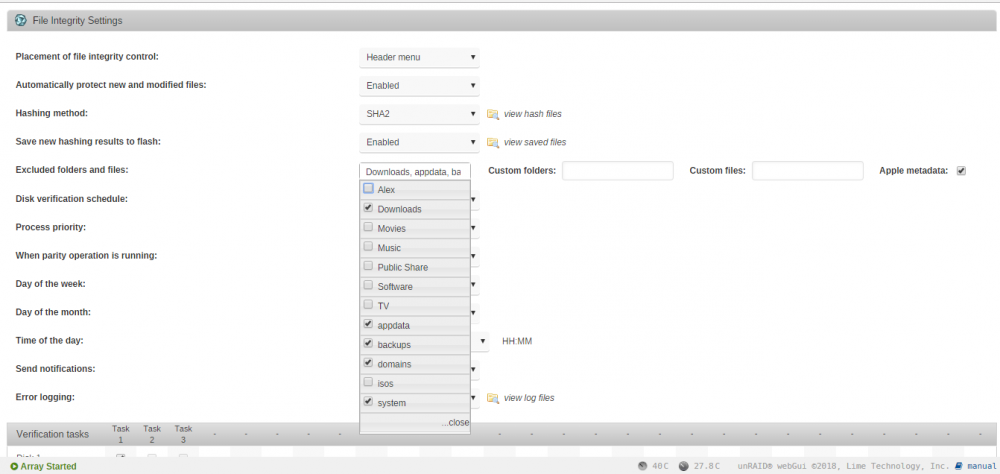
Im sure its super simple however I have excluded all the folders that will cause lots of issues, like incomplete downloads and appdata etc... As shown, but i'm still getting false errors like so: SHA256 hash key mismatch (updated), /mnt/disk1/appdata/binhex-minidlna/files.db was modified SHA256 hash key mismatch (updated) and lots of them, how do i ignore the appdata folder?
-
That's ok i guess, i'll just do without i guess Thanks spending the time for me!
-
Nope! I tried switching how many drive slots too, no change either.
-
Fresh diagnostics like before with the updated lib.php sdg is now in my main array haven't worked out why the other drive disappeared yet either. alexserver-diagnostics-20180414-0005.zip
-
Finally getting a chance to try this for you, I shall report back tonight
-
No probs I can't actually check that until i'm back within my network, because I can't stop the array without losing my VPN access. But suffice to say there has been a previous "test" phase in this unraid setups life, where I had many drives connected testing how I would set things up and fit in cases etc... before I went wild with the 2tb SAS drives. Part of the switch over/upgrade ready for its final setup I was switching out many smaller drives with one 1tb drive, and switched the original parity drive over with a "final" 2tb SATA drive. So no doubt i've done something none-standard along the way. //Eurgh: One of my drives in the array has just went missing now too, like its suddenly died. I need to really check things in person when i get back home. =/
-
Took a little while trying to work out what i'm doing ? and i've been busy. I believe i've done what you need, and this is the new disagnostics file, hope this is correct. I wont reinstall Unassigned Devices before I know you've got what you need. alexserver-diagnostics-20180409-1750.zip
-
I can't find the folder /usr/local/emhttp/plugins/unassigned.devices/include/ do I create it ? /usr/local/ doesnt have an emhttp, and I can't seem to find that anywhere?
-
Ahhhhh, awesome,, problem is im currently remote, and I can't stop the array, because im using a vpn docker to login. But i'll look at it when i'm home at the end of the week Guess it was simple
-
Uninstalled Preclear, and rebooted, and nothing is still showing under unassigned devices
-
Okey doke, i'll report back soon
-
Linux 4.14.26-unRAID. Last login: Sun Apr 8 23:22:40 +0100 2018 on /dev/pts/0. root@alexserver:~# ls /dev/ aer_inject input/ md3 ptyp2 sde sdm1 stdout@ tty22 tty38 tty53 ttyp1 vcsa2 block/ kmem mem ptyp3 sde1 sg0 tty tty23 tty39 tty54 ttyp2 vcsa3 bsg/ kmsg memory_bandwidth ptyp4 sdf sg1 tty0 tty24 tty4 tty55 ttyp3 vcsa4 btrfs-control kvm mouse@ ptyp5 sdf1 sg10 tty1 tty25 tty40 tty56 ttyp4 vcsa5 bus/ log= mpt2ctl ptyp6 sdg sg11 tty10 tty26 tty41 tty57 ttyp5 vcsa6 char/ loop-control mpt3ctl ptyp7 sdg1 sg12 tty11 tty27 tty42 tty58 ttyp6 vfio/ console loop0 net/ random sdh sg2 tty12 tty28 tty43 tty59 ttyp7 vga_arbiter core@ loop1 network_latency rtc@ sdh1 sg3 tty13 tty29 tty44 tty6 urandom vhost-net cpu/ loop2 network_throughput rtc0 sdi sg4 tty14 tty3 tty45 tty60 vcs xconsole| cpu_dma_latency loop3 null sda sdi1 sg5 tty15 tty30 tty46 tty61 vcs1 zero disk/ loop4 port sda1 sdj sg6 tty16 tty31 tty47 tty62 vcs2 fd@ loop5 ppp sdb sdj1 sg7 tty17 tty32 tty48 tty63 vcs3 full loop6 ptmx sdb1 sdk sg8 tty18 tty33 tty49 tty7 vcs4 fuse loop7 ptp0 sdc sdk1 sg9 tty19 tty34 tty5 tty8 vcs5 hpet mapper/ pts/ sdc1 sdl shm/ tty2 tty35 tty50 tty9 vcs6 hwrng md1 ptyp0 sdd sdl1 stderr@ tty20 tty36 tty51 ttyS0 vcsa initctl| md2 ptyp1 sdd1 sdm stdin@ tty21 tty37 tty52 ttyp0 vcsa1
-
lrwxrwxrwx 1 root root 9 Apr 8 12:00 ata-SAMSUNG_HD103SJ_S246J9GZB06056 -> ../../sdj lrwxrwxrwx 1 root root 10 Apr 8 12:00 ata-SAMSUNG_HD103SJ_S246J9GZB06056-part1 -> ../../sdj1 lrwxrwxrwx 1 root root 9 Apr 8 12:00 ata-ST1000DM003-1CH162_Z1D8Y3Z7 -> ../../sdl lrwxrwxrwx 1 root root 10 Apr 8 12:00 ata-ST1000DM003-1CH162_Z1D8Y3Z7-part1 -> ../../sdl1 lrwxrwxrwx 1 root root 9 Apr 8 12:00 ata-ST500DM002-1BD142_Z6ELEWZY -> ../../sdm lrwxrwxrwx 1 root root 10 Apr 8 12:00 ata-ST500DM002-1BD142_Z6ELEWZY-part1 -> ../../sdm1 lrwxrwxrwx 1 root root 9 Apr 8 12:00 ata-WDC_WD20EURX-63T0FY0_WD-WCC4M7XA0RXL -> ../../sdf lrwxrwxrwx 1 root root 10 Apr 8 12:00 ata-WDC_WD20EURX-63T0FY0_WD-WCC4M7XA0RXL-part1 -> ../../sdf1 lrwxrwxrwx 1 root root 9 Apr 8 12:00 scsi-ST32000444SS_9WM3ZVZY0000C130DG42 -> ../../sdd lrwxrwxrwx 1 root root 10 Apr 8 12:00 scsi-ST32000444SS_9WM3ZVZY0000C130DG42-part1 -> ../../sdd1 lrwxrwxrwx 1 root root 9 Apr 8 12:00 scsi-ST32000444SS_9WM4C6CD00009133T7SW -> ../../sdi lrwxrwxrwx 1 root root 10 Apr 8 12:00 scsi-ST32000444SS_9WM4C6CD00009133T7SW-part1 -> ../../sdi1 lrwxrwxrwx 1 root root 9 Apr 8 12:00 scsi-ST32000444SS_9WM4EPZT00009134CTD1 -> ../../sdc lrwxrwxrwx 1 root root 10 Apr 8 12:00 scsi-ST32000444SS_9WM4EPZT00009134CTD1-part1 -> ../../sdc1 lrwxrwxrwx 1 root root 9 Apr 8 12:00 scsi-ST32000444SS_9WM4FMPL0000C1347DNU -> ../../sdb lrwxrwxrwx 1 root root 10 Apr 8 12:00 scsi-ST32000444SS_9WM4FMPL0000C1347DNU-part1 -> ../../sdb1 lrwxrwxrwx 1 root root 9 Apr 8 12:00 scsi-ST32000444SS_9WM4HELV00009134WA9B -> ../../sdg lrwxrwxrwx 1 root root 10 Apr 8 12:00 scsi-ST32000444SS_9WM4HELV00009134WA9B-part1 -> ../../sdg1 lrwxrwxrwx 1 root root 9 Apr 8 12:00 scsi-ST32000444SS_9WM4LHLS0000C1347ADN -> ../../sdh lrwxrwxrwx 1 root root 10 Apr 8 12:00 scsi-ST32000444SS_9WM4LHLS0000C1347ADN-part1 -> ../../sdh1 lrwxrwxrwx 1 root root 9 Apr 8 12:00 scsi-ST32000444SS_9WM5ZE6E0000C1435EES -> ../../sde lrwxrwxrwx 1 root root 10 Apr 8 12:00 scsi-ST32000444SS_9WM5ZE6E0000C1435EES-part1 -> ../../sde1 lrwxrwxrwx 1 root root 9 Apr 8 12:00 scsi-ST32000444SS_9WM6036J0000C1432M65 -> ../../sdk lrwxrwxrwx 1 root root 10 Apr 8 12:00 scsi-ST32000444SS_9WM6036J0000C1432M65-part1 -> ../../sdk1 lrwxrwxrwx 1 root root 9 Apr 8 12:00 usb-Kingston_DataTraveler_U3_0E61E860C1632924-0:0 -> ../../sda lrwxrwxrwx 1 root root 10 Apr 8 12:00 usb-Kingston_DataTraveler_U3_0E61E860C1632924-0:0-part1 -> ../../sda1 lrwxrwxrwx 1 root root 9 Apr 8 12:00 wwn-0x5000c5002622b38f -> ../../sdd lrwxrwxrwx 1 root root 10 Apr 8 12:00 wwn-0x5000c5002622b38f-part1 -> ../../sdd1 lrwxrwxrwx 1 root root 9 Apr 8 12:00 wwn-0x5000c50033d0d8b7 -> ../../sdi lrwxrwxrwx 1 root root 10 Apr 8 12:00 wwn-0x5000c50033d0d8b7-part1 -> ../../sdi1 lrwxrwxrwx 1 root root 9 Apr 8 12:00 wwn-0x5000c50033d97543 -> ../../sdc lrwxrwxrwx 1 root root 10 Apr 8 12:00 wwn-0x5000c50033d97543-part1 -> ../../sdc1 lrwxrwxrwx 1 root root 9 Apr 8 12:00 wwn-0x5000c50033d9fefb -> ../../sdb lrwxrwxrwx 1 root root 10 Apr 8 12:00 wwn-0x5000c50033d9fefb-part1 -> ../../sdb1 lrwxrwxrwx 1 root root 9 Apr 8 12:00 wwn-0x5000c50033e0f60b -> ../../sdg lrwxrwxrwx 1 root root 10 Apr 8 12:00 wwn-0x5000c50033e0f60b-part1 -> ../../sdg1 lrwxrwxrwx 1 root root 9 Apr 8 12:00 wwn-0x5000c50033e3703f -> ../../sdh lrwxrwxrwx 1 root root 10 Apr 8 12:00 wwn-0x5000c50033e3703f-part1 -> ../../sdh1 lrwxrwxrwx 1 root root 9 Apr 8 12:00 wwn-0x5000c50034417483 -> ../../sde lrwxrwxrwx 1 root root 10 Apr 8 12:00 wwn-0x5000c50034417483-part1 -> ../../sde1 lrwxrwxrwx 1 root root 9 Apr 8 12:00 wwn-0x5000c500344457cf -> ../../sdk lrwxrwxrwx 1 root root 10 Apr 8 12:00 wwn-0x5000c500344457cf-part1 -> ../../sdk1 lrwxrwxrwx 1 root root 9 Apr 8 12:00 wwn-0x5000c50065bd6fd8 -> ../../sdl lrwxrwxrwx 1 root root 10 Apr 8 12:00 wwn-0x5000c50065bd6fd8-part1 -> ../../sdl1 lrwxrwxrwx 1 root root 9 Apr 8 12:00 wwn-0x5000c5007b86b61a -> ../../sdm lrwxrwxrwx 1 root root 10 Apr 8 12:00 wwn-0x5000c5007b86b61a-part1 -> ../../sdm1 lrwxrwxrwx 1 root root 9 Apr 8 12:00 wwn-0x50014ee20b9309e8 -> ../../sdf lrwxrwxrwx 1 root root 10 Apr 8 12:00 wwn-0x50014ee20b9309e8-part1 -> ../../sdf1 lrwxrwxrwx 1 root root 9 Apr 8 12:00 wwn-0x50024e9203e6b8dd -> ../../sdj lrwxrwxrwx 1 root root 10 Apr 8 12:00 wwn-0x50024e9203e6b8dd-part1 -> ../../sdj1
-
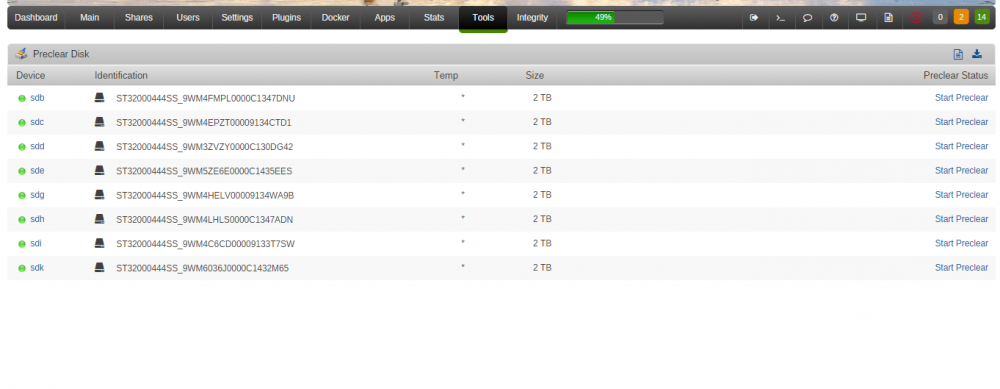
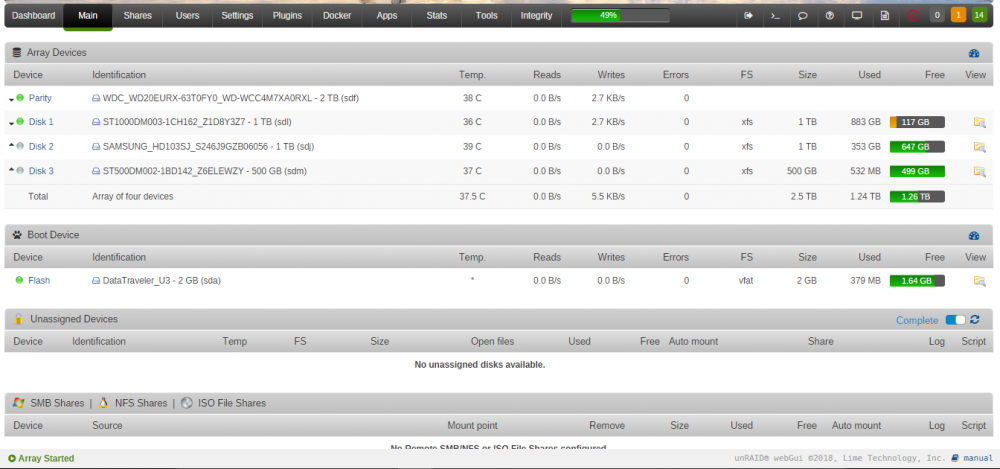
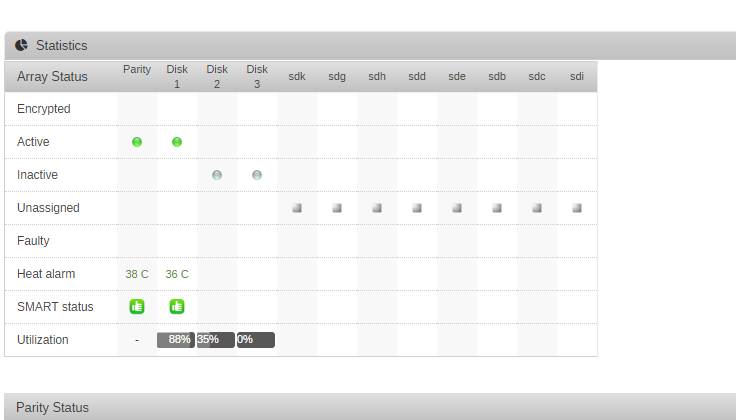
I presume this is simple, but search for drive not appearing in unassigned devices doesn't give me anything I can work with. Installed 8 x 2tb SAS drives on an M1015, run the preclear script from the tools tab. Let that finish, all good and we're back to here: But they are not available in unassigned devices: Is this because they are SAS drives on a SAS controller? I wouldn't have thought so mind... Main tabs shows the drives? Diagnostics attached: alexserver-diagnostics-20180408-2252.zip
-
Just fell across HDSentinal, and realised its by far the best HD test, and monitoring software ever made. It seems criminal I have to use my windows box/VM to get all the features! Would love to have it all integrated in to unraid, in a docker outputtingputing to a web front end. Would happily pay for that
-
Hmmm, I'm using binhex-delugevpn for privoxy, and everything works fine with my browser proxy switcher, and with sonarr, but if i use the same settings in radarr i lose connection to my indexers and my download clients sab/deluge. If i switch back to direct on radarr, everything resumes communicating.
-
I'm not that worried about anonymity, its a nice idea, but i know what i'm doing isn't so. Its just to move around rudimentary ISP blocks easy in case i need to.
-
How do I go about enabling SSL, i've flicked the setting, but nothing happens when i try the address:port? https://myserver:8787 The setting in radarr says that i require to run as administrator but im not quite sure how that translates to the docker?
-
You're right, SwitchySharp seems to work ok, honestly I don't really care so much as long as i can quickly turn it on and off at will
-
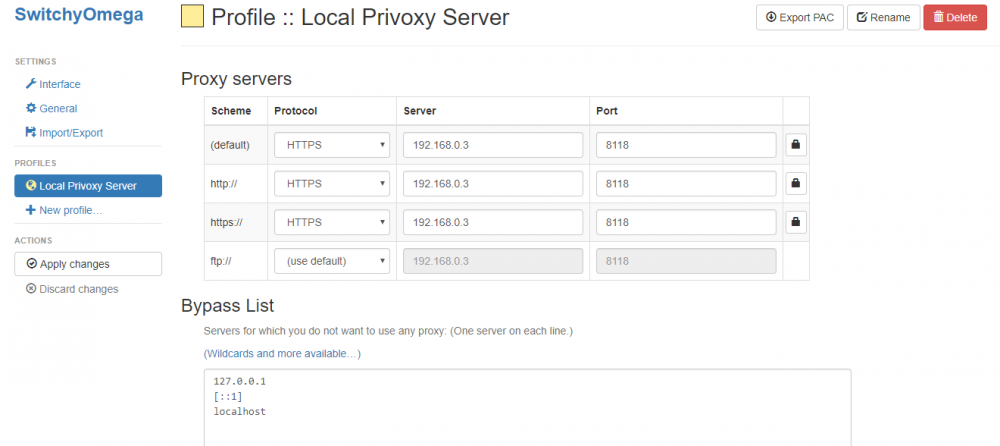
I've set it to HTTPS my ip and port and to bind as default and HTTP and HTTPS just in case. No authentication. Can't really see much else to choose from. Hmmmm
-
I'm having trouble using Privoxy bundled with this. Everything looks good, but i can't connect with it. So my VPN works fine because i set that up first, and have been downloading with that, and then i thought i'd switch on the privoxy and to test it works connect through chrome with switchyomegeproxy extension. I have Privoxy enable checked that the .0/24 setting, and i'm pointing the extension to my webserver ip, port 8118, but I'm timing out and its not working Any clues?


