





jang430
Members
-
Joined
-
Last visited
Everything posted by jang430
-
Thanks
-
I'm looking for a Topton motherboard for NAS. A lot of them using i226-V for 2.5 Gbe. Are they supported now?
-
@KilrahRebooting works. After a while, browser shows the same once again.
-
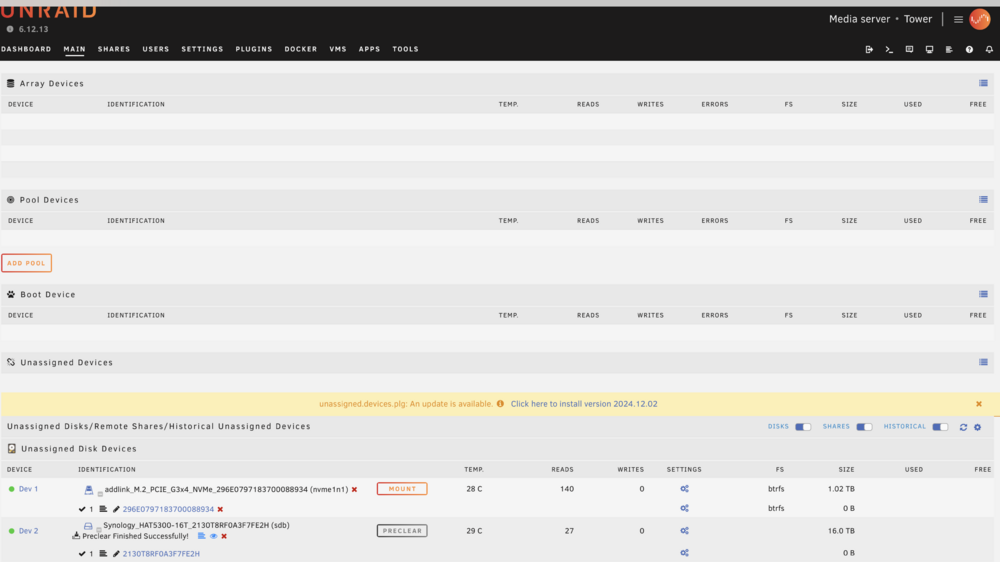
Array is stopped. I wanted to add recently finished pre-cleared drive. But there's no option to add.
-
Thank you! Will check guides on youtube.
-
I have Adguard Home (192.168.1.2) and have DNS rewrite *.1234.site to Nginx Proxy Manager (npm, 192.168.1.3). In npm, I went to add certificate, under domains, I put in *.1234.site, use DNS challenge Cloudflare. I created a token in Cloudflare before this. Under DNS of 1234.site, I also put in a CNAME * under name, Target I used something.duckdns.org (this points to my public IP). Proxy status is turned off. I'm getting this error: Error: Command failed: . /opt/certbot/bin/activate && pip install --no-cache-dir certbot-dns-cloudflare==$(certbot --version | grep -Eo '[0-9](\.[0-9]+)+') cloudflare && deactivate An unexpected error occurred: ModuleNotFoundError: No module named 'CloudFlare' Ask for help or search for solutions at https://community.letsencrypt.org. See the logfile /tmp/certbot-log-daeijkey/log or re-run Certbot with -v for more details. ERROR: Ignored the following versions that require a different python version: 2.10.0 Requires-Python >=3.8; 2.11.0 Requires-Python >=3.8; 2.8.0 Requires-Python >=3.8; 2.9.0 Requires-Python >=3.8; 3.0.0 Requires-Python >=3.8; 3.0.1 Requires-Python >=3.8 ERROR: Could not find a version that satisfies the requirement certbot-dns-cloudflare== (from versions: 0.14.0.dev0, 0.15.0, 0.16.0, 0.17.0, 0.18.0, 0.18.1, 0.18.2, 0.19.0, 0.20.0, 0.21.0, 0.21.1, 0.22.0, 0.22.1, 0.22.2, 0.23.0, 0.24.0, 0.25.0, 0.25.1, 0.26.0, 0.26.1, 0.27.0, 0.27.1, 0.28.0, 0.29.0, 0.29.1, 0.30.0, 0.30.1, 0.30.2, 0.31.0, 0.32.0, 0.33.0, 0.33.1, 0.34.0, 0.34.1, 0.34.2, 0.35.0, 0.35.1, 0.36.0, 0.37.0, 0.37.1, 0.37.2, 0.38.0, 0.39.0, 0.40.0, 0.40.1, 1.0.0, 1.1.0, 1.2.0, 1.3.0, 1.4.0, 1.5.0, 1.6.0, 1.7.0, 1.8.0, 1.9.0, 1.10.0, 1.10.1, 1.11.0, 1.12.0, 1.13.0, 1.14.0, 1.15.0, 1.16.0, 1.17.0, 1.18.0, 1.19.0, 1.20.0, 1.21.0, 1.22.0, 1.23.0, 1.24.0, 1.25.0, 1.26.0, 1.27.0, 1.28.0, 1.29.0, 1.30.0, 1.31.0, 1.32.0, 2.0.0, 2.1.0, 2.2.0, 2.3.0, 2.4.0, 2.5.0, 2.6.0, 2.7.0, 2.7.1, 2.7.2, 2.7.3, 2.7.4) ERROR: No matching distribution found for certbot-dns-cloudflare== [notice] A new release of pip is available: 23.3.2 -> 24.0 [notice] To update, run: pip install --upgrade pip at ChildProcess.exithandler (node:child_process:402:12) at ChildProcess.emit (node:events:513:28) at maybeClose (node:internal/child_process:1100:16) at Process.ChildProcess._handle.onexit (node:internal/child_process:304:5). In my firewall, I have http, https pointed to npm (192.168.1.3). Am I missing something? I can't get ssl to work. I saw this on my logs: [12/2/2024] [11:24:02 AM] [SSL ] › ✖ error Error: Command failed: certbot renew --non-interactive --quiet --config "/etc/letsencrypt.ini" --work-dir "/tmp/letsencrypt-lib" --logs-dir "/tmp/letsencrypt-log" --preferred-challenges "dns,http" --disable-hook-validation P.S. I also thought test server reachability might be broken.
-
I've got nginx configured properly, for me to be able to access domains from internally, to sites such as sonarr.1234.site, and tower.1234.site, this greatly helps, and is what I wanted to achieve. What is left for me to do is to access this sites without showing not secure. This I am still trying to figure out. I should be generating an SSL cert first right? To do so, I'm testing server reachability first using both sites above, and I'm getting "Communication with the API failed, is NPM running correctly?" I am using a firewall. Do I need to do anything? Do I have to open any ports for the server reachability to work?
-
I can already go to sites via sonarr.1234.site, tower.1234.site, and this is coming from external WAN connection. I assume my firewall is configured properly that's why it hits the intended server. But when I go to ssl and test server reachability, using the same tower.1234.site, I get this error "Communication with the API failed, is NPM running correctly?" When using duckdns, something.duckdns.org, testing server reachability provides the same error. When doing the dns challenge, I get the following: Error: Command failed: certbot certonly --config "/etc/letsencrypt.ini" --work-dir "/tmp/letsencrypt-lib" --logs-dir "/tmp/letsencrypt-log" --cert-name "npm-12" --agree-tos --email "[email protected]" --domains "something.duckdns.org" --authenticator dns-duckdns --dns-duckdns-credentials "/etc/letsencrypt/credentials/credentials-12" An unexpected error occurred: ModuleNotFoundError: No module named 'CloudFlare' Ask for help or search for solutions at https://community.letsencrypt.org. See the logfile /tmp/certbot-log-zox60zoj/log or re-run Certbot with -v for more details. I wonder why there's the word CloudFlare in there? Any clues?
-
Thank you for your patience @Espressomatic. The SSL is the last thing I am figuring out.
-
In my scenario, I'm using Adguard home for my internal DNS. I don't access it from outside. Are the instructions still applicable to get ssl cert? Cloudflare supports DNS challenge?
-
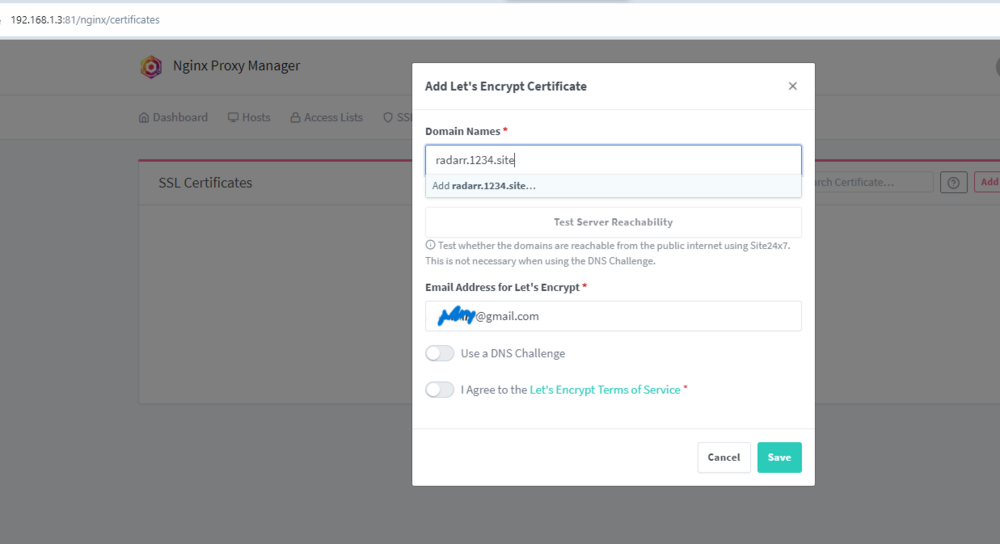
@Espressomatic After following all your advise, this is the final step got it working. Now, I can access radarr.1234.site, tower.1234.site, all EXCEPT sonarr.1234.site. Sonarr doesn't proceed. But after sometime, it does. Sometimes after 30 mins, this time, after restart of all docker, a day. Similar behavior with other browsers, chrome, edge. Any idea what causes this? Lastly, how do you get ssl cert? Below test doesn't work. I've tried *.1234.site, doesn't work either. Error message says: *.1234.site: There is a server found at this domain but it returned an unexpected status code Invalid domain or IP. Is it the NPM server? Please make sure your domain points to the IP where your NPM instance is running.
-
Thanks! I will try your suggestions.
-
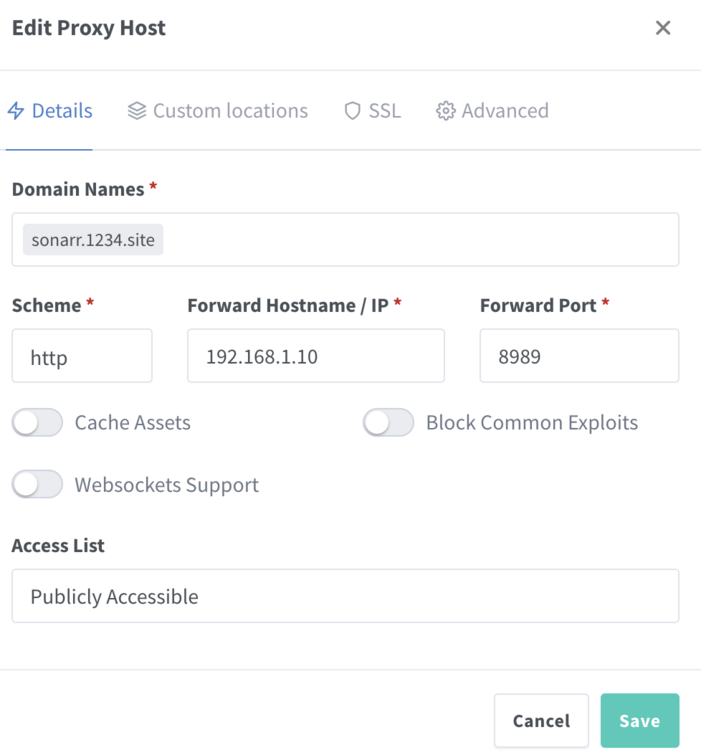
In my adguard home config, I created a filter, DNS rewrites *.1234.site and pointed to 192.168.1.3 (npm). In npm, I have the following: Doing so, I get 502 Bad Gateway. Going to letsencrypt, using sonarr.1234.site, shows the following: sonarr.qnap.site: There is a server found at this domain but it returned an unexpected status code Invalid domain or IP. Is it the NPM server? Please make sure your domain points to the IP where your NPM instance is running. another proxy host tower.1234.site http://192.168.1.10:80 leads me to the Congratulations page. I have a firewall. I haven't port forwarded anything yet, as I believe that's what adguard is there for. Internal access to sonarr.1234.site should point to app behind npm. Is this correct? Or do I have to configure firewall? So far, no intention to access from outside.
-
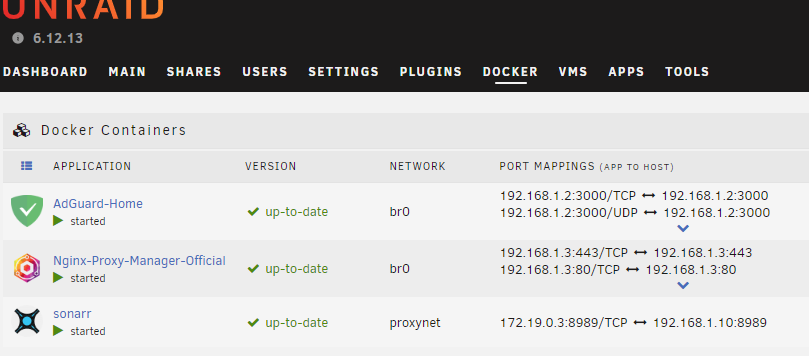
@Espressomatic Can you share further how to make this work? I have both Adguard Home and Nginx on Custom: br0. They have 192.168.1.2 and 192.168.1.3 IPs respectively. How will Nginx be able to forward to Sonarr if it's on proxynet?
-
I thought so. I think it would be better to have NPM on it's own IP. But I cannot get it to work. I don't know which network to choose for NPM. Bridge, Host, Custom: br0 or Custom: proxynet (the one I created). Whether I choose Bridge, or Custom: proxynet, I have to change ports of NPM. How did you do it?
-
Done! If I use proxynet, I get the same IP address of the NAS. To get to Nginx, I have to use NAS_IP:880. Adguard Home DNS rewrites doesn't support NAS_IP:880. How is it done?
-
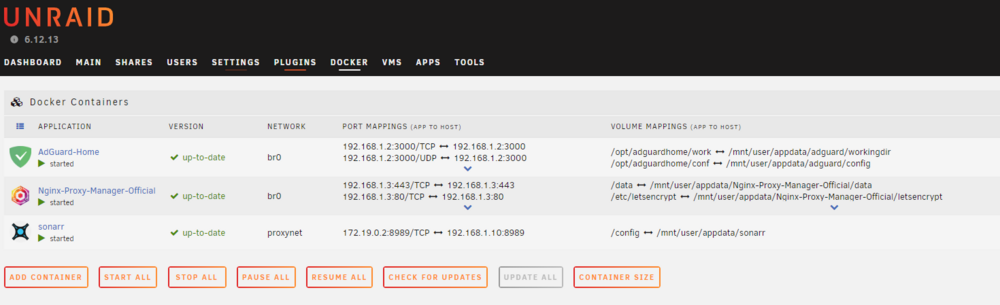
If I do that, I think it will get an ip address 172.x.x.x, how can I point adguard home (on 192.168.1.2) to NPM (on 172.x.x.x)? Update: I redid the setup. Selecting custom br0 for adguard home, assigned ip of 192.168.1.2 Installed nginx proxy manager, and used proxynet, an error occured. "WARNING: Your kernel does not support swap limit capabilities or the cgroup is not mounted. Memory limited without swap. b7c2e2cef967044f781812bece5c0be151faae7ac46b6875a7b6e9fa031b010a docker: Error response from daemon: driver failed programming external connectivity on endpoint Nginx-Proxy-Manager-Official (1c106880a1f9168700163aa93143253e421c203b1bf839655532736103699c6a): Error starting userland proxy: listen tcp4 0.0.0.0:443: bind: address already in use." When I select custom br0, it finishes successfully. Custom br0 has subnet of 192.168.1.0/24. Pasting my docker settings
-
I'm trying to get Adguard Home and NPM and some apps like Sonarr, Radarr to work behind NPM. NAS IP- 192.168.1.10 Adguard Home- 192.168.1.2 NPM IP- 192.168.1.99 I can reach NPM via something.home.com- I input the IP address of NPM in Adguard Home. My question is, a lot of people says create a network. I did, named it proxynet using the command docker network create proxynet. If I assign Sonarr, Radarr to proxynet, how does it work behind NPM? I think it will have an ip address of 172.x.x.x. What's the way to fix this?
-
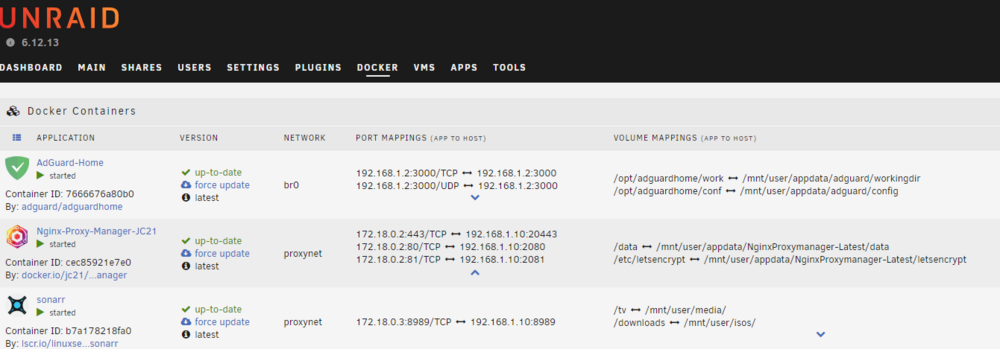
Hi. I need some help getting all to work together. My unraid is at 192.168.1.10. I installed Adguard home, and gave it a permanent IP 192.168.1.2. Then I created a custom bridge named proxynet (from instructions of Spaceinvader One). I installed Nginx Proxy Manager, assigned proxynet. I also installed Sonarr, used proxynet as well. I can access NPM via nas ip:2081 (192.168.1.2081). I can access Adguard home at 192.168.1.2. In Adguard home, I went to filter, dns rewrites, and added sonarr.home.local, and used ip address 192.168.1.10. It doesn't work. When I access 192.168.1.10:2080, I get Congratulations. When I access https://192.168.1.10:20443, site cannot be reached. If NPM is using same address as NAS, I need to change ports to 2080, 20443. In adguard home, it doesn't support ip_address:port_number. Am I right that NPM should have it's own IP, so that once adguard home points to that IP, it hits NPM? If so, how do I assign permanent IP to NPM? What network should I use?
-
Indeed, you are right. Changing connections to a different router works fine. Thanks for your help!
-
Hi. I'm encountering this problem while installing community applications. plugin: installing: community.applications.plg Executing hook script: pre_plugin_checks plugin: downloading: community.applications.plg ... plugin: community.applications.plg download failure: SSL verification failure Executing hook script: post_plugin_checks This is on a newly installed unraid.
-
After configuring the yml file, and running docker-compose up, it starts to download the apps, but this message appears and halts everything... ✘ nginx-proxy-manager Error Get "https://registry-1.docker.io/v2/": tls: failed to verify... How do I fix this?
-
Thank you! I will look at the switches.
-
Thanks Frank1940. Is that command source first, then target? Don't want to mess up with rsync
-
I plan to sync photos from Qnap to Unraid. How do I enable Unraid as a target?




