





jang430
Members
-
Joined
-
Last visited
Everything posted by jang430
-
Thanks @error311 Sorry, forgot to reply. I really like what you've done. I'll see if I can replicate it. Thanks.
-
Hello. I was just thinking of e-ink and how it may be useful for this purpose. You nailed it. My question is, how is it pulling data from Unraid? Wi-fi? Bluetooth? Preferably wireless.
-
Thanks. I may have a bad board. Tested different USB as well. That's OK. I just bought Topton mw-n100-NAS m/b. Am happy with it.
-
Yes, all you suggested done. I think I know now why I cannot boot in. Even after flashing, while running memtest, I see the old company (this is a used board that I bought) name in 1 of the info shown on memtest :-(
-
Hi @shazza6887Are you using Asrock H270m-itx/ac? Did you get any trouble getting it to boot into Unraid? I'm using this old board. I cannot get past boot menu. It stops at bzroot...ok.
-
Hello @t33j4y! Are you using Asrock H270m-itx/ac? Did you get any trouble getting it to boot into Unraid? I'm using this old board. I cannot get past boot menu. It stops at bzroot...ok.
-
@norberttDid you use the H270M-itx motherboard? I'm trying to setup this motherboard now. I can't get it to reach Unraid. Were you able to? Any special tips? Encountering too many problems during bootup. Disabled almost everything, and yet, nothing works.
-
Well, I just unplugged 1 memory, and it still didn't work. I've resorted to turning off all features that I don't know about. Even Sata, even my LAN just to be sure. Still, I'm stuck at bzroot... ok. I know it's an old board, but I'd hate to see it go to waste, as I already have an i5-6500t processor, I have the memory. It has 6 sata ports, Dual Intel NIC, A wi-fi that I don't need, lots of USB 3.0 ports and an m.2 slot. A PCIE 3.0 x 16 as well. Help me keep this board please
-
I believe that's what I did, not removing the vdisk entry though. I will do it again and try save some screenshots while I am at it. This time, will try without vdisk entry.
-
Since you all are using Asrock M/B, I was wondering if you had any issues getting Unraid to boot? I'm using an old H270M-itx/AC, Bios version from 2018/3/29, version 2.5. I'm wondering whether the same bios is used across different board models? Are there any special things to watch out for for it to boot? I know that I have to disable C states to get it to somewhat reach farther down the line in bootup.
-
Thanks, will give it a shot!
-
Indeed. I've already done all those. I have only a few lines left enabled Is there such a thing as Unraid not compatible with the board? Will that be the brand of the board, or the chipset?
-
I'm starting to think this Asrock H270m-itx/ac m/b is being overly difficult. It has so many features, but I'm getting so many problems in booting into Unraid. I've almost disabled everything that sounds unknown to me, and still, I'm not getting in. UEFI boot stops at /bzroot...ok. While booting not using UEFI, I am stuck with Freeing initrd memory... What does that even mean? This motherboard even has dual intel NIC. Do I need to give up on this board? Please share ideas how to get it working.
-
Update Saw a lot of people having good experience after disabling TPM, tweaking CSM in bios. I just want to add, I finally got past boot menu by disabling all C States in the bios. So now, I'm stock with bzroot.... ok A few lines at a time hahaha
-
I am replacing 1 of my Unraid NAS M/B. The model is H270m- itx/ac. I plugged the USB from the working motherboard, to the motherboard I intend to use. I've been changing bios settings here and there. Disabling, enabling CMS support. I changed the folder name in the USB from EFI- to EFI, all not working. Got another USB and used the latest version 7 with same results. What else could be done? I tested both said USBs, and both of them worked on another PC. No hanging in boot menu.
-
I intend to use this SSD for gaming, therefore, I prefer passthrough to get the most out of the performance.
-
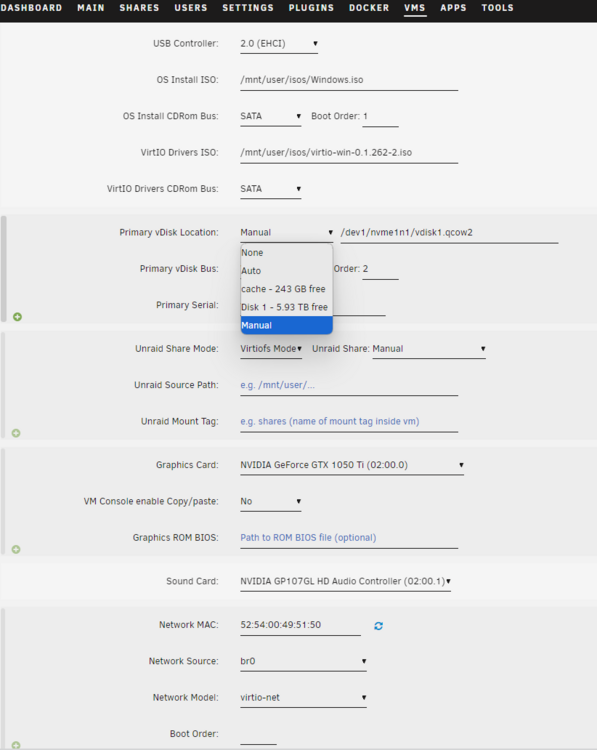
The option is not available for choosing. The SSD is m.2 Adata 1 TB.
-
<?xml version='1.0' encoding='UTF-8'?> <domain type='kvm'> <name>Windows 10</name> <uuid>6c267a1e-2b6a-7533-bc5e-94e5b2bf1736</uuid> <metadata> <vmtemplate xmlns="unraid" name="Windows 10" icon="windows.png" os="windows10"/> </metadata> <memory unit='KiB'>16777216</memory> <currentMemory unit='KiB'>16777216</currentMemory> <memoryBacking> <nosharepages/> </memoryBacking> <vcpu placement='static'>4</vcpu> <cputune> <vcpupin vcpu='0' cpuset='2'/> <vcpupin vcpu='1' cpuset='8'/> <vcpupin vcpu='2' cpuset='4'/> <vcpupin vcpu='3' cpuset='10'/> </cputune> <os> <type arch='x86_64' machine='pc-i440fx-7.2'>hvm</type> </os> <features> <acpi/> <apic/> <hyperv mode='custom'> <relaxed state='on'/> <vapic state='on'/> <spinlocks state='on' retries='8191'/> <vendor_id state='on' value='none'/> </hyperv> </features> <cpu mode='host-passthrough' check='none' migratable='on'> <topology sockets='1' dies='1' cores='2' threads='2'/> <cache mode='passthrough'/> </cpu> <clock offset='localtime'> <timer name='hypervclock' present='yes'/> <timer name='hpet' present='no'/> </clock> <on_poweroff>destroy</on_poweroff> <on_reboot>restart</on_reboot> <on_crash>restart</on_crash> <devices> <emulator>/usr/local/sbin/qemu</emulator> <disk type='file' device='disk'> <driver name='qemu' type='qcow2' cache='writeback'/> <source file='/dev1/nvme1n1/vdisk1.qcow2'/> <target dev='hdc' bus='virtio'/> <serial>vdisk1</serial> <boot order='2'/> <address type='pci' domain='0x0000' bus='0x00' slot='0x05' function='0x0'/> </disk> <disk type='file' device='cdrom'> <driver name='qemu' type='raw'/> <source file='/mnt/user/isos/Windows.iso'/> <target dev='hda' bus='sata'/> <readonly/> <boot order='1'/> <address type='drive' controller='0' bus='0' target='0' unit='0'/> </disk> <disk type='file' device='cdrom'> <driver name='qemu' type='raw'/> <source file='/mnt/user/isos/virtio-win-0.1.262-2.iso'/> <target dev='hdb' bus='sata'/> <readonly/> <address type='drive' controller='0' bus='0' target='0' unit='1'/> </disk> <controller type='usb' index='0' model='ich9-ehci1'> <address type='pci' domain='0x0000' bus='0x00' slot='0x07' function='0x7'/> </controller> <controller type='usb' index='0' model='ich9-uhci1'> <master startport='0'/> <address type='pci' domain='0x0000' bus='0x00' slot='0x07' function='0x0' multifunction='on'/> </controller> <controller type='usb' index='0' model='ich9-uhci2'> <master startport='2'/> <address type='pci' domain='0x0000' bus='0x00' slot='0x07' function='0x1'/> </controller> <controller type='usb' index='0' model='ich9-uhci3'> <master startport='4'/> <address type='pci' domain='0x0000' bus='0x00' slot='0x07' function='0x2'/> </controller> <controller type='pci' index='0' model='pci-root'/> <controller type='sata' index='0'> <address type='pci' domain='0x0000' bus='0x00' slot='0x03' function='0x0'/> </controller> <controller type='virtio-serial' index='0'> <address type='pci' domain='0x0000' bus='0x00' slot='0x04' function='0x0'/> </controller> <interface type='bridge'> <mac address='52:54:00:49:51:50'/> <source bridge='br0'/> <model type='virtio-net'/> <address type='pci' domain='0x0000' bus='0x00' slot='0x02' function='0x0'/> </interface> <serial type='pty'> <target type='isa-serial' port='0'> <model name='isa-serial'/> </target> </serial> <console type='pty'> <target type='serial' port='0'/> </console> <channel type='unix'> <target type='virtio' name='org.qemu.guest_agent.0'/> <address type='virtio-serial' controller='0' bus='0' port='1'/> </channel> <input type='mouse' bus='ps2'/> <input type='keyboard' bus='ps2'/> <audio id='1' type='none'/> <hostdev mode='subsystem' type='pci' managed='yes'> <driver name='vfio'/> <source> <address domain='0x0000' bus='0x02' slot='0x00' function='0x0'/> </source> <address type='pci' domain='0x0000' bus='0x00' slot='0x06' function='0x0'/> </hostdev> <hostdev mode='subsystem' type='pci' managed='yes'> <driver name='vfio'/> <source> <address domain='0x0000' bus='0x02' slot='0x00' function='0x1'/> </source> <address type='pci' domain='0x0000' bus='0x00' slot='0x08' function='0x0'/> </hostdev> <hostdev mode='subsystem' type='usb' managed='no'> <source> <vendor id='0x03f0'/> <product id='0x0024'/> </source> <address type='usb' bus='0' port='1'/> </hostdev> <hostdev mode='subsystem' type='usb' managed='no'> <source> <vendor id='0x046d'/> <product id='0xc077'/> </source> <address type='usb' bus='0' port='2'/> </hostdev> <memballoon model='none'/> </devices> </domain>
-
The device is being passed through. What's the proper way to call it? If it's passed through, it doesn't require mounting right?

-
I'm wondering if it's because I refer to the nvme I'm installing Windows 10 to as /dev1/vdisk1.img? Does it have to be anything like /dev1/nvme1on1/vdisk...?
-
I'm using GPU Passthrough, so I have a separate monitor keyboard and mouse. I've used Primary vDisk Type: Raw or Qcow2, with same results. I've tried Primary vDisk Bus: VirtIO and SATA, still the same. When it hangs, even Unraid webUI hangs, and needs to be hard reset. After booting up, I go to edit config of vm, putting all settings back to when I started the vm, upon starting the VM, it seems there was totally no installation of Windows done. Any ideas?
-
After stubbing the NVME, it works now.
-
Primary vDisk Bus SATA and VirtIO both hanging upon selecting the visible hdd location for installation of OS.
-
any ideas?
-
After loading VirtIO driver from Viastor, I can see the 300GB drive I allocated in the template. Then, everything hangs. My choices: Q35-7.2 OVMF Hyper-V Yes Qcow2


