





Mlatx
Members
-
Joined
-
Last visited
-
Gluetun was working great routing Prowlarr and Qbitorrent traffic. Both those apps are not working anymore. I can get out to the Internet on Firefox when I use Gluetun as a proxy. Is this a recent update issue? If so, what is the working previous version?
-
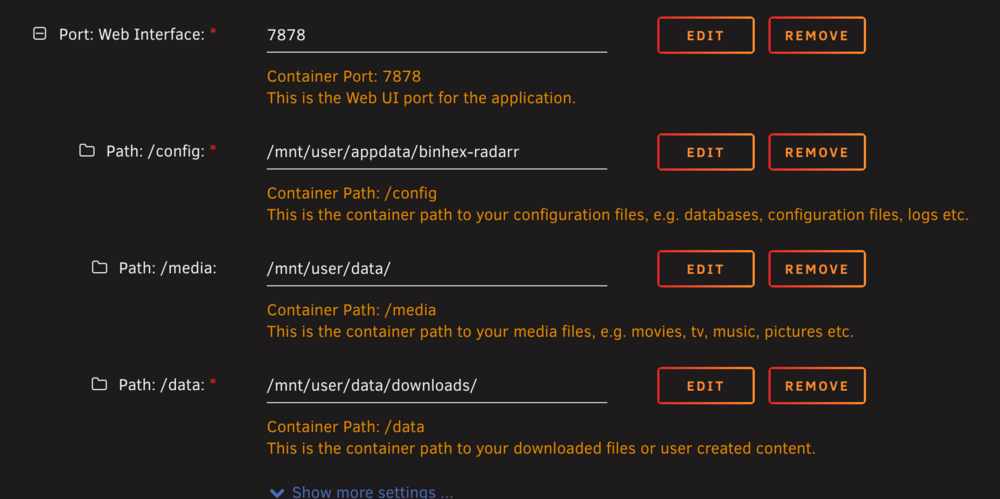
Hi All, I need to understand why I am getting the errors shown here. I have binhex sonnar installed with the exact same settings and no errors. Can someone help point me in the right direction?


-
If you are having issues with updating to the latest zwave docker, do this to fix it. Edit the container and use this as the repository: zwavejs/zwave-js-ui:11.3.1. It will pull the last version. The devs have identified the issue and are working on a fix.
-
I'm not sure what is happening, but I'm getting the same ERR Module not found. I restored the past 4 backups without success. I'm not sure what happened that backups don't work.
-
Thanks for pointing out the bug.
-
I am not routing it through a vopn container network using vpn_inout_port. My Radar container has its own IP address. It uses privoxy from QBitTorrent as shown in my screen shot. I don’t see why I shouldn’t be able to access the webui from the docker tab. It worked in this setup about 6 months ago.
-
I can access it via IP address and port. I cannot access it by left clicking the container and selecting webui. I get this in the browser address: about:blank#blocked. It's kind of a pain to have to remember the IP address versus the other method.
-
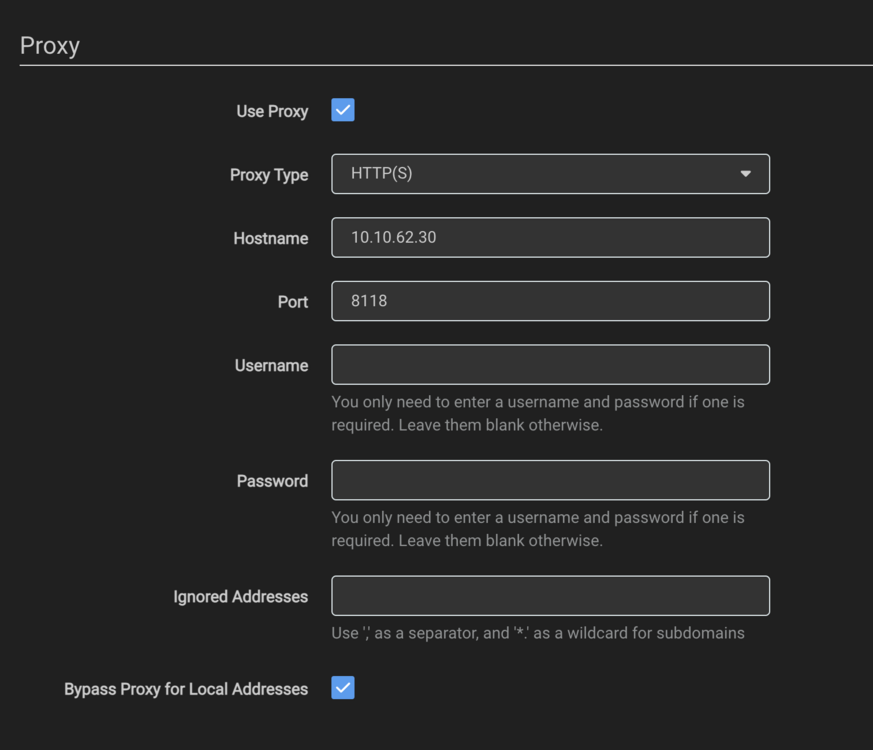
It's been a while since I've been able to access the webui for radarr and sonarr. I switched to qbittorrent from delugevpn, but the problem was happening with deluge. I have my lan networks defined in qbittorrent. The proxy setting are shown in the attached file. My docker containers run their own vlan with an IP address assigned. I'm not getting any port mappings on the docker page, and I used to get those. What could be causing the port mappings to disappear and me not get access to the webui? Or is it some other problem?
-
HI All, As of today, I just started getting an error that says my instance has been rate limited. The logs say it's a 503 CAPTCHA Error. F'ing Google. There doesn't seem to be a fix. I've read that this will eventually happen to self-hosted instances. Any ideas from the group? Mark
-
Yup this is it. Thank you for responding. I can drag it down to see the content. I'll check out the other UI's.
-
Thank you.
-
Hi All, Over the years, I've raised my docker disk size to 60GB. It's currently using 40GB. This started to not make sense. I've always cleaned up orphan images with cleanup appdata. I think I've used most of the scripts and command line entries to help clean it up. When I run Spaceinvaderone's check docker script, I get the output shown below. It doesn't make sense why it's high in usage. Does the output look off? Where should I go next? dockeruse.txt
-
Hi All, I'm trying to make the switch from delugevpn to qbittorrentvpn. I'm having a couple of issues. When I add a torrent link, it shows as active in the status bar. However in the main screen it does not show the torrent. The log says it was added. What would cause this to happen? Also, I'm seeing this error in the logs. UPnP/NAT-PMP port mapping failed. Message: "could not map port using UPnP[10.69.199.142]: no router found". I'm using mullvad vpn, and all containers using this as a proxy work fine. Should I ignore this, or is this causing the issue above?
-
Something is broken with the container. I use fixed IP's on all my dockers without issue. This one worked correctly up until a month ago. Something broke in a recent update where the webui link doesn't work. It works under bridge mode but does not work under a custom network with fixed IP, which it did for the past couple of years.
-
I did not try that. I never had this issue until the last update.



