CowboyRedBeard
Members
-
Joined
-
Last visited
Everything posted by CowboyRedBeard
-
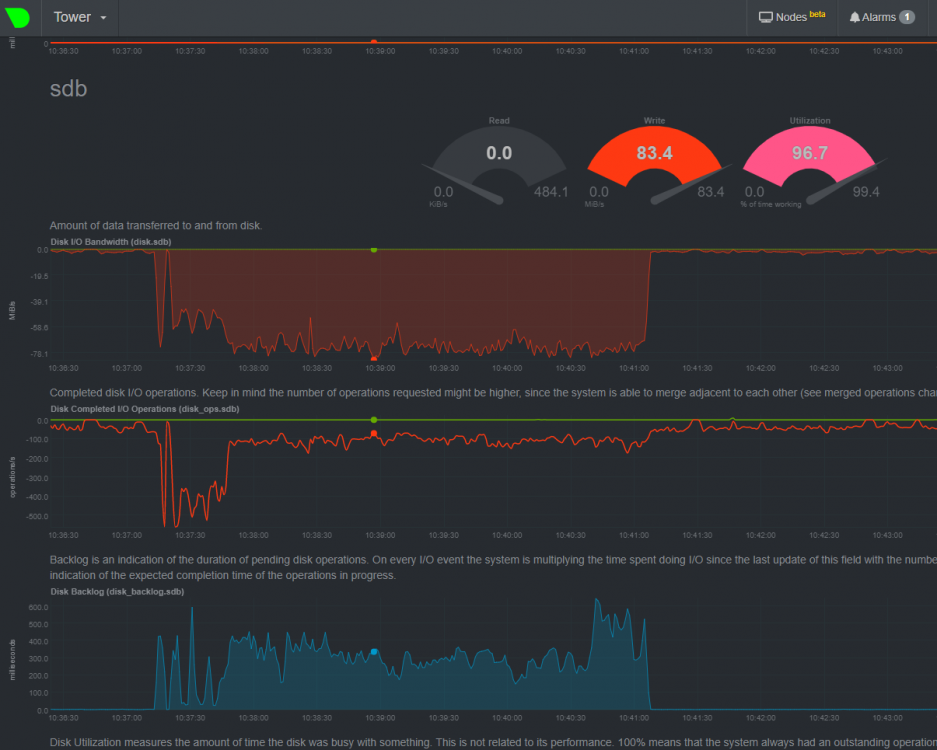
Which, this is one of the cache drives...
-
I did move all the sab operations to a dedicated share that is set to only.... it's still giving me high IO wait
-
OK, putting it all back together and will report. Is there a way to tell which of the apps was last installed? I have a few of them that I've installed from different sources, one worked well and the other didn't. So whatever one was last installed was the one I had working.
-
I had a good dozen, will they get all their config data back from /appdata ? Do I have to reconfigure all the parameters, like mappings and stuff? Is there somewhere that has that still I can copy from?
-
5th-tower-diagnostics-20200326-0926.zip
-
root@Tower:~# ls -lah /mnt/cache/system/docker total 0 drwxrwxrwx 1 root root 0 Mar 26 09:00 ./ drwxrwxrwx 1 nobody users 26 Feb 6 2019 ../ root@Tower:~# ls -lah /mnt/cache/system/libvirt total 105M drwxrwxrwx 1 root root 22 Feb 6 2019 ./ drwxrwxrwx 1 nobody users 26 Feb 6 2019 ../ -rw-rw-rw- 1 nobody users 1.0G Mar 26 05:30 libvirt.img root@Tower:~#
-
Yes, I did the check box and delete root@Tower:~# ls -lah /mnt/disk1/system total 0 drwxrwxrwx 4 nobody users 35 Feb 6 2019 ./ drwxrwxrwx 8 nobody users 125 Mar 24 22:24 ../ drwxrwxrwx 2 root root 24 Feb 6 2019 docker/ drwxrwxrwx 2 root root 25 Feb 6 2019 libvirt/ root@Tower:~# ls -lah /mnt/cache/system total 16K drwxrwxrwx 1 nobody users 26 Feb 6 2019 ./ drwxrwxrwx 1 nobody users 82 Mar 25 17:42 ../ drwxrwxrwx 1 root root 0 Mar 26 09:00 docker/ drwxrwxrwx 1 root root 22 Feb 6 2019 libvirt/ root@Tower:~#
-
OK, but this is going to make a lot of small people on lockdown from the virus angry for however long it takes to get it back... 4th-tower-diagnostics-20200326-0900.zip
-
I do have VM's... I disabled everything, did prefer, ran the mover, then changed it to only and started it back it up. What do I do now? Ugh... I guess it's time I do some RTFM.... unraid is too powerful, look at what I've created and now I cannot control THE BEAST ! 🤣
-
And I guess my next question would be, does it make sense to create a share for just sab that is cache only. Then sonarr / radarr can move the files off of that share to the media share once unpacking is done, which would also happen on cache but in a "yes" share?
-
Next try, did I get it right this go? 😃
-
Done...
-
also.... THANKS FOR THE HELP! I know n00bs can be frustrating with our problems that seem simple to those with experience
-
OK, so if I understand correctly I should: 1) shut down all the dockers and VMs 2) disable both Docker and VM in settings 3) change the shares to "only" 4) invoke mover 5) re-enable docker and VM 6) turn them back on ? Also, I know there's some cleanup of appdata that can be done due to dockers that I no longer have, how else can I see what is eating up all the docker image size? I think this was when I was fighting the image running out of space. That ended up being the Plex docker "/transcode" mapping, which I have since fixed. Do you think this could be the issue with the high IO when Sab is unpacking a file?
-
Should the system share be set to "only" ? Docker image size, I have no idea... I probably messed that up. Is it bad to have it be 40G? Like I said, I'm not a systems/linux guy... I know enough to be dangerous. I follow directions well though!
-
I had originally thought the SSD drives might be going bad, and I frequently ran out of cache space anyway... so I upgraded them last night to brand new (qty 2) 1TB Samsung EVO 860 QVO (MZ-76Q1T0). I probably should have mentioned that. The problem existed with the Crucial 500G ones I had in before, but I don't think I had ever seen it happen before upgrading to 6.7 but I'm not certain. I mean, unraid has been so freaking rock solid, and I'm not really a systems/linux guy in my day job to be honest I've not really given it much attention until this started happening. It just sat on the shelf and worked... Attached is diag What else can I provide?
-
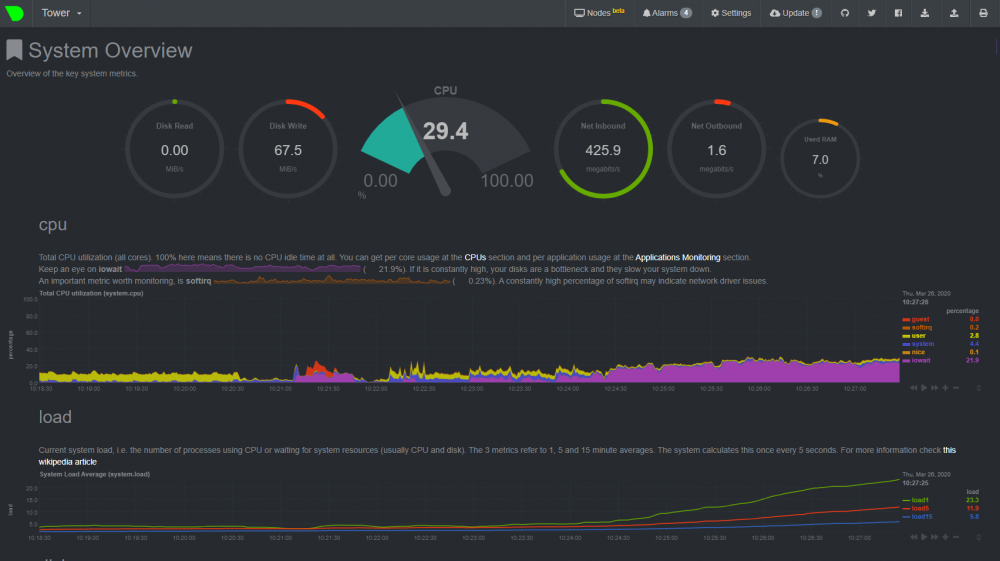
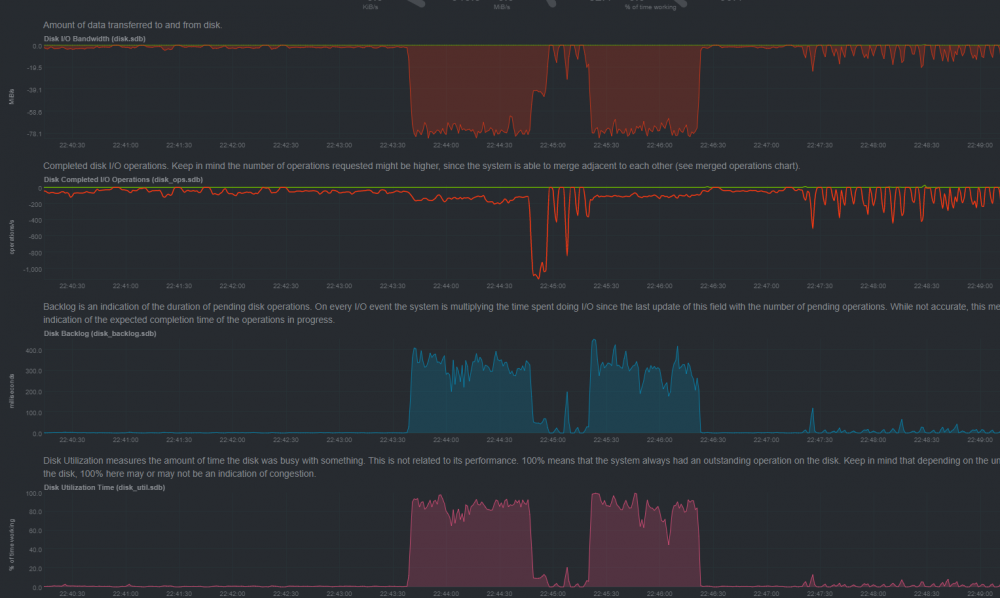
OK... might have found some part of an answer to my question. Not sure why this would have not been needed before. My guess is that it started during my upgrade to 6.7. This seems to make some difference when only sab is running. However, if I'm streaming Plex at the same time it then starts to be an issue again. I'm wondering if I need this for Plex too? I'm don't understand what the -c does or how to put the right number there. I also have the Plex transcode folder on the cache drive so I suppose that compounds whatever the issue is here. I have 128G of RAM, so maybe there's a way to use it? I found this thread also: Which suggests adjusting the "dirty ratio" within tips and tweaks.... I'm afraid of doing that as I have just read the explanation here: https://lonesysadmin.net/2013/12/22/better-linux-disk-caching-performance-vm-dirty_ratio/ And have no idea what it's saying.... This is the kind of action on the cache SSD during this, and worse actually... So maybe this "dirty ratio" through tips and tweaks is the right place to be looking? When this happens nothing seems to work until it's done doing whatever it's doing. Even my pi-hole docker isn't able to serve DNS queries. Help a n00b!
-
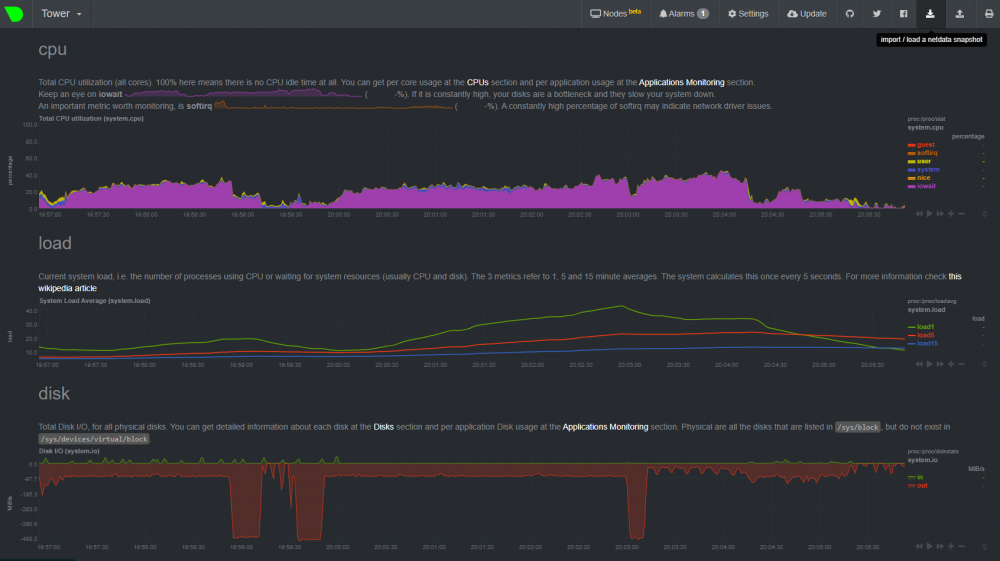
Not sure where to even start looking. But now if I for example have sabnzdb in docker download a file of say 8G it puts my system into pretty heavy CPU usage and from there, a lot of the other services experience interruption. I just recently upgraded from 6.7.0 to 6.8.3, I was hoping that would fix it but did not. The system is dual E5 2690v2 @ 3Ghz ... 20 cores with 128G of RAM so it's decently powered. What am I looking at here? What information is helpful in tracking this down? I assume it's happening because of operations happening on the cache drives, which are SSD connected on SATA3. At times I can see writes in excess of 500MBs
-
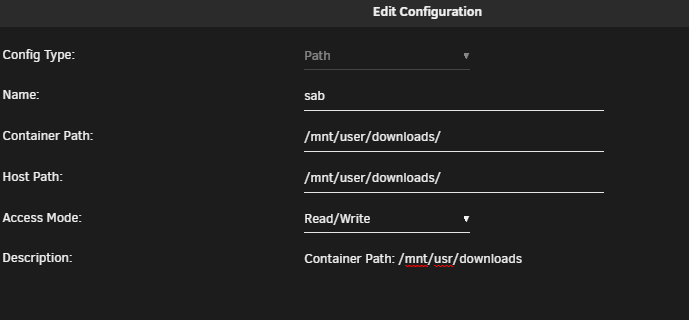
I think that's just the description?? Well, I changed it all to match and it's still doing it. Is there a way to see which docker is causing this? UPDATE Ended up being my Plex Transcode directory. Apparently I had set it to be the same for container and host path during an upgrade.... Long story short is to make sure the container sees it as "/transcode"
-
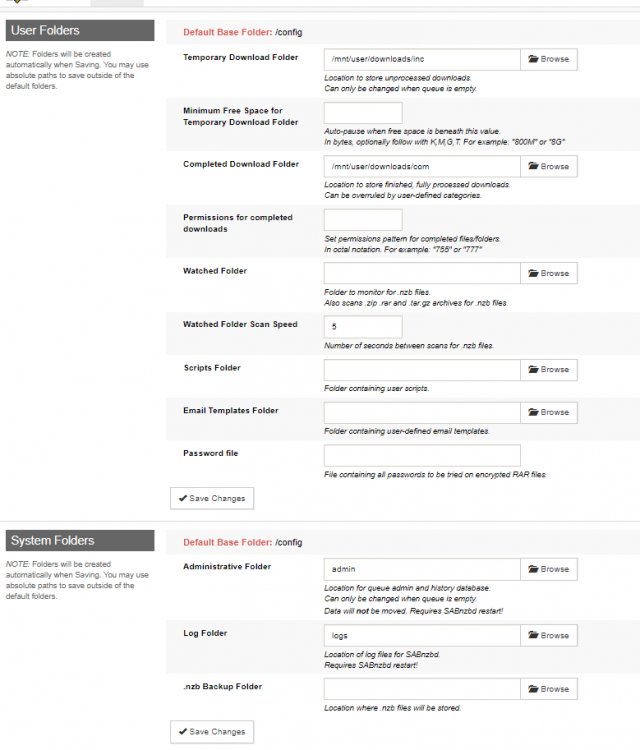
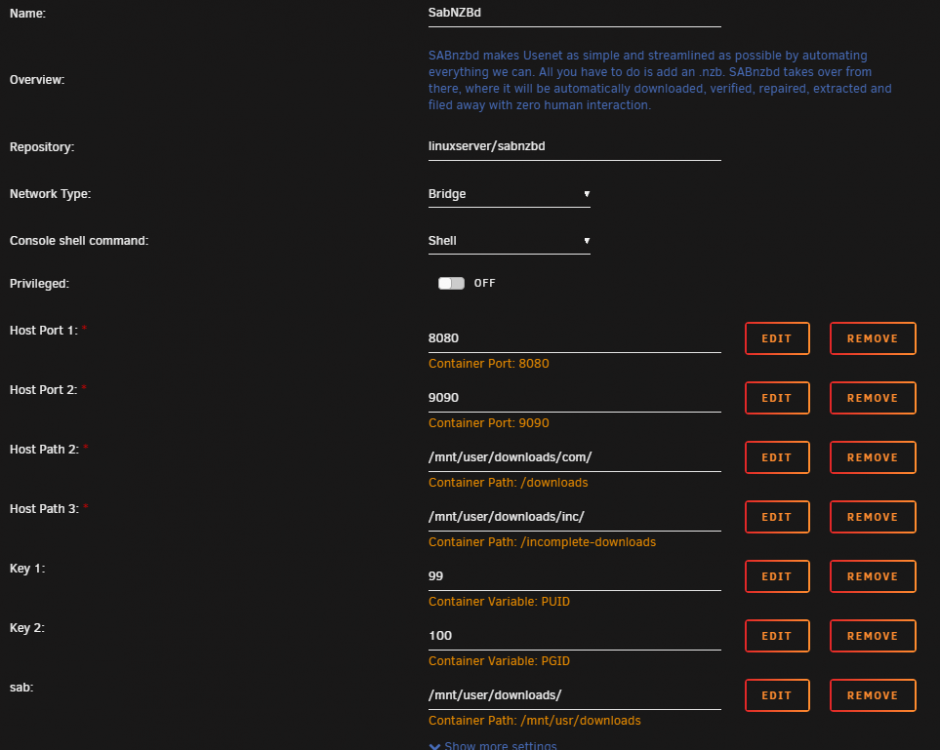
OK... I'm not sure why I keep getting this stuff. Docker critical image disk utilization: 23-02-2020 16:12 Alert [TOWER] - Docker image disk utilization of 92% Docker utilization of image file /mnt/user/system/docker/docker.img Container sizes: Name Container Writable Log --------------------------------------------------------------------- KrusadeR 2.47 GB 12 MB 81.5 kB Lidarr 1.29 GB 0 B 12.8 MB radarr 1.12 GB 24.9 MB 8.59 MB MineCraftServer 899 MB 0 B 12.8 MB SonarR 622 MB 21.1 MB 2.83 MB Netdata 566 MB 267 MB 21.0 MB dupeGuru 491 MB 0 B 12.8 MB PlexOfficial 482 MB 2.44 MB 573 kB pihole 341 MB 37 MB 107 kB HandBrake 315 MB 0 B 12.8 MB SabNZBd 259 MB 303 kB 131 kB tautulli 256 MB 123 MB 2.70 MB Grafana 233 MB 0 B 9.22 kB YouYube-DL 178 MB 0 B 12.8 MB uGet 118 MB 0 B 12.8 MB transmission 80.3 MB 0 B 12.8 MB unifi-poller 10.9 MB 0 B 18.5 MB I've put this into each of the dockers --log-opt max-size=50m --log-opt max-file=1 This is my Sab config: What in the world am I missing here? This worked fine for the last year, this is driving me nuts through notifications.
-
So.... My docker has been working for a long while and now all of a sudden Krusader cannot move or create directories. I'm guessing it's a file permission issue. I did try this: And that didn't work. I'm on Unraid 6.7.0 and Krusader in the "help" menu shows version 2.7.2 This is the last thing in the docker log: 2020-02-09 10:42:45,741 DEBG 'start' stderr output: kdeinit5: Got EXEC_NEW '/usr/lib/qt/plugins/kf5/kio/file.so' from launcher. kdeinit5: preparing to launch '/usr/lib/qt/plugins/kf5/kio/file.so' Where should I look next? I noticed this when all of a sudden Sonarr couldn't see files that I had manually dumped into a series folder, even though Plex docker can.
-
OK, stupid question... How do I edit the file?? It doesn't seem like nano / vim work in the console. I tried viewing the files via Krusader but the Netdata folder in appdata is empty?
-
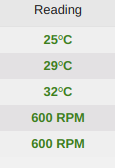
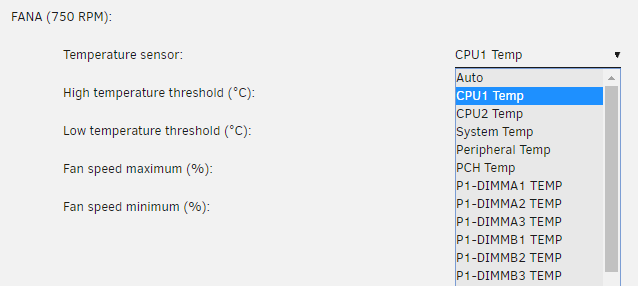
Hrmm... so just now messing with this again. I guess the issue I have is that FANA/B for CPUs based on CPU temp is based on the temp of just 1 CPU... So if I ended up having 1 CPU get really hot, and that wasn't the one being monitored... then that could be a real issue.... I guess I could do one zone for 1 CPU and the other zone for the other CPU... but then that would leave the drive & case fans to be done via my dedicated controller... Which is what I have today. So maybe I'm to let SM BMC control the CPU fans, my dedicated controller to case & drive fans (it does have a probe) ... and I just use the IPMI plugin for monitoring and alerting. Thoughts?
-
I've read this like 4 times now... Thanks, that is VERY helpful. SO... if I read you correctly. I could: Use one zone (FANA/B) to run CPU fans - basing the controls and thresholds on the CPU temp sensors Also use another zone (FAN1234) - referencing the highest HD temp to control case fans ? That... sounds... AWESOME I'm just so nervous to mess this up and cause a meltdown. Part of my trepidation is I'm running e5-2690v2 procs which are 130w TDP ... I'm actually on round 2 of Noctua coolers (NH-D9DX i4 3U). I'm worried they won't keep pace under load. In my limited testing it appears I'm getting some level of thermal throttling under load presently with fans at 77%. However, they don't seem to ramp to 100% unless I set it that way in the BMC. This is all with the standard fan control in BMC, not through the plugin. It's not likely that I'll hit such high sustained loads regularly, but I also want to build it so that I don't have to ever worry about it. Do you think it's best to manage fans via the BMC or the IPMI plugin?
-
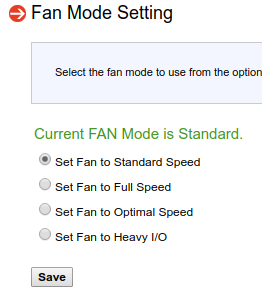
OK, thanks for that info on the thresholds. But my question is more surrounding if it's referencing the hard drive temp instead of the CPU... minimum threshold isn't going to help me. I'm thinking the plugin might be the way I monitor it and issue alerts, but CPU fan control might need to be done via BMC / BIOS on the SM board. I've since switched it to "standard" via the SM IPMI: And it seems to hold the fans at a nice low speed and temps are stable (at idle) And when I'm loading it up (one processor doing a video conversion via handbrake) it kicks the fans up appropriately and holds acceptable temps. Although it seems I might be getting a bit of thermal throttling, but I need to do more testing on that. I guess at this point I'm most interested in knowing if I can manage the fans referencing the CPU temp instead of a HD temp which makes no sense to me... so I had assumed I'm doing something incorrectly. Which wouldn't be the first time.