





Nishadul Haque
Members
-
Joined
-
Last visited
Everything posted by Nishadul Haque
-
my filebrowser problem not solved
-
I have try it as your following instruction but problem is filebrowser not started
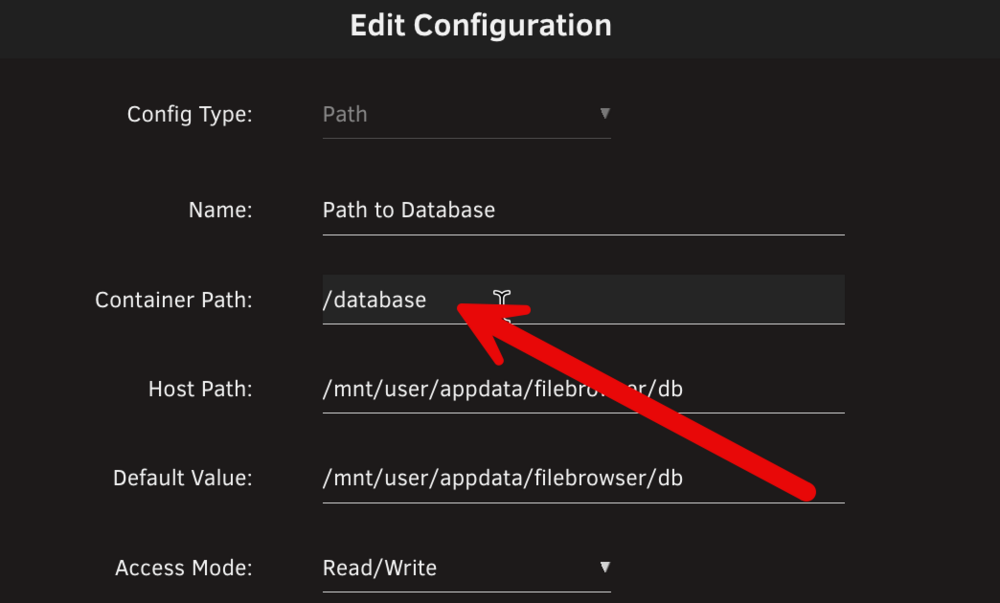
-
I have try it as your instruction but problem is filebrowser not started
-
I have installed it in docker of Unraid my setting is: but file browser log error message is :
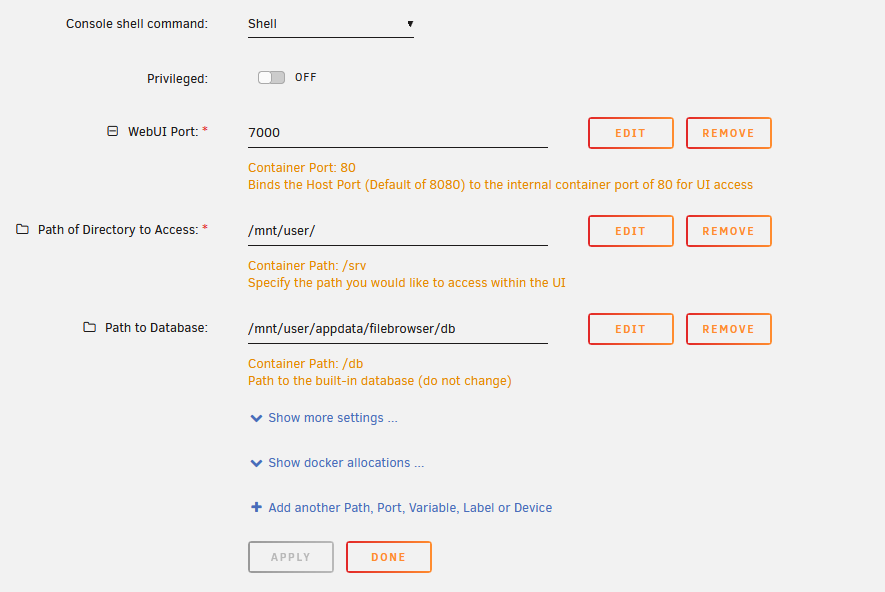
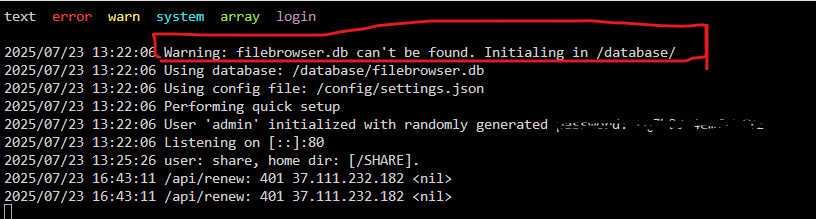
-
Problem is : When is change any option or update FileBrower then all setting automatically set default and all user deleted automatically of user management (only show default admin user). maybe database location problem. can me help me regarding this issue. I am not understand/not finding database location: Docker Image UpdatesThe Alpine Docker image has breaking changes from v2.33.0, in order to address multiple issues that have continuously affected multiple users. The changes are as follows: User: File Browser no longer runs as root, but as user with PID 1000 and GID 1000. You can still change this by using Docker's --user flag. Volumes: the volumes with the database and configuration are now aligned with the s6-overlay images. Instead of mounting the files themselves, which leads to frequent issues, you now mount the surrounding directory. Unfortunately, these are breaking changes and will require updates on your side. Assuming you have a database.db, a .filebrowser.json and the data in /data, do the following: Change the path of database in .filebrowser.json to /database/filebrowser.db Rename database.db to filebrowser.db Rename .filebrowser.json to settings.json Put them in the same directory locally, let's say /app/filebrowser/ Change the permissions of both directories: sudo chown -R 1000:1000 /app/filebrowser /data Mount with the flags -v /app/filebrowser:/database -v /app/filebrowser:/config - you can also choose to put them in separate directories, but it is not needed. If you are still getting errors, please make sure that the paths/volumes you are mounting have read-write permission for user 1000:1000. For more up to date information regarding how you should use the Docker image, check filebrowser.org/installation.html#docker
-
Pl see the attach diagnostics file diagnostics-20231224-1148.zip
-
Hello Sir: I have faced a problem, problem is my Cache drive show message: Pool has 1 SMART error. I am not understanding what is the problem of this SSD and how to solve it. Please suggest me.
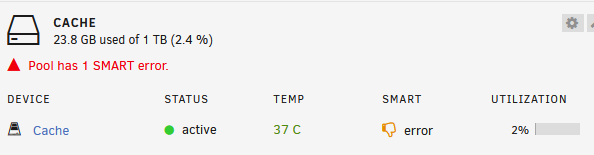
-
In same configuration I have faced a problem. problem is when I am trying from another router's PC ip is 192.168.2.5 to 192.168.0.25 then file browser not open. because no gateway entry in this configuration. how to solve this problem in Network Type: Custom: br0
-
Hello, How to change Instance name width and height of FileBrowser page OR how to change Font size of Instance name
-
Hello, My File Browser Network type is Custom : br0, Fixed IP address: 192.168.10.67, Subnet: 192.168.10.0/24 My problem is I am not getting ping from another sub router ip is 192.168.0.1 to 192.168.10.67 my sub router WAN port connected with 192.168.10.35, pl suggest me how to solve this problem.

-
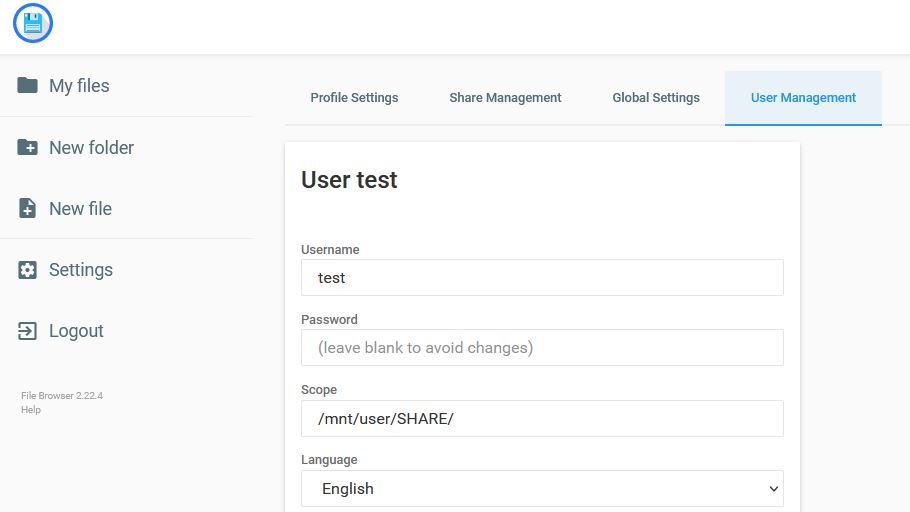
Thank you for your reply, How to mount another folder with Host Path 2, Host Path 3, Host Path 4 with share folder, doc folder, test folder etc.Hello Sir, I have installed filebrowser apps in my unraid backup server. but I have faced a problem Problem is : when I open file browser with Admin/Admin then show one TEST folder (setting > user manager > Scope: blank) but when I open another user test for folder share (setting > user manager > Scope: /mnt/user/share) then always show error message "This location can't be reached". Please help me how to solve this problemHello Sir, I have installed filebrowser apps in my unraid backup server. but I have faced a problem Problem is : when I open file browser with Admin/Admin then show one TEST folder (setting > user manager > Scope: blank) but when I open another user test for folder share (setting > user manager > Scope: /mnt/user/share) then always show error message "This location can't be reached". Please help me how to solve this problem

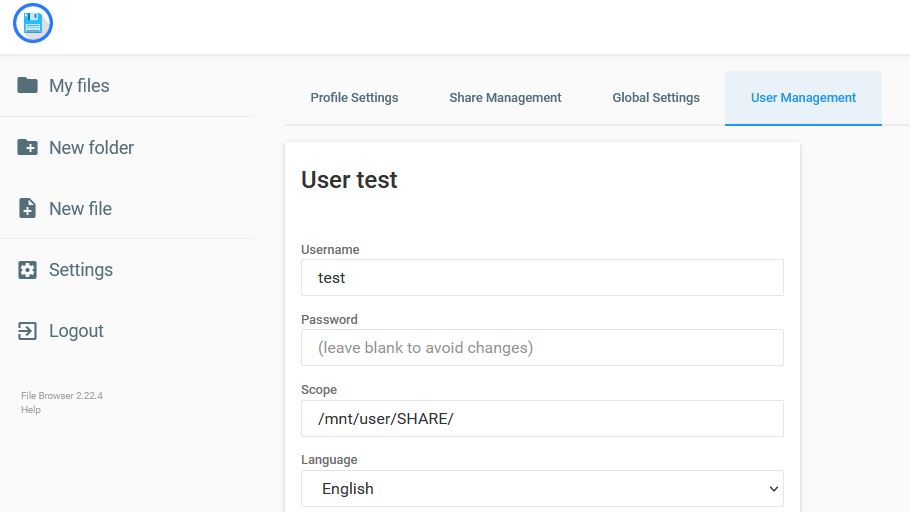 Hello Sir, I have installed filebrowser apps in my unraid backup server. but I have faced a problem Problem is : when I open file browser with Admin/Admin then show one TEST folder (setting > user manager > Scope: blank) but when I open another user test for folder share (setting > user manager > Scope: /mnt/user/share) then always show error message "This location can't be reached". Please help me how to solve this problem
 My Problem is solved Reboot the server During boot up press F2 to enter the Bios. After open the Bios, enter the menu System Bios -> Processor Settings -> Virtualization Technology Set it to disabled Press Esc to get to the top menu again Press F10 to exit the bios and save The server should now boot again as normal, Then Upgrade Unraid OS from 6.10.1 To 6.10.2 without (Cannot find device "eth0") problem.Thanks Oceanic and JorgeB After following your instruction I have upgraded Unraid OS from 6.10.1 to 6.10.2 without any problem. Now suggest me Can I enable vt-d OR not ?I have faced same problem of my server (Dell R730XD) Error : Device "eth0" does not exist. Cannot find device "eth0"Hello, Today I have upgraded Unraid OS from 6.10.1 to 6.10.2 but problem is I am not connection with my unraid server using browser and I am not ping to server IP from my pc. I have attached monitor with my server and see its show : device "eth0" does not exist., cannot find device " etho", please see the attach file Now pl help me how to solve my problem, and how to connect with my unraid server using browser Best regards, NishadulHello, Today I have upgraded Unraid OS from 6.10.0 TO 6.10.1 But after upgraded my Unraid Backup Server's (Dell R730XD) all fan speed is high continuously (not run slowly). Please help/suggest me how to solve the problem. Best regards, Nishadul HaqueThank you for your information How to move my post to Feature RequestsLimit disk space of a share is a very important issue, Can we get it in next upgrade?Hello, How to limit (fixed) disk space of a share in unraid. Example my unraid backup server is 20TB, now I want add share "Test" which disk space will 500GB (user only use 500GB, not over) how to possible it.Thank you for your help


