





nadbmal
Members
-
Joined
-
Last visited
Everything posted by nadbmal
-
I cannot get auto-update to work. When it's all set up and it runs at night I always end up with "toomanyrequests" errors, so Compose Manager Plus has to be doing something terrible to trigger this. Doesn't happen with containers that are non-compose (updated through the CA auto-updater). For example, my Jellyfin stack that has one container (Jellyfin) got this error tonight:
-
Very annoying that OpenVPN-as is one of the most important/critical dockers I run and its the one that always randomly breaks and I don't notice it until it's too late when I'm not home and need to remote in. Changing the repo to linuxserver/openvpn-as:2.8.8-cbf850a0-Ubuntu18-ls122 according to the comment above fixed it anyway. Hopefully it'll stay fixed since that version number/repo adress shouldn't change.
-
Had the same problem. You can fix it for now by going to the "Nginx Log" folder and creating a file there (it errors because the folder is empty). I.e. on your Unraid machine, open up a Terminal/SSH and cd to /mnt/user/appdata/lancache-bundle/log/nginx and create a file in there ("touch test" for example will create a blank file called test), then it works.
-
I can't rollback to an older working version, I put linuxserver/letsencrypt:0.34.1-ls25 into the Repository field but I just get: root@localhost:# /usr/local/emhttp/plugins/dynamix.docker.manager/scripts/docker run -d --name='letsencrypt' --net='bridge' --privileged=true -e TZ="Europe/Berlin" -e HOST_OS="Unraid" -e 'EMAIL'='(redacted)' -e 'URL'='(redacted).duckdns.org' -e 'ONLY_SUBDOMAINS'='false' -e 'DHLEVEL'='2048' -e 'VALIDATION'='http' -e 'DNSPLUGIN'='' -e 'SUBDOMAINS'='www,' -e 'PUID'='99' -e 'PGID'='100' -p '43666:80/tcp' -p '43667:443/tcp' -v '/mnt/user/appdata/letsencrypt':'/config':'rw' 'linuxserver/letsencrypt:0.34.1-ls25' /usr/bin/docker: invalid reference format. See '/usr/bin/docker run --help'. The command failed. Anyone else or is it something on my end? EDIT: I fixed it by reverting to an even older version: linuxserver/letsencrypt:0.34.0-ls24 I got the version number from here: https://github.com/linuxserver/docker-letsencrypt/releases
-
I don't wanna map /transcode straight to /tmp incase Plex sniffs around in there or if it ever does a "rm -rf *". Mapping it to its own subfolder is safer.
-
Here's how to reproduce on my end (it simulates a reboot): - Have guest /transcode mapped to host /tmp/plexram - Stop the docker - Remove the folder /tmp/plexram - Start the docker. /tmp/plexram will be created again. - Try playing something that requires a transcode. It will only keep on spinning. - Create the folder "Transcode" inside /tmp/plexram - Now it works I'm attaching a screen recording of this. I don't wanna map /transcode straight to /tmp incase Plex sniffs around in there or if it ever does a "rm -rf *". Mapping it to its own subfolder is safer. 2019-04-01_16-13-51.mp4
-
It creates the Session folder when you start a transcode. It doesn't create the parent Transcode folder, and fails.
-
It creates the "Transcode/Sessions" folder when you save your docker settings. It expects it to already be there after a reboot.
-
I've run into that bug too. It fails because there isn't a folder called "Transcode" in /tmp/transcode after a reboot since the RAM was wiped. So you just need to create that folder and it works. You could probably automate it by running "mkdir /tmp/transcode/Transcode" at boot.
-
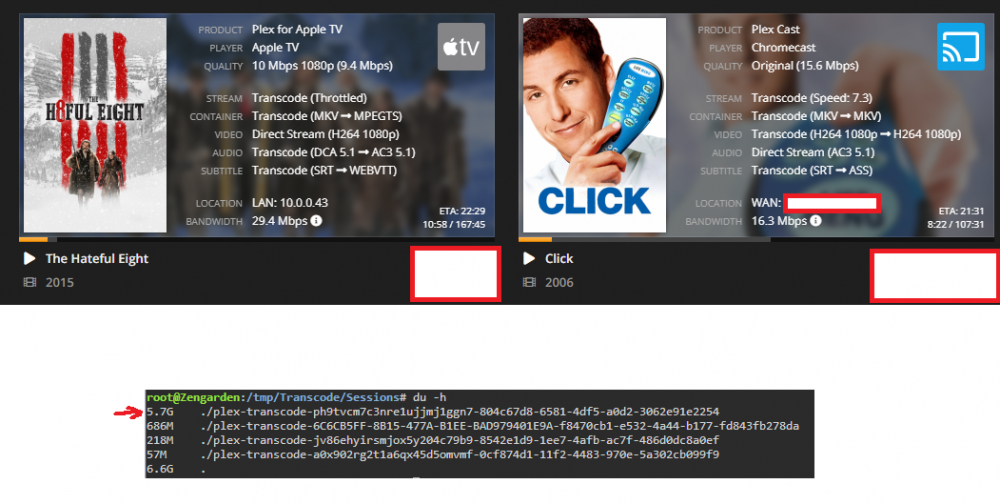
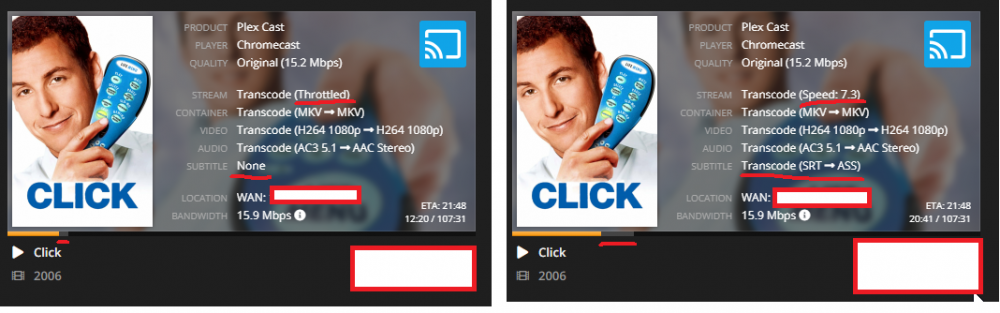
So I've been testing more and I've come to the conclusion that it is the client one of my users are using that is the problem: Chromecast. Whenever he plays something via the Chromecast it buffers the whole movie into RAM almost immediately, he can watch for 15 mins or so and then the whole movie is in RAM and gets killed. I had him try using the web player on his computer, and then it worked fine, it only buffered a couple of % ahead of where he was, like it should. This picture pretty much sums it up. Look at the buffer bars. EDIT: I have narrowed it down even further, and come to the conclusion that it is the transcoding of subtitles that is causing the problem, atleast when transcoding to ASS format. EDIT 2: And you can probably narrow it down even further to only being a issue with Chromecast users, because it transcodes to a MKV container. I tried with the web player in Chrome, which also uses ASS subtitles, but a MP4 container and then I can see the transcoder is throttled.
-
Is there a way to display the Stats page without login? I'm thinking about setting up a raspberry pi + monitor or just a tablet just showing the stats page in my room
-
I admit I havent ran memtest for 24 hours on the RAM, but i have done 2 hours and it was fine. I would prefer not to run memtest any more because then I need to connect a GPU (the Ryzen 1700x has no integrated...) and the server needs to be offline, and I get upset when I can't access my Plex on the iPad before i sleep... I've had previous experience with bad RAM and in those cases Memtest almost immediately got an error. Also everything else seems fine (I got 45 days uptime on 6.6.1 before I updated to 6.6.5)... Is there some "lighter" version of memtest I could run without taking the server offline? maybe some script that runs in /tmp/ and just moves big files around verifying their integrity to simulate Plex transcoding?
-
I have 16 GB, with around 30% in use typically (looking at the dashboard page in Unraid). And all I know is that whenever I set /transcode/ <--> /tmp/ alot of stuff just breaks. I see users restarting movies constantly (I'm guessing they're getting a transcoder error). If I reboot then Plex wouldn't start transcoding anything immediately because it wanted to remove some left over Session files but since they were in /tmp/ they weren't there so it complained about that (not really sure how it gets solved, it just starts working eventually): Dec 01, 2018 16:55:25.314 [0x153c166d5800] ERROR - Transcoder: Error cleaning old transcode sessions: boost::filesystem::directory_iterator::construct: No such file or directory: "/transcode/Transcode/Sessions" One of the most absurd things I saw was someone direct streaming a movie, and it looked like it cached the whole video in the RAM and then quit the stream (I saw the Tautulli buffer bar fill up really fast and then disappear, and then re-appear when he restarted the movie...) Then whenever I just point it back at the SSD everything works wonderfully...
-
Transcoding to RAM is severely broken I feel. I think it works fine as long as you’re the only user but If someone else starts watching too, needing a transcode, they’ll get an error. Plex could fix this if they removed old chunks from the other stream when another one starts watching.



