




.png.b2ecc25a2ab69eeef101165f65c9a537.png)

DieFalse
Members
-
Joined
-
Last visited
-
Ok, I: Pre-Req: 1. screenshotted the drives in pool "ocean" Work: 1: CLI - zpool export ocean 2: clicked on "ocean" in UnRaid Web Portal 3: clicked "Remove Pool" 4: typed the name of the pool to confirm 5: added new pool named "ocean" with 24 devices 6: re-assigned all 24 drives 7: verified all 24 drive assignments to screenshot 8: LEFT FILESYSTEM AS AUTO. 9: started array Verified pool with status and list, and can then confirm the CRC checks and all passes, no data lost. THANK YOU!
-
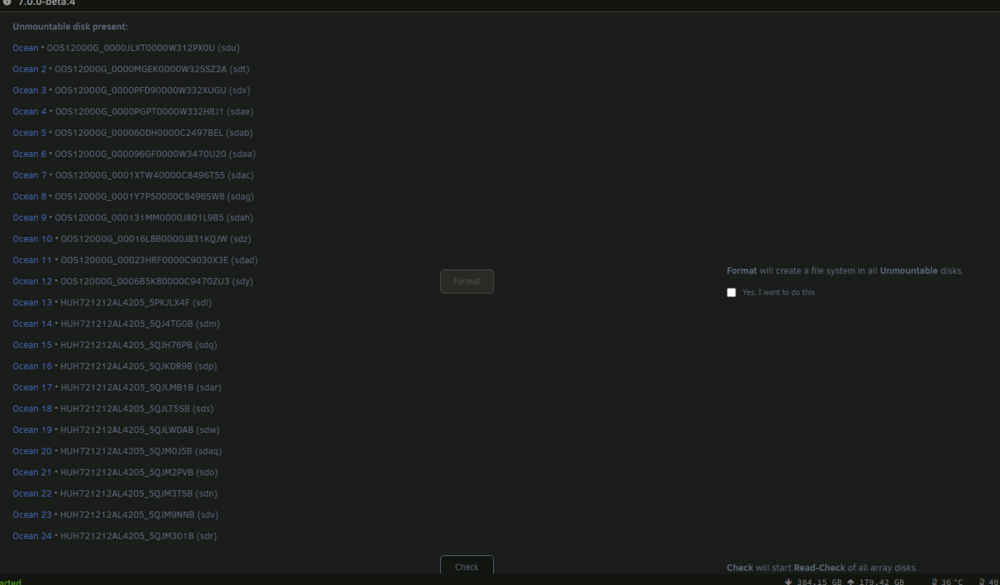
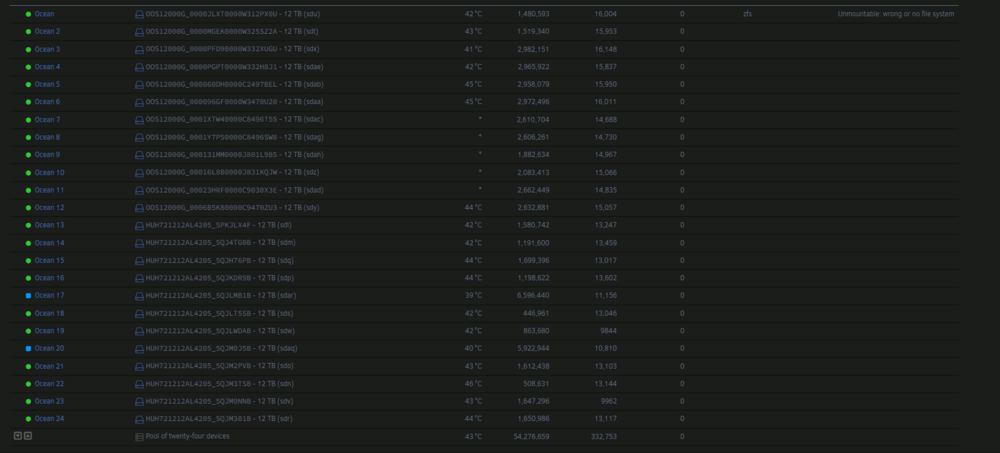
Also note: ocean is showing in ZFS list, and is online, and I can read data, but Unraid is saying it wants to format it. root@blinky:~# zfs list NAME USED AVAIL REFER MOUNTPOINT lake 98.0G 64.4T 213K /mnt/lake lake/backups 171K 64.4T 171K /mnt/lake/backups lake/downloads 69.4G 64.4T 69.4G /mnt/lake/downloads lake/isos 28.2G 64.4T 28.2G /mnt/lake/isos lake/scans 239M 64.4T 239M /mnt/lake/scans ocean 84.2T 115T 238K /mnt/ocean ocean/data 84.2T 115T 84.2T /mnt/ocean/data pond 18.7G 6.37T 104K /mnt/pond pond/windowsdockers 18.7G 6.37T 18.7G /mnt/pond/windowsdockers puddle 165G 1.64T 20.9G /mnt/puddle puddle/appdata 133G 1.64T 133G /mnt/puddle/appdata puddle/system 10.6G 1.64T 10.6G /mnt/puddle/system root@blinky:~# zpool status ocean pool: ocean state: ONLINE scan: scrub in progress since Wed Nov 20 17:42:11 2024 24.8T / 111T scanned at 13.5G/s, 2.69T / 111T issued at 1.46G/s 0B repaired, 2.44% done, 21:00:12 to go config: NAME STATE READ WRITE CKSUM ocean ONLINE 0 0 0 raidz2-0 ONLINE 0 0 0 sdu1 ONLINE 0 0 0 sdt1 ONLINE 0 0 0 sdx1 ONLINE 0 0 0 sdae1 ONLINE 0 0 0 sdab1 ONLINE 0 0 0 sdaa1 ONLINE 0 0 0 sdac1 ONLINE 0 0 0 sdag1 ONLINE 0 0 0 sdah1 ONLINE 0 0 0 sdz1 ONLINE 0 0 0 sdad1 ONLINE 0 0 0 sdy1 ONLINE 0 0 0 raidz2-1 ONLINE 0 0 0 sdl1 ONLINE 0 0 0 sdm1 ONLINE 0 0 0 sdq1 ONLINE 0 0 0 sdp1 ONLINE 0 0 0 sdar1 ONLINE 0 0 0 sds1 ONLINE 0 0 0 sdw1 ONLINE 0 0 0 sdaq1 ONLINE 0 0 0 sdo1 ONLINE 0 0 0 sdn1 ONLINE 0 0 0 sdv1 ONLINE 0 0 0 sdr1 ONLINE 0 0 0 errors: No known data errors root@blinky:~# blinky-diagnostics-20241120-1818.zip
-
I recently had a few older disks go bad and ZFS got the better of me, I lost everything and had to recover from glacier, super slow. I recovered and was working on a smaller ZFS pool replacing disks and accidentally left two disks out of the 24 disk main array. I started the array because I needed to resilver the smaller pool and that finished and I realized the two drives were missing in the main array and the pool was unmountable. Now, I stopped the array and went to re-assign the drives to their slots and it wants to format the main array again. I stopped here. How do I re-insert the two drives into the array without losing the entire array again? ocean - 24 x 12 TB SAS Drives. ZFS RaidZ2 2x12drive vdevs. Both drives removed were from the 2nd vdev. OS is 7.0.0 beta.4
-
An error occurred while testing this indexer Exception (torrentleech): FlareSolverr was unable to process the request, please check FlareSolverr logs. Message: Error: Error solving the challenge. Timeout after 55.0 seconds.: FlareSolverr was unable to process the request, please check FlareSolverr logs. Message: Error: Error solving the challenge. Timeout after 55.0 seconds.
-
Also, I still have the old disks. It's over 90TB of data on that pool, so restorning will take quite a while, if there is an alternative.
-
Is it SDAH still the bad one?
-
Ok, running zpool import ocean stalls - I gave it 24 hours and the command never finishes. zpool status does the same, I gave it 24 hours also. Trying to start the array stalls on mounting disks. blinky-diagnostics-20240912-0951.zip
-
root@blinky:~# diagnostics Starting diagnostics collection... SG_IO: bad/missing sense data, sb[]: 72 05 20 00 00 00 00 34 00 0a 00 00 00 00 00 00 00 00 00 00 01 0a 00 00 00 00 00 00 00 00 00 00 SG_IO: bad/missing sense data, sb[]: 72 05 20 00 00 00 00 34 00 0a 00 00 00 00 00 00 00 00 00 00 01 0a 00 00 00 00 00 00 00 00 00 00 SG_IO: bad/missing sense data, sb[]: 72 05 20 00 00 00 00 34 00 0a 00 00 00 00 00 00 00 00 00 00 01 0a 00 00 00 00 00 00 00 00 00 00 SG_IO: bad/missing sense data, sb[]: 72 05 20 00 00 00 00 34 00 0a 00 00 00 00 00 00 00 00 00 00 01 0a 00 00 00 00 00 00 00 00 00 00 SG_IO: bad/missing sense data, sb[]: 72 05 20 00 00 00 00 34 00 0a 00 00 00 00 00 00 00 00 00 00 01 0a 00 00 00 00 00 00 00 00 00 00 SG_IO: bad/missing sense data, sb[]: 72 05 20 00 00 00 00 34 00 0a 00 00 00 00 00 00 00 00 00 00 01 0a 00 00 00 00 00 00 00 00 00 00 SG_IO: bad/missing sense data, sb[]: 72 05 20 00 00 00 00 34 00 0a 00 00 00 00 00 00 00 00 00 00 01 0a 00 00 00 00 00 00 00 00 00 00 SG_IO: bad/missing sense data, sb[]: 72 05 20 00 00 00 00 34 00 0a 00 00 00 00 00 00 00 00 00 00 01 0a 00 00 00 00 00 00 00 00 00 00 SG_IO: bad/missing sense data, sb[]: 72 05 20 00 00 00 00 34 00 0a 00 00 00 00 00 00 00 00 00 00 01 0a 00 00 00 00 00 00 00 00 00 00 SG_IO: bad/missing sense data, sb[]: 72 05 20 00 00 00 00 34 00 0a 00 00 00 00 00 00 00 00 00 00 01 0a 00 00 00 00 00 00 00 00 00 00 SG_IO: bad/missing sense data, sb[]: 72 05 20 00 00 00 00 1c 02 06 00 00 cf 00 00 00 03 02 00 01 80 0e 00 00 00 00 00 00 00 00 00 00 SG_IO: bad/missing sense data, sb[]: 72 05 20 00 00 00 00 1c 02 06 00 00 cf 00 00 00 03 02 00 01 80 0e 00 00 00 00 00 00 00 00 00 00 SG_IO: bad/missing sense data, sb[]: 72 05 20 00 00 00 00 1c 02 06 00 00 cf 00 00 00 03 02 00 01 80 0e 00 00 00 00 00 00 00 00 00 00 SG_IO: bad/missing sense data, sb[]: 72 05 20 00 00 00 00 1c 02 06 00 00 cf 00 00 00 03 02 00 01 80 0e 00 00 00 00 00 00 00 00 00 00 SG_IO: bad/missing sense data, sb[]: 72 05 20 00 00 00 00 1c 02 06 00 00 cf 00 00 00 03 02 00 01 80 0e 00 00 00 00 00 00 00 00 00 00 SG_IO: bad/missing sense data, sb[]: 72 05 20 00 00 00 00 1c 02 06 00 00 cf 00 00 00 03 02 00 01 80 0e 00 00 00 00 00 00 00 00 00 00 SG_IO: bad/missing sense data, sb[]: 72 05 20 00 00 00 00 1c 02 06 00 00 cf 00 00 00 03 02 00 01 80 0e 00 00 00 00 00 00 00 00 00 00 SG_IO: bad/missing sense data, sb[]: 72 05 20 00 00 00 00 1c 02 06 00 00 cf 00 00 00 03 02 00 01 80 0e 00 00 00 00 00 00 00 00 00 00 SG_IO: bad/missing sense data, sb[]: 72 05 20 00 00 00 00 1c 02 06 00 00 cf 00 00 00 03 02 00 01 80 0e 00 00 00 00 00 00 00 00 00 00 SG_IO: bad/missing sense data, sb[]: 72 05 20 00 00 00 00 1c 02 06 00 00 cf 00 00 00 03 02 00 01 80 0e 00 00 00 00 00 00 00 00 00 00 SG_IO: bad/missing sense data, sb[]: 72 05 20 00 00 00 00 1c 02 06 00 00 cf 00 00 00 03 02 00 01 80 0e 00 00 00 00 00 00 00 00 00 00 SG_IO: bad/missing sense data, sb[]: 70 00 05 00 00 00 00 18 00 00 00 00 20 00 21 c0 00 00 00 00 f8 21 00 00 00 00 00 00 00 00 00 00 SG_IO: bad/missing sense data, sb[]: 70 00 05 00 00 00 00 18 00 00 00 00 20 00 21 c0 00 00 00 00 f8 21 00 00 00 00 00 00 00 00 00 00 SG_IO: bad/missing sense data, sb[]: 70 00 05 00 00 00 00 28 00 00 00 00 20 00 00 00 00 00 00 00 11 05 01 00 00 00 00 00 00 00 00 00 SG_IO: bad/missing sense data, sb[]: 70 00 05 00 00 00 00 28 00 00 00 00 20 00 00 00 00 00 00 00 11 05 01 00 00 00 00 00 00 00 00 00 blinky-diagnostics-20240908-1426.zip
-
I have moved SDAH1 to a completely different bay. blinky-diagnostics-20240907-2316.zip
-
Attached. blinky-diagnostics-20240906-1511.zip
-
These are the replacements, bad disks were SDAB1 and SDAH
-
root@blinky:~# zpool import ocean root@blinky:~# zpool status pool: ocean state: ONLINE status: One or more devices is currently being resilvered. The pool will continue to function, possibly in a degraded state. action: Wait for the resilver to complete. scan: resilver in progress since Tue Aug 27 10:01:17 2024 25.2T / 161T scanned at 2.21G/s, 2.70T / 138T issued 234G resilvered, 1.95% done, no estimated completion time config: NAME STATE READ WRITE CKSUM ocean ONLINE 0 0 0 raidz2-0 ONLINE 0 0 0 sdl1 ONLINE 0 0 0 sdm1 ONLINE 0 0 0 sdn1 ONLINE 0 0 0 sdo1 ONLINE 0 0 0 sdp1 ONLINE 0 0 0 sdq1 ONLINE 0 0 0 sdr1 ONLINE 0 0 0 sds1 ONLINE 0 0 0 sdt1 ONLINE 0 0 0 sdu1 ONLINE 0 0 0 sdv1 ONLINE 0 0 0 sdw1 ONLINE 0 0 0 raidz2-1 ONLINE 0 0 0 sdk1 ONLINE 0 0 0 sdx1 ONLINE 0 0 0 sdy1 ONLINE 0 0 0 sdz1 ONLINE 0 0 0 sdaa1 ONLINE 0 0 0 sdab1 ONLINE 42 0 2 (resilvering) sdac1 ONLINE 0 0 0 sdad1 ONLINE 0 0 0 sdas1 ONLINE 0 0 105 (resilvering) sdaf1 ONLINE 0 0 0 sdag1 ONLINE 0 0 0 sdah1 ONLINE 0 0 5 errors: 5251538 data errors, use '-v' for a list
-
root@blinky:~# zpool import pool: puddle id: 11867148198770777971 state: ONLINE status: Some supported features are not enabled on the pool. (Note that they may be intentionally disabled if the 'compatibility' property is set.) action: The pool can be imported using its name or numeric identifier, though some features will not be available without an explicit 'zpool upgrade'. config: puddle ONLINE sdi1 ONLINE sdj1 ONLINE pool: pond id: 8288541694324865914 state: ONLINE status: Some supported features are not enabled on the pool. (Note that they may be intentionally disabled if the 'compatibility' property is set.) action: The pool can be imported using its name or numeric identifier, though some features will not be available without an explicit 'zpool upgrade'. config: pond ONLINE sdc1 ONLINE sdd1 ONLINE sde1 ONLINE sdf1 ONLINE sdg1 ONLINE sdh1 ONLINE pool: lake id: 14754233077931072669 state: ONLINE status: Some supported features are not enabled on the pool. (Note that they may be intentionally disabled if the 'compatibility' property is set.) action: The pool can be imported using its name or numeric identifier, though some features will not be available without an explicit 'zpool upgrade'. config: lake ONLINE raidz1-0 ONLINE sdai1 ONLINE sdaj1 ONLINE sdak1 ONLINE sdal1 ONLINE sdam1 ONLINE sdan1 ONLINE sdao1 ONLINE sdap1 ONLINE sdaq1 ONLINE sdar1 ONLINE pool: ocean id: 7071264282089903179 state: ONLINE status: One or more devices were being resilvered. action: The pool can be imported using its name or numeric identifier. config: ocean ONLINE raidz2-0 ONLINE sdl1 ONLINE sdm1 ONLINE sdn1 ONLINE sdo1 ONLINE sdp1 ONLINE sdq1 ONLINE sdr1 ONLINE sds1 ONLINE sdt1 ONLINE sdu1 ONLINE sdv1 ONLINE sdw1 ONLINE raidz2-1 ONLINE sdk1 ONLINE sdx1 ONLINE sdy1 ONLINE sdz1 ONLINE sdaa1 ONLINE sdab1 ONLINE sdac1 ONLINE sdad1 ONLINE sdas1 ONLINE sdaf1 ONLINE sdag1 ONLINE sdah1 ONLINE
-
Hello mindhive. I may have messed up, but I know to stop and wait when this happens and research and ask. I had two disks go UNAVAIL in my ZFS pool (Ocean is its name) and purchased two to replace them. since they were unavail, I swapped the drives and started the array. It now is erroring out and wanting me to format the entire pool, which I would love not to do, as restoring that much data from backups will be time consuming. I still have both old disks and the two new disks, but the pool recognizes the two new disks and wont accept the old disks. In my research I found i likely messed up by replacing both, even though they are unavail. I should have done one at a time even though the redundancy is capable of dual loss. Please help me restore my pool and fix this. blinky-diagnostics-20240906-1252.zip
-
Any ideas on this error?



