





munit85
Members
-
Joined
-
Last visited
-
This just solved a problem I've been having periodically. I was experiencing the 'bad time' from using an IP. thanks
-
to update. not solved, but I seem to be having mDNS errors. if I connect via IP address it loads fine. If I try to load via my server name plex-pc it takes a few tries and has all the sluggish behavior. I have lots of mdns entries in my log as well as dockers not being able to download their icons. So basically its something wrong with my network.
-
Agreed. A rollback fixed the problem for me as well. thanks for the hard work Binhex, we appreciate it.
-
I tried visiting unraid with edge, vs my normal firefox and it seems to load fine. Seems its just a problem on my end.
-
I pulled any errors or warnings from my system logs. the mdns issue does seem interesting, not sure what to do about it though. Oct 22 17:37:10 Plex-PC kernel: ACPI: Early table checksum verification disabled Oct 22 17:37:10 Plex-PC kernel: pci 0000:01:00.0: BAR 9: failed to assign [mem size 0x00400000 64bit] Oct 22 17:37:10 Plex-PC kernel: pci 0000:01:00.0: BAR 7: failed to assign [mem size 0x00040000 64bit] Oct 22 17:37:10 Plex-PC kernel: floppy0: no floppy controllers found Oct 22 17:37:10 Plex-PC kernel: ACPI BIOS Error (bug): Could not resolve symbol [\_SB.PCI0.SAT0.PRT0._GTF.DSSP], AE_NOT_FOUND (20220331/psargs-330) Oct 22 17:37:10 Plex-PC kernel: ACPI Error: Aborting method \_SB.PCI0.SAT0.PRT0._GTF due to previous error (AE_NOT_FOUND) (20220331/psparse-529) Oct 22 17:37:10 Plex-PC kernel: ACPI BIOS Error (bug): Could not resolve symbol [\_SB.PCI0.SAT0.PRT0._GTF.DSSP], AE_NOT_FOUND (20220331/psargs-330) Oct 22 17:37:10 Plex-PC kernel: ACPI Error: Aborting method \_SB.PCI0.SAT0.PRT0._GTF due to previous error (AE_NOT_FOUND) (20220331/psparse-529) Oct 22 17:37:10 Plex-PC kernel: ACPI BIOS Error (bug): Could not resolve symbol [\_SB.PCI0.SAT0.PRT2._GTF.DSSP], AE_NOT_FOUND (20220331/psargs-330) Oct 22 17:37:10 Plex-PC kernel: ACPI Error: Aborting method \_SB.PCI0.SAT0.PRT2._GTF due to previous error (AE_NOT_FOUND) (20220331/psparse-529) Oct 22 17:37:10 Plex-PC kernel: ACPI BIOS Error (bug): Could not resolve symbol [\_SB.PCI0.SAT0.PRT5._GTF.DSSP], AE_NOT_FOUND (20220331/psargs-330) Oct 22 17:37:10 Plex-PC kernel: ACPI Error: Aborting method \_SB.PCI0.SAT0.PRT5._GTF due to previous error (AE_NOT_FOUND) (20220331/psparse-529) Oct 22 17:37:10 Plex-PC kernel: ACPI BIOS Error (bug): Could not resolve symbol [\_SB.PCI0.SAT0.PRT4._GTF.DSSP], AE_NOT_FOUND (20220331/psargs-330) Oct 22 17:37:10 Plex-PC kernel: ACPI Error: Aborting method \_SB.PCI0.SAT0.PRT4._GTF due to previous error (AE_NOT_FOUND) (20220331/psparse-529) Oct 22 17:37:10 Plex-PC kernel: ACPI BIOS Error (bug): Could not resolve symbol [\_SB.PCI0.SAT0.PRT2._GTF.DSSP], AE_NOT_FOUND (20220331/psargs-330) Oct 22 17:37:10 Plex-PC kernel: ACPI Error: Aborting method \_SB.PCI0.SAT0.PRT2._GTF due to previous error (AE_NOT_FOUND) (20220331/psparse-529) Oct 22 17:37:10 Plex-PC kernel: ACPI BIOS Error (bug): Could not resolve symbol [\_SB.PCI0.SAT0.PRT4._GTF.DSSP], AE_NOT_FOUND (20220331/psargs-330) Oct 22 17:37:10 Plex-PC kernel: ACPI Error: Aborting method \_SB.PCI0.SAT0.PRT4._GTF due to previous error (AE_NOT_FOUND) (20220331/psparse-529) Oct 22 17:37:10 Plex-PC kernel: ACPI BIOS Error (bug): Could not resolve symbol [\_SB.PCI0.SAT0.PRT5._GTF.DSSP], AE_NOT_FOUND (20220331/psargs-330) Oct 22 17:37:10 Plex-PC kernel: ACPI Error: Aborting method \_SB.PCI0.SAT0.PRT5._GTF due to previous error (AE_NOT_FOUND) (20220331/psparse-529) Oct 22 17:37:10 Plex-PC kernel: i915 0000:00:02.0: [drm] failed to retrieve link info, disabling eDP Oct 22 17:37:14 Plex-PC mcelog: failed to prefill DIMM database from DMI data Oct 22 17:50:09 Plex-PC root: Fix Common Problems: Other Warning: Background notifications not enabled ** Ignored Oct 23 04:30:07 Plex-PC root: Fix Common Problems: Other Warning: Background notifications not enabled ** Ignored Oct 23 06:56:46 Plex-PC avahi-daemon[820]: *** WARNING: Detected another IPv4 mDNS stack running on this host. This makes mDNS unreliable and is thus not recommended. *** Oct 23 07:15:50 Plex-PC nginx: 2022/10/23 07:15:50 [error] 5348#5348: *501968 connect() to unix:/var/tmp/compose_manager_action.sock failed (111: Connection refused) while connecting to upstream, client: 192.168.1.134, server: , request: "GET /logterminal/compose_manager_action/token HTTP/2.0", upstream: "http://unix:/var/tmp/compose_manager_action.sock:/token", host: "plex-pc:11443", referrer: "https://plex-pc:11443/logterminal/compose_manager_action/"
-
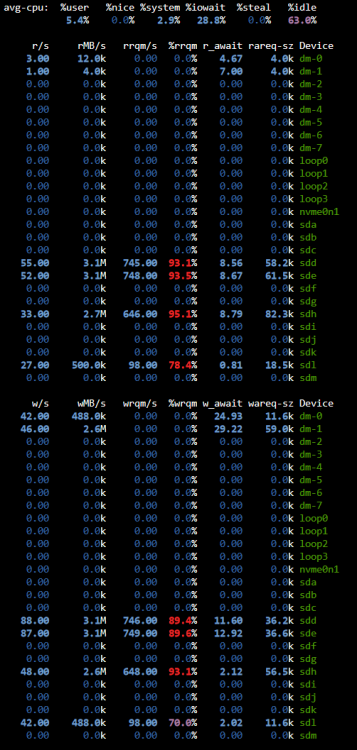
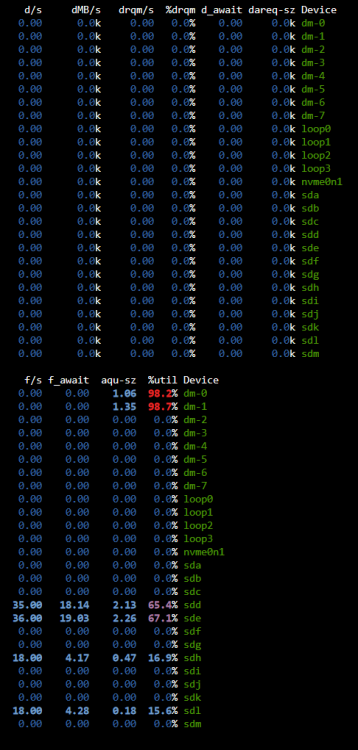
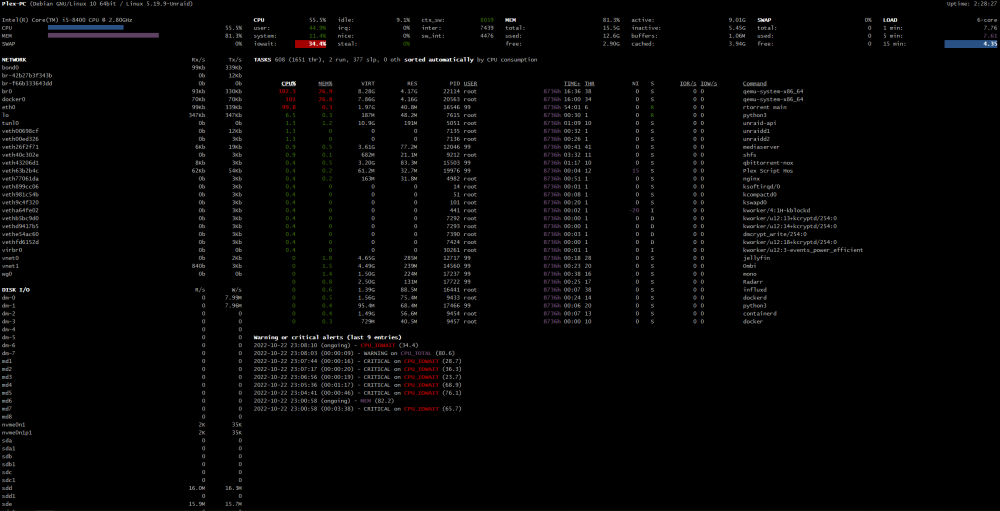
Sure seems like iowait is the culprit based on these right? I'll try updating my bios tonight. I assume some iowait is normal, but not 30% plus? //edit - I take that back. that was while 2 vm's were running and for whatever reason the disk images were on the array, those 2 drives that were being used plus the 2 cache drives. Let me try this again with the domains in my cache pool
-
Hello everyone, Unraid 6.11.0 rolled back from 6.11.1 no change I'm having trouble in the following ways. main page takes up to a minute for the drive information to populate dashboard page also has this loading lag, as well as a lag in loading the processor usage information When i click to see the log of a docker (any docker) the page pops up, blank, waits maybe 20 seconds and closes. It will work after several tries When I update a docker, the update panel shows up, but no progress is shown. if i esc out after a minute or so it will have updated the docker, just not given me the information attempting to stop the array will either take a very long time or just hang and never stop entirely. This has happened twice. It seems that unassigned devices has the hardest time loading. It shows the loading wave the longest without actually finding anything. These problems happened when i tried to stop the array and it hung on unmounting the drives. since then it has acted oddly. Please advise, thank you plex-pc-diagnostics-20221022-1349.zip
-
emby blacklisted jell* on their apps so none work with jellyfin. There's an android app and androidtv app. roku is super rough so far. not sure what else is up. reddit.com/r/jellyfin has more info
-
Doing this completely borks my plex. I have my plex appdata on an unassigned SSD I'm using nvidia card for transcoding and I'm running the encode/decode user script. I assume one of those things is what's breaking it. I just get spinning circle. Even when I undo the change and set everything back I can't get things to load at home. Assuming a full reboot will be needed. Anyone else in this boat?
-
No, stick with emby for now. You already paid and it's way more feature complete. Jellyfin has a lot of catching up to do. I'd keep an eye on it as it improves.
-
hmm yeah so not really a UD problem. I wonder what I could do to help with that. I just can't get them to shutdown gracefully at all. I figured they'd time out and move on when they can't access files anymore, but yeah.. anyway, thanks.
-
"unraid" assignments https://i.imgur.com/6DYx0Rr.jpg "jefflix" assignments https://i.imgur.com/aQ6Wkvc.jpg web gui settings for both https://i.imgur.com/1XNCrlG.jpg
-
i have to grab them before rebooting right? the preclear was the only thing still working. the other server not running pre-clear had identical problems. What seems to be happening is my dockers that are expecting the files on the other server seem to lock up and I can't kill them no matter what and that is the real problem with locking up. docker kill commands are completely ineffective.
-
Just wanted to hop in here and say I have 2 unraid servers connected together with unassigned devices. I experience trouble when I reboot one server without unmounting the share via the second server. Once i reboot server "unraid" while server "Jefflix" is still running I guess "jefflix" tries to connect to the "unraid" and it seems to crash unassigned devices. It will show unassigned devices as loading without ever kicking in. Eventually it locks up the whole server and a hard reboot is the only solution. Right now my mover is "running" but not actually moving anything, presumably because of this slow lockup process. This problem is super consistent. i just hard booted "jefflix" so of course now "unraid" unassigned devices is locked up. Although the icon in the bottom tray show my two preclears are running. I can't see anything under the unassigned devices area. shares are connected as "//JEFFLIX/Media" for example and //Unraid/media" the other direction. Unraid 6.6.6, I believe the entirety of the 6.x I've had this problem. I have them directly connected with mellanox 10gb cards and a DAC cable. Apr 11 15:51:10 Jefflix nginx: 2019/04/11 15:51:10 [error] 10799#10799: *6055578 upstream timed out (110: Connection timed out) while reading response header from upstream, client: 192.168.1.9, server: , request: "POST /webGui/include/Download.php HTTP/1.1", upstream: "fastcgi://unix:/var/run/php5-fpm.sock", host: "jefflix", referrer: "http://jefflix/Tools/Diagnostics" Apr 11 15:57:38 Jefflix php-fpm[10740]: [WARNING] [pool www] server reached max_children setting (20), consider raising it i tried to run diagnostics but that locked up as well.
-
excellent. I set my subdomains to "wildcard" in the container and set cloudflare cname to * and it seems to be working. Thanks a lot.



