





therapist
Members
-
Joined
-
Last visited
-
@msalad no news is good news i have had zero call traces since implementing the fixes. have been without swap active going on a little over a week and all seems OK. aside from an occasional hiccup/stutter with a w10 VM that ive had operational forever I am liking unraid 7.0
-
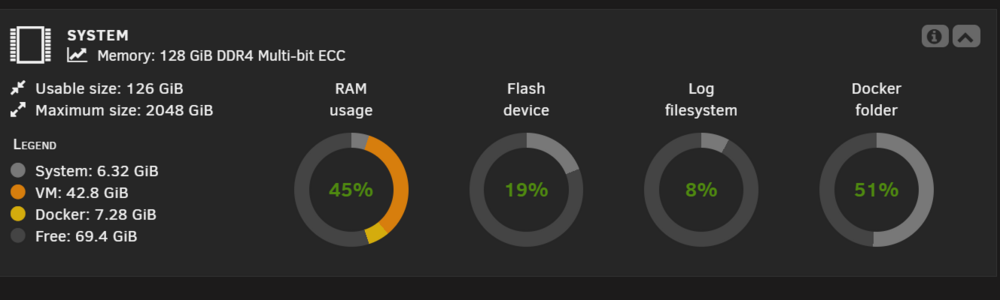
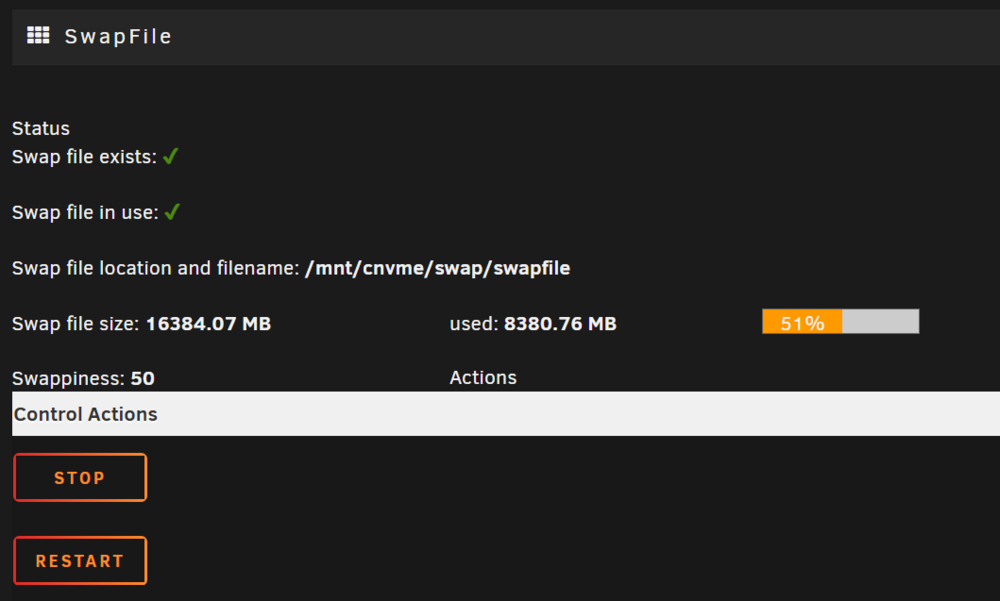
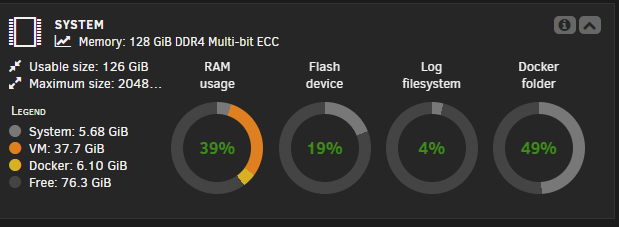
Hey @msalad So I actually tested without the swap file plug-in and have not had any issues yet. With the swap file I was averaging 44 to 46% usage of RAM and went up to 56 to 57% after disabling which makes sense because the swap file had about 12GB used (10% of my 128GB) Thats the exact app I used though The added code changes "the number of fuse file descriptors" which ive never had to adjust before, but here we are. You dont actually have to add that line anymore...if you go to settings/global share settings you can set that parameter while array is stopped
-
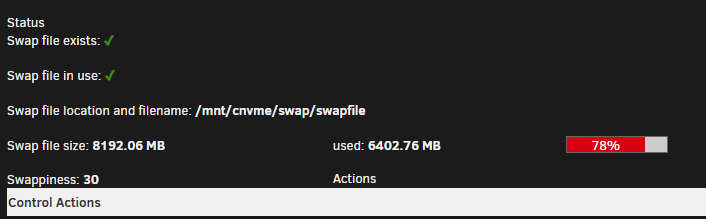
checking in so far i havent had any call traces since implementing my fixes i still dont quite understand why i would need to use swap after all these years of not having it, but i am hesitant to get rid of it since ive made headway
-
installed newest version of unraid connect -- seems to have solved the logging issue
-
@bmartino1 I've implemented a number of "fixes" and preliminary testing is positive: added to boot options: append mitigations=off iommu=pt transparent_hugepage=never installed swap plugin and configured a 8gb swapfile on nvme added shareNOFILE="813384" to /boot/config/share.cfg I still dont quite get why swap is necessary after all these years of not using + having a load of "free" memory
-
just jumping in to say thanks for reviewing, but unraid is running baremetal and ive never needed swap before. Im going to digest your first post and see if that takes me anywheres
-
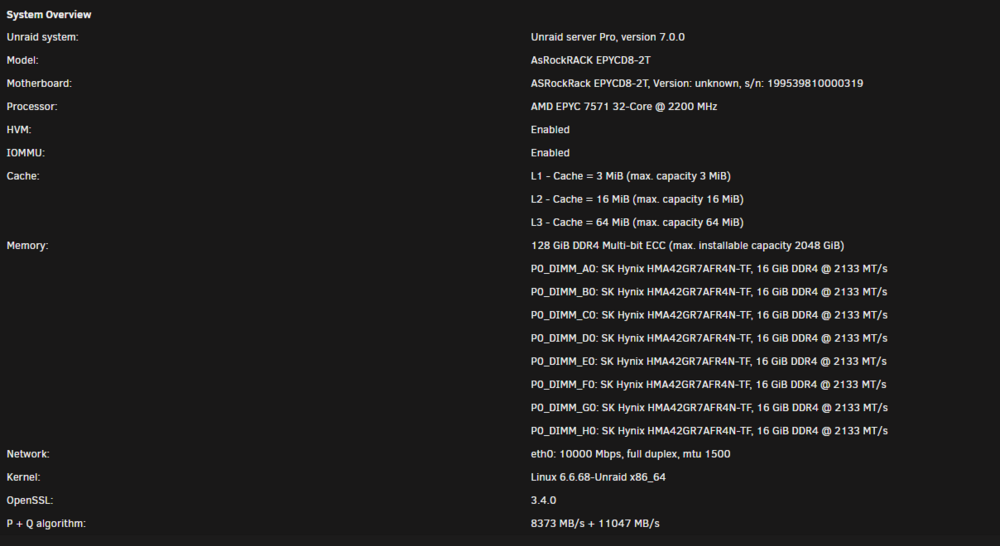
I had been on 6.11.5 forever and recently upgraded to 7.0 when my USB flash died. Aside from an issue with UNRAID CONNECT everything has been working well....but I noticed an intermittent call trace error relating to vmalloc Feb 18 14:10:55 CRUNCH kernel: warn_alloc: 1 callbacks suppressed Feb 18 14:10:55 CRUNCH kernel: lsof: vmalloc error: size 4194304, failed to allocated page array size 8192, mode:0x400cc2(GFP_KERNEL_ACCOUNT|__GFP_HIGHMEM), nodemask=(null),cpuset=/,mems_allowed=0-3 Feb 18 14:10:55 CRUNCH kernel: CPU: 12 PID: 3184246 Comm: lsof Tainted: P W O 6.6.68-Unraid #1 Feb 18 14:10:55 CRUNCH kernel: Hardware name: To Be Filled By O.E.M. To Be Filled By O.E.M./EPYCD8-2T, BIOS P2.60 04/10/2020 Feb 18 14:10:55 CRUNCH kernel: Call Trace: Feb 18 14:10:55 CRUNCH kernel: <TASK> Feb 18 14:10:55 CRUNCH kernel: dump_stack_lvl+0x38/0x4a Feb 18 14:10:55 CRUNCH kernel: warn_alloc+0xfb/0x189 Feb 18 14:10:55 CRUNCH kernel: ? srso_return_thunk+0x5/0x5f Feb 18 14:10:55 CRUNCH kernel: __vmalloc_node_range+0x2bd/0x62b Feb 18 14:10:55 CRUNCH kernel: ? seq_read_iter+0x1de/0x353 Feb 18 14:10:55 CRUNCH kernel: kvmalloc_node+0xae/0xbc Feb 18 14:10:55 CRUNCH kernel: ? seq_read_iter+0x1de/0x353 Feb 18 14:10:55 CRUNCH kernel: seq_read_iter+0x1de/0x353 Feb 18 14:10:55 CRUNCH kernel: seq_read+0x91/0xbb Feb 18 14:10:55 CRUNCH kernel: vfs_read+0xa7/0x1d1 Feb 18 14:10:55 CRUNCH kernel: ? srso_return_thunk+0x5/0x5f Feb 18 14:10:55 CRUNCH kernel: ? __do_sys_newfstat+0x34/0x5c Feb 18 14:10:55 CRUNCH kernel: ksys_read+0x74/0xc0 Feb 18 14:10:55 CRUNCH kernel: do_syscall_64+0x57/0x7b Feb 18 14:10:55 CRUNCH kernel: entry_SYSCALL_64_after_hwframe+0x78/0xe2 Feb 18 14:10:55 CRUNCH kernel: RIP: 0033:0x14588a3106ed Feb 18 14:10:55 CRUNCH kernel: Code: 21 87 0e 00 f7 d8 64 89 02 b8 ff ff ff ff eb bb 66 2e 0f 1f 84 00 00 00 00 00 0f 1f 00 80 3d 59 0b 0f 00 00 74 17 31 c0 0f 05 <48> 3d 00 f0 ff ff 77 5b c3 66 2e 0f 1f 84 00 00 00 00 00 48 83 ec Feb 18 14:10:55 CRUNCH kernel: RSP: 002b:00007ffe7259dcc8 EFLAGS: 00000246 ORIG_RAX: 0000000000000000 Feb 18 14:10:55 CRUNCH kernel: RAX: ffffffffffffffda RBX: 000000000043f600 RCX: 000014588a3106ed Feb 18 14:10:55 CRUNCH kernel: RDX: 0000000000000400 RSI: 0000000000448690 RDI: 0000000000000007 Feb 18 14:10:55 CRUNCH kernel: RBP: 000014588a3f81f0 R08: 0000000000000001 R09: 0000000000000000 Feb 18 14:10:55 CRUNCH kernel: R10: 0000000000000000 R11: 0000000000000246 R12: 000014588a3f80a0 Feb 18 14:10:55 CRUNCH kernel: R13: 0000000000000000 R14: 0000000000001000 R15: 000000000043f600 Feb 18 14:10:55 CRUNCH kernel: </TASK> Feb 18 14:10:55 CRUNCH kernel: Mem-Info: Feb 18 14:10:55 CRUNCH kernel: active_anon:11403130 inactive_anon:2693854 isolated_anon:0 Feb 18 14:10:55 CRUNCH kernel: active_file:8358687 inactive_file:7968638 isolated_file:0 Feb 18 14:10:55 CRUNCH kernel: unevictable:836 dirty:30773 writeback:0 Feb 18 14:10:55 CRUNCH kernel: slab_reclaimable:886844 slab_unreclaimable:232381 Feb 18 14:10:55 CRUNCH kernel: mapped:395878 shmem:573300 pagetables:51966 Feb 18 14:10:55 CRUNCH kernel: sec_pagetables:195 bounce:0 Feb 18 14:10:55 CRUNCH kernel: kernel_misc_reclaimable:0 Feb 18 14:10:55 CRUNCH kernel: free:553088 free_pcp:41074 free_cma:0 Feb 18 14:10:55 CRUNCH kernel: Node 0 active_anon:16735288kB inactive_anon:1718592kB active_file:5798564kB inactive_file:6043816kB unevictable:32kB isolated(anon):0kB isolated(file):0kB mapped:313920kB dirty:20416kB writeback:0kB shmem:363020kB shmem_thp:0kB shmem_pmdmapped:0kB anon_thp:17328128kB writeback_tmp:0kB kernel_stack:12820kB pagetables:54480kB sec_pagetables:176kB all_unreclaimable? no Feb 18 14:10:55 CRUNCH kernel: Node 1 active_anon:9206180kB inactive_anon:3987664kB active_file:9857148kB inactive_file:6922696kB unevictable:32kB isolated(anon):0kB isolated(file):0kB mapped:865512kB dirty:60296kB writeback:0kB shmem:1518372kB shmem_thp:0kB shmem_pmdmapped:0kB anon_thp:9562112kB writeback_tmp:0kB kernel_stack:22916kB pagetables:46896kB sec_pagetables:264kB all_unreclaimable? no Feb 18 14:10:55 CRUNCH kernel: Node 2 active_anon:3228760kB inactive_anon:1957716kB active_file:11863852kB inactive_file:13841864kB unevictable:96kB isolated(anon):0kB isolated(file):0kB mapped:240120kB dirty:14400kB writeback:0kB shmem:210476kB shmem_thp:0kB shmem_pmdmapped:0kB anon_thp:3741696kB writeback_tmp:0kB kernel_stack:12100kB pagetables:34144kB sec_pagetables:164kB all_unreclaimable? no Feb 18 14:10:55 CRUNCH kernel: Node 3 active_anon:16442292kB inactive_anon:3111444kB active_file:5915184kB inactive_file:5066176kB unevictable:3184kB isolated(anon):0kB isolated(file):0kB mapped:163960kB dirty:27980kB writeback:0kB shmem:201332kB shmem_thp:0kB shmem_pmdmapped:0kB anon_thp:17127424kB writeback_tmp:0kB kernel_stack:18260kB pagetables:72344kB sec_pagetables:176kB all_unreclaimable? no Feb 18 14:10:55 CRUNCH kernel: Node 0 DMA free:15360kB boost:0kB min:12kB low:24kB high:36kB reserved_highatomic:0KB active_anon:0kB inactive_anon:0kB active_file:0kB inactive_file:0kB unevictable:0kB writepending:0kB present:15984kB managed:15360kB mlocked:0kB bounce:0kB free_pcp:0kB local_pcp:0kB free_cma:0kB Feb 18 14:10:55 CRUNCH kernel: lowmem_reserve[]: 0 2831 31999 31999 31999 Feb 18 14:10:55 CRUNCH kernel: Node 0 DMA32 free:239148kB boost:0kB min:2968kB low:5864kB high:8760kB reserved_highatomic:0KB active_anon:124768kB inactive_anon:417300kB active_file:818600kB inactive_file:1064328kB unevictable:0kB writepending:40kB present:3027788kB managed:2935032kB mlocked:0kB bounce:0kB free_pcp:10604kB local_pcp:0kB free_cma:0kB Feb 18 14:10:55 CRUNCH kernel: lowmem_reserve[]: 0 0 29167 29167 29167 Feb 18 14:10:55 CRUNCH kernel: Node 0 Normal free:660640kB boost:32768kB min:63384kB low:93248kB high:123112kB reserved_highatomic:270336KB active_anon:16610520kB inactive_anon:1301292kB active_file:4979836kB inactive_file:4979072kB unevictable:32kB writepending:19872kB present:30395904kB managed:29867976kB mlocked:32kB bounce:0kB free_pcp:38796kB local_pcp:492kB free_cma:0kB Feb 18 14:10:55 CRUNCH kernel: lowmem_reserve[]: 0 0 0 0 0 Feb 18 14:10:55 CRUNCH kernel: Node 1 Normal free:125188kB boost:59392kB min:93244kB low:126268kB high:159292kB reserved_highatomic:2048KB active_anon:9206180kB inactive_anon:3987664kB active_file:9857148kB inactive_file:6922696kB unevictable:32kB writepending:60296kB present:33553920kB managed:33026000kB mlocked:32kB bounce:0kB free_pcp:34140kB local_pcp:3516kB free_cma:0kB Feb 18 14:10:55 CRUNCH kernel: lowmem_reserve[]: 0 0 0 0 0 Feb 18 14:10:55 CRUNCH kernel: Node 2 Normal free:1074724kB boost:114688kB min:148540kB low:181564kB high:214588kB reserved_highatomic:10240KB active_anon:3228760kB inactive_anon:1957716kB active_file:11863852kB inactive_file:13841864kB unevictable:96kB writepending:14400kB present:33553920kB managed:33026004kB mlocked:96kB bounce:0kB free_pcp:40912kB local_pcp:1552kB free_cma:0kB Feb 18 14:10:55 CRUNCH kernel: lowmem_reserve[]: 0 0 0 0 0 Feb 18 14:10:55 CRUNCH kernel: Node 3 Normal free:97796kB boost:0kB min:33848kB low:66868kB high:99888kB reserved_highatomic:2048KB active_anon:16442292kB inactive_anon:3111444kB active_file:5915184kB inactive_file:5066176kB unevictable:3184kB writepending:27980kB present:33553920kB managed:33022812kB mlocked:96kB bounce:0kB free_pcp:39252kB local_pcp:2512kB free_cma:0kB Feb 18 14:10:55 CRUNCH kernel: lowmem_reserve[]: 0 0 0 0 0 Feb 18 14:10:55 CRUNCH kernel: Node 0 DMA: 0*4kB 0*8kB 0*16kB 0*32kB 0*64kB 0*128kB 0*256kB 0*512kB 1*1024kB (U) 1*2048kB (M) 3*4096kB (M) = 15360kB Feb 18 14:10:55 CRUNCH kernel: Node 0 DMA32: 12435*4kB (UME) 3931*8kB (UME) 1486*16kB (UME) 582*32kB (UME) 182*64kB (UME) 177*128kB (UME) 34*256kB (UME) 25*512kB (UME) 56*1024kB (UME) 1*2048kB (U) 0*4096kB = 238788kB Feb 18 14:10:55 CRUNCH kernel: Node 0 Normal: 47593*4kB (UMEH) 11404*8kB (UMEH) 2380*16kB (UMEH) 1763*32kB (UMEH) 851*64kB (UMEH) 411*128kB (UMH) 88*256kB (H) 66*512kB (H) 36*1024kB (H) 37*2048kB (H) 2*4096kB (H) = 660324kB Feb 18 14:10:55 CRUNCH kernel: Node 1 Normal: 859*4kB (UME) 5383*8kB (UME) 3166*16kB (UME) 670*32kB (UM) 73*64kB (UME) 0*128kB 0*256kB 0*512kB 0*1024kB 1*2048kB (H) 0*4096kB = 125316kB Feb 18 14:10:55 CRUNCH kernel: Node 2 Normal: 24777*4kB (UME) 12657*8kB (UME) 11249*16kB (UME) 8873*32kB (UME) 5954*64kB (UME) 143*128kB (M) 3*256kB (M) 0*512kB 0*1024kB 5*2048kB (H) 0*4096kB = 1074652kB Feb 18 14:10:55 CRUNCH kernel: Node 3 Normal: 955*4kB (UME) 1415*8kB (UME) 671*16kB (UME) 1678*32kB (UME) 249*64kB (UME) 3*128kB (M) 0*256kB 0*512kB 0*1024kB 1*2048kB (H) 0*4096kB = 97940kB Feb 18 14:10:55 CRUNCH kernel: Node 0 hugepages_total=0 hugepages_free=0 hugepages_surp=0 hugepages_size=1048576kB Feb 18 14:10:55 CRUNCH kernel: Node 0 hugepages_total=0 hugepages_free=0 hugepages_surp=0 hugepages_size=2048kB Feb 18 14:10:55 CRUNCH kernel: Node 1 hugepages_total=0 hugepages_free=0 hugepages_surp=0 hugepages_size=1048576kB Feb 18 14:10:55 CRUNCH kernel: Node 1 hugepages_total=0 hugepages_free=0 hugepages_surp=0 hugepages_size=2048kB Feb 18 14:10:55 CRUNCH kernel: Node 2 hugepages_total=0 hugepages_free=0 hugepages_surp=0 hugepages_size=1048576kB Feb 18 14:10:55 CRUNCH kernel: Node 2 hugepages_total=0 hugepages_free=0 hugepages_surp=0 hugepages_size=2048kB Feb 18 14:10:55 CRUNCH kernel: Node 3 hugepages_total=0 hugepages_free=0 hugepages_surp=0 hugepages_size=1048576kB Feb 18 14:10:55 CRUNCH kernel: Node 3 hugepages_total=0 hugepages_free=0 hugepages_surp=0 hugepages_size=2048kB Feb 18 14:10:55 CRUNCH kernel: 16874061 total pagecache pages Feb 18 14:10:55 CRUNCH kernel: 0 pages in swap cache Feb 18 14:10:55 CRUNCH kernel: Free swap = 0kB Feb 18 14:10:55 CRUNCH kernel: Total swap = 0kB Feb 18 14:10:55 CRUNCH kernel: 33525359 pages RAM Feb 18 14:10:55 CRUNCH kernel: 0 pages HighMem/MovableOnly Feb 18 14:10:55 CRUNCH kernel: 552063 pages reserved Feb 18 14:10:55 CRUNCH kernel: 0 pages cma reserved I have not had any system hangs, or any evident operational issues -- diags attached I did read about setting /boot/config/share.cfg shareNOFILE="813384" Is this along the same route for remedy? crunch-diagnostics-20250218-1421.zip
-
did a little testing: logged out of unraid connect and logged back in -- errors continue logged out of unraid connect -- errors continue uninstall the unraid connect plugin -- errors no longer appearing in log reinstall of connect plugin results in errors resuming, even without logging in i have another server on same network segment which is humming along on unraid connect w/ no error
-
recently upgrade to 7.0 from 6.11.5 -- went smooth as butter, sans a few issues with USB hardware. notived that my log was filling up and I thought it was due to the previous USB issues, but upon replacement and restart I am getting my unraid-api.log file filling up with [15:11:11.268] [31mERROR[39m: [36mFailed to validate session [39m [90m{"logger":"api","req":{"id":"req-1te","method":"POST","url":"/graphql"},"context":"AuthService"}[39m [15:11:11.268] [31mERROR[39m: [36mError in handleRequest[39m [90m{"logger":"api","req":{"id":"req-1te","method":"POST","url":"/graphql"},"context":"GraphqlAuthGuard"}[39m [15:11:13.275] [31mERROR[39m: [36mFailed to validate session [39m [90m{"logger":"api","req":{"id":"req-1tf","method":"POST","url":"/graphql"},"context":"AuthService"}[39m [15:11:13.275] [31mERROR[39m: [36mError in handleRequest[39m [90m{"logger":"api","req":{"id":"req-1tf","method":"POST","url":"/graphql"},"context":"GraphqlAuthGuard"}[39m [15:11:15.281] [31mERROR[39m: [36mFailed to validate session [39m [90m{"logger":"api","req":{"id":"req-1th","method":"POST","url":"/graphql"},"context":"AuthService"}[39m [15:11:15.281] [31mERROR[39m: [36mError in handleRequest[39m [90m{"logger":"api","req":{"id":"req-1th","method":"POST","url":"/graphql"},"context":"GraphqlAuthGuard"}[39m Any assistance on how to rectify?
-
Having a bit of a formatting issue for some time now I am on 6.11.5 and have been using UD since its inception. Roughly 3-4 months ago I noticed after an update that the toggles and titles were not formatted correctly. I tried adjusting screen resolution but it happens across multiple viewing devices. Any input on what may be going on?

-
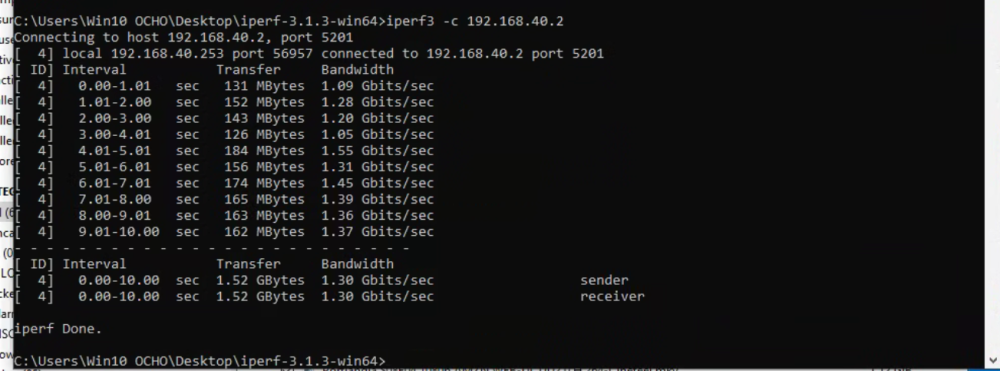
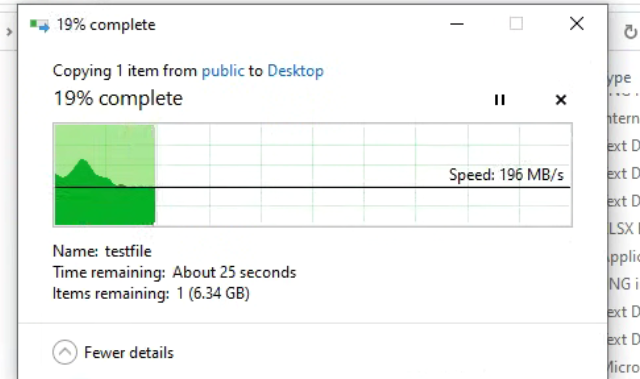
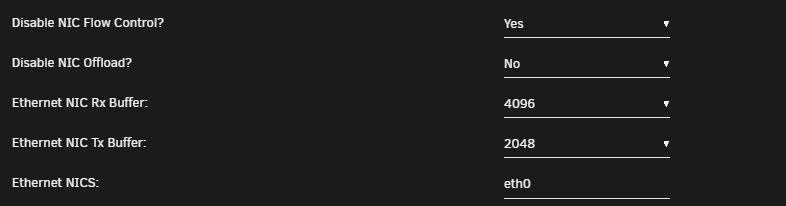
so i have a VM on this unraid box that is on a vlan (192.168.40.253) it connects to unraid SMB at 192.168.40.2 file transfer rates are close to reported bandwidth there are no wires, just the virtual 10gbe adapter and unraid i have reset the VM network settings to default, adjusted max rss to 6 to match cores on VM unraid has all default network settings except for buffers through tips & tweaks plugin...which shouldnt matter for a VM using br0.x, no? I get better than gigabit, but something isnt right since im not seeing anywhere near proper speeds
-
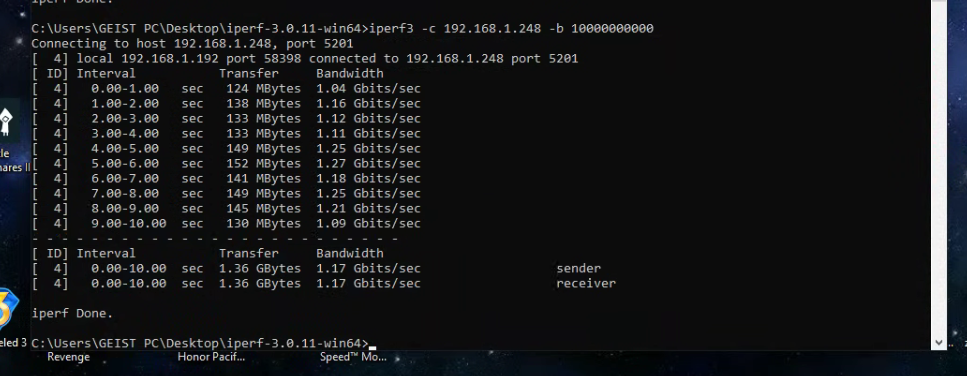
this is indicating nothing better than gigabit... all links are indicating 10gb any idea where to look into what i am doing wrong?
-
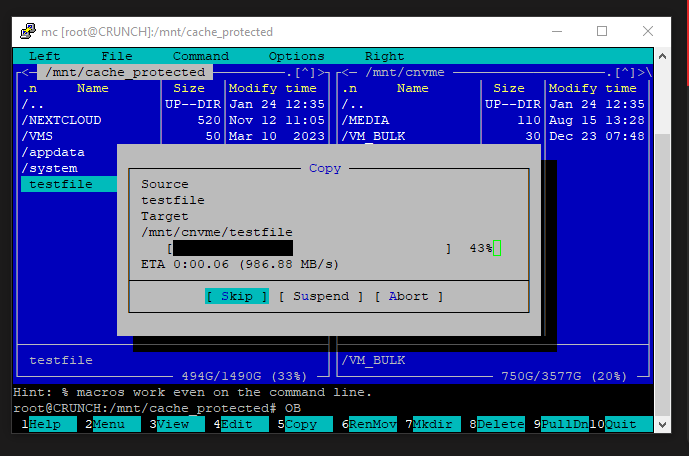
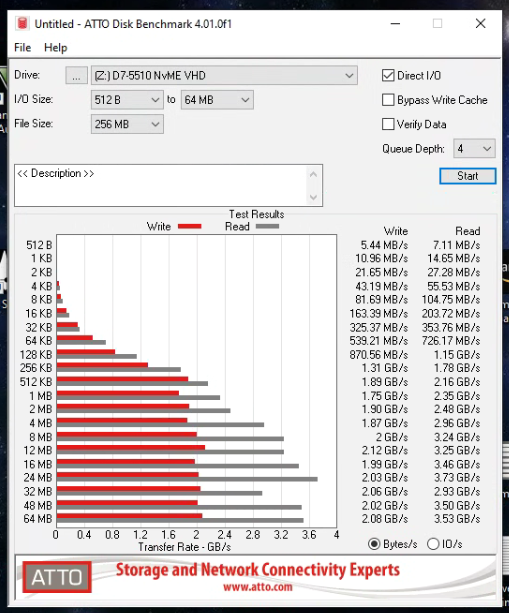
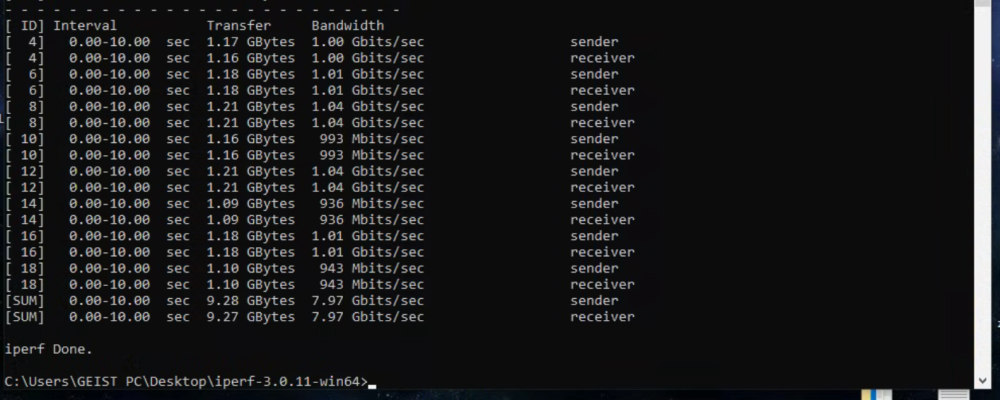
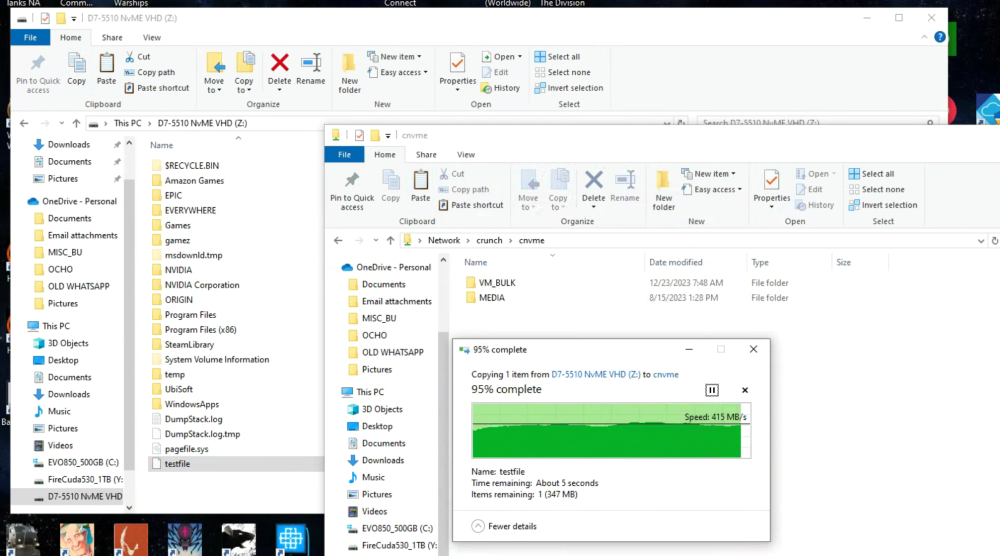
I have been doing my testing with both I have a EVO 860 SSD as my main cache disk...so current performance saturates that read/write I have an intel NVME disk installed for VM VHDs and can test full 10gbe bandwidth through that Copying a testfile from RAID1 "cache-protected" to nvme gets speeds I would expect from RAID1 SAS SSD --> NVME Benchmarking the VHD for the VM (which is on the nvme) gets results I expect iperf shows bandwidth is there But when I transfer to DISK share using SMB the speed doesnt translate I thought that it was a networking issue At first because originally my VM was coming out through br0 on unraid. I was able to pass through one of the 10ge ports from my motherboard directly to the VM and improved speed but not to where I think it should be
-
I have hit a bit of a speed limit on my setup iperf3 tests indicate 8+gb/s of available bandwidth between unraid and my test PC, but I cant transfer over SMB faster than 490-520 mb/s unraid v6.11.5 on EPYCD8-2T w/ 7551 eth0 10gb rj45 --> sfp+ @ mikrotik CRS305-1G-4S+ test share/disk = INTEL SSDPF2KX038TZ test pc = unraid VM w/ mobo eth1 passed through 24c 24gb memory disk = Seagate FireCuda 530 diagnostics attached crunch-diagnostics-20240129-1604.zip
-
I am working to improve SMB performance and have found a collection of settings that work well. I would like to deploy to all interfaces, but I get strange delays / drops when applied as written: server multi channel support = yes aio read size = 1 aio write size = 1 interfaces = "192.168.1.248;capability=RSS,speed=10000000000" "192.168.40.2;capability=RSS,speed=10000000000" with both interface characteristics specified the main vm on 192.168.1.x hangs on file transfer and transfers dreadfully slow if i remove the 2nd interface (192.168.40.2) main vm on 192.168.1.x works OK, but VM on that interface does not exceed ~175mb/s transfer are the interfaces listed correctly?



