





serverfan
Members
-
Joined
-
Last visited
Everything posted by serverfan
-
I've been trying to give my only GPU to my VM just like you were trying originally. My server can boot with no GPU at all, including no igpu, so I was hopeful to get it working like that but I'm not having any luck. When I assign the GPU to the VM it does what you described; The screen shows unraid stuff until I boot the VM and then it goes blank and is useless, forcing me to reboot the server. I guess I'll try a basic 1-slot GPU like you next although I was hoping to save my very last slot for another future project. 2700, X470 Master SLI/ac, GTX 1050 is the pertinent part of my setup
-
I'm at this point right now, trying to get my 1050 to show an image. Did you ever get yours working?
-
Damn that was it, thanks. After multiple installs I must have fat-fingered it. Thanks for your assistance, I appreciate you taking the time to lend your eyes!
-
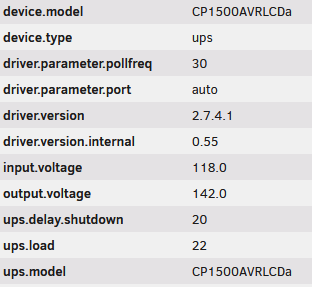
Hi, I'm having issues reassigning the WebUI port to avoid the conflict with my Ubiquiti Console Docker. I read the ReadMe on GitHub as well as some posts on here and such have reassigned both the WebGui port as well as both sides of the port allocation in the Docker settings. I stil don't get anything when I connect the the set port. My docker install command results are below (vpn credentials edited) From what I can understand I have successfully edited -p '8088:8088/tcp' as well as -e 'WEBUI_PORT'='8088' The only detail where I might have gone wrong is to change the -p setting I had to delete "Host Path 3" in the image settings and create a new "Host Path 3" BTW I set privoxy to 9119 but that was the case before and didn't cause any issues previously.Hi! Thanks for this plugin. I was tired of having random disconnect-reconnect warning messages from the integrated UPS utility with my USB connected CP1500AVRLCD. I'm surprised by two things that I see now that I have NUT configured though. First off, I can't seem to change the Master IP address? I stays stuck on the default 127.0.0.1 even though the field seems editable. The other detail, a bit more striking to me, is that it says my UPS is outputting at a unnecessarily high voltage? When I had it connected through a windows client I remember setting it at the strictest voltage control settings but right now it's receiving 118V from the wall and sending out 142V if NUT is to be believed. Is that information reliable? And if so, is it configurable through NUT? edit: I re-activated the integrated UPS utility and that one says my UPS is both receiving and outputting at 119V, which sounds more normal.
 Oh I hadn't seen that anywhere, thanks for the clarification. Do you have a luks-compatible windows utility to recommend by any chance? Veracrypt seems to be the most up to date I can find suggested but the last build now dates back 3 years.@dlandon
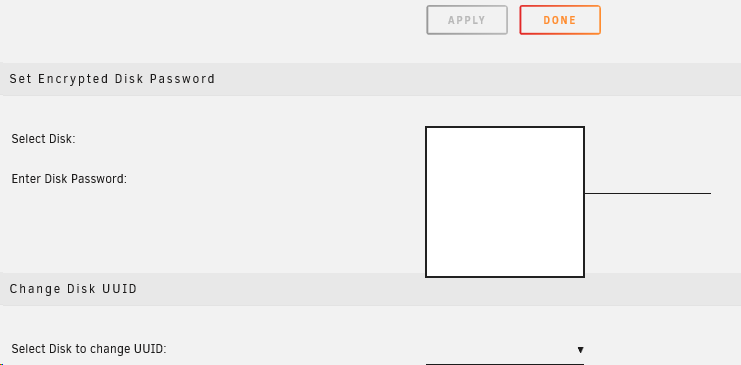
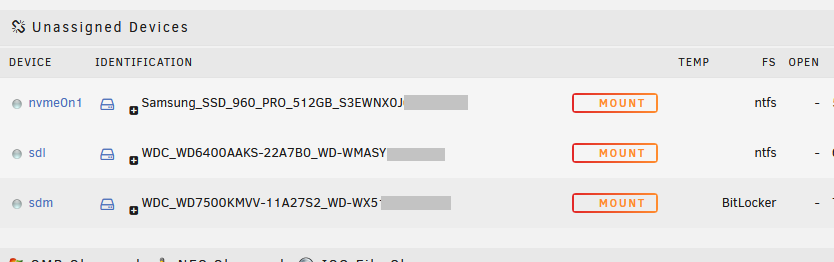 I'm currently on UD v2020.04.27 and have been trying to mount a Bitlocker protected drive for the first time. I'm not capable of selecting a drive for the "encrypted disk" settings in either Firefox nor Edge at the moment. Could this be a bug with the drop down menu? I can't seem to mount the disk without the password beforehand either.
 4gb, maxed out the MB. No VM on this hardware.
