





serverfan
Members
-
Joined
-
Last visited
Everything posted by serverfan
-
Thank you, the latest version was simply not working for me. It wouldn't generate a new wg0.conf file based on my PIA credentials and was spamming errors in the logs. Rolling back to that version got it working as before.
-
Thanks guys, the disk contents looked fine based on the few files I opened, the emulated disk also tested fine in Maintenance mode so I started the disk rebuild.
-
dobby-diagnostics-20260321-1059.zip I did just that, here are the new diagnostics. Can you tell me how you'll evaluate the condition of the filesystem from this? I'm familiar with "filesystem check" on a single drive but that requires the array to be in maintenance mode.
-
dobby-diagnostics-20260320-1406.zip Hi trurl, Thanks for chiming in, here are my Diagnostics.
-
I'd love some help,I've gone through the documentation on the matter but it hasn't addressed my case; This morning one of the disks was suddenly emulated. I suspect a temporary power issue, I could see in the logs the HBA considered it unresponsive and disconnected it before assigning it a new ID. After a reboot I can confirm the SMART values of the disk are fine, including 0 reallocated sectors. My array is xfs-encrypted and the drives are connected to a 9500-16i with a SATA breakout cable. In maintenance mode I checked the filesystem of the drive and got "No file system corruption detected." so the GUI won't suggest any fixes yet with the drive still assigned to it's slot it remains emulated. No option appeared to change the flags on the command. I then tried doing it in the command lin with xfs_repair -v /dev/md2p1 but only got these errors: /dev/md2p1: No such file or directory /dev/md2p1: No such file or directory fatal error -- couldn't initialize XFS library Before I do anything more I'd really appreciate some experienced input. I have a spare drive on hand but from what I understand the issue with the drive is present in parity data so just replacing the drive with a new one is not the path forward.
-
Hi, I'm trying to do a clean install of Automatic1111 on unraid 7.0.1 and once installed the docker won't start. I get the following in the logs as if there are missing requirements in the latest build. Any insight? Thanks! Installing requirements for peft Installing onnxruntime Installing None --installing modelscope... Installing requirements for modelscope --installing controlnet_aux... Installing requirements for controlnet_aux --installing mmcv... Installing None Couldn't install None. Command: "/opt/conda/bin/python" -m pip install mmcv-full==1.7.2 --prefer-binary Error code: 1 stdout: Collecting mmcv-full==1.7.2 Using cached mmcv-full-1.7.2.tar.gz (607 kB) Preparing metadata (setup.py): started Preparing metadata (setup.py): finished with status 'error' stderr: error: subprocess-exited-with-error × python setup.py egg_info did not run successfully. │ exit code: 1 ╰─> [16 lines of output] /tmp/pip-install-xd7jtfv_/mmcv-full_2ced3b11452041b88258ac2ec124abb7/setup.py:6: DeprecationWarning: pkg_resources is deprecated as an API. See https://setuptools.pypa.io/en/latest/pkg_resources.html from pkg_resources import DistributionNotFound, get_distribution, parse_version Traceback (most recent call last): File "<string>", line 2, in <module> File "<pip-setuptools-caller>", line 34, in <module> File "/tmp/pip-install-xd7jtfv_/mmcv-full_2ced3b11452041b88258ac2ec124abb7/setup.py", line 572, in <module> ext_modules=get_extensions(), File "/tmp/pip-install-xd7jtfv_/mmcv-full_2ced3b11452041b88258ac2ec124abb7/setup.py", line 474, in get_extensions ext_ops = extension( File "/opt/conda/lib/python3.10/site-packages/torch/utils/cpp_extension.py", line 1077, in CUDAExtension library_dirs += library_paths(cuda=True) File "/opt/conda/lib/python3.10/site-packages/torch/utils/cpp_extension.py", line 1204, in library_paths if (not os.path.exists(_join_cuda_home(lib_dir)) and File "/opt/conda/lib/python3.10/site-packages/torch/utils/cpp_extension.py", line 2419, in _join_cuda_home raise OSError('CUDA_HOME environment variable is not set. ' OSError: CUDA_HOME environment variable is not set. Please set it to your CUDA install root. [end of output] note: This error originates from a subprocess, and is likely not a problem with pip. error: metadata-generation-failed × Encountered error while generating package metadata. ╰─> See above for output. note: This is an issue with the package mentioned above, not pip. hint: See above for details. ERROR facechain: failed to install mmcv, make sure to have "CUDA Toolkit" installed --installing mmdet... Installing requirements for mmdet --installing mmdet... Installing requirements for mediapipe ** Press ANY KEY to close this window **
-
DId you every get that fixed? Having the same issue and it's clearly not using my 16GB available VRAM, the cards stays at P0.
-
That would be great! Similarly I'd love to know if it's possible to query HBA temps from StorCLI and have them show up in the footer or on the dashboard.
-
After installing a 9500-16i I had the same question and ended up figuring out how. Since this thread seems to be the only one on the topic, I'll post a summary for anyone else looking for help. I cannot speak for flashing the firmware within unraid since I did that beforehand in a EFI environment. That was a learning experience in itself! To install StorCLI on unraid: Get the most up to date StorCLI version on your HBA's page on Broadcom's website, in the Management Software and Tools section. In my case here: https://www.broadcom.com/products/storage/host-bus-adapters/sas-nvme-9500-16i Download & unzip Get the .rpm file in the Linux folder and unpack using 7zip Transfer the resulting .cpio file to your server, I used a flash drive mounted using UD my file was called : storcli-007.3205.0000.0000-1.noarch.cpio Using the console, go to the folder where the .cpio file is located in my case : cd /mnt/disks/myflashdrive/ Unpack the .cpio file in situ cpio -idmv < storcli-007.3205.0000.0000-1.noarch.cpio This created new nested folders with two storcli binaries in the last one cd /mnt/disks/myflashdrive/opt/MegaRAID/storcli You then want to copy the 64bit binary file to your unraid flash drive, renaming it for ease of use mkdir -p /boot/config/plugins/storcli cp storcli64 /boot/config/plugins/storcli/storcli Edit the Go file so that storcli is started at each boot by adding the two lines at step 9.2 nano /boot/config/go cp /boot/config/plugins/storcli/storcli /usr/local/bin/storcli chmod +x /usr/local/bin/storcli Reboot and test by running storcli show. This will allow you to identify your controller and then send commands like the following: storcli /c0 show storcli /c0 show temperature storcli /c0 show all Hope this helps someone, it took me a few tries to get there but I'm happy to be able to access that directly in unraid now!
-
Yeah I tried, I reinstalled Appdata backup v2.5 which I assume backs up plugins at the same time? I ran the backup and a few plugins generated errors and didn't install, including all three UD.
-
So when I updated to 6.12.10 and all my plugins updated as well that was irreversible?
-
Hi, I'm having to run one of my servers temporarily on 6.9.2 while I create backups and take notes on the setup prior to updating it to 6.12.X but for some reason I can't get Unassigned Devices to reinstall. I don't see it in the Community Apps and when I try to install it directly from https://github.com/dlandon/unassigned.devices/blob/master/unassigned.devices.plg it doesn't work. Would it be possible to share some 6.9.2 compatible links for UD, UD+ and UD Preclear please? Thanks in advance
-
Wow thanks, not sure I would have figured this out. I had it installed and working initially and somewhere in the process I switched to location to /mnt/user/share to properly use the FUSE system and it stopped working but I never thought that could be it.
-
My latest install of the Postrgres 15 docker won't start. I have the following logs each time I try to start it even though it "installed successfuly" I had it working but nuked the previous image since I am just learning Postgres and had databases that Datagrip couldn't drop for some reason. Any help would be much appreciated!
-
I made sure it was all lowercase everywhere and have not had an issue with that part. Has anybody here had errors when trying to do multiple concurrent scans? I'm facing the same "database locked" error mentioned previously on the Github (#500, #880) after trying to use both of my drives at the same time. edit: Is there any way to make the container use the latest build (2.6.60) that was published yesterday?
-
I can confirm I had to enable privileged mode to get it to work as well. Thanks for setting up this docker image for unraid! I had looked into running a Ubuntu instance solely for ARM but I'm not familiar enough with Linux to make that a quick project.
-
I added those two variable to the template based on the Github and tweaked them following your comment but I'm still getting this same error. Tried both in the default network Bridge and with Br0 to no avail.
-
I just tried installing it and I just can't get it working. I also tried both the /config trick and changing the network¨settings to a dedicated IP and I keep getting
-
Ok, I'll try to update to 6.12 as soon as I have enough free time to address the permission issues that seem to come with that update. Thanks for your time
-
That was my first thought but in the Docker page it showed as stopped. To be sure I just tried running the backup again after first stopping binhex-qbittorrentvpn and got the same error message so I think something else is afoot.
-
Hi, My last auto-backup failed with this message at the end and now my manual attempts stall at that same "socket ignored" step. Any insight on what's wrong? Thanks [24.04.2023 05:02:08] Backing Up /usr/bin/tar: ./binhex-qbittorrentvpn/qBittorrent/config/ipc-socket: socket ignored /usr/bin/tar: .: file changed as we read it [24.04.2023 06:23:33] tar creation/extraction failed!
-
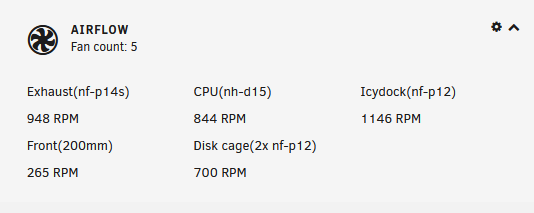
@SiteAssemble has a suggested "fix" which renames those labels using the Theme.Engine plugin. It won't change the fan names anywhere else but that was perfect for me: I actually found your post by looking for his, I needed to modify a name and had forgotten how 🤦♂️
-
Yeah, everything is updated with a working driver there. I'm gonna try a BIOS update since that seems to fix the error code 127 and code D3 for a lot of people. My only worry is that Asrock has no BIOS with AGESA 1.0.0.4 which they recommend for my 2700
-
I did pretty much that, I had it working through VNC previously just like my other VMs. Problems started trying to do more by adding a GPU. Not sure how I would control that VM if I didn't also passthrough the USB pcie card? As far as IOMMU groups go, I had to do a PCIe ACS override and now my GPU and it's sound card are in two groups but I don't believe that to be an issue. I also followed SpaceInvaderOne's recommended XML edit to put both on the same 'multifunction' slot. In any scenario I believe I have found the issue; In the VM logs the last line is: A google search of that brings me to a /r/unraid thread that explains that is caused by a buggy MB BIOS. That will be my new research lead for another night. I appreciate you taking the time to try and help! edit: I mean the screen that is plugged in the GPU that is assigned to the VM. VNC is disabled by unraid since there is a GPU but remote desktop works just fine.
-
I have a computer right next to it I tried cycling the VM a couple times, I can remote desktop into it but the screen stays blank and pressing on the wireless keyboard I have plugged in the a add-in card allocated to the VM doesn't change anything either. I also just tried booting the server with no output cable in the GPU, to see if that would help with unraid not taking it during boot. Also have unraid booting with no GUI just in case.


