





chatman64
Members
-
Joined
-
Last visited
-
Hi, The tip with Xcode worked great. Now I have the problem that I have with Opencore in VideoProc no HEVC. I think I have to adapt ACPI S08. But I have no idea how to do that? With the last Clover Image of Leoyzen HEVC runs without a change thanks
-
Hello everybody, I currently have a very strange problem. I bought extra for Mojave a Vega 64 graphics card (Asus Strix). When I first boot a Windows 10 VM with the GPU and then finish and then the Mojave VM works fine. if I restart unraid and first start the mojave vm I see on the monitor that the card is accessed but nothing happens. A core then remains at almost 100% utilization. The card will not work until a complete reboot. attached the two configs of the VM's. I've already tried to use mojave without special CPU or memory parameters> but that does not change the problem I use the last clover image from Leoyzen System: AMD 1950x @ 3.8 Ghz 64 GB Ram @ 3200 CL 14 Asrock Taichi Bios P3.50 and 3.60 Unraid 6.7.2 Asus AREZ Strix Vega 64 last question: I would like to switch to the opencore efi qcow2 from Leoyzen. can someone explain to me how I must enter my SMBIos data with opencore? I have only ever worked with Clover and CloverConfigurator. thanks Win10VM.rtf MojaveVM.rtf
-
Thank you for the information. Now all I have to do is swap my graphics cards and I'm going to move completely from Windows.
-
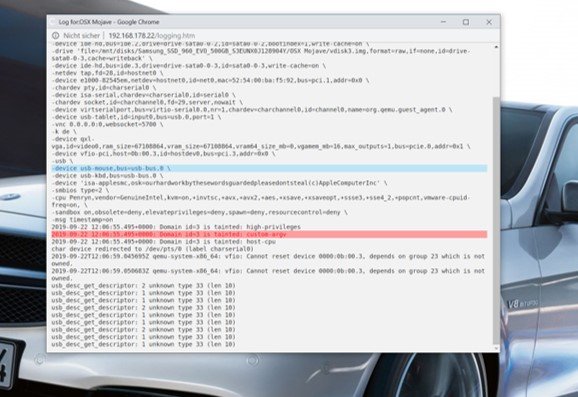
I would like to thank Leoyzen> with his clover file my mojave is finally running fast and clean! The only problem I have is an error in the log of the VM: 2019-09-22 12:06:55.495+0000: Domain id=3 is tainted: custom-argv I once attached a picture of it and my xml as a text file. but despite the error message everything runs without problems does anyone have a tip on how to get away? System: AMD 1950x @ 3.8 Ghz 64 GB Ram @ 3200 CL 14 Asrock Taichi Bios P3.50 and 3.60 Unraid 6.7.2 XML_Mac.txt
-
Hello everybody, I have a big problem with a mac OS vm. I followed the instructions of SpaceInvaderOne and successfully installed mojave and high sirra. I noticed that the vm's are very sluggish. I have only the problem that I get in geekbench singlecore only 850 points and multicore 5000. I have from my Threadripper 1950x @ 3.8 Ghz 8 cores (isolated) and passed. of course I have <qemu: arg value = 'Penryn, vendor = GenuineIntel, kvm = on, + invtsc, + avx, + avx2, + aes, + xsave, + xsaveopt, vmware-cpuid-freq = on,' /> added. I have at times passed through an AMD RX580, which works well but makes no difference. I have tested more without a GPU. System: AMD 1950x @ 3.8 Ghz 64 GB Ram @ 3200 CL 14 Asrock Taichi Bios P3.50 and 3.60 Unraid 6.7.2 Does somebody has any idea? My Windows 10 Vm's with GPU and USB passtrought run for 2 years without any problems and in full speed.
-
Hello everybody, Currently I own an I5 8700K and can easily pass the IGPU to Docker. Now I have 1 day to test the I9 9900K here and just put it on my motherboard. Unfortunately, then the driver of the I9 9900K was not loaded. Is there a trick? Or are the drivers missing? I thought that the IGPU is the same. I would like to change over the long term but without the IGPU at 4k it makes no sense. Thank you! and sorry for my bad english
-
I have a CT1000MX500SSD1 and again and again the problem> is there already an update?
-
hello, after the update to 6.5, I can no longer access my cardreader in oscam. if i downgrade to 6.4 everything works fine. the following message appears in the oscam: 2018/03/15 23:05:16 7C96C8D6 r (reader) HD01 [mouse] ERROR: Opening device /dev/ttyUSB0 (errno=13 Permission denied) 2018/03/15 23:05:16 7C96C8D6 r (reader) HD01 [mouse] Cannot open device: /dev/ttyUSB0 dmesg | tail [ 537.644519] usb 1-3.1: new full-speed USB device number 6 using xhci_hcd [ 537.748780] ftdi_sio 1-3.1:1.0: FTDI USB Serial Device converter detected [ 537.748839] usb 1-3.1: Detected FT232RL [ 537.749128] usb 1-3.1: FTDI USB Serial Device converter now attached to ttyUSB0
