





Aceriz
Members
-
Joined
Everything posted by Aceriz
-
Hello all, I know this is likely a simple question But hoping someone can help me understand and setup something. So I am trying to setup the extract app. --> https://github.com/PaulLereverend/NextcloudExtract Just wondering where I would run the following commands "sudo apt-get install unrar" and "sudo apt-get install p7zip p7zip-full" so that I can have the pre-requisits for the extraction app. Sorry if this is a simple question. Also wondering if this would be persistent between version updates. ? Thanks in advance!!
-
@housewrecker Just thought I would say I really like your above designs for the missing. Especially the missing as associated with actors/actresses.
-
So Not sure how to tell what Incoming port I should select within the Deluge settings, to try and improve speed. Followed Space Invaders video. Have PIA with port forwarding working through Vancouver currently. Get the following in the log file below.. Should I have the incoming port set to "6890," "22509" or "58846" 2020-08-09 12:07:03,955 DEBG 'watchdog-script' stdout output: [info] Deluge incoming port 6890 and VPN incoming port 22509 different, marking for reconfigure 2020-08-09 12:07:03,956 DEBG 'watchdog-script' stdout output: [info] Attempting to start Deluge... [info] Removing deluge pid file (if it exists)... 2020-08-09 12:07:04,314 DEBG 'watchdog-script' stdout output: [info] Deluge key 'listen_interface' currently has a value of '10.23.11.10' [info] Deluge key 'listen_interface' will have a new value '10.20.10.6' [info] Writing changes to Deluge config file '/config/core.conf'... 2020-08-09 12:07:04,479 DEBG 'watchdog-script' stdout output: [info] Deluge key 'outgoing_interface' currently has a value of 'tun0' [info] Deluge key 'outgoing_interface' will have a new value 'tun0' [info] Writing changes to Deluge config file '/config/core.conf'... 2020-08-09 12:07:04,917 DEBG 'watchdog-script' stdout output: [info] Deluge process started [info] Waiting for Deluge process to start listening on port 58846... 2020-08-09 12:07:05,130 DEBG 'watchdog-script' stdout output: [info] Deluge process listening on port 58846 2020-08-09 12:07:07,153 DEBG 'watchdog-script' stdout output: Setting "random_port" to: False Configuration value successfully updated. 2020-08-09 12:07:09,254 DEBG 'watchdog-script' stdout output: Setting "listen_ports" to: (22509, 22509) Configuration value successfully updated.
-
So I have tried over the last day to do the update to the BIOS, unfortunately it didn't work setup wise (could not use GUI on the onboard with updated bios/firmware, and have VM running), as well continued to have the errors in the syslog.. So I reverted back to the older bios I was on.... with the change to having the GPU stubbed... I have attached the syslog. It doen't appear to be filling as quickly..but might need to monitor for a few more days.. I might end-up still eventually going back to the latest bios just as while there noticed a setting which helped with performance....lol.. need to figure out how to do GUI or similar without need for second computer... any suggestions would be great). if it helps I use GUI mainly to reset VM if they freeze up. or to do things like close VM load kruisader and make copy of vm v-disk etc... ) rizznetunraid-syslog-20200710-0117.zip
-
I have uninstalled... At this point no plan to need it.. (main reason I had installed plugin was to pass gpu through to plex... but realized need plex pass lol). also I always have my VM on...
-
Okay I can definitely do a Bios update... That I have gotten comfortable with.. Will have to do a bit of reading to figure out how to go about a firmware update... (any general tips would be much appreciated ) Is there an order that I should do them in.? ie bios first then firmware. or other way around
-
Thanks:) So I rebooted the server to try and capture that weird nvidia note that i saw and it was the following "/bin/bash: line 14: nvidia-smi: command not found" This occurred right after the Starting Samba, and just before the transition to the GUI login page pops up.. Again I had installed the unraid default 6.8.3 from the nvidia plugin-- i didn't uninstall the plugin but am happy to do that if needed...
-
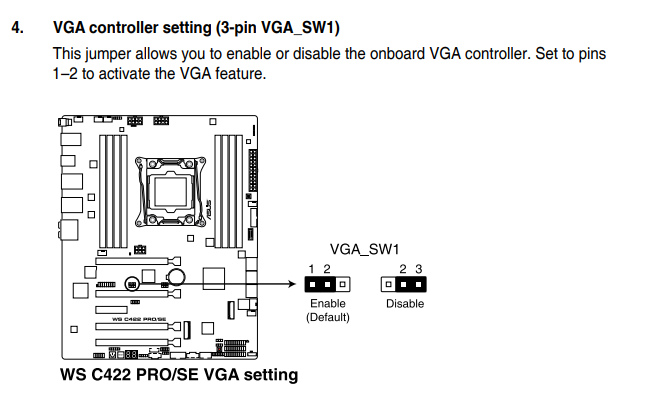
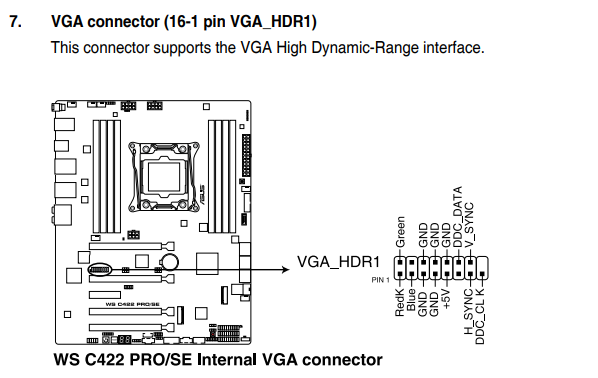
I did just notice as unraid was booting, right before it got to the final gui page... it popped up something related to --- unable to load nvidia --- something -- it happened very quickly so will have to restart computer to see what it was maybe get a photo capture of it.... (i had changed over to the stock unraid through the nvidia plugin --- so not sure what that was... ) Ya, It is a bit hidden, but it has on-onboard VGA-- Not anything fancy mind you.... lol
-
So I have just stubbed the Graphics card and all associated devices on that IOMMU group. Will give it like 2-3 days and give an update. crossing my fingers this might help... Otherwise what I will do is figure out a way to maybe get my single slot cheap-o graphics card in a pci slot. and update bios and have that selected as default since i can't select the onboard graphics with the new bios to be given to unraid... (or least had not been able to in past..)... do you know if stubbing the graphics card might change this??... as that would be wicked... But again my understanding was that the stubbing occurred after the boot process had already grabbed a graphics card... hence need for onboard... I apologize if this is a stupid question.
-
I had not stubbed the RTX-2080 as I didn't realize I had to.. I had just folllowed spaceinvader's setup video for the VMs.. I don't mind giving it a try stubbing the graphics card... see if that helps out... But again I am not sure if I can update the bios as I appreciate having unraid run GUI mode so that if i have to i can on the same PC monitor just switch to the onboard graphics and use the GUI to do any quick changes or restarts.. rather than grabbing laptop. (unless there is a better way to have it so that I wouldn't have to grab a laptop or another device if I need to say force-stop VM, or something else)... Again appreciate the help.... And honestly I would be willing to give an update to the Bios a try after I try the stubbing the Graphics card... to see if it helps..
-
I would like to be able to run the MB on the latest bios however asus in the latest bios has prevented the ability to select the onboard vga graphics as primary display. Which then forces unraid to grab my 2080. Or if I put in another cheapo graphics card-which takes up space of a PCI slot... So it is a bit of a trade off..
-
Wondering, So I have let the system run the last few days with the stock unraid build.. Still noticing that I am getting the tainted error. Is there a suggestion of a way to isolate down in the most efficient way what this could be by? Also for the memory grab... is there a way to know what is trying to grab the memory so I can perhaps put a limit on it? (ie if it is a docker or plugin. I can put a limit of like 3gb memory or what ever is needed...). I have also attached new syslog and diagnostics from since I went back to stock unraid build... In case this helps. rizznetunraid-syslog-20200708-1320.zip rizznetunraid-diagnostics-20200708-1025.zip
-
Wonderful I will do this tonight for my system and then update based on how things look
-
Hi Thanks so much for this suggestion.. As I am not currently running the system in such a way that I need the unraid Nvidia build (stopped running Plex with it). Is there any specific way to down-grade out of the nvidia build back to stock without losing my pluggins etc... ? (on another note I have added signature hope it works lol)
-
Would it be helpful to know my config for my system hardware wise.? I realized I don't have it in my handle (partly because I don't know how to add that... lol)
-
I will give this a try today, I am wondering... Do you know if there is anything special I need to do since I have ECC memory.... I thought I red that memtest will not show errors with ecc... but again not sure about this..
-
So I have attached an updated Syslog which shows more of the errors that appear to be piling up. In working on trouble shooting this. I had not touched the computer over the weekend. (ie not used my VM). The error did not appear to build at all over the weekend... But on using it this morning they started to appear to increase... But unfortunately this morning a transfer and optimization also occurred in sonarr/radar/ plex... Any other suggestions much appreciated rizznetunraid-syslog-20200706-1042.zip
-
Hi Itimpi and anyone else that has Ideas. So I think I captured the first of the repetative errors that will continue to show up in the syslog and fill it up. Rather than let the syslog fill completely, and post I thought it would be best to post now. Again thanks:) rizznetunraid-syslog-20200702-2151.zip
-
When i repost the syslog would there be anything else that is helpful? ie a new set of diagnostic or screen capture of iommu groupings etc.. Although i have been using unraid for like 2 years ish. i am still very much new.. lol so not sure what would be helpful
-
Lol, I dont know what happened there.. .. At least in regards to the error it does appear to occur relatively quickly if the last 2 days are anything to go by... So I will repost a syslog after i notice it filling up again... probably won't be long thanks for helping...
-
Okay so I have attached my syslog file as it hit 100% today, after just 2 days... This was faster than it had been in previous, when I had not been stubbing the Audio.. So i have reverted that... Again not even sure if that is the cause... Any ideas how I could start diagnosis this or isolating down the problem.. Thanks rizznetunraid-syslog-20200702-1759.zip
-
I thought that it might have had something to do with some of my IOMMU stubbing so have removed them(Was stubbing my onboard audio as per the guide), But the errors continue.
-
Hey all, Not sure what might be causing this issue... I have noticed that that in my Sys-log I keep getting errors similar to the below. With the full tracing that occurs after the error in the longer thread further below... I know that I asked about this like 5 months ago shortly after the initial 6.8.0 updates. But things have continued on 6.8.3. An ideas of where I should start to problem solve this would be great.. (Last time the thought was memory issue-- so i limited Deluge, and duplicati's memory allocation..). I have also attached diagnostics to help figure this out. Thanks in advance.. Jul 1 00:39:42 RizznetUnraid kernel: CPU 4/KVM: page allocation failure: order:4, mode:0x6080c0(GFP_KERNEL|__GFP_ZERO), nodemask=(null) Jul 1 00:39:42 kernel: CPU 4/KVM cpuset=vcpu4 mems_allowed=0 Jul 1 00:39:42 kernel: CPU: 13 PID: 23066 Comm: CPU 4/KVM Tainted: P W O 4.19.107-Unraid #1 Jul 1 00:39:42 kernel: Hardware name: System manufacturer System Product Name/WS C422 PRO_SE, BIOS 1202 07/25/2019 Jul 1 00:39:42 kernel: Call Trace: Jul 1 00:39:42 kernel: CPU 4/KVM: page allocation failure: order:4, mode:0x6080c0(GFP_KERNEL|__GFP_ZERO), nodemask=(null) Jul 1 00:39:42 kernel: CPU 4/KVM cpuset=vcpu4 mems_allowed=0 Jul 1 00:39:42 kernel: CPU: 13 PID: 23066 Comm: CPU 4/KVM Tainted: P W O 4.19.107-Unraid #1 Jul 1 00:39:42 kernel: Hardware name: System manufacturer System Product Name/WS C422 PRO_SE, BIOS 1202 07/25/2019 Jul 1 00:39:42 kernel: Call Trace: Jul 1 00:39:42rizznetunraid-diagnostics-20200701-0058.zip kernel: dump_stack+0x67/0x83 Jul 1 00:39:42 kernel: warn_alloc+0xd6/0x16c Jul 1 00:39:42 kernel: __alloc_pages_nodemask+0xa81/0xae1 Jul 1 00:39:42 kernel: ? flush_tlb_kernel_range+0x5e/0x78 Jul 1 00:39:42 kernel: dsalloc_pages+0x38/0x5e Jul 1 00:39:42 kernel: reserve_ds_buffers+0x19e/0x382 Jul 1 00:39:42 kernel: ? kvm_dev_ioctl_get_cpuid+0x1d3/0x1d3 [kvm] Jul 1 00:39:42 kernel: x86_reserve_hardware+0x134/0x14f Jul 1 00:39:42 kernel: x86_pmu_event_init+0x3a/0x1d5 Jul 1 00:39:42 kernel: ? kvm_dev_ioctl_get_cpuid+0x1d3/0x1d3 [kvm] Jul 1 00:39:42 kernel: perf_try_init_event+0x4f/0x7d Jul 1 00:39:42 kernel: perf_event_alloc+0x46e/0x821 Jul 1 00:39:42 kernel: perf_event_create_kernel_counter+0x1a/0xff Jul 1 00:39:42 kernel: pmc_reprogram_counter+0xd9/0x111 [kvm] Jul 1 00:39:42 kernel: reprogram_fixed_counter+0xd8/0xfc [kvm] Jul 1 00:39:42 kernel: ? vmx_vcpu_run+0x6b8/0xa97 [kvm_intel] Jul 1 00:39:42 kernel: ? vmx_vcpu_run+0x6ac/0xa97 [kvm_intel] Jul 1 00:39:42 kernel: intel_pmu_set_msr+0xf4/0x2e4 [kvm_intel] Jul 1 00:39:42 kernel: ? vmx_vcpu_run+0x6ac/0xa97 [kvm_intel] Jul 1 00:39:42 kernel: kvm_set_msr_common+0xc6e/0xd24 [kvm] Jul 1 00:39:42 kernel: ? vmx_vcpu_run+0x6b8/0xa97 [kvm_intel] Jul 1 00:39:42 kernel: ? vmx_vcpu_run+0x6ac/0xa97 [kvm_intel] Jul 1 00:39:42 kernel: ? vmx_vcpu_run+0x6b8/0xa97 [kvm_intel] Jul 1 00:39:42 kernel: ? vmx_vcpu_run+0x6ac/0xa97 [kvm_intel] Jul 1 00:39:42 kernel: ? vmx_vcpu_run+0x6b8/0xa97 [kvm_intel] Jul 1 00:39:42 kernel: handle_wrmsr+0x4b/0x85 [kvm_intel] Jul 1 00:39:42 kernel: kvm_arch_vcpu_ioctl_run+0x10d0/0x1367 [kvm] Jul 1 00:39:42 kernel: ? wake_up_q+0x2d/0x48 Jul 1 00:39:42 kernel: ? futex_wake+0x120/0x147 Jul 1 00:39:42 kernel: kvm_vcpu_ioctl+0x17b/0x4b1 [kvm] Jul 1 00:39:42 kernel: ? __seccomp_filter+0x39/0x1ed Jul 1 00:39:42 kernel: vfs_ioctl+0x19/0x26 Jul 1 00:39:42 kernel: do_vfs_ioctl+0x533/0x55d Jul 1 00:39:42 kernel: ksys_ioctl+0x37/0x56 Jul 1 00:39:42 kernel: __x64_sys_ioctl+0x11/0x14 Jul 1 00:39:42 kernel: do_syscall_64+0x57/0xf2 Jul 1 00:39:42 kernel: entry_SYSCALL_64_after_hwframe+0x44/0xa9 Jul 1 00:39:42 kernel: RIP: 0033:0x1455fa5934b7 Jul 1 00:39:42 kernel: Code: 00 00 90 48 8b 05 d9 29 0d 00 64 c7 00 26 00 00 00 48 c7 c0 ff ff ff ff c3 66 2e 0f 1f 84 00 00 00 00 00 b8 10 00 00 00 0f 05 <48> 3d 01 f0 ff ff 73 01 c3 48 8b 0d a9 29 0d 00 f7 d8 64 89 01 48 Jul 1 00:39:42 kernel: RSP: 002b:00001455f63fe678 EFLAGS: 00000246 ORIG_RAX: 0000000000000010 Jul 1 00:39:42 kernel: RAX: ffffffffffffffda RBX: 000000000000ae80 RCX: 00001455fa5934b7 Jul 1 00:39:42 kernel: RDX: 0000000000000000 RSI: 000000000000ae80 RDI: 000000000000001b Jul 1 00:39:42 kernel: RBP: 00001455f83509c0 R08: 00005630473fa770 R09: 0000000304834890 Jul 1 00:39:42 kernel: R10: 0000000000000000 R11: 0000000000000246 R12: 0000000000000000 Jul 1 00:39:42 kernel: R13: 0000000000000006 R14: 00001455f63ff700 R15: 0000000000000000 Jul 1 00:39:42 kernel: warn_alloc_show_mem: 2 callbacks suppressed Jul 1 00:39:42 kernel: Mem-Info: Jul 1 00:39:42 kernel: active_anon:4693275 inactive_anon:54704 isolated_anon:0 Jul 1 00:39:42 kernel: active_file:1429790 inactive_file:1219787 isolated_file:0 Jul 1 00:39:42 kernel: unevictable:14 dirty:18302 writeback:22347 unstable:0 Jul 1 00:39:42 kernel: slab_reclaimable:406678 slab_unreclaimable:123265 Jul 1 00:39:42 kernel: mapped:79720 shmem:397133 pagetables:14998 bounce:0 Jul 1 00:39:42 kernel: free:61298 free_pcp:1220 free_cma:0 Jul 1 00:39:42 kernel: Node 0 active_anon:18773100kB inactive_anon:218816kB active_file:5719160kB inactive_file:4879148kB unevictable:56kB isolated(anon):0kB isolated(file):0kB mapped:318880kB dirty:73208kB writeback:89388kB shmem:1588532kB shmem_thp: 0kB shmem_pmdmapped: 0kB anon_thp: 8814592kB writeback_tmp:0kB unstable:0kB all_unreclaimable? no Jul 1 00:39:42 kernel: Node 0 DMA free:15876kB min:32kB low:44kB high:56kB active_anon:0kB inactive_anon:0kB active_file:0kB inactive_file:0kB unevictable:0kB writepending:0kB present:15996kB managed:15892kB mlocked:0kB kernel_stack:0kB pagetables:0kB bounce:0kB free_pcp:0kB local_pcp:0kB free_cma:0kB Jul 1 00:39:42 kernel: lowmem_reserve[]: 0 817 31534 31534 Jul 1 00:39:42 kernel: Node 0 DMA32 free:124580kB min:1748kB low:2584kB high:3420kB active_anon:1035892kB inactive_anon:0kB active_file:7936kB inactive_file:5268kB unevictable:0kB writepending:0kB present:1210228kB managed:1192360kB mlocked:0kB kernel_stack:0kB pagetables:32kB bounce:0kB free_pcp:4kB local_pcp:0kB free_cma:0kB Jul 1 00:39:42 kernel: lowmem_reserve[]: 0 0 30716 30716 Jul 1 00:39:42 kernel: Node 0 Normal free:104736kB min:65796kB low:97248kB high:128700kB active_anon:17737208kB inactive_anon:218816kB active_file:5711056kB inactive_file:4873528kB unevictable:56kB writepending:162348kB present:31981568kB managed:31454516kB mlocked:56kB kernel_stack:31520kB pagetables:59960kB bounce:0kB free_pcp:4748kB local_pcp:0kB free_cma:0kB Jul 1 00:39:42 kernel: lowmem_reserve[]: 0 0 0 0 Jul 1 00:39:42 kernel: Node 0 DMA: 1*4kB (U) 0*8kB 0*16kB 0*32kB 2*64kB (U) 1*128kB (U) 1*256kB (U) 0*512kB 1*1024kB (U) 1*2048kB (M) 3*4096kB (M) = 15876kB Jul 1 00:39:42 kernel: Node 0 DMA32: 365*4kB (UME) 592*8kB (UME) 496*16kB (UME) 320*32kB (UME) 174*64kB (UME) 144*128kB (UME) 84*256kB (UME) 40*512kB (UME) 28*1024kB (UME) 0*2048kB 0*4096kB = 124596kB Jul 1 00:39:42 kernel: Node 0 Normal: 11429*4kB (UME) 4215*8kB (UME) 1377*16kB (UMH) 0*32kB 1*64kB (H) 0*128kB 1*256kB (H) 1*512kB (H) 1*1024kB (H) 0*2048kB 0*4096kB = 103324kB Jul 1 00:39:42 kernel: Node 0 hugepages_total=0 hugepages_free=0 hugepages_surp=0 hugepages_size=1048576kB Jul 1 00:39:42 kernel: Node 0 hugepages_total=0 hugepages_free=0 hugepages_surp=0 hugepages_size=2048kB Jul 1 00:39:42 Kernel: 3044961 total pagecache pages Jul 1 00:39:42 kernel: 0 pages in swap cache Jul 1 00:39:42 kernel: Swap cache stats: add 0, delete 0, find 0/0 Jul 1 00:39:42 kernel: Free swap = 0kB Jul 1 00:39:42 kernel: Total swap = 0kB Jul 1 00:39:42 kernel: 8301948 pages RAM Jul 1 00:39:42 kernel: 0 pages HighMem/MovableOnly Jul 1 00:39:42 kernel: 136256 pages reserved Jul 1 00:39:42 kernel: 0 pages cma reserved
-
I have tried a reinstall with no luck to fix.. Have you had any luck getting it working again
-
This is the log I see in for the docker.... [s6-init] making user provided files available at /var/run/s6/etc...exited 0. [s6-init] ensuring user provided files have correct perms...exited 0. [fix-attrs.d] applying ownership & permissions fixes... [fix-attrs.d] done. [cont-init.d] executing container initialization scripts... [cont-init.d] 01-envfile: executing... [cont-init.d] 01-envfile: exited 0. [cont-init.d] 10-adduser: executing... ------------------------------------- _ () | | ___ _ __ | | / __| | | / \ | | \__ \ | | | () | |_| |___/ |_| \__/ Brought to you by linuxserver.io ------------------------------------- To support LSIO projects visit: https://www.linuxserver.io/donate/ ------------------------------------- GID/UID ------------------------------------- User uid: 99 User gid: 100 ------------------------------------- [cont-init.d] 10-adduser: exited 0. [cont-init.d] 30-config: executing... [cont-init.d] 30-config: exited 0. [cont-init.d] 99-custom-scripts: executing... [custom-init] no custom files found exiting... [cont-init.d] 99-custom-scripts: exited 0. [cont-init.d] done. [services.d] starting services [services.d] done.
