





UnraidUser_2020
Members
-
Joined
-
Last visited
-
Not sure why the vm backup is disable and grayed out. i got containers replicating just fine. Any ideas on what to check? Source & Destination are ZFS and same configuration for default vm disk location /mnt/nvme/virtual_machines on both source and dest.
-
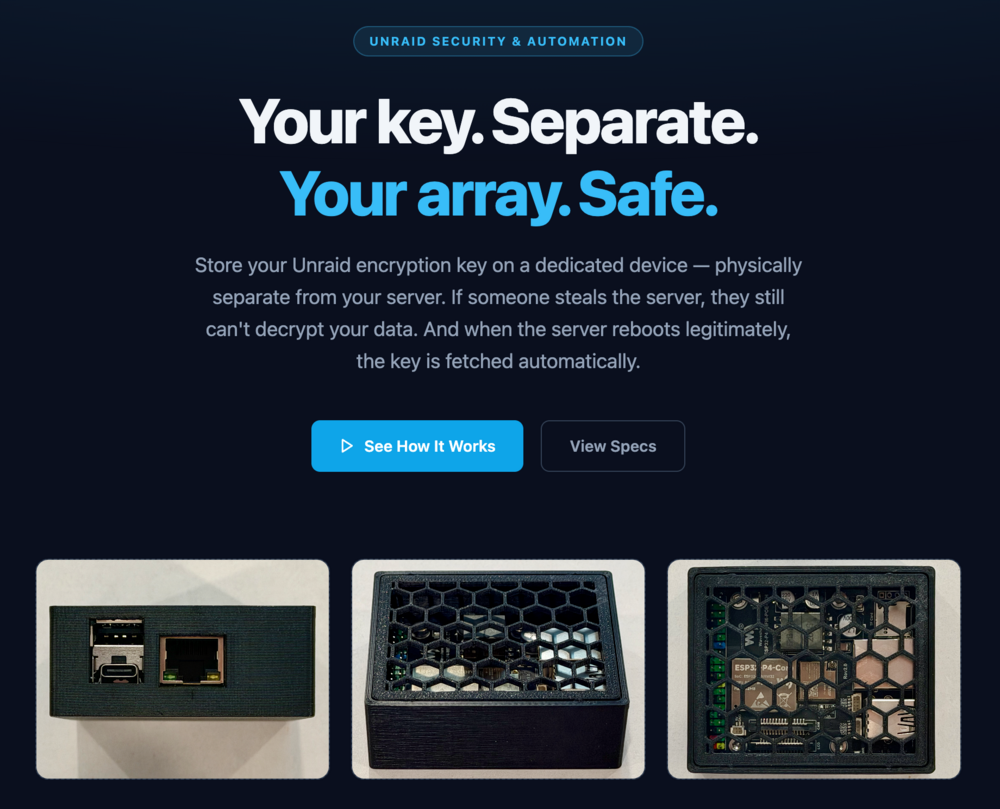
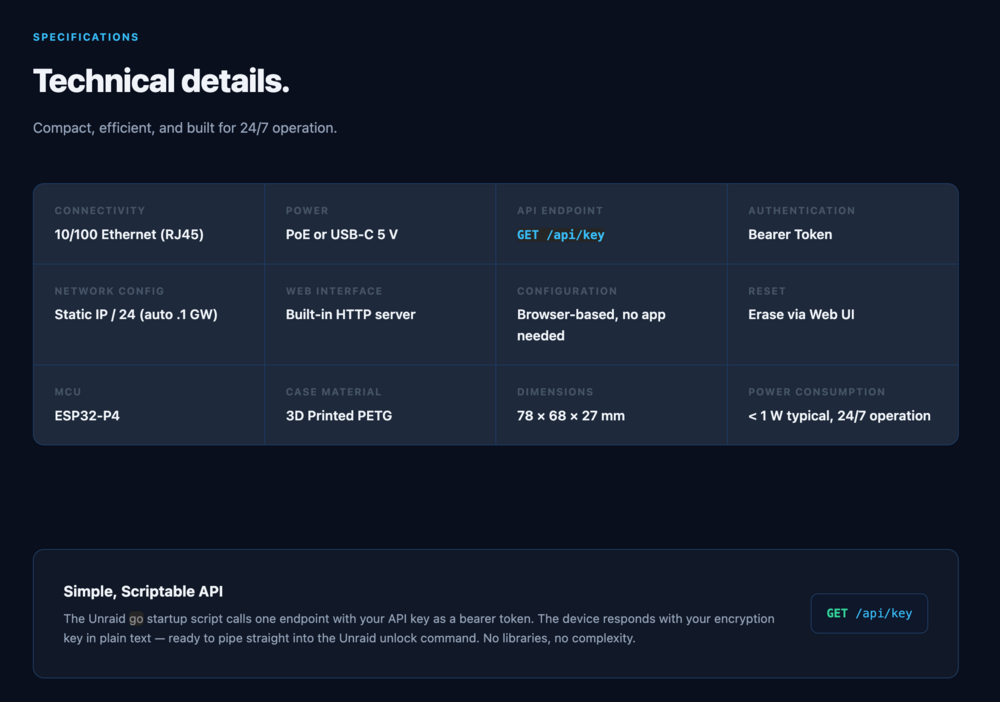
Incase anyone else is interested I ended up building this little low-power device that allows the server to auto un-encrypt the array on reboots. https://www.etsy.com/listing/4510794348/unraid-unlock-key https://www.ebay.com/itm/188419781911

-
It looks like every time i add a new peer to try different config that shim-br0 gets reset...
-
I tried enabling host access to custom networks and confirmed i have shim-bro in the config file. And i still cant access the custom ip docker containers nor the internet. Also im running Pi-Hole in a container on unraid so when i manually change the dns entry on my iphone to 1.1.1.1 i can get to internet and unraid server / some containers but cant access the custom ipvlan containers still.
-
Does this work with docker containers that have custom ipvlan network with custom ip address? Containers like pi-hole which runs a dedicated IP on my main network subnet.
-
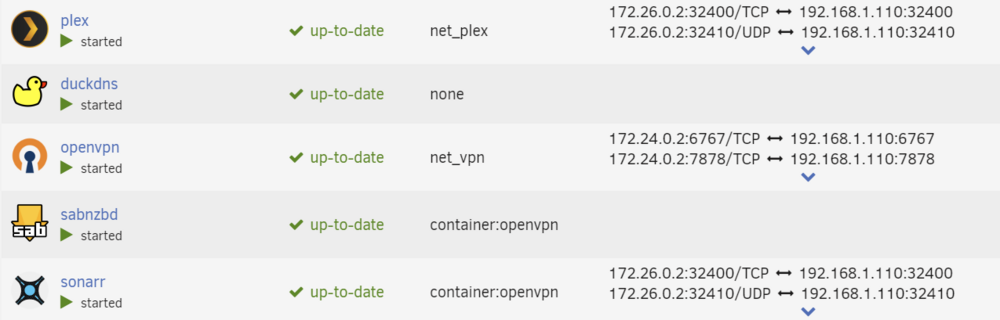
Unraid OS: 06.12.11, not sure when this changed/broke but i recently noticed the port mappings are all over the place. Some containers show nothing when they should, other times they show wrong information. For example a sonar container is showing the ports of the plex container. In console of sonar it shows its correct internal ip of 172.24.0.2 but in Unraid GUI it shows ports with ranges of 172.26.0.2 which is not correct. Not sure if i did something wrong, when i re-created my containers due to migrating to ZFS Pool. sonar's network is set to none and I'm passing an argument in as --net=container:openvpn. Everything works correctly its just the GUI is off. Anyone else see this? And/Or how do i fix this minor issue?

-
This is happening to me now just upgraded to 6.12.0 and I'm trying to do a rsync from ARRAY to external zfs drive with 15TB of data, through a user script running in background. Last I peaked at progress was around 1.5TB done of the 15TB. GUI has become unresponsive after 2 Hours. Can't access GUI locally or through WireGuard Remote Access tunnel. The Tunnel establishes but can't access the GUI. Ping still works. I don't have SSH enabled so I don't know if that no longer works. Also all docker containers with separate IPs their GUIS load, but they can't reach the internet. Update: 2024.07.22 So it turns out I had a corrupted ZFS Pool on my NVME pool which was in raid 1. I just re-formated and recreated the pool and this error seems to have gone away. So I thought. I now found another issue that crashed the UI for me once. I had WireGuard off, I had docker containers running with one ipvlan pool running fine. I then turned on WireGuard Tunnel and it crashed the UI. I then hard-restarted and then clean restarted. I then turned on WireGuard First, then turned on my dockers and everything seems to be ok now. If I turn on docker first then Wireguard it crashes the GUI. This is reproducible. I have the logs saved in case this can help a developer. However I glanced through the system log and no kernel panics or errors jumped out at me. I also upgraded to 6.12.11. I did run meatiest with no errors. I also went through a hardware change while this corruption happened. I migrated to Asus w680-ace ATX motherboard with 64GB ECC ram. ECC Ram passed mem-test also. So ill keep an eye out if the system remains stable you won't hear from me again else ill post more updates, here and any additional findings.
-
@SimonF is correct in regards to having referenced isos from array having to spin up the disk before tab loads. The Fix: I edited all my windows VMs and removed the reference to the virt-io.iso which i have stored on array. And now the VM tab loads fast as normal. I never noticed this in the past because i kept my isos directory on cache but i moved it to array to clear up cache pool, and thats when this started happening.
-
I would use isci for attaching a drive to my mac so that i can move my photos library off the small internal SSD to the isci Target. Right now photos only allows the library to run off attached drives (internal or external is OK) but you can't runt he library from a nas drive.
-
This is the trick!!! It worked I can now send 6cores to vm thank you!!
-
This is the trick!!! It worked I can now send 6cores to vm thank you!!
-
Does passing the device to the VM like this allow SSD TRIM to be performed from the guest?


